Salesforce Admin Topics on this blog cover everything a new admin needs, from cloud basics to security, automation, reports and AI. This page puts all 89 admin posts in one place, grouped by topic, so you always know what to read next.
If you are just starting, read our simple guide to Salesforce first and set up your free Developer Edition org. Then come back here and follow the sections in order.
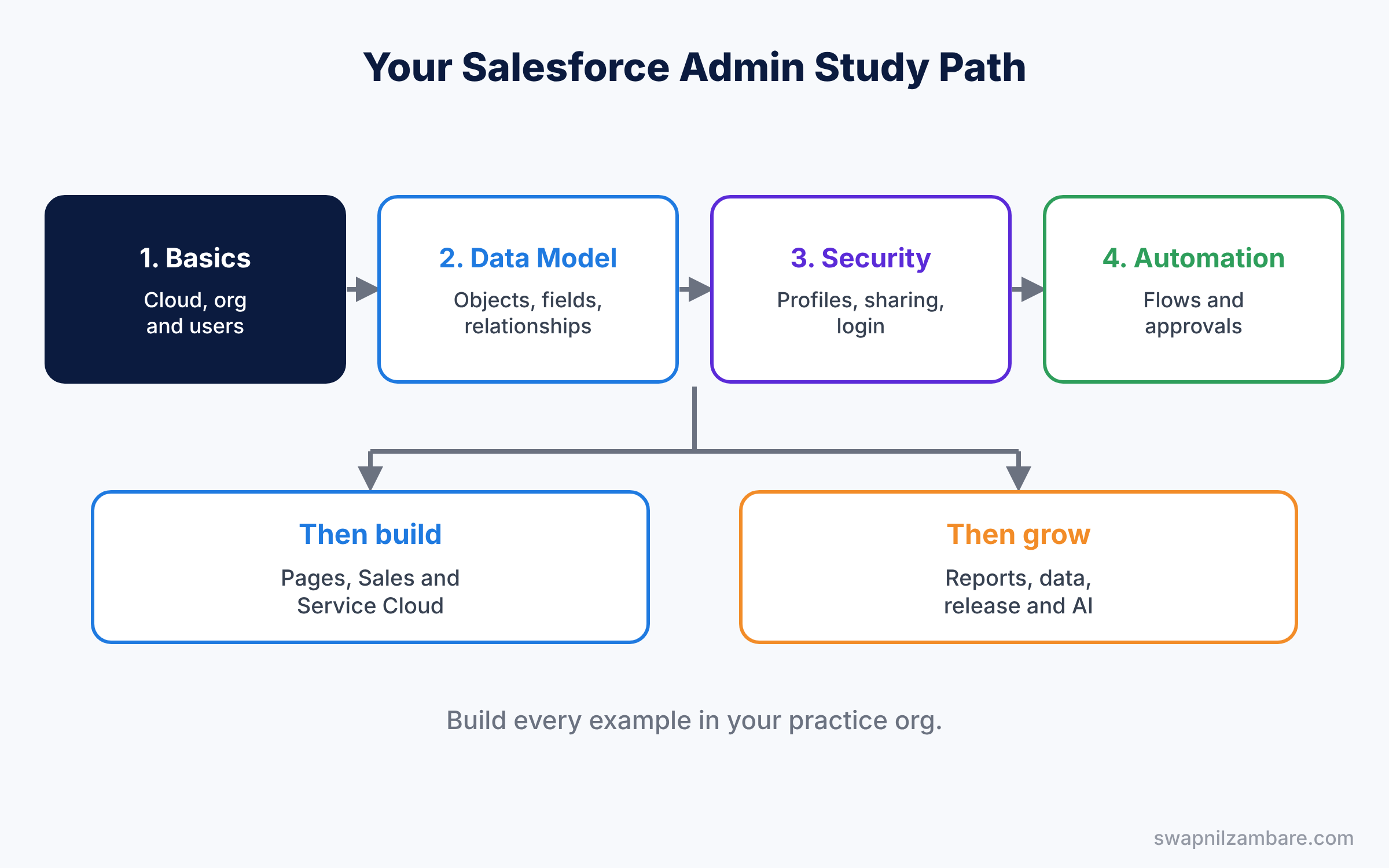
How to Use This Salesforce Admin Topics Study Guide
Each section below has a short table. The table shows the post, its level and what you will learn. So you can see the whole path at a glance and pick up where you left off.
Follow these five steps for the best results.
- Read the sections in order, because later topics build on earlier ones.
- Build every example in your practice org while you read.
- Mark each post as done in your own notes or a simple spreadsheet.
- After each section, explain the main ideas aloud in your own words.
- Finally, test yourself with the interview questions linked at the end.
A Simple Study Plan for Salesforce Admin Topics
Most learners can cover all the posts in about 12 weeks with one hour a day. The plan below shows one way to split the work. Move faster or slower based on your own time.
| Weeks | Sections to study | Goal |
|---|---|---|
| 1 | Getting Started, Org Setup and Users | Know the platform and set up your org |
| 2 to 3 | Data Model | Build objects, fields and relationships |
| 4 to 5 | Security and Access | Control who sees what |
| 6 to 7 | Automation, User Interface and Apps | Build flows and pages |
| 8 to 9 | Sales Cloud, Service Cloud | Set up sales and support |
| 10 | Reports, Dashboards and Data Management | Report on clean data |
| 11 | Collaboration, Release, Data and AI | Learn teamwork, deployment and new tools |
| 12 | Certification | Revise and book your exam |
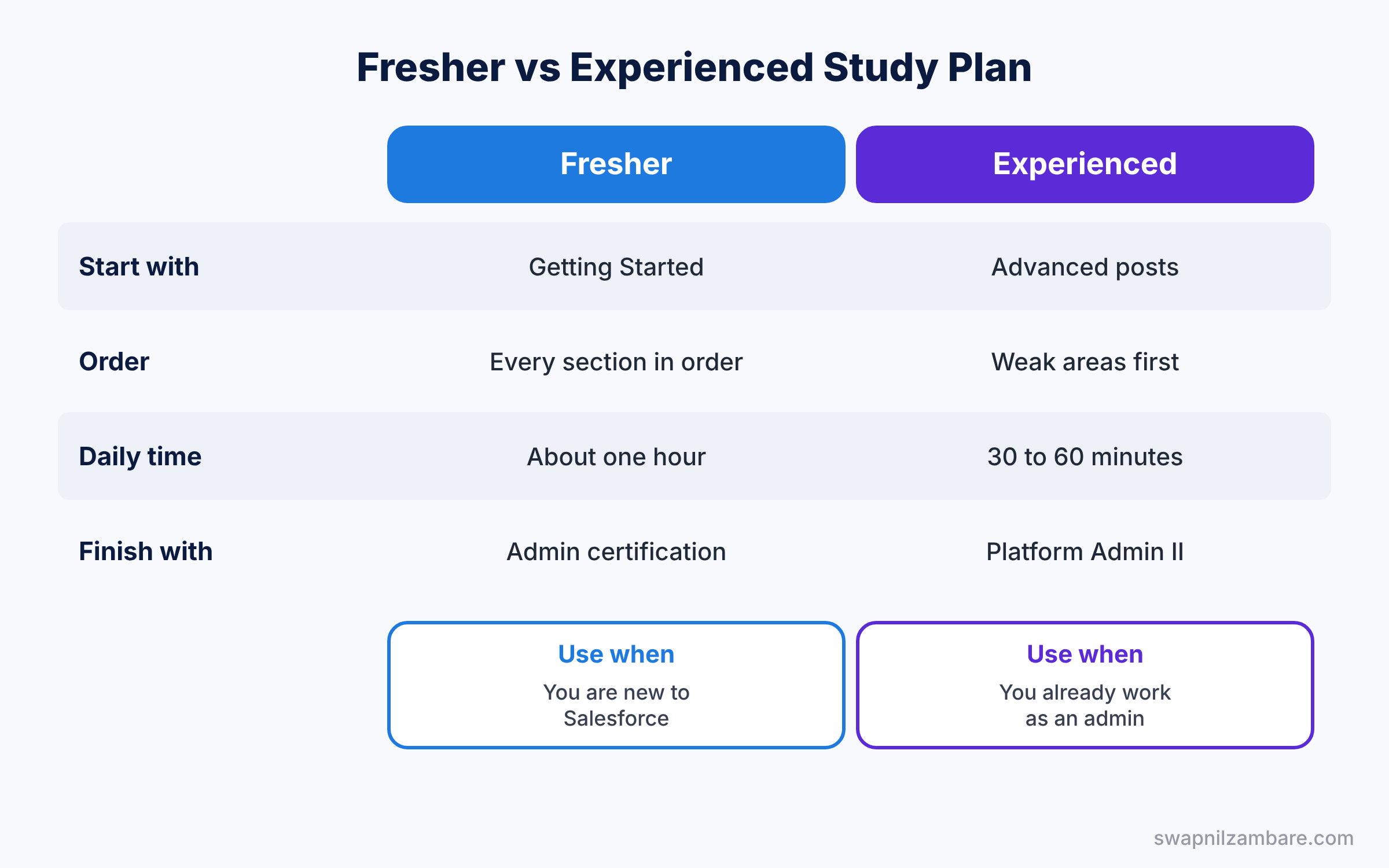
Each post is marked Basic, Intermediate or Advanced. In short, a fresher should finish every Basic post first, then come back for the rest. An experienced admin can jump to the Advanced posts in each section.
All Salesforce Admin Topics by Section
Here is the full list of 89 posts. Every title links to the full post.
Salesforce Admin Topics: Getting Started with Salesforce
Start here if you are new. These posts explain the cloud, Salesforce, free learning and your own practice org.
| No. | Post | Level | What you will learn |
|---|---|---|---|
| 1 | What is Cloud Computing? | Basic | Cloud basics: SaaS, PaaS and IaaS |
| 2 | What is Salesforce? | Basic | What Salesforce does and who uses it |
| 3 | What is Trailhead? | Basic | Free learning with badges and trails |
| 4 | Salesforce Admin vs Developer | Basic | Which career path suits you |
| 5 | Salesforce Developer Edition Setup | Basic | Get your free practice org |
Org Setup and Users
Next, learn how an org is set up and how people get into it.
| No. | Post | Level | What you will learn |
|---|---|---|---|
| 1 | Company Settings, Business Hours and Fiscal Year | Basic | Time zone, locale and fiscal year |
| 2 | User Management | Basic | Create, freeze and deactivate users |
| 3 | Queues and Public Groups | Basic | Group users and share work |
| 4 | Translation Workbench and Multi-Currency | Intermediate | Languages and currencies for global teams |
| 5 | AppExchange Apps | Intermediate | Install and manage apps safely |
Salesforce Admin Topics: Data Model
The data model is the base of everything else, so take your time here.
| No. | Post | Level | What you will learn |
|---|---|---|---|
| 1 | Salesforce Data Model Explained | Basic | Objects, fields and relationships |
| 2 | Standard vs Custom Objects | Basic | When to build a custom object |
| 3 | Formula Fields and Field Types | Basic | Pick the right field type |
| 4 | Picklists and Global Value Sets | Basic | Dependent and shared picklists |
| 5 | Validation Rules with Examples | Basic | Stop bad data on save |
| 6 | REGEX Validation Rules | Intermediate | Check PAN, GST and phone formats |
| 7 | Record Types | Basic | Different processes on one object |
| 8 | Master-Detail vs Lookup | Intermediate | Relationships and junction objects |
| 9 | Roll-Up Summary Fields and Cross-Object Formulas | Intermediate | Totals and values from related records |
| 10 | Custom Metadata vs Custom Settings | Advanced | Store app settings the right way |
| 11 | Schema Builder | Intermediate | See your data model as a diagram |
| 12 | Salesforce Connect and External Objects | Advanced | View outside data without copying it |
Salesforce Admin Topics: Security and Access
Security questions come up in every admin job, so learn this section well.
| No. | Post | Level | What you will learn |
|---|---|---|---|
| 1 | Profiles and Permission Sets | Basic | What users can do |
| 2 | Sharing Rules, Roles and OWD | Basic | Which records users can see |
| 3 | Permission Set Groups and Muting | Intermediate | Bundle and limit permissions |
| 4 | Delegated Administration | Intermediate | Let team leads manage their users |
| 5 | Restriction Rules and Scoping Rules | Advanced | Narrow record access further |
| 6 | Org Security: MFA, Login and Sessions | Intermediate | Protect how users log in |
| 7 | Single Sign-On and My Domain | Advanced | One login for many apps |
| 8 | External Client Apps and Connected Apps | Advanced | Safe access for other systems |
| 9 | Field History Tracking and Setup Audit Trail | Intermediate | Track who changed what |
| 10 | Event Monitoring and Login History | Advanced | Watch user activity and logins |
| 11 | Platform Encryption | Advanced | Encrypt sensitive data at rest |
Salesforce Admin Topics: Automation
Flow is the main automation tool now, so build each example in your practice org.
| No. | Post | Level | What you will learn |
|---|---|---|---|
| 1 | Salesforce Flow Builder | Basic | Your first flow, step by step |
| 2 | Flow Types | Intermediate | Screen, record-triggered and scheduled flows |
| 3 | Advanced Flows: Subflows and Fault Paths | Advanced | Reuse flows and handle errors |
| 4 | Approval Processes | Intermediate | Send records for approval |
| 5 | Email Templates and Email Alerts | Basic | Send the right email at the right time |
| 6 | Custom Notifications and Custom Labels | Intermediate | Bell alerts and reusable text |
| 7 | Order of Execution | Advanced | What runs first when a record saves |
| 8 | Migrate to Flow | Intermediate | Move old rules into Flow |
| 9 | Debug Logs for Admins | Advanced | Find and fix automation errors |
User Interface and Apps
These posts help you build pages and apps that people enjoy using.
| No. | Post | Level | What you will learn |
|---|---|---|---|
| 1 | Page Layouts and Lightning Record Pages | Basic | Arrange fields and components |
| 2 | Lightning App Builder and Custom Apps | Basic | Build apps with clicks |
| 3 | List Views, Kanban and Search Layouts | Basic | Find and sort records fast |
| 4 | Quick Actions and the Mobile App | Intermediate | Shortcuts on desktop and mobile |
| 5 | Dynamic Forms and Dynamic Actions | Intermediate | Show fields and buttons only when needed |
| 6 | In-App Guidance | Intermediate | Tips and walkthroughs for users |
| 7 | Lightning Page Performance | Advanced | Make slow pages faster |
Salesforce Admin Topics: Sales Cloud
This section follows a deal from first lead to signed order.
| No. | Post | Level | What you will learn |
|---|---|---|---|
| 1 | Lead Management and Web-to-Lead | Basic | Capture, assign and convert leads |
| 2 | Accounts and Contacts | Basic | Companies, people and hierarchies |
| 3 | Opportunities, Sales Process and Path | Basic | Track deals stage by stage |
| 4 | Products, Price Books and Quotes | Intermediate | Prices and quotes for deals |
| 5 | Product Schedules | Intermediate | Revenue and quantity over time |
| 6 | Contracts and Orders | Intermediate | From signed deal to order |
| 7 | Campaigns and Campaign Influence | Intermediate | Measure marketing results |
| 8 | Activities, Tasks, Events and Email | Basic | Log calls, meetings and emails |
| 9 | Collaborative Forecasting and Quotas | Advanced | Predict sales and set targets |
| 10 | Enterprise Territory Management | Advanced | Split accounts by region or segment |
Service Cloud
Here you set up customer support, from the first case to a happy customer.
| No. | Post | Level | What you will learn |
|---|---|---|---|
| 1 | Cases, Web-to-Case and Email-to-Case | Basic | Create cases from web and email |
| 2 | Case Assignment and Escalation Rules | Intermediate | Route and escalate cases |
| 3 | Entitlements and Milestones | Intermediate | Track service levels |
| 4 | Salesforce Knowledge | Intermediate | Write and publish help articles |
| 5 | Omni-Channel and the Service Console | Advanced | Route work to free agents |
| 6 | Enhanced Chat and Messaging | Advanced | Chat with customers on web and apps |
| 7 | Macros and Quick Text | Intermediate | Faster replies for agents |
| 8 | Salesforce Surveys | Intermediate | Collect customer feedback |
Salesforce Admin Topics: Reports and Dashboards
Reports turn data into answers, and every manager will ask you for them.
| No. | Post | Level | What you will learn |
|---|---|---|---|
| 1 | Reports and Dashboards for Beginners | Basic | Your first report and dashboard |
| 2 | Custom Report Types | Intermediate | Report on any object combination |
| 3 | Joined Reports and Bucket Fields | Intermediate | Combine and group report data |
| 4 | Report Folders and Cross Filters | Intermediate | Share reports and filter by related data |
| 5 | Dynamic Dashboards and Filters | Advanced | One dashboard for many viewers |
| 6 | Reporting Snapshots | Advanced | Track trends over time |
Data Management
Clean data makes every report and flow better, so learn these tools early.
| No. | Post | Level | What you will learn |
|---|---|---|---|
| 1 | Data Loader and Data Import Wizard | Basic | Import and update records |
| 2 | Duplicate Rules and Matching Rules | Intermediate | Stop duplicate records |
| 3 | Weekly Export, Mass Transfer and Recycle Bin | Intermediate | Back up and restore data |
| 4 | Data Migration and Load Order | Advanced | Move data with relationships |
| 5 | Data Mask and Seed | Advanced | Protect real data in sandboxes |
Collaboration and Experience Cloud
These posts cover how teams and customers work together in Salesforce.
| No. | Post | Level | What you will learn |
|---|---|---|---|
| 1 | Chatter, Files and Collaboration | Basic | Discuss records and share files |
| 2 | Salesforce and Slack | Intermediate | Connect Slack with your org |
| 3 | Experience Cloud Sites | Intermediate | Portals for customers and partners |
Release and Deployment
Learn to move changes safely before you work on a live org.
| No. | Post | Level | What you will learn |
|---|---|---|---|
| 1 | Sandboxes and Change Sets | Intermediate | Build and test, then deploy |
| 2 | DevOps Center | Advanced | Track and deploy changes with history |
| 3 | Release Updates and Seasonal Releases | Intermediate | Prepare for three releases a year |
Salesforce Admin Topics: Data and AI
Finally, learn the newest tools that many companies now ask about.
| No. | Post | Level | What you will learn |
|---|---|---|---|
| 1 | Data 360 Basics | Advanced | One view of each customer |
| 2 | Agentforce for Admins | Advanced | Set up AI agents safely |
Certification
When you finish the sections above, use these posts to plan your exams.
| No. | Post | Level | What you will learn |
|---|---|---|---|
| 1 | Salesforce Admin Certification Guide | Basic | How to prepare for the Admin exam |
| 2 | Exam Registration Step by Step | Basic | Book your exam |
| 3 | Platform Administrator II Guide | Advanced | The next admin certification |
Tips to Learn Salesforce Admin Topics Faster
- Practise in a real org, because reading alone is not enough.
- Use the Bright Path Tutors example from our posts, so each lesson builds on the last.
- Keep a list of questions you cannot answer yet, then find the post that covers them.
- Revisit the security and automation sections often, since interviews focus on them.
- Read the release notes three times a year, as features change with each release.
Official Resources
- Admin Beginner Trail (Trailhead)
- Admin Intermediate Trail (Trailhead)
- Salesforce Platform Administrator Credential (Trailhead)
Quick Recap
- This page lists all 89 Salesforce Admin Topics posts on the blog in one place.
- The sections run from basics to data, security, automation, sales, service and AI.
- Each post has a level, so freshers and experienced admins can plan their study.
- A 12-week plan with one hour a day covers every post.
- Build each example in your own practice org as you read.
What’s Next?
Once you finish the topics, test what you learned. Start with Top Salesforce Admin Interview Questions by Topic (Part 1), the first part of our interview question series.