Salesforce Campaigns help you plan a marketing effort, track who took part, and prove which deals that effort helped to win. A campaign can be a webinar, an email blast, a school fair or a Google ad. In our lead management guide, you captured enquiries from a web form. Campaigns answer the next question your manager will ask: “Which of our marketing activities brought in these leads?”
In this post, you will learn how campaigns, campaign members and member statuses work, how campaign hierarchies group related efforts, and how Campaign Influence links campaigns to opportunities. Then you will build a “Summer Coding Camp 2026” campaign for Bright Path Tutors and report on its results. This is the first post in our Advanced Admin series, so we will move a little faster than before.
What are Salesforce Campaigns?
A campaign is a record that represents one marketing activity. It stores the plan, such as the start date, end date, budget and expected revenue. It also stores the people who were part of it, as campaign members. Each member is a lead or a contact with a status, like Sent, Registered or Attended.
Here is a simple analogy. Think of a school annual day. The event itself is the campaign. The guest list is the campaign members, and the tick marks for “invited”, “came” and “gave feedback” are the member statuses. Later, the principal can count how many guests became new admissions. That last step is Campaign Influence.
Why Salesforce Campaigns Matter
Marketing teams spend real money, so they need to know what works. Without campaigns, a lead record only shows a Lead Source like “Web”. It does not tell you which webinar or which ad brought the person in.
Here are some real situations at Bright Path Tutors.
- The marketing team runs a free coding webinar every month and wants to compare them.
- The CEO asks how much revenue came from the Summer Coding Camp.
- Sales reps want to see which parents attended a demo before they call them.
- Finance wants to compare the budgeted cost with the actual cost of each event.
In short, campaigns turn marketing from guesswork into numbers that everyone can trust.
How Salesforce Campaigns Work
The flow has four clear steps. First, a marketing user creates the campaign and sets its member statuses. Next, you add leads and contacts as campaign members from a list view, a report, an import or a web form. Then each member’s status changes as they respond, for example from Sent to Registered to Attended. Finally, when a member’s contact is linked to an opportunity, Campaign Influence connects that opportunity back to the campaign.
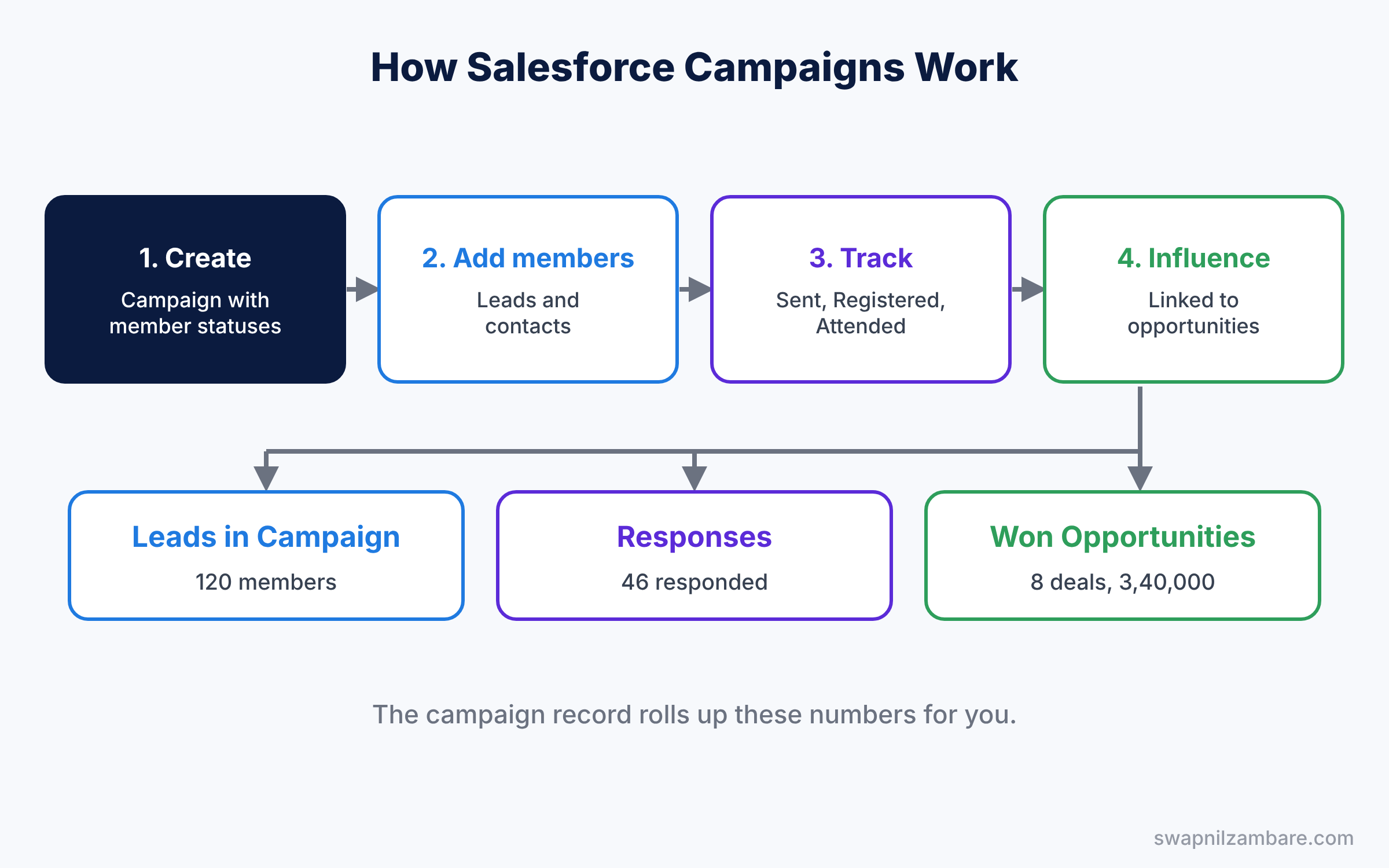
The campaign record then rolls up the numbers for you. It shows fields like Leads in Campaign, Responses in Campaign, Opportunities in Campaign and Won Opportunities in Campaign. So you can see the full story on one page.
Key Parts of Salesforce Campaigns
Campaign fields
First, every campaign has a Type, such as Webinar, Email or Event, and a Status, such as Planned or In Progress. It also has money fields: Budgeted Cost, Actual Cost and Expected Revenue. Reps can only pick active campaigns on leads and opportunities, so tick Active when the campaign starts.
Campaign members
Next, a campaign member is a link between one campaign and one lead or contact. The same person can join many campaigns, and each link has its own status. For example, Priya Nair can be “Attended” for the webinar and “Sent” for the summer camp email.
Member statuses
Then member statuses describe how far each person went. Every new campaign starts with Sent and Responded. You can add your own values, such as Registered and Attended, and mark which ones count as a response. When a status counts as a response, the HasResponded checkbox turns on for that member.
Grouping campaigns in a hierarchy
Campaign hierarchies group related campaigns under a parent. For example, “Summer 2026 Marketing” can be the parent of the webinar, the email blast and the school fair. Salesforce supports up to five levels, and the parent shows totals for the whole hierarchy.
Campaign Influence
Finally, Campaign Influence links campaigns to the opportunities they helped. The simple version uses the Primary Campaign Source field on the opportunity. With Customizable Campaign Influence turned on, one opportunity can be linked to many campaigns, each with a share of the credit.
The table below lists the default member statuses and two custom ones for our camp.
| Member status | Counts as responded | Example meaning |
|---|---|---|
| Sent | No | Invitation email sent |
| Registered | Yes | Parent filled the sign-up form |
| Attended | Yes | Child joined the first camp day |
| No Show | No | Registered but did not come |
Primary Campaign Source vs Customizable Campaign Influence
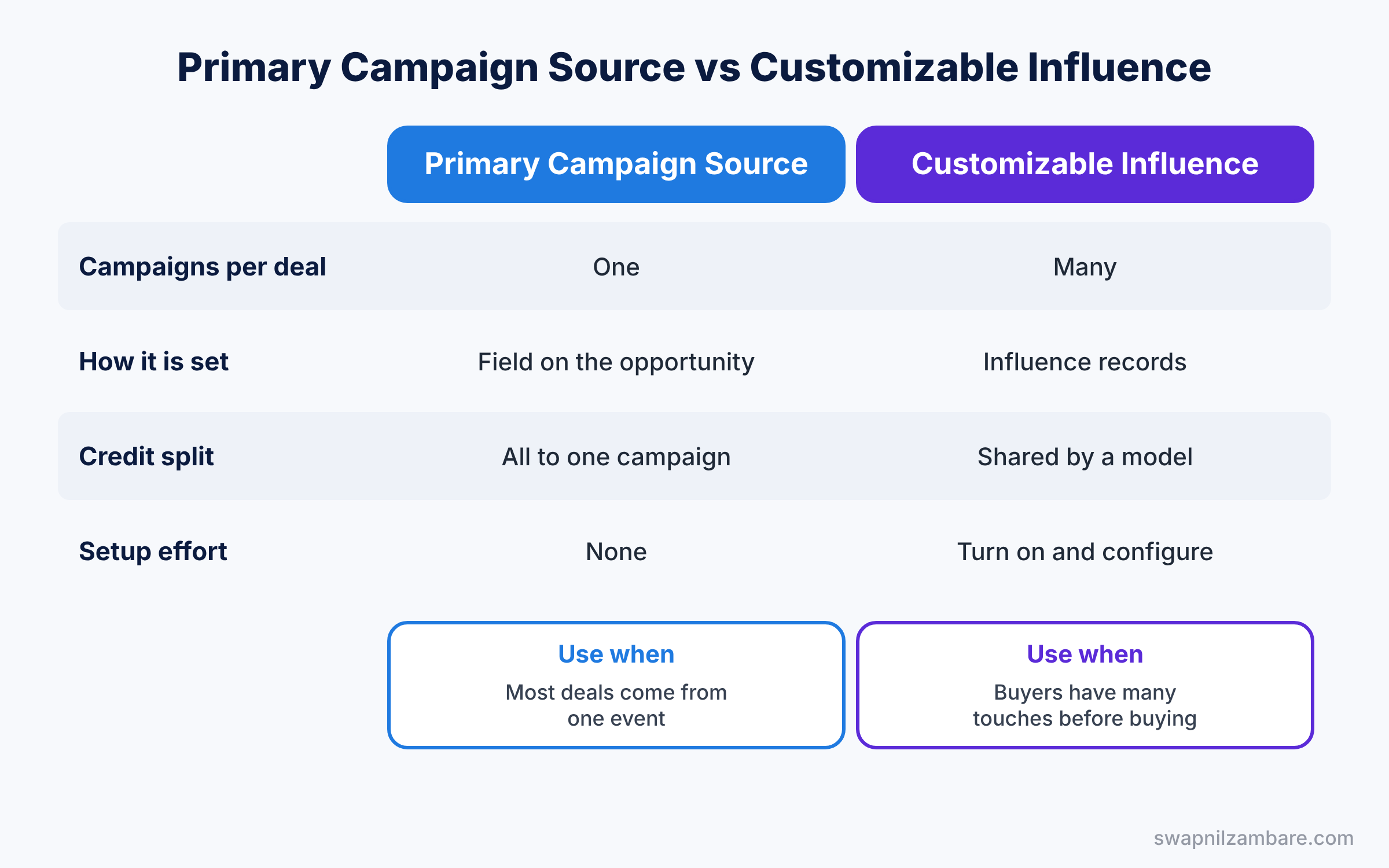
Beginners often ask which influence option to use. The table below compares them.
| Feature | Primary Campaign Source | Customizable Campaign Influence |
|---|---|---|
| Campaigns per opportunity | One | Many |
| How it is set | Field on the opportunity | Influence records, often automatic |
| Credit split | All credit to one campaign | Shared by an influence model |
| Setup effort | None, works out of the box | Turn on and configure settings |
| Best for | Small teams, simple reports | Long sales cycles with many touches |
In short, start with Primary Campaign Source if most deals come from one event. Move to Customizable Campaign Influence when a parent usually attends a webinar, reads emails and visits a fair before buying.
With Customizable Campaign Influence, Salesforce includes a primary campaign model by default. You can also add your own models, and Marketing Cloud Account Engagement adds first touch, last touch and even distribution models.
Hands-on Example: Salesforce Campaigns for a Summer Camp
Let’s build a campaign in your Developer Edition org.
Step 1: Give yourself the Marketing User checkbox
- Go to Setup, then Users, and edit your own user record.
- Tick Marketing User and save. Without it, you cannot create or edit campaigns.
Step 2: Create the campaign hierarchy
- Open the Campaigns tab and click New. Create a parent called “Summer 2026 Marketing” with Type set to Other.
- Then create a child campaign with the values from the table below, and set Parent Campaign to the summer parent.
| Field | Value |
|---|---|
| Campaign Name | Summer Coding Camp 2026 |
| Type | Event |
| Status | In Progress |
| Start Date and End Date | 1 May 2026 to 31 May 2026 |
| Budgeted Cost | 50,000 |
| Expected Revenue | 4,00,000 |
| Active | Ticked |
Step 3: Set up member statuses
- On the campaign, open the Campaign Member Statuses related list and click Edit.
- Add Registered and Attended, and tick Responded for both. Add No Show without Responded. Keep Sent as the default.
Step 4: Add members
- Open the Leads tab, pick a list view of parents from Pune, and select a few leads.
- Click Add to Campaign, choose Summer Coding Camp 2026, and set the status to Sent.
- Later, change Priya Nair to Attended from the Campaign Members related list.
Step 5: Turn on Customizable Campaign Influence
- In Setup, type “Campaign Influence” in Quick Find, then turn on Customizable Campaign Influence.
- Turn on auto-association and set a time frame, such as 90 days. Salesforce then links an opportunity to campaigns where its contact roles were members within that window.
Step 6: Check the results with SOQL
Developers can list members and their responses with this SOQL query.
SELECT Campaign.Name, Status, HasResponded, LeadId, ContactId
FROM CampaignMember
WHERE Campaign.Name = 'Summer Coding Camp 2026'
ORDER BY Status
This second query shows how much revenue each campaign influenced.
SELECT Campaign.Name, Opportunity.Name, Influence, RevenueShare
FROM CampaignInfluence
WHERE Campaign.Name = 'Summer Coding Camp 2026'
The result might look like this.
Campaign.Name            Opportunity.Name           Influence  RevenueShare
Summer Coding Camp 2026  Green Valley Coding Club   50         60000
Summer Coding Camp 2026  Nair Family Camp Seats     100        18000
Influence is the percentage of credit, and RevenueShare is that share of the opportunity amount. So the camp gets half the credit for the school deal and full credit for the family deal.
Common Mistakes with Salesforce Campaigns
- Forgetting the Marketing User checkbox. Users then see campaigns but cannot create them.
- Leaving campaigns inactive. Reps cannot pick an inactive campaign as the Primary Campaign Source.
- Not marking responded statuses. Response numbers stay at zero even when people attend.
- Expecting influence without contact roles. Auto-association needs contacts on the opportunity as contact roles.
- Typing costs once and never updating. Actual Cost must be filled in after the event, or ROI reports are wrong.
Best Practices for Salesforce Campaigns
- Use one naming pattern. “Summer Coding Camp 2026” is easier to report on than “camp new final”.
- Group with hierarchies. Parents show the total result of a season or product launch.
- Agree on statuses early. The same status names across campaigns make reports simple.
- Add members from reports. Our reports and dashboards guide shows how to build the right report first.
- Link deals to campaigns. Keep contact roles on opportunities up to date, so influence data stays correct.
Practice Task
Create a “Free Python Webinar” child campaign under Summer 2026 Marketing, add three contacts, and mark two as Attended. Then check the parent’s hierarchy totals.
Hint: open the parent and click View Hierarchy to see the child campaigns with their numbers.
Salesforce Campaigns FAQ
Can a lead be in two campaigns at once?
Yes. A lead or contact can be a member of many campaigns, with a different status in each.
What happens to campaign history when a lead converts?
The campaign member moves to the new contact, so the history stays with the person.
Can a web form add people to a campaign?
Yes. Web-to-Lead forms can include a campaign ID and a member status, so new leads join the campaign automatically.
Official Resources
Quick Recap
- Salesforce Campaigns track one marketing activity with its budget and dates.
- Campaign members link leads and contacts to a campaign with a status.
- Responded statuses tell you who really took part.
- Hierarchies group campaigns and show season totals.
- Campaign Influence links campaigns to the opportunities they helped win.
What’s Next?
Marketing now knows which campaigns create pipeline. Next, learn how sales managers predict how much of that pipeline will close. Read Salesforce Collaborative Forecasting: Setup, Quotas and Adjustments.