Salesforce Admin Interview Questions and Answers help you practise the replies interviewers expect, and this two-part post answers the 120 most asked questions in simple words. This is Part 1, with questions 1 to 50 on basics, security, data modelling and automation. In Part 2, we answer questions 51 to 133 on data, Sales Cloud, Service Cloud, reports, deployment, scenarios and newer topics.
Last reviewed for the Winter ’27 release (November 2026).
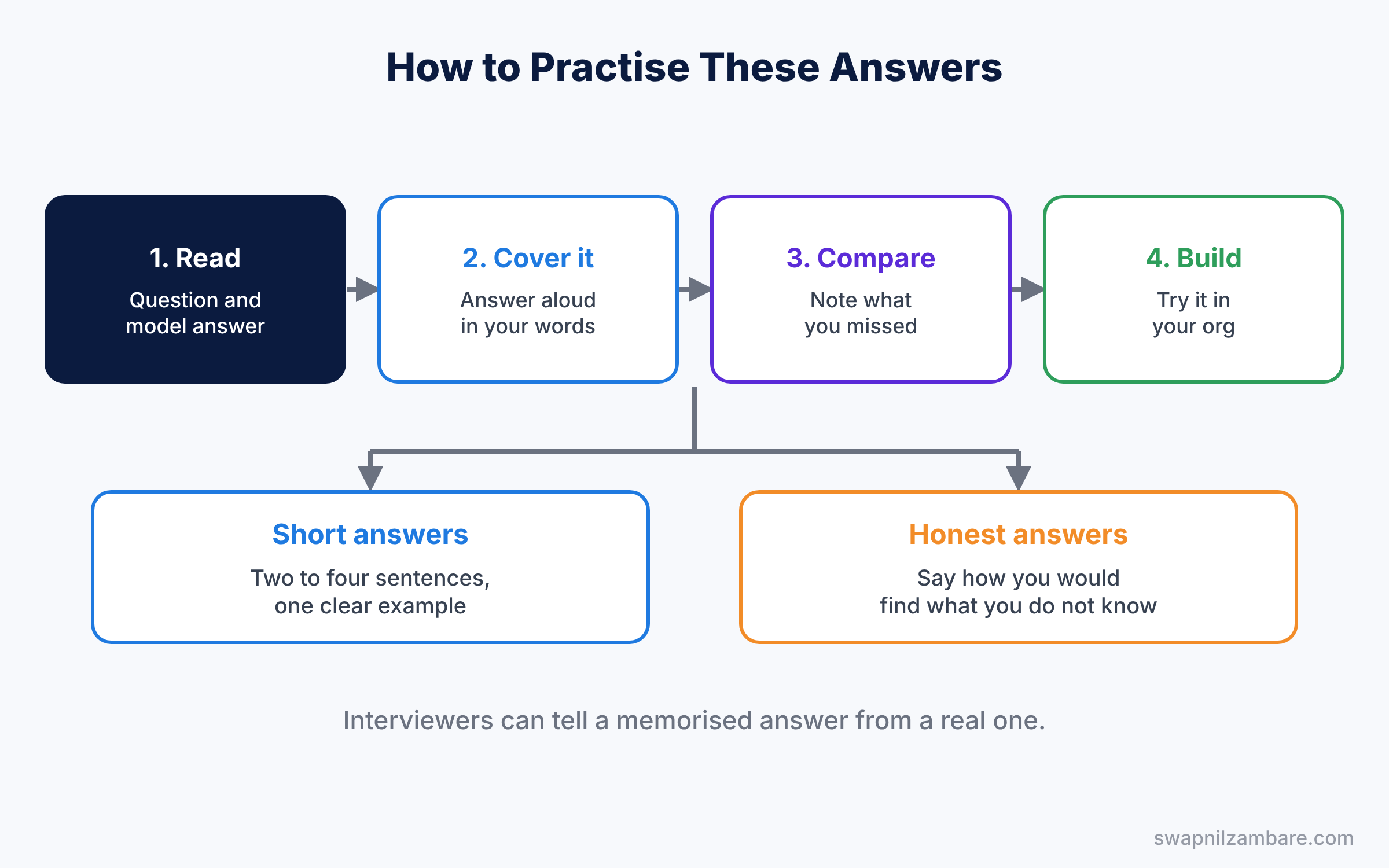
Each answer is two to four sentences, which is about the right length to say out loud. Read the answer, close the page, and explain it in your own words. For the full list of more than 3,000 questions, see our 25-part list, starting with Top Salesforce Admin Interview Questions by Topic (Part 1).
How to Use These Admin Interview Questions and Answers
First, read one section at a time. Next, cover the answer and say your own version aloud. Then compare it with the model answer and note what you missed. Finally, open your Developer Edition org and build anything you could not explain.
These Admin Interview Questions and Answers follow the same topics as our Salesforce Admin series. So when an answer feels thin, open the linked post for that topic and read the full lesson.
Salesforce Basics: Admin Interview Questions and Answers
Q1. What is Salesforce, and is it SaaS or PaaS?
Salesforce is a cloud CRM (customer relationship management) system. Companies use it to manage sales, service and marketing in one place.
It is both SaaS and PaaS. Ready-made apps like Sales Cloud are SaaS: you log in and use them. The platform where admins build custom objects, flows and apps is PaaS.
Interview tip: say ‘both’ and give one example of each. Answering only ‘SaaS’ sounds incomplete.
Q2. What is multitenant architecture?
Many customers share the same Salesforce servers and database, but each company’s data stays separate. As a result, Salesforce sets governor limits so that one customer cannot use too many shared resources.
Q3. What is metadata?
Metadata is data about the setup of your org, such as objects, fields, page layouts and flows. For example, a Course object is metadata, while a course record called “Salesforce Basics” is data.
Follow-up you may get: does a deployment move data? No. Change sets and deployments move metadata only. Data is loaded separately, for example with Data Loader.
Q4. How many releases does Salesforce have each year?
Three: Spring, Summer and Winter. Sandboxes get each release a few weeks early, so admins can test changes before production is upgraded.
Q5. Where do you check for a Salesforce outage or maintenance?
On the Salesforce Trust site, trust.salesforce.com. Search for your instance or My Domain to see current incidents and planned maintenance.
Users and Login: Admin Interview Questions and Answers
For more detail on this topic, read our User Management guide.
Q6. Can you delete a user in Salesforce?
No. Users cannot be deleted, because they own records and history. Instead, you deactivate the user, which frees the licence. If you cannot deactivate the user right away, for example because they are part of an approval, you freeze them first.
Interview tip: this is a trap question. Start with a clear ‘No’, then explain freeze and deactivate.
Q7. What is the difference between freezing and deactivating a user?
Freezing stops the login right away, but the user still uses a licence. Deactivating stops login and frees the licence, but Salesforce checks a few things first.
| Point | Freeze | Deactivate |
|---|---|---|
| Can the user log in? | No | No |
| Uses a licence? | Yes | No |
| Checks before it works | None, it is instant | The user must not be used in approvals, default owner settings and similar places |
| When to use it | The moment someone leaves | After their records are reassigned |
So freeze immediately when someone leaves, then deactivate once their records are reassigned.
Q8. What is MFA, and is it required?
MFA means multi-factor authentication. In simple terms, users prove who they are with a password plus a second factor, such as the Salesforce Authenticator app. Salesforce requires MFA for all direct logins to the user interface.
Follow-up you may get: do SMS codes count as MFA? No. Users need an authenticator app, a security key or a built-in authenticator like Touch ID.
Q9. What is the difference between login IP ranges on a profile and trusted IP ranges in network access?
They do opposite jobs. Profile login IP ranges block logins from anywhere else. Trusted IP ranges block nobody, they only let users skip the identity check.
| Point | Profile login IP ranges | Trusted IP ranges (Network Access) |
|---|---|---|
| Applies to | Users with that profile | The whole org |
| Login from another IP | Blocked | Allowed, after identity verification |
| Purpose | Restrict where people can log in | Make login easier from the office network |
Setup steps are in Login Flows, Login IP Ranges and Trusted IPs.
Q10. What is a security token?
A security token is a case-sensitive code that some API tools need when they log in from an IP address that is not trusted. Users reset it from their personal settings. Today most integrations use OAuth through an External Client App instead.
Profiles and Permission Sets: Admin Interview Questions and Answers
For more detail on this topic, read our Profiles and Permission Sets guide.
Q11. What is the difference between a profile and a permission set?
A profile gives a user their baseline access. Permission sets add extra access on top.
| Point | Profile | Permission set |
|---|---|---|
| How many per user | Exactly one | As many as needed |
| Required? | Yes | No |
| Typical use | Login hours, IP ranges, page layout assignment | Object, field and app access for a job or task |
| Can it take access away? | It sets the starting point | No, it only adds |
The modern approach is a minimum access profile plus permission sets, or permission set groups, for each job.
Q12. What is a permission set group?
A permission set group bundles several permission sets so you can assign them together. For example, a “Support Agent” group can hold the case, knowledge and console permission sets. One assignment then gives everything an agent needs.
Q13. What is a muting permission set?
A muting permission set lives inside a permission set group and removes specific permissions from that group. For example, you can reuse the “Case Manager” permission sets for junior agents but mute Delete on cases.
Q14. Can a permission set take away access?
No. Permission sets only add access. To restrict access, use a stricter profile, a muting permission set inside a group, or field-level security.
Interview tip: many candidates say ‘yes’. The correct answer is no, and mentioning muting permission sets shows you know the modern option.
Q15. What is the difference between View All and View All Data?
View All works on one object and lets the user see all its records. View All Data works across every object in the org. So View All Data is very powerful and should be limited to admins.
Record Access: Admin Interview Questions and Answers
For more detail on this topic, read our Sharing Rules, Roles and OWD guide.
Q16. What are organization-wide defaults?
OWDs set the baseline record access for each object. The main options are Private, Public Read Only and Public Read/Write. Then you open access with the role hierarchy and sharing rules, because those can only add access.
Q17. What is the difference between a role and a profile?
A profile controls what a user can do, such as edit accounts. A role controls which records they can see, through the role hierarchy. In short, a profile is about objects and fields, and a role is about records.
Follow-up you may get: can a user have no role? Yes, but then they get no extra record access through the role hierarchy.
Q18. Can you turn off “Grant Access Using Hierarchies”?
Yes, but only for custom objects. For standard objects, managers always see the records of users below them in the role hierarchy.
Q19. Can sharing rules restrict access?
No. Sharing rules only open access beyond the OWD. To limit what users see, use a stricter OWD or a restriction rule.
Interview tip: another trap. Sharing rules, roles and manual sharing can only open access. Restriction rules are the tool that narrows it.
Q20. What is a restriction rule?
A restriction rule limits which records a user can see, even if sharing would give them more. For example, sales reps see only tasks related to their own accounts. It is useful when OWD alone is too open.
Objects and Fields: Admin Interview Questions and Answers
Q21. How do you identify a custom object or field?
Custom API names end with __c, such as Course__c. Standard objects and fields have no suffix, such as Account and Name.
Q22. Can you change a field’s data type after you create it?
Often yes, but it can lose data. For example, changing a text field to a number deletes values that are not numbers. Also, some changes are blocked when the field is used in formulas, flows or Apex. So always check where the field is used first.
Interview tip: mention the ‘Where is this used?’ button on the field. It shows the interviewer you check before you change anything.
Q23. What is an external ID?
An external ID is a field that stores a record’s ID from another system. It is indexed, so searches are fast. Most importantly, Data Loader can upsert records by matching on it.
Q24. What is the difference between the 15 and 18 character record ID?
The 15-character ID is case sensitive, so “a0X” and “a0x” are different records. The 18-character ID adds three characters that make it case insensitive, which is safer in spreadsheets. You can convert it in a formula with CASESAFEID.
Q25. What is the difference between custom metadata types and custom settings?
Both store settings that formulas, flows and Apex can read. The big difference is that custom metadata records deploy like metadata, and custom settings records do not.
| Point | Custom metadata types | Custom settings |
|---|---|---|
| Records are | Metadata | Data |
| Move with change sets or packages | Yes, records included | Only the definition, not the values |
| Different values per user or profile | No | Yes, with hierarchy custom settings |
| Best for | App configuration that should match in every org | Per-user or per-profile switches |
Read more in Custom Metadata Types vs Custom Settings.
Relationships: Admin Interview Questions and Answers
For more detail on this topic, read our Master-Detail vs Lookup guide.
Q26. What is the difference between a lookup and a master-detail relationship?
A lookup is a loose link, and the child can exist on its own. Master-detail is a tight link, and the child depends on the parent.
| Point | Lookup | Master-detail |
|---|---|---|
| Is the parent field required? | No, optional by default | Yes, always |
| When the parent is deleted | Child stays and the field is cleared, or the delete is blocked | Children are deleted too |
| Sharing and owner | Child has its own owner and sharing | Child follows the parent and has no owner field |
| Roll-up summary fields | No | Yes |
Example: a Case can point to a Product with a lookup, and the case still makes sense if the product is removed. An Enrollment that cannot exist without its Course should be master-detail.
Q27. What happens to child records when you delete the parent?
In master-detail, the detail records are deleted too. In a lookup, the field is cleared by default, although you can choose to block the delete instead. If you restore a master from the Recycle Bin, its detail records come back as well.
Q28. What is a junction object?
A junction object is a custom object with two master-detail relationships. It creates a many-to-many link. For example, an Enrollment object connects many students to many courses.
Follow-up you may get: who owns a junction record? It has no owner of its own. It takes its owner from the primary master, and users need at least read access to both masters to see it.
Q29. Can you convert a lookup to master-detail?
Yes, but every existing child record must already have a value in the lookup field. Also, the object must not already have two master-detail relationships.
Q30. Can you create a roll-up summary from Contact to Account?
Not as a standard roll-up summary field, because Contact uses a lookup to Account. Instead, use a record-triggered flow that updates a number field on the account, or an AppExchange roll-up tool.
Interview tip: they want to hear why it is not possible (roll-up summaries need master-detail) before you give the workaround.
Formulas and Validation: Admin Interview Questions and Answers
Q31. What is the difference between ISBLANK and ISNULL?
ISBLANK works with text and number fields, and it treats an empty text field as blank. ISNULL does not work properly with text fields. So Salesforce recommends ISBLANK for new formulas.
Q32. How do you make a validation rule run only when a record is created?
Add ISNEW() to the formula with AND. For example, AND(ISNEW(), Start_Date__c < TODAY()) stops new courses from starting in the past but allows edits to old records.
Q33. Do validation rules run for Data Loader and flows?
Yes. Validation rules run whenever a record is saved through the API, Data Loader, flows or Apex. Therefore, many admins add a custom permission check so that trusted integration users can bypass a rule.
Q34. Can a validation rule stop a record from being deleted?
No, validation rules only run on insert and update. To stop deletes, remove the Delete permission, or use a record-triggered flow that runs before delete with a Custom Error element.
Interview tip: a common wrong answer is ‘yes’. Validation rules never run on delete.
Q35. How do you check a PAN or phone number format?
Use the REGEX function inside a validation rule. For example, NOT(REGEX(PAN__c, “[A-Z]{5}[0-9]{4}[A-Z]”)) shows an error when the value does not match. Our REGEX validation guide has ready formulas for PAN, GSTIN and IFSC.
Page Design Interview Questions
Q36. What is the difference between a page layout and a Lightning record page?
A page layout controls fields, related lists and buttons in the record detail section. A Lightning record page controls the whole page, including tabs and components. With Dynamic Forms, fields can also move onto the Lightning page itself.
Q37. What is a record type?
A record type gives different users different picklist values, page layouts and business processes for the same object. For example, “School” and “Individual” accounts can have different fields and stages.
Q38. If a user cannot use a record type, can they still see those records?
Yes. Record type access only controls which record types a user can choose when creating records. Seeing records depends on sharing, not on record types.
Interview tip: this checks whether you mix up record types with sharing. Record types control the form and picklists, and sharing controls what you can see.
Q39. What are Dynamic Forms?
Dynamic Forms let you place fields and sections directly on a Lightning record page and show them only when rules are met. For example, the “Online Class Details” section appears only when Is Online is checked.
Q40. What is a compact layout?
A compact layout picks the key fields shown in the highlights panel at the top of a record, and on record cards in the mobile app. It can hold up to 10 fields, and the highlights panel shows the first 7.
Example: for Opportunity you might show Amount, Close Date, Stage and Owner, so users see the important facts without scrolling. See Compact Layouts and the Highlights Panel.
Automation: Admin Interview Questions and Answers
For more detail on this topic, read our Flow Types guide.
Q41. What automation tools does Salesforce recommend today?
Flow is the main tool for automation. Approval processes still handle approvals, and Apex covers needs that Flow cannot meet. Workflow Rules and Process Builder reached end of support on 31 December 2025.
Q42. What are the main types of flows?
Screen flows show screens to users. Record-triggered flows run when a record is created, updated or deleted. Schedule-triggered flows run at set times, and autolaunched flows run when something calls them, like a button or another flow.
Q43. What is the difference between a before-save and an after-save flow?
A before-save flow quickly updates fields on the same record. An after-save flow can do more, like create other records or send emails.
| Point | Before-save (Fast Field Updates) | After-save (Actions and Related Records) |
|---|---|---|
| Update the triggering record | Yes, very fast with no extra save | Yes, but it costs an extra save |
| Create or update other records | No | Yes |
| Send emails, call actions or subflows | No | Yes |
| Record ID available on create | No | Yes |
So use before-save for simple field updates on the triggering record, and after-save for everything else.
Q44. What is a fault path?
A fault path is the route a flow takes when an element fails. You use it to log the error or send an alert instead of showing users a confusing message. Every element that changes data should have one.
Follow-up you may get: what happens if there is no fault path? The user sees an unhandled fault error, and an error email goes to the admin or the flow’s creator.
Q45. What is a scheduled path?
A scheduled path runs part of a record-triggered flow later, based on a date. For example, you can create a follow-up task 30 days after an enrollment starts. It replaces time-based workflow actions.
More Automation: Admin Interview Questions and Answers
Q46. How do you migrate workflow rules to Flow?
Use the Migrate to Flow tool in Setup. It converts supported workflow rules into record-triggered flows. Then you test the new flow in a sandbox, activate it and deactivate the old rule.
Q47. What is the order of execution?
It is the fixed order Salesforce follows when a record saves. In short, before-save flows run first, then before triggers, validation rules, duplicate rules, after triggers and after-save flows, and then the record commits. Knowing this order helps you explain why automation runs twice or a rule blocks a flow.
Interview tip: you do not need every step. Know that before-save flows run first, validation rules run after before triggers, and after-save flows run near the end.
Q48. How do you debug a flow?
Use the Debug button in Flow Builder to run it with test values and see each step. For live errors, read the flow error email or check debug logs. Our debug logs guide shows the steps.
Q49. What is an approval process?
An approval process routes a record to one or more approvers before it can move forward. It has entry criteria, approval steps and actions on submit, approve, reject and recall. While it waits, the record is locked.
Follow-up you may get: can anyone edit a locked record? Admins can, and you can also let the assigned approver edit it with a setting in the approval process.
Q50. Can one object have more than one approval process?
Yes. Salesforce checks them in order and uses the first one whose entry criteria match the record.
Admin Interview Questions and Answers FAQ
How should I answer if I do not know?
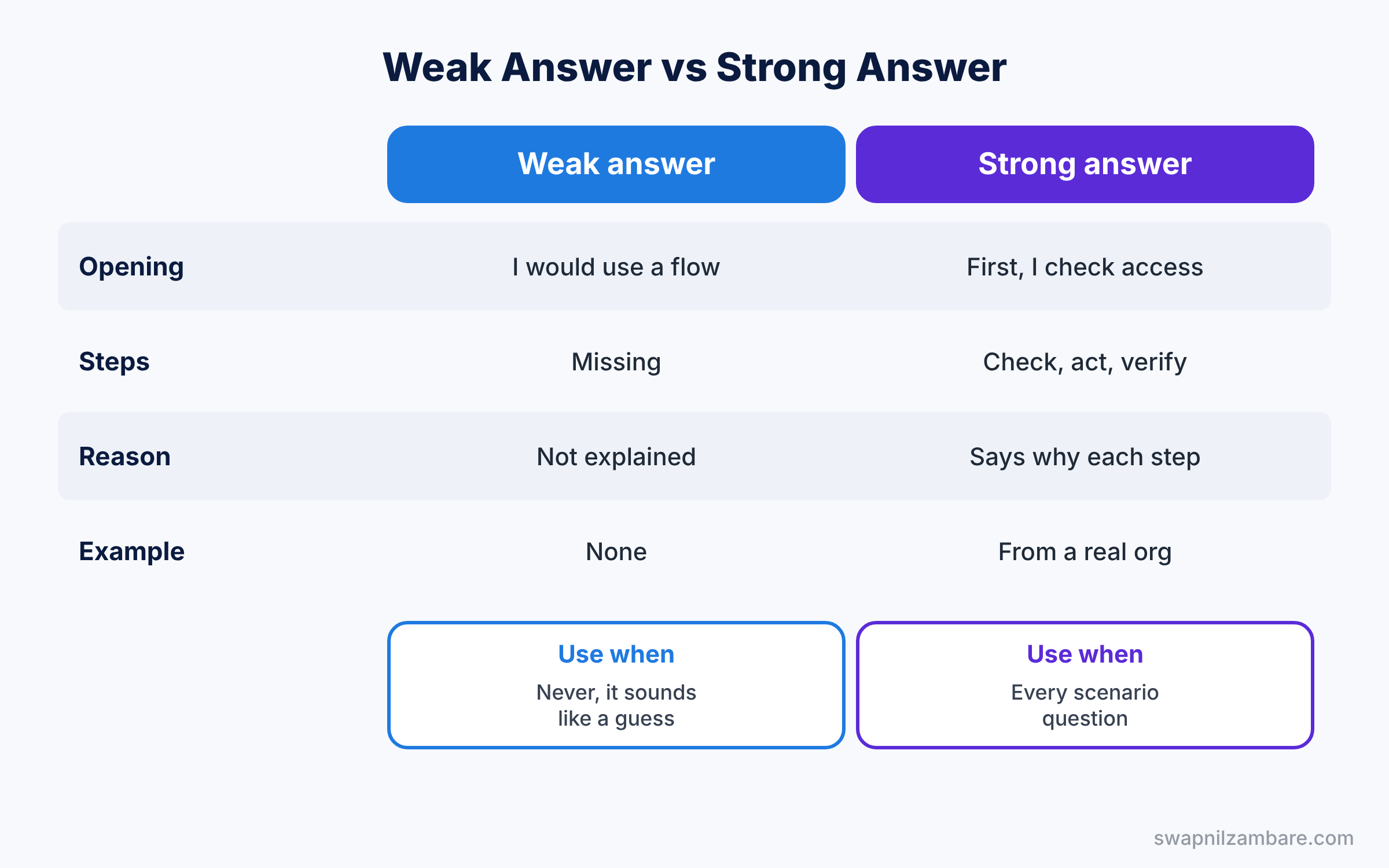
In Admin Interview Questions and Answers rounds, say what you do know and how you would find the answer, for example in Salesforce Help or a sandbox test. Honest answers score better than guesses.
Where are the scenario answers?
Part 2 answers scenario questions, together with data, Sales Cloud, Service Cloud, reports, deployment and newer topics. For more practice, see our 12-post scenario series, starting with Security Scenario Interview Questions.
Official Resources
Quick Recap
- These Admin Interview Questions and Answers cover questions 1 to 50.
- Answer aloud in two to four sentences and add your own example.
- Security and automation carry the most weight in this part.
- Flow has replaced Workflow Rules and Process Builder in every answer.
- Part 2 answers questions 51 to 133, including scenarios and newer topics.
What’s Next?
Continue with the second half. Read Advanced Admin Interview Answers (Part 2), which answers questions 51 to 133.


