Advanced Admin Interview Answers help you handle the second half of a Salesforce Admin interview, where questions move to data, sales and service setup, reports, deployment, security and real scenarios. This is Part 2, with questions 51 to 120. In Part 1, we answered questions 1 to 50 on basics, security, data modelling and automation.
Each answer is two to four sentences, so you can say it out loud in under a minute. For the full question list, see our 25-part list, starting with Top Salesforce Admin Interview Questions by Topic (Part 1).
How to Use These Advanced Admin Interview Answers
First, read one section at a time. Next, cover the answer and say your own version aloud. Then compare it with the model answer and note what you missed. Finally, try the scenarios in your Developer Edition org, because scenario answers sound stronger when you have built them.
Data Management: Advanced Admin Interview Answers
For more detail on this topic, read our Data Loader guide.
Q51. What is the difference between the Data Import Wizard and Data Loader?
The Data Import Wizard runs in the browser, handles up to 50,000 records and supports common objects. Data Loader is a separate app that handles millions of records, supports all objects and can delete and export. Also, the wizard can check for duplicates during import.
Q52. What is upsert?
Upsert inserts new records and updates existing ones in one job. It matches records by ID or by an external ID field. So it is the safest way to load data more than once.
Q53. What is the difference between Export and Export All?
Export gets current records. Export All also includes deleted records in the Recycle Bin and archived activities.
Q54. How long does the Recycle Bin keep records?
Deleted records stay in the Recycle Bin for 15 days. After that, they are removed for good, unless you restore them first.
Q55. What are duplicate rules and matching rules?
A matching rule defines how two records are compared, such as same email or similar name. Then a duplicate rule uses the matching rule and decides what happens, such as blocking the save or showing a warning.
Sales Cloud: Advanced Admin Interview Answers
Q56. What happens when you convert a lead?
Salesforce creates an account and a contact, and it can create an opportunity too. Lead fields copy to the new records through lead field mapping. The lead itself is marked as converted and becomes read only.
Q57. What is a person account?
A person account stores an individual customer as one record that acts like both an account and a contact. It suits businesses that sell to people, not companies. Once enabled, it cannot be turned off.
Q58. What is the relationship between a sales process and a record type?
A sales process lists which opportunity stages are available. You assign a sales process to an opportunity record type, so different teams can use different stages.
Q59. What is a price book?
A price book is a list of products with their prices. In practice, the standard price book holds the default price of every product, and custom price books hold special prices, such as school discounts.
Q60. What is collaborative forecasting?
It shows expected revenue by period, based on opportunity amounts and forecast categories. Then managers can adjust forecasts, and quotas show progress against targets.
Service Cloud: Advanced Admin Interview Answers
For more detail on this topic, read our Cases guide.
Q61. What is the difference between Web-to-Case and Email-to-Case?
Web-to-Case creates cases from a form on your website. Email-to-Case creates cases from emails sent to a support address. Both can use assignment and auto-response rules.
Q62. What is a queue?
A queue is a holding place for records waiting for someone to take them. Leads, cases and custom objects can be owned by queues. Members pick records from the queue list view.
Q63. What is the difference between a queue and a public group?
A queue can own records. In contrast, a public group cannot own records, and it is used to share records or folders with a set of users.
Q64. What are entitlements and milestones?
An entitlement defines the support a customer gets, such as a four-hour response time. Milestones are the steps inside that promise, and they track time against business hours.
Q65. What is Omni-Channel?
Omni-Channel routes work like cases and chats to available agents based on capacity and skills. As a result, agents get the next best item instead of picking from a queue.
Reports and Dashboards Interview Questions
For more detail on this topic, read our Reports and Dashboards guide.
Q66. What are the report formats?
Tabular, summary, matrix and joined. Summary and matrix reports group rows. Joined reports show several report blocks side by side.
Q67. Are new fields added to custom report types automatically?
No. After creating a field, edit the custom report type layout and add the field so it appears in reports.
Q68. What is a bucket field?
A bucket field groups report values into categories without creating a real field. For example, you can group fees into Low, Medium and High.
Q69. What is a dynamic dashboard?
A dynamic dashboard runs as the person viewing it, so each user sees only their own data. Each edition allows a limited number of dynamic dashboards.
Q70. Can a report show records that a user cannot access?
No. Reports always respect the viewer’s record access. However, a normal dashboard runs as one chosen user, so viewers can see that user’s data in the charts.
Deployment: Advanced Admin Interview Answers
For more detail on this topic, read our Sandboxes and Change Sets guide.
Q71. What sandbox types are there?
Developer, Developer Pro, Partial Copy and Full. Also, Developer and Developer Pro copy only metadata. Partial Copy adds a sample of data, and a Full sandbox copies all data.
Q72. How often can you refresh a sandbox?
Developer and Developer Pro sandboxes can refresh once a day. Partial Copy every 5 days, and Full every 29 days.
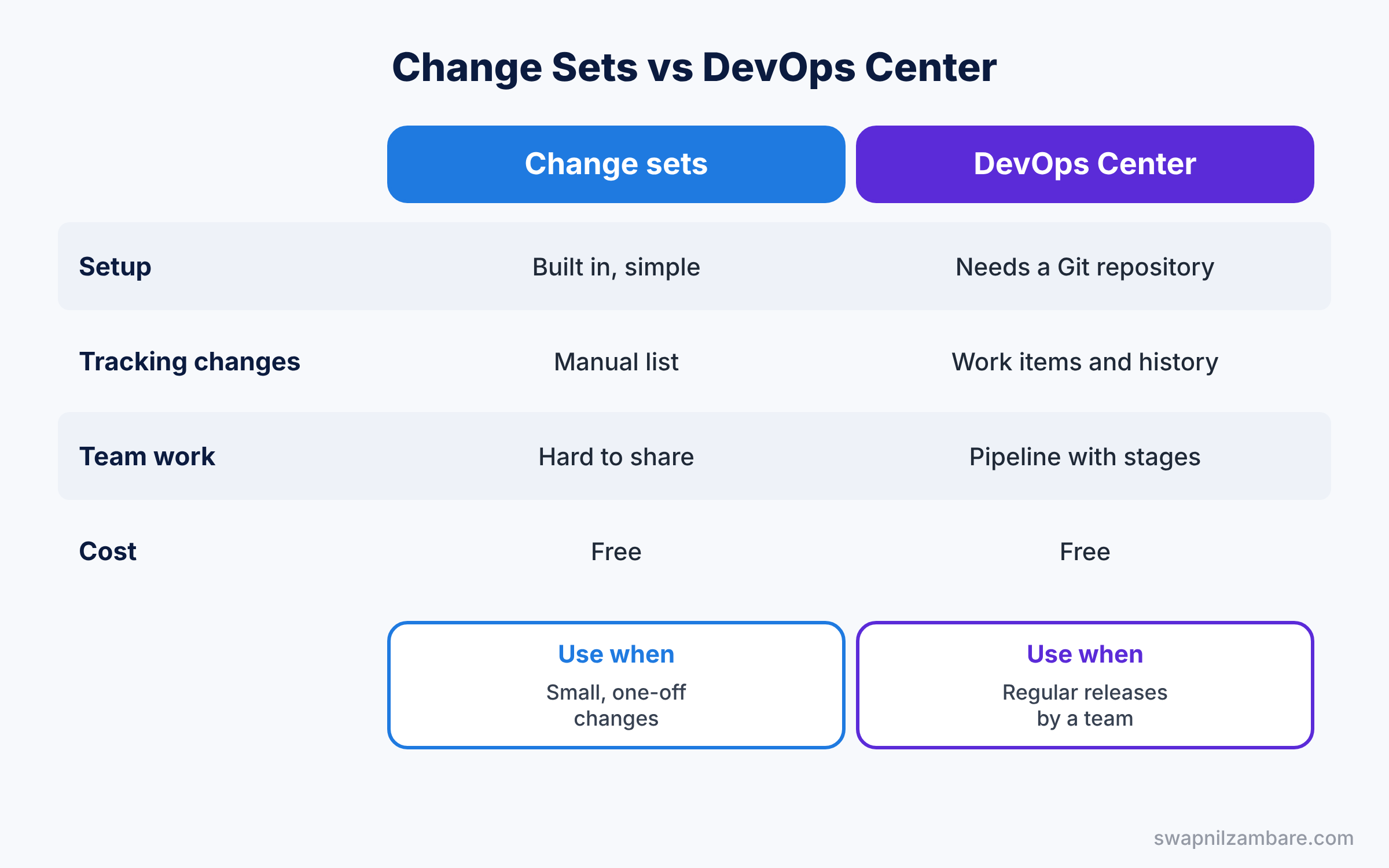
Q73. What is a change set?
A change set moves metadata between connected orgs, such as from a sandbox to production. In practice, you build an outbound change set in the source org and deploy the inbound change set in the target org.
Q74. What is DevOps Center?
DevOps Center is a free Salesforce tool that tracks changes in work items and moves them through stages using source control. Also, it replaces many change set tasks with a clearer process.
Q75. Why should you mask data in sandboxes?
Full and Partial Copy sandboxes hold real customer data, but sandbox access is usually wider. So you mask names, emails and phone numbers with Data Mask & Seed before giving others access.
Security and Audit: Advanced Admin Interview Answers
For more detail on this topic, read our Audit Trail guide.
Q76. What is Setup Audit Trail?
It records setup changes made by admins, such as new fields or profile edits. In practice, you can view the last 180 days in Setup and download them.
Q77. What is field history tracking?
It records old and new values for chosen fields on records. Also, you can track up to 20 fields per object by default.
Q78. What is Health Check?
Health Check compares your security settings with a Salesforce baseline and gives a score. Then you can fix risky settings directly from the list.
Q79. What is the difference between Platform Encryption and Classic Encryption?
Classic Encryption gives you a special encrypted text field that shows masked values. Platform Encryption encrypts many standard and custom fields at rest while users with access still see normal values. It needs an extra licence.
Q80. What are External Client Apps?
They define how outside systems connect to Salesforce with OAuth. Since Spring ’26, new connected apps are disabled by default, so new integrations use External Client Apps.
Modern Features: Advanced Admin Interview Answers
Q81. What is Agentforce?
Agentforce lets you build AI agents that answer questions and take actions in Salesforce. In practice, admins set topics, instructions and actions in Agent Builder, and agents follow user permissions.
Q82. What is the Einstein Trust Layer?
It protects data sent to AI models. For example, it can mask sensitive data, check for toxic content and keep prompts from being stored by the model provider.
Q83. What is Data 360?
Data 360, formerly Data Cloud, brings data from many systems into one profile per customer. Then teams use that profile for segments, insights and AI.
Q84. What is Experience Cloud?
Experience Cloud builds websites and portals where customers or partners log in and work with Salesforce data. External users get access through their licences, profiles and sharing sets.
Q85. What is Salesforce Connect?
Salesforce Connect shows data from outside systems as external objects without copying it into Salesforce. Also, users can view the records in real time, like any other object.
More Modern Feature Questions
Q86. What is Translation Workbench?
It lets you translate labels, picklist values and help text into other languages. Users then see Salesforce in their own language.
Q87. Can you turn off multi-currency?
No. Once multi-currency is enabled, you cannot disable it, so test it in a sandbox first.
Q88. What is In-App Guidance?
In-App Guidance shows prompts and walkthroughs on Lightning pages to help users learn new features. In practice, you can target it by profile, permission set and dates.
Q89. What are custom notifications?
Custom notifications send alerts to the bell icon and the Salesforce mobile app. Flows usually send them, for example when a big deal closes.
Q90. How do you keep up with releases?
Read the release notes, test the preview in a sandbox, and review release updates in Setup. Also, follow the Admin trail on Trailhead and the official admin blog.
Scenario-Based Advanced Admin Interview Answers
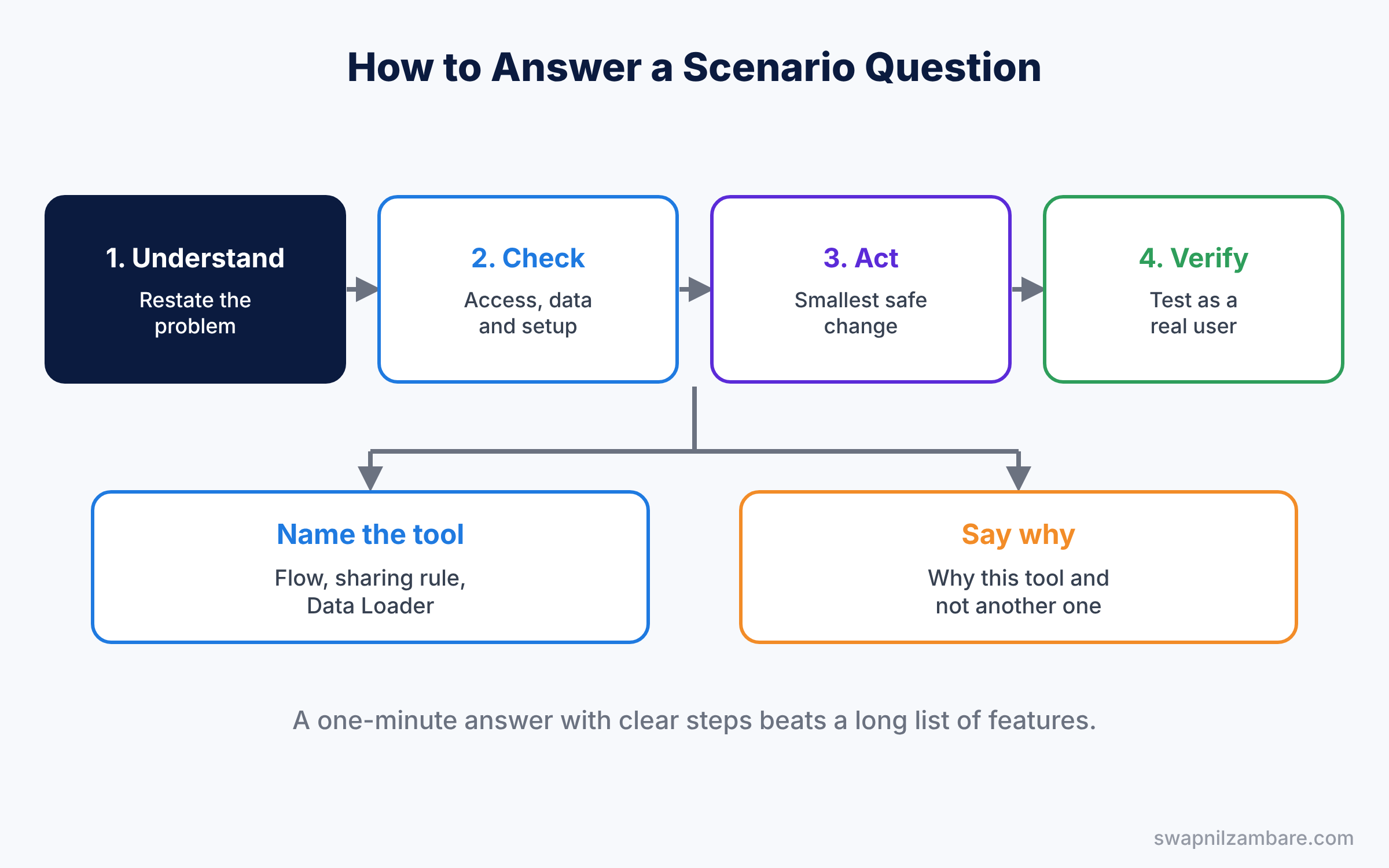
Use the same three steps for every scenario: check the facts, make the change, then verify it with a real user.
Q91. A user cannot see a record that a colleague can see. What do you check?
First, check object access on the profile and permission sets. Next, check the OWD, the role hierarchy and sharing rules. Then look at restriction rules. Finally, use the record’s Sharing Hierarchy button to see who has access and why.
Q92. Reps should see only their own opportunities, but managers should see their team’s. How?
Set the opportunity OWD to Private and keep “Grant Access Using Hierarchies” on. Then place each manager above their reps in the role hierarchy.
Q93. Users keep creating duplicate accounts. What do you do?
Create a matching rule on account name and website, and a duplicate rule that warns or blocks. Then run a duplicate job or a report to merge existing duplicates.
Q94. A user left the company today. What steps do you take?
Freeze the user immediately. Then reassign their open records with mass transfer, update approvals and queues, and finally deactivate the user to free the licence.
Q95. You need to load 200,000 contacts linked to accounts. What is your plan?
Load accounts first with an external ID. Then load contacts with Data Loader using upsert and the account external ID to link them. Test with 100 records in a sandbox before the full load.
More Scenario-Based Advanced Admin Interview Answers
Q96. Discounts over 20% need sales manager approval. How do you build it?
Create an approval process on Opportunity with entry criteria Discount greater than 20%. Also, set the approver to the user’s manager, and lock the record until a decision is made.
Q97. A flow fails for some records. How do you find the cause?
Read the flow error email, which names the failing element. Then debug the flow with one of the failing records and check debug logs. Finally, add a fault path so future errors are logged.
Q98. Your manager wants an email when a deal over 10 lakh closes. Which tool?
Use a record-triggered flow on Opportunity with entry conditions Stage = Closed Won and Amount over 10 lakh. Then add an email or custom notification action.
Q99. Pages load slowly for support agents. What do you check?
Measure page time, then click Analyze in Lightning App Builder. Move related lists and heavy components into tabs. Also run the speed test to check the browser and network.
Q100. You must deploy ten new fields and a flow to production. What is your process?
Build and test in a sandbox, then deploy with a change set or DevOps Center. Check field-level security and page layouts in the deployment. Finally, activate the flow in production and test with a real user.
Newer Topics: Advanced Admin Interview Answers
Q101. What is Experience Cloud, and which licence would you use for 50,000 customers?
Experience Cloud builds websites and portals where customers and partners log in to Salesforce. For many customers who only see their own cases, use a high-volume Customer Community licence. Then share records with sharing sets, because high-volume users have no roles.
Q102. How do you keep guest users safe on a public site?
Give the guest user profile the least access it needs and share records only through guest sharing rules. Also review guest access after each release. Finally, add protection such as reCAPTCHA on public forms.
Q103. Why should an integration use its own user?
A dedicated integration user makes it clear which changes came from the integration. Also, you can give it only the access it needs and it will not break when an employee leaves. Use OAuth instead of a shared password.
Q104. What is the difference between a platform event and change data capture?
A platform event is a custom message you publish when something happens, such as an order being shipped. Change data capture sends an event automatically when a record is created, updated or deleted. So use change data capture to copy record changes, and platform events for business events.
Q105. What is Agentforce, and how is an agent set up?
Agentforce lets you build AI agents that answer questions and take actions in Salesforce. An agent has topics, which say what it can help with, instructions, which guide its behaviour, and actions, which do the work. It always runs with the permissions you give it.
More Newer Topic Questions
Q106. What does the Einstein Trust Layer do?
It protects company data when AI features use large language models. For example, it masks sensitive data, keeps the model provider from storing your data and logs AI activity for audit. Normal Salesforce security still applies on top of it.
Q107. What is Flow Orchestration, and when would you use it?
Flow Orchestration links many flows into stages and steps, with work assigned to different people. Use it when a process has several people acting in order, such as employee onboarding. A single approval is still simpler with an approval process.
Q108. What is data skew, and why does it matter?
Data skew happens when one record owns or links to a very large number of records, such as one account with 50,000 contacts. It can cause record locking errors and slow sharing updates. Spread records across more owners or parent records to avoid it.
Q109. What is Health Cloud?
Health Cloud is a Salesforce product for healthcare providers and insurers, built on Service Cloud. It stores patients as person accounts and adds care plans, care teams and a clinical data model. Privacy rules such as HIPAA make security a big part of every Health Cloud project.
Q110. What is the difference between CRM Analytics and standard reports?
Standard reports work on Salesforce data and suit daily lists and simple dashboards. CRM Analytics can combine data from many sources and handle very large data sets with deep drill-down. It needs an extra licence and more setup.
Troubleshooting: Advanced Admin Interview Answers
Q111. A user cannot see a record. How do you troubleshoot it?
First, use Login As to confirm the problem. Then check the profile and permission sets for object access, then OWD, the role hierarchy and sharing rules. The Sharing button on the record shows exactly who has access and why.
Q112. Emails from Salesforce are not arriving. What do you check?
Check the email deliverability setting first, because new sandboxes are set to system emails only. Then check the automation that sends the email and request an email log. Finally, check SPF and DKIM if emails land in spam.
Q113. A field keeps changing back after users save. How do you find the cause?
Turn on field history for the field to see who or what changed it. Then check flows, integrations and Apex triggers on the object with a debug log. Usually one automation or integration overwrites the user value.
Q114. The whole org feels slow this morning. What do you check?
Check the Salesforce Trust site first for platform issues. Then look at the Setup Audit Trail for recent changes. If only some users are affected, check their network and browser.
Q115. How do you handle a vague request like “we need a new field”?
Ask what problem the field will solve and who will use it. Then check if an existing field or report already meets the need. Write it as a user story with acceptance criteria before building.
Project and Career Answers
Q116. Three directors send urgent requests at once. How do you decide?
Compare each request by business value, effort and risk. Then talk to the directors and agree on an order, ideally with your manager. Write down the decision so everyone knows the plan.
Q117. What is your go-live checklist for a new process?
Test in a full or partial sandbox, get business sign-off and plan the deployment order. Then train users, send a short release note and stay ready to support on day one. Finally, measure adoption in the first two weeks.
Q118. How do you measure if a Salesforce change was successful?
Agree on a measure before you build, such as time saved or fewer open cases. Then build a simple report or dashboard to track it after go-live. Share the result with stakeholders after a few weeks.
Q119. Tell me about a mistake you made in Salesforce.
Pick a real, small mistake, such as a field update that changed the wrong records. Explain how you found it, fixed the data and told the users. Then say what you changed, such as testing in a sandbox first.
Q120. What would you do in your first 30 days as a new admin?
First, learn the org: users, main objects, automation and integrations. Next, meet key users to learn their pain points. Then fix a few quick wins and write a short plan for bigger changes.
Advanced Admin Interview Answers FAQ
Are these answers enough for experienced roles?
They cover the most asked questions. For experienced roles, also practise the 12 posts in our scenario series, starting with Security Scenario Interview Questions, and prepare real stories from your projects.
How long should a scenario answer be?
About one minute. State the steps, name the tools, and say how you would verify the result.
Official Resources
Quick Recap
- These Advanced Admin Interview Answers cover questions 51 to 120.
- Data, deployment and security answers need exact numbers and steps.
- Scenario answers follow check, act and verify.
- Add a real example from your own org to every answer.
- Part 1 answers questions 1 to 50 on basics and automation.
What’s Next?
You have finished the Salesforce Admin interview series. Next, we start the Developer track. Coming soon: SOQL Basics for Salesforce Developers.