Salesforce Order of Execution is the fixed sequence of steps Salesforce follows every time a record is saved, from validation rules to flows, triggers and roll-up summaries. Knowing this order explains why a field has a surprising value or why an error appears. In our flow types guide, you built before-save and after-save flows. In our validation rules guide, you blocked bad data. Now you will see exactly when each of them runs.
In this post, you will learn the main steps of the save process, what changes between before-save and after-save, and how roll-ups and the final commit fit in. Then you will test the order at Bright Path Tutors with a flow that sets a default fee and a validation rule that checks it. This topic also appears in the Platform Administrator II exam, so it is worth learning well.
What is Salesforce Order of Execution?
When you click Save, Salesforce does not just write the record. It runs a long list of checks and automations in a fixed order, all inside one transaction. If any step fails, the whole save is rolled back, and nothing is stored.
Here is a simple analogy. Think of passing through an airport. You check in, drop your bag, go through security, then passport control, then boarding. You cannot board before security, and if security stops you, you do not fly at all. Saving a record works the same way, with each step waiting for the one before it.
Why Salesforce Order of Execution Matters
Most automation bugs come from the order, not from the logic. A flow may update a field after a validation rule already checked it. Or two automations may change the same field, and the last one wins.
Here are some real situations at Bright Path Tutors.
- A flow sets a default fee, but a validation rule still complains that the fee is blank.
- An assignment rule changes the case owner after a flow already sent an email to the old owner.
- A roll-up on Course updates, which fires the Course’s own flows.
- Developers add an Apex trigger, and the admin’s flow suddenly behaves differently.
So knowing the order helps you design automation that works together, and fix it quickly when it does not.
How Salesforce Order of Execution Works
Here is the simplified order for a record save. First, Salesforce loads the record and applies the new values, with basic system checks like required fields on the page. Next, before-save record-triggered flows run, then before Apex triggers. Then Salesforce runs system validation again, followed by your custom validation rules and duplicate rules. After that, it saves the record to the database, but does not commit yet. Then after Apex triggers, assignment rules, auto-response rules, any remaining workflow rules and escalation rules run. Next, after-save flows and processes run, followed by entitlement rules. Finally, roll-up summaries update the parent, sharing is recalculated, and everything commits.
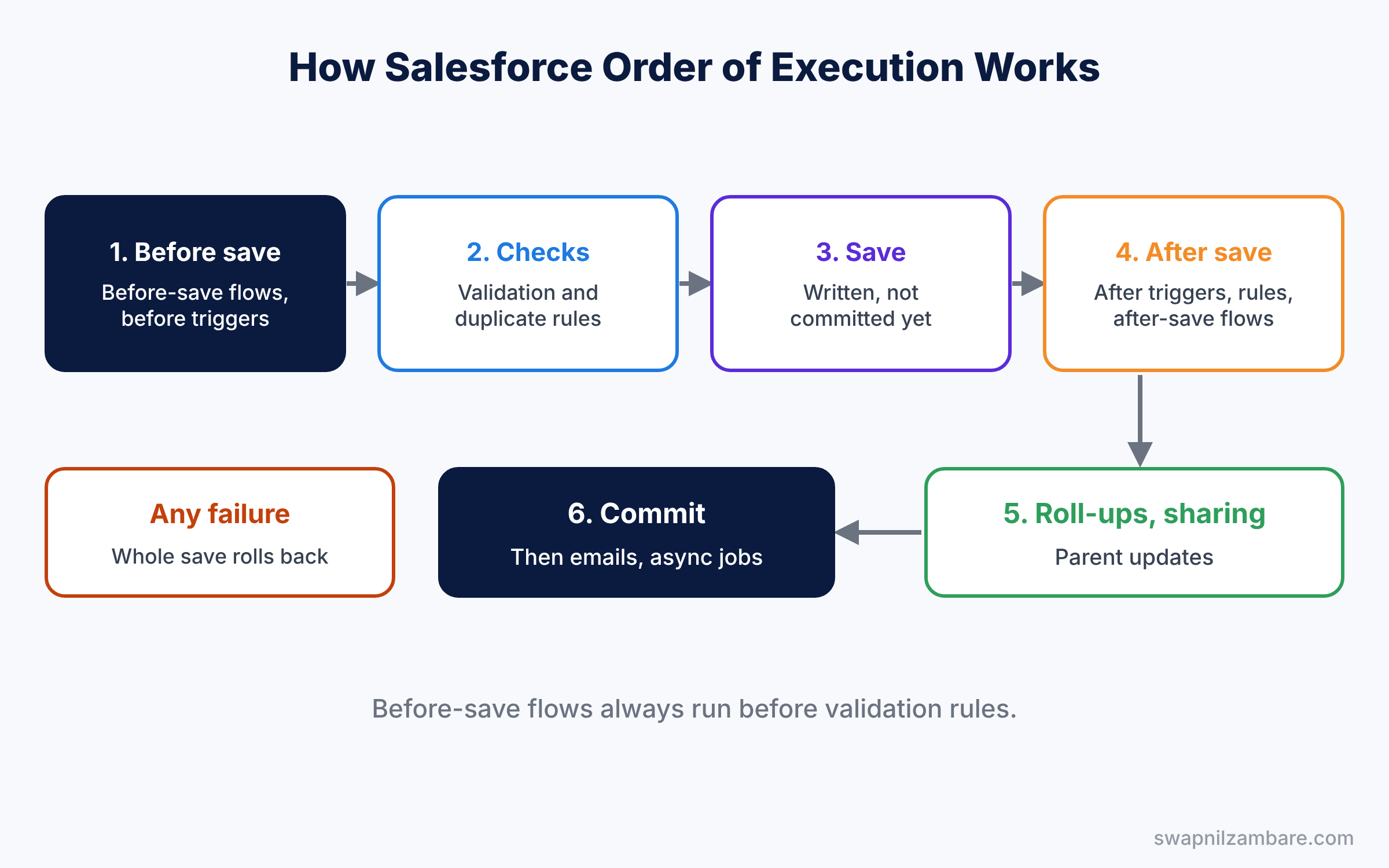
After the commit, post-commit work happens. This includes sending emails and starting queued or asynchronous jobs. So if a save fails, no email goes out, because the email step never ran. This is a useful clue when a user says the record failed but they still got a notification, because that usually means two separate saves happened.
Key Parts of Salesforce Order of Execution
Before-save automation
First, before-save flows and before triggers run before the record is saved. They can change fields on the same record for free, because no extra save is needed. This is the fastest place to set default values.
Validation and duplicate rules
Next, validation rules run after before-save automation. So a value set by a before-save flow is checked by your validation rules. Duplicate rules run right after them.
After-save automation
Then after triggers, assignment rules, escalation rules and after-save flows run. The record already has an ID, so they can create related records or send emails. However, changing the same record again starts another save, which costs time.
Workflow field updates
Old workflow field updates are special. If one changes the record, Salesforce runs before and after triggers again, once more. This can surprise you in older orgs that still have workflow rules.
Roll-ups and the commit
Finally, if the record is a child in a master-detail relationship, Salesforce updates the parent’s roll-up fields. The parent then goes through its own save steps. Once everything succeeds, Salesforce commits all the changes together.
The table below sums up the main stages in order.
| Stage | What runs | Can change the same record |
|---|---|---|
| 1. Before save | Before-save flows, before triggers | Yes, for free |
| 2. Checks | Validation rules, duplicate rules | No |
| 3. Save | Record written, not committed | No |
| 4. After save | After triggers, rules, after-save flows | Only with another save |
| 5. Parent and sharing | Roll-ups, sharing recalculation | Parent record only |
| 6. Commit and post-commit | Commit, emails, async jobs | No |
Before-Save vs After-Save in the Order of Execution
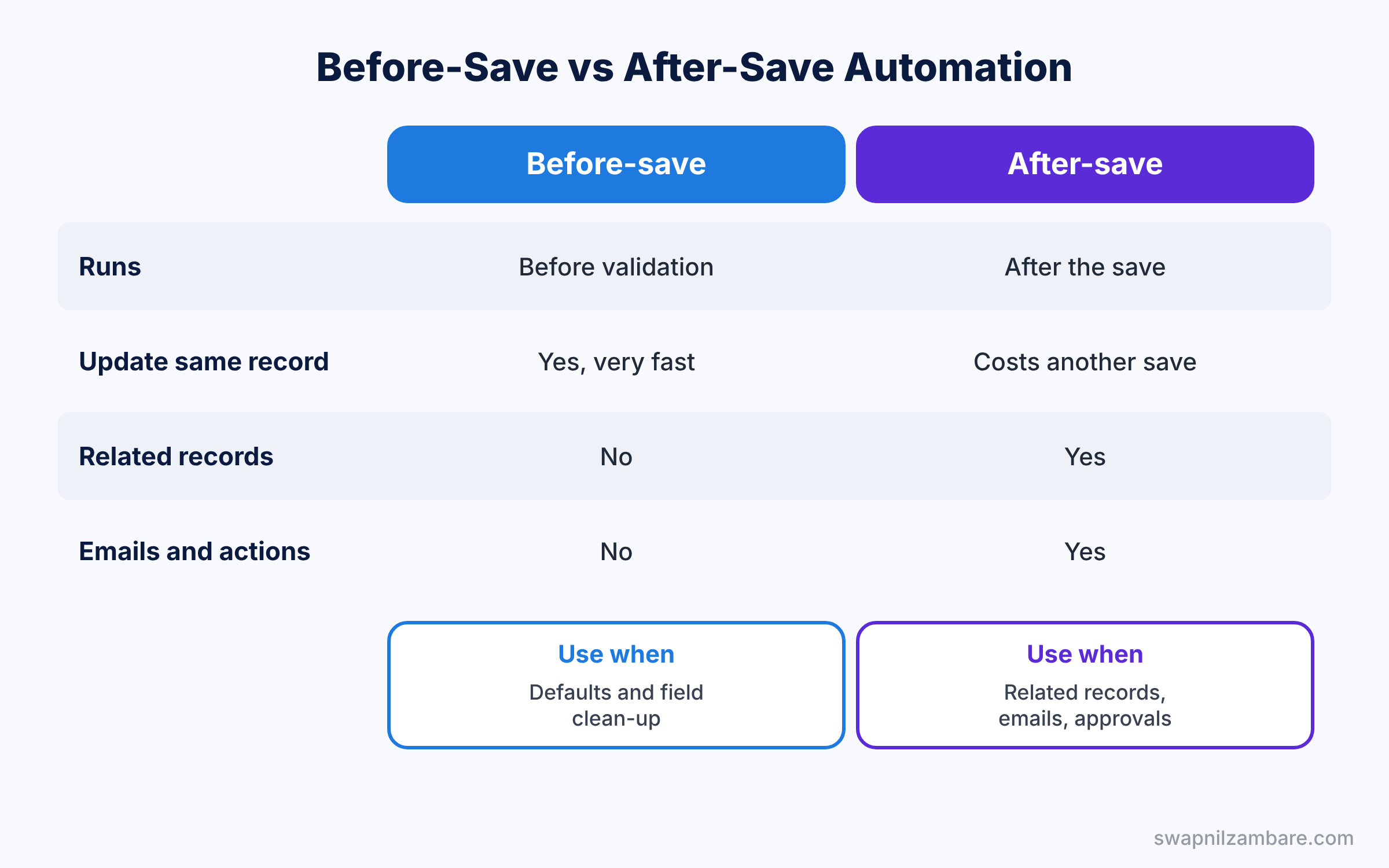
Choosing the right side of the save is the most practical use of this knowledge. The table below compares them.
| Feature | Before-save | After-save |
|---|---|---|
| Runs | Before validation rules | After the record is saved |
| Update the same record | Yes, very fast | Possible, but costs another save |
| Create related records | No | Yes |
| Send emails or call actions | No | Yes |
| Best for | Defaults and field clean-up | Related records, emails, approvals |
In short, use before-save flows for field updates on the triggering record. Use after-save flows when you need the record ID or other records.
Hands-on Example: Salesforce Order of Execution for Course Fees
Let’s prove the order in your Developer Edition org.
Step 1: Add a validation rule
- Go to Setup, then Object Manager, then Course, then Validation Rules, and click New.
- Name it “Fee_Required_Minimum” and enter the formula below. Set the error message to “Fee must be at least 1,000”.
OR(
  ISBLANK(Fee__c),
  Fee__c < 1000
)
Step 2: Add a before-save flow
- Create a Record-Triggered Flow on Course, triggered when a record is created.
- Choose Fast Field Updates, which is the before-save option.
- Add an Assignment element that sets $Record.Fee__c to 5000 when Fee is blank. Save and activate it as “Course Default Fee”.
Step 3: Test the order
- Create a new course called “Robotics Basics” and leave Fee empty.
- The record saves with a fee of 5,000, and no error appears.
The flow ran before the validation rule, so the rule saw 5,000, not a blank. If you change the flow to Actions and Related Records, which runs after save, the same test fails with the error. That one change shows the whole idea.
Step 4: Read the order in a debug log
Turn on a debug log for your user and save another course. Here are the key log lines, shortened, in the order they appear.
FLOW_START_INTERVIEWS_BEGIN|1
FLOW_START_INTERVIEW_BEGIN|Course Default Fee
VALIDATION_RULE|Fee_Required_Minimum
VALIDATION_PASS
DML_END
The flow lines come before the VALIDATION_RULE line, which confirms the order. We cover debug logs in detail later in this series.
Common Mistakes with Salesforce Order of Execution
- Using after-save flows for simple field updates. They cause an extra save and slow down bulk loads.
- Expecting validation to run first. Before-save flows and triggers always run before validation rules.
- Two automations on one field. The last one to run wins, which may not be the one you expect.
- Forgetting roll-ups. A child save also fires the parent’s automation.
- Mixing old workflow rules with flows. Field updates re-fire triggers and confuse the result.
Best Practices for Salesforce Order of Execution
- One record-triggered flow strategy per object. Use Flow Trigger Explorer to see and order them.
- Prefer before-save for same-record updates. It is the fastest automation in the platform.
- Keep validation simple. Let flows fix values, then let rules check them.
- Talk to developers. Triggers and flows share the same save, so plan them together.
- Move old rules to Flow. Fewer tools in the save mean fewer surprises.
Practice Task
Add an after-save flow on Course that creates a Task for the course owner. Then save a course and find the flow in the debug log after the DML_END line.
Hint: search the log for FLOW_START_INTERVIEW_BEGIN and note which comes first.
Salesforce Order of Execution FAQ
Do flows always run before Apex triggers?
Before-save flows run before before triggers. After-save flows run after after triggers.
Can I control the order of several flows on one object?
Yes. Set the Trigger Order value on each record-triggered flow, and check it in Flow Trigger Explorer.
Does the order matter for imports?
Yes. Every record in a Data Loader batch goes through the same steps, so slow automation slows the whole load.
Official Resources
Quick Recap
- Salesforce Order of Execution is the fixed sequence of steps in every save.
- Before-save flows and triggers run before validation rules.
- After-save automation runs once the record has an ID.
- Roll-ups update the parent, which runs its own automation.
- Everything commits together, so one failure rolls back the whole save.
What’s Next?
You now know when each automation runs. Next, learn advanced flow skills like subflows, fault paths and scheduled paths. Read Advanced Salesforce Flows: Subflows, Fault Paths and Scheduled Paths. You can also revisit the roll-up summary fields guide.