Salesforce Entitlements tell your support team what level of help each customer has bought, and milestones track whether you deliver that help on time. Together they turn a promise like “we reply within 4 working hours” into a timer on every case. In our case rules guide, you escalated cases that waited too long. Entitlements go one step further and measure each case against a clear service level agreement, or SLA.
In this post, you will learn what entitlements, entitlement processes and milestones are, how milestone actions warn agents before a deadline, and how business hours shape the timers. Then you will set up a Gold School Support plan for Bright Path Tutors with first response and resolution targets. Some steps need a few clicks in Setup, but no code at all.
What are Salesforce Entitlements?
An entitlement is a record that says a customer is entitled to a certain kind of support. For example, “Gold School Support for Green Valley School North, from 1 June 2026 to 31 May 2027”. It links to an account and, through the case, to every support request from that school.
An entitlement process is the timeline behind it. It lists milestones, such as First Response within 4 hours and Resolution within 2 days. When a case uses the entitlement, Salesforce starts these timers.
Here is a simple analogy. Think of a food delivery app that promises “delivery in 30 minutes, or the next order is free”. The promise is the entitlement. Then the countdown on your screen is the milestone. The free order is the violation action when the timer runs out.
Why Salesforce Entitlements Matter
Not every customer pays for the same support. So a partner school with a premium plan should get faster help than a free trial user. Entitlements make that difference visible to every agent, on every case.
Here are some real situations at Bright Path Tutors.
- Gold schools are promised a first reply within 4 working hours.
- The support manager wants a warning before a promise is broken, not after.
- Finance needs to know which schools have an active support plan this year.
- At the end of the month, the CEO wants to see how many cases met their targets.
In short, entitlements protect your promises and give you proof that you kept them.
How Salesforce Entitlements Work
The parts connect in a clear chain. First, an admin creates milestones, like First Response and Resolution. Next, the admin builds an entitlement process that uses those milestones with time limits. Then each customer gets an entitlement that points to that process. Finally, when a case links to the entitlement, Salesforce creates case milestones with target dates and starts the timers.
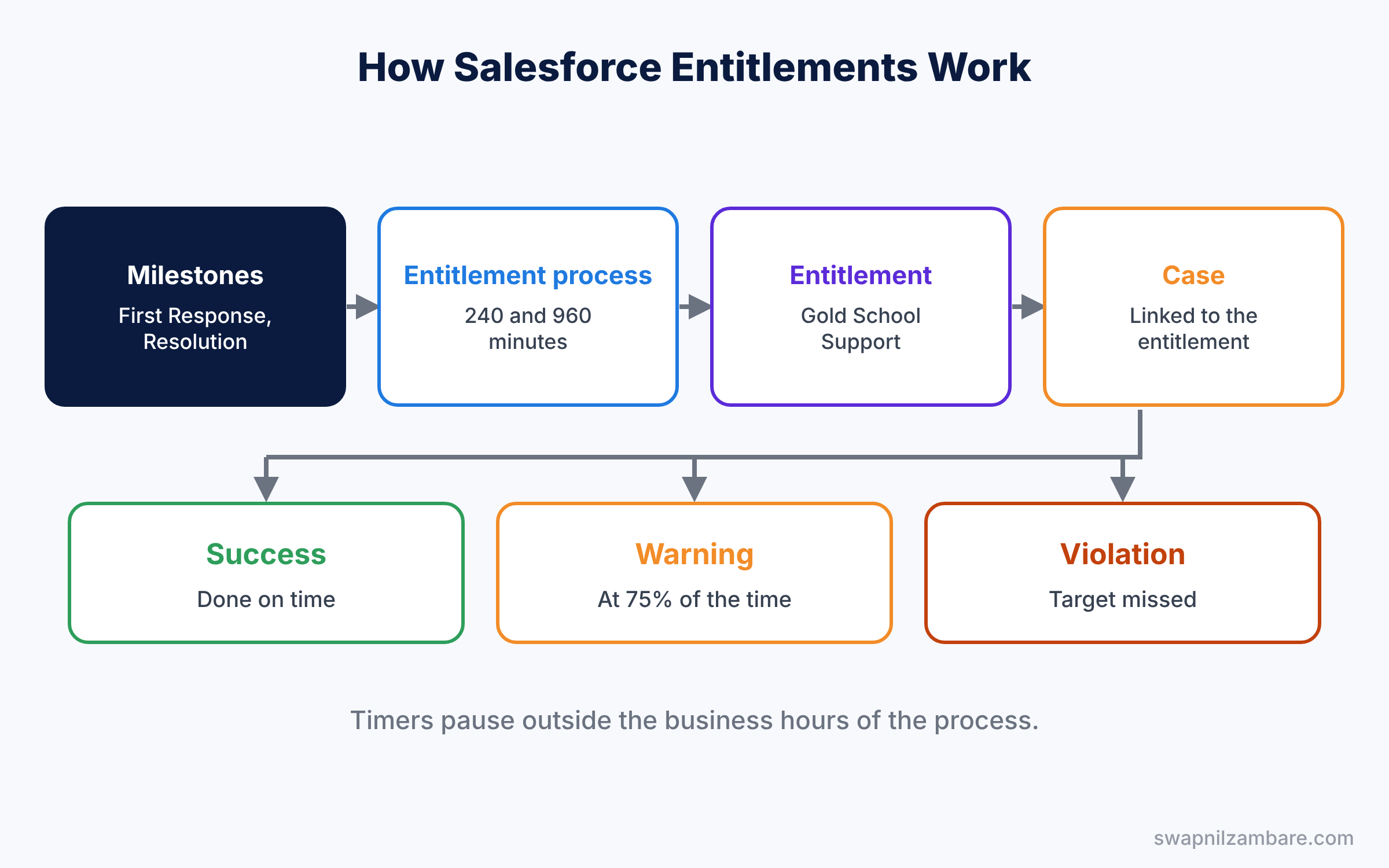
Business hours matter here. If the process uses India Office Hours, the timer pauses at night and on Sundays. So a case opened at 5:30 PM on Saturday with a 4-hour target is due at 12:30 PM on Monday, not at 9:30 PM on Saturday.
Key Parts of Salesforce Entitlements
Entitlements and service contracts
First, an entitlement belongs to an account and has a start date, an end date and an entitlement process. Service contracts can group several entitlements into one agreement, such as a yearly school contract. Many small teams use entitlements alone and add service contracts later.
Entitlement processes
Next, an entitlement process is like a stopwatch with several laps. It has entry criteria, business hours and a list of milestones. You can create versions of a process, so old cases keep their old rules while new cases use the new ones.
Milestones
Then milestones are the steps you promise to complete, like First Response or Resolution. You create each milestone once in Setup. Each process then adds it with criteria and minutes to complete, such as 240 minutes.
Milestone actions
Milestone actions run at three points. Warning actions run before the deadline, violation actions run after it, and success actions run when the agent completes the milestone on time. Each action can send an email alert, update a field or create a task.
Milestone Tracker
Finally, the Milestone Tracker component shows timers on the case page. Agents see a countdown for the next milestone, and it turns red when a target is missed.
The table below shows the main objects and their API names, which help with reports and SOQL.
| Object | API name | Stores |
|---|---|---|
| Entitlement | Entitlement | The support a customer has |
| Entitlement Process | SlaProcess | The timeline of milestones |
| Milestone | MilestoneType | A step like First Response |
| Case Milestone | CaseMilestone | One timer on one case |
Entitlements vs Escalation Rules
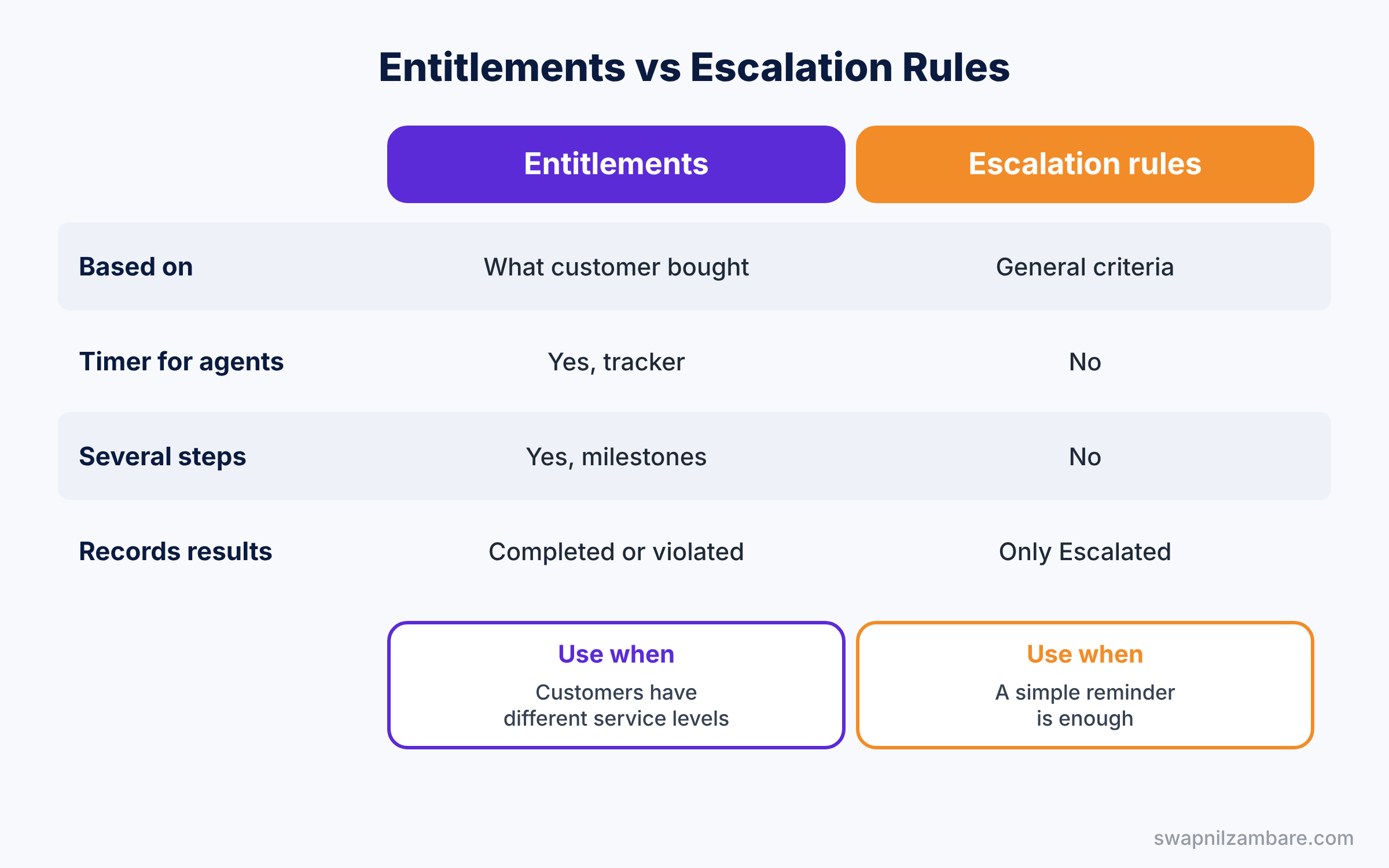
Both tools act when cases take too long, so beginners often ask which one to use. The table below compares them.
| Feature | Entitlements and milestones | Escalation rules |
|---|---|---|
| Based on | What each customer bought | General case criteria |
| Shows a timer to agents | Yes, Milestone Tracker | No |
| Several steps per case | Yes, many milestones | One rule entry per case |
| Records success or failure | Yes, completed or violated | Only ticks Escalated |
| Setup effort | Higher | Lower |
In short, use escalation rules for simple “do not forget this case” alerts. Use Salesforce Entitlements when customers have different service levels and you must report on them.
Hands-on Example: Salesforce Entitlements for Gold Schools
Let’s set up a Gold School Support plan in your Developer Edition org.
Step 1: Turn on entitlement management
- Go to Setup, type “Entitlement Settings” in Quick Find, tick Enable Entitlement Management and save.
- Add the Entitlement Name field to the case page layout and the Entitlements related list to the account page layout.
Step 2: Create milestones
- In Quick Find, type “Milestones” and click New Milestone.
- Create “First Response” and “Resolution”, both with the recurrence type No Recurrence.
Step 3: Build the entitlement process
- In Quick Find, type “Entitlement Processes” and click New Process. Choose Case, name it “Gold School Process” and pick India Office Hours.
- Add the milestones from the table below.
- Open First Response, add a warning action at 75% that emails the case owner, and a violation action that emails the support manager.
- Activate the process.
| Milestone | Criteria | Time to complete |
|---|---|---|
| First Response | Case: Priority not equal to blank | 240 minutes |
| Resolution | Case: Priority not equal to blank | 960 minutes |
Step 4: Give a school its entitlement
- Open Green Valley School North and click New in the Entitlements related list.
- Name it “Gold School Support”, set the dates, and choose Gold School Process. Save.
- Create a case for this school and set Entitlement Name to Gold School Support. Add the Milestone Tracker to the case page in Lightning App Builder, and watch the timers start.
Step 5: Track milestones with SOQL
Developers can list open milestones that are close to their target with this SOQL query.
SELECT Case.CaseNumber, MilestoneType.Name, TargetDate, IsViolated
FROM CaseMilestone
WHERE IsCompleted = false
ORDER BY TargetDate
The result might look like this.
CaseNumber   MilestoneType.Name   TargetDate         IsViolated
00001031     First Response       2026-06-11 11:00   false
00001028     Resolution           2026-06-11 15:30   false
00001019     First Response       2026-06-10 16:00   true
IsViolated shows missed targets. So the support manager can act on red rows first.
Common Mistakes with Salesforce Entitlements
- Cases without an entitlement. Salesforce does not fill the Entitlement field by itself, so timers never start. Use a flow to set it from the account.
- Forgetting to complete milestones. If nobody sets the completion date, every milestone ends as violated. Use a flow to complete First Response when the first email goes out.
- Wrong business hours. A 24-hour clock makes targets far too strict.
- No warning actions. Agents only learn about a problem after it is too late.
- Editing an active process. Create a new version instead, so open cases keep the same rules.
Best Practices for Salesforce Entitlements
- Start with two milestones. First Response and Resolution cover most needs.
- Warn at 75% of the time. Agents still have time to act.
- Automate the boring parts. Use flows, as shown in our flow types guide, to set entitlements and complete milestones.
- Report on violations weekly. Patterns show where you need more staff or training.
- Name entitlements after the plan. “Gold School Support” is clearer than a contract number.
Practice Task
Create a “Silver School Process” with First Response in 480 minutes and Resolution in 1,920 minutes, and give it to a second school.
Hint: you can clone the Gold process from its detail page and change the minutes.
Salesforce Entitlements FAQ
Do Salesforce Entitlements need Service Cloud?
Entitlement management is part of Service Cloud and some other editions. Check your edition in Company Information before you plan it.
Can a case have more than one entitlement?
No. A case links to one entitlement at a time, which uses one entitlement process.
Can customers see their milestones?
Not by default. You can show some details on an Experience Cloud site if you want to share them.
Official Resources
- Entitlement Management (Salesforce Help)
- Work with Milestones (Salesforce Help)
- Entitlement Management for Lightning Experience (Trailhead)
Quick Recap
- Salesforce Entitlements record the support level each customer has.
- An entitlement process holds milestones with time limits and business hours.
- Case milestones start when a case links to an entitlement.
- Warning, violation and success actions alert people at the right time.
- The Milestone Tracker shows agents a live countdown on the case.
What’s Next?
Your team now works to clear time targets. Next, learn how to help customers faster with ready-made answers. Read Salesforce Knowledge: Articles, Data Categories and Publishing.