Salesforce exam registration now happens on Trailhead Academy, with Pearson VUE delivering the exam either online or at a test centre. If you followed our Salesforce Admin certification guide and feel ready, the next step is booking your exam. The process is simple once you know it, but a small mistake, like a name that does not match your ID, can cost you the full exam fee.
In this post, you will learn exactly how to book a Salesforce certification exam from the official portal, step by step. You will also see what to check before you pay, how online and test centre exams differ, and the rules for rescheduling and cancelling. Every step below comes from Salesforce’s own help articles, and the links are in the Official Resources section.
What is Salesforce Exam Registration?
Salesforce exam registration is the process of choosing a certification exam, picking how and when you will take it, and paying for it. In July 2025, Salesforce moved all certification exams from the old Webassessor site to Trailhead Academy. So today you start every booking at trailheadacademy.salesforce.com.
Trailhead Academy handles your certification account, exam history and bookings. Pearson VUE is the delivery partner. It runs the scheduling screens, the payment page, online proctoring through its OnVUE app, and its physical test centres.
Here is a simple analogy. Booking an exam is like booking a train ticket through a travel app. Trailhead Academy is the app where you search and start the booking. Pearson VUE is the railway company that sells the actual seat and checks your ticket on the day.
Why Salesforce Exam Registration Matters
Most people think booking is the easy part. However, many candidates lose money or get turned away on exam day because of small booking mistakes. A few minutes of care at this stage saves a lot of stress later.
Here are some real situations where careful booking helps.
- Your Trailblazer profile says “Swapnil Z” but your passport says “Swapnil Zambare”, so the proctor refuses entry.
- Your office laptop blocks the OnVUE app, and you find out only five minutes before the exam.
- You need to move your exam, but you are already inside the reschedule window, so you lose the fee.
- Your company gave you a voucher, but you forget to enter it and pay by card instead.
So treat booking as part of your exam preparation, not as an afterthought. And if you still need practice, keep building in your Developer Edition org before you pick a date.
How Salesforce Exam Registration Works
The full process has five stages. First, you sign in to Trailhead Academy with your Trailblazer account. Next, you find your exam and click Register Now. Then Pearson VUE opens, where you pick your language, time zone, date and time. After that, you pay and confirm. Finally, for online exams, you run a system test on the computer you will use.
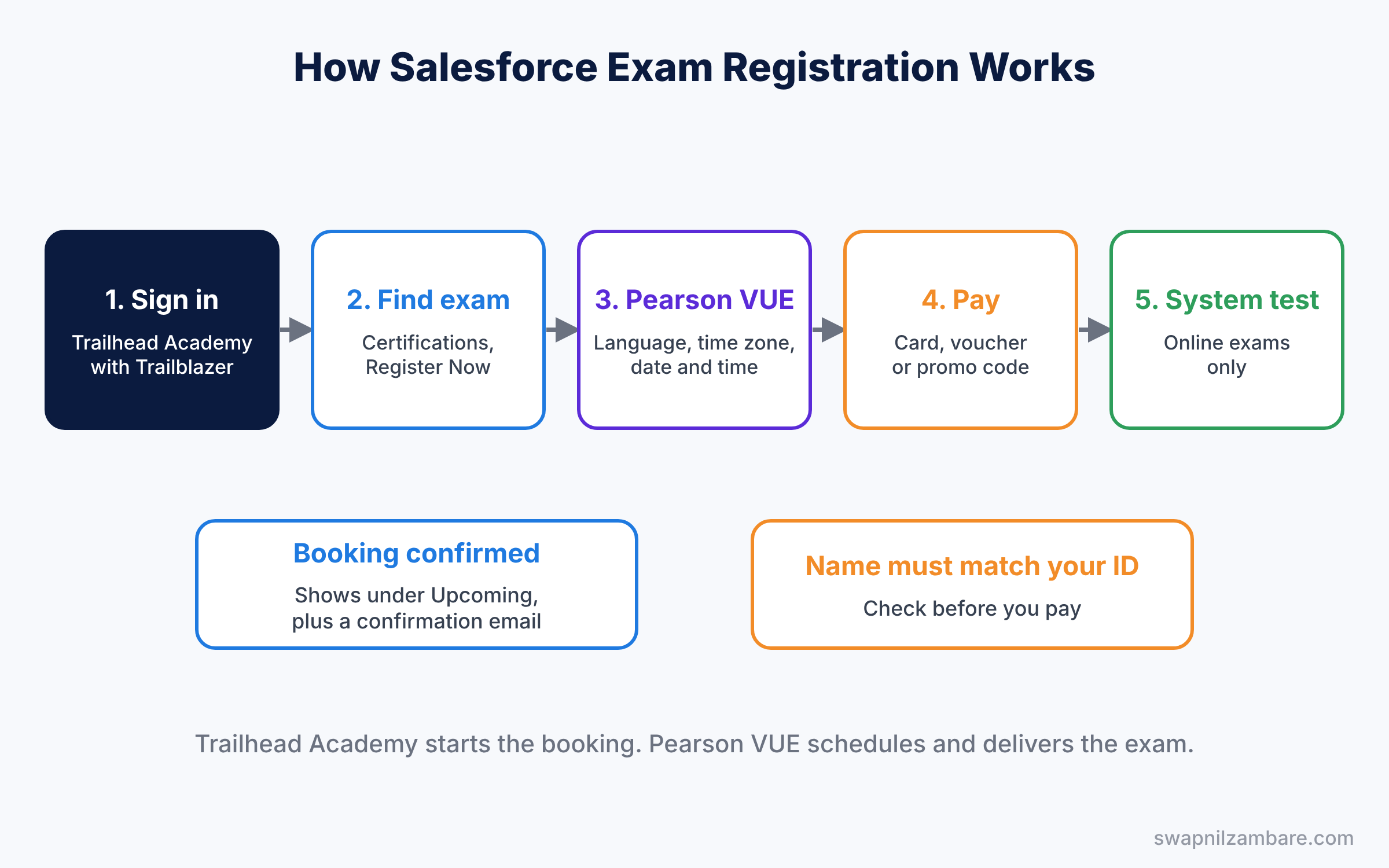
When you finish, your booking appears in the Upcoming section of your Trailhead Academy homepage. You also get a confirmation email at the address linked to your Trailblazer profile.
What to Check Before Salesforce Exam Registration
Your Trailblazer account and email
You need a Trailblazer account to sign in to Trailhead Academy. If you followed our Trailhead guide, you already have one. Use the same email you use on Trailhead, so your exam history and badges stay in one place. If you took exams on Webassessor before July 2025, using the same email also brings that history across.
Your legal name
During registration, Salesforce asks you to verify your legal name. This name must match your photo ID exactly. So check your passport, driving licence or other ID first, and copy the name in the same order and spelling.
Your photo ID
Salesforce accepts valid, government-issued photo IDs, such as a passport, a plastic driving licence or a national ID card. Expired, digital, copied or paper-based IDs are not accepted.
For readers in India, an Aadhaar card is accepted only if it is the physical PVC card issued by UIDAI. It must show your first and last names, matching your registration, and a recent photo. Laminated paper Aadhaar printouts are not accepted.
Your computer, for online exams
Online exams run in Pearson’s OnVUE app. You need a working webcam, a microphone, a stable internet connection and a quiet, private room. Also, work laptops with strict security software often fail, so test the exact machine you plan to use.
Fees and vouchers
The table below shows the fees for the Salesforce Certified Platform Administrator exam at the time of writing. Other exams have their own fees, shown on each exam page.
| Item | Platform Administrator exam |
|---|---|
| Registration fee | USD 200 plus local taxes (JPY 30,000 in Japan) |
| Retake fee | USD 100 plus local taxes (JPY 15,000 in Japan) |
| Questions | 60 scored, plus 5 unscored |
| Time | 105 minutes |
| Languages | English, Japanese, French, Spanish |
| Payment | Card, or a voucher or promo code at checkout |
Online vs Test Centre: Salesforce Exam Registration Options
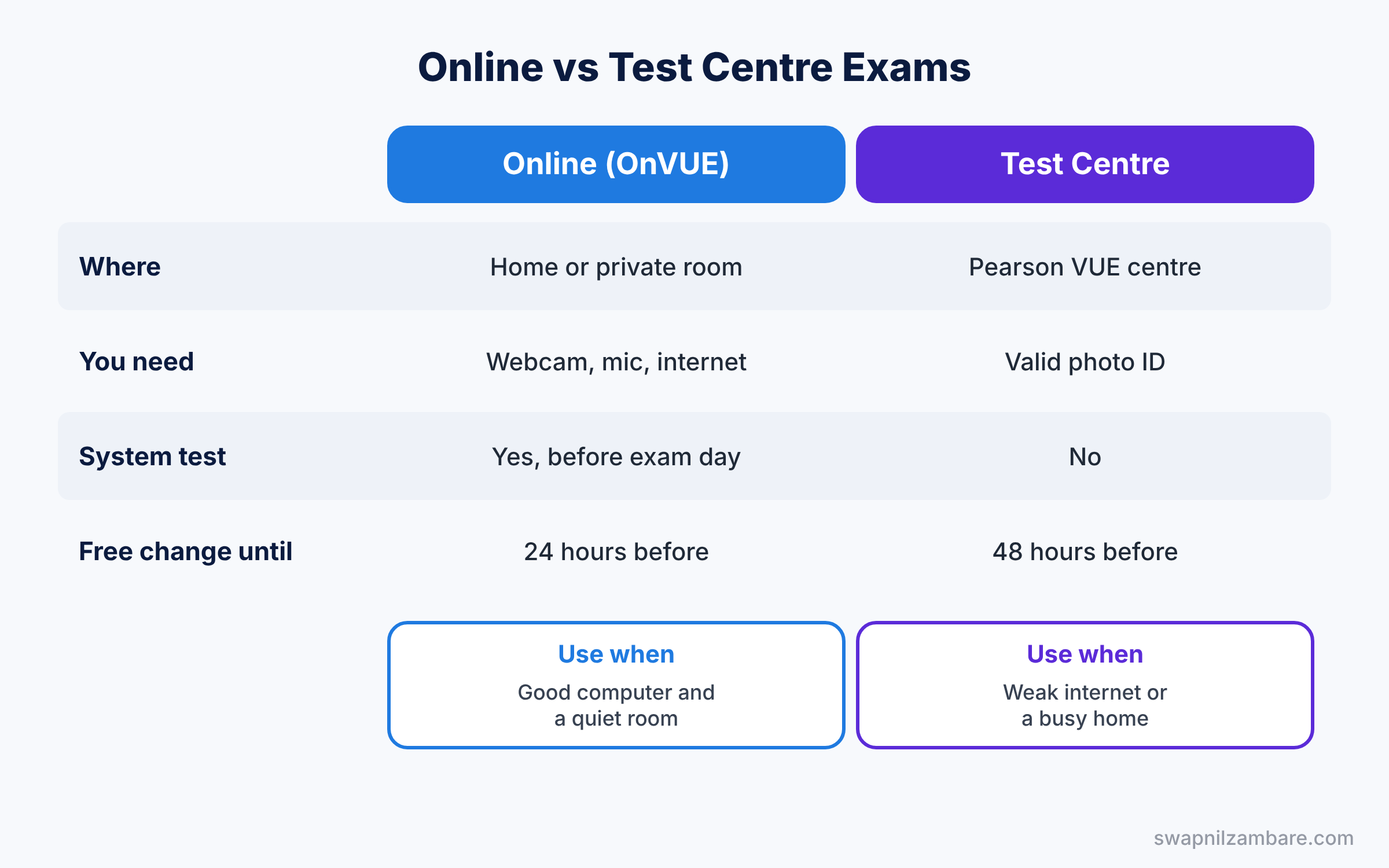
Every proctored Salesforce exam can be taken online or at a Pearson VUE test centre. The table below compares the two options.
| Feature | Online (Pearson OnVUE) | Test centre (Pearson VUE) |
|---|---|---|
| Where you sit the exam | Your home or a private room | A Pearson VUE test centre near you |
| What you need | Webcam, mic, stable internet, quiet room | Valid photo ID only |
| System test needed | Yes, before exam day | No |
| Free reschedule or cancel | Up to 24 hours before the start | Up to 48 hours before the start |
| Best for | People with a reliable computer and quiet space | People with weak internet or a busy home |
In short, choose online if you have a good computer and a quiet room. Choose a test centre if your internet is unreliable or you cannot guarantee privacy at home.
Salesforce Exam Registration Step by Step
Let’s book the Salesforce Certified Platform Administrator exam online. The steps are the same for other exams, and test centre bookings differ only in the delivery option you pick.
Part 1: Find your exam on Trailhead Academy
- Go to trailheadacademy.salesforce.com and click Log In. Sign in with your Trailblazer account.
- At the top of the homepage, click Certifications, then Find a Certification.
- Use the Product, Role or Level filters, or search for “Platform Administrator“.
- Click the exam tile to open its detail page. Read the exam outline, fee and policies there.
Part 2: Register and verify your name
- On the exam detail page, click Register Now.
- Choose the Online option. For a test centre, choose the onsite option instead.
- Verify your legal name when asked. Make sure it matches your ID exactly, then click Schedule Now.
Part 3: Pick language, date and time in Pearson VUE
- Pearson VUE opens automatically. Click Next to continue.
- Select your exam language.
- Read each online exam and Salesforce policy, tick the check mark next to it, and click Agree at the bottom.
- Select the language spoken by your proctor.
- Confirm your time zone. For India, check that it shows India Standard Time.
- Pick a date and start time, then click Book this appointment.
Part 4: Pay and confirm
- Review the cart: exam name, language, length, date, start time and price. Click Proceed to Checkout, or Change Appointment if something is wrong.
- Enter your payment and billing details. If you have a voucher or promo code, enter it here. Click Next.
- Check the confirmation page, then click Agree and proceed.
Part 5: Run the system test
- For online exams, click Run a system test on the confirmation screen. You can also run it later from the Pearson system test page for Salesforce.
- Fix anything that fails, such as webcam access or a blocked app.
- Click the Home icon to return to Trailhead Academy. Your exam now shows in the Upcoming section.
Reschedule or Cancel After Salesforce Exam Registration
Plans change, so it helps to know the rules before you book. The table below summarises Salesforce’s policy.
| Situation | Online exam | Test centre exam |
|---|---|---|
| Free reschedule or cancel | At least 24 hours before start | At least 48 hours before start |
| Inside that window | Not allowed, fee is lost | Not allowed, fee is lost |
| No-show without contacting Salesforce Help | Full fee charged, voucher forfeited | Full fee charged, voucher forfeited |
| Refund after a valid card cancellation | About seven business days | About seven business days |
To reschedule or cancel, sign in to Trailhead Academy and open the exam from the Upcoming section. Then click Modify Registration. Pearson VUE opens, where you can pick a new date or cancel. Finally, you receive a confirmation email for the change.
Common Mistakes with Salesforce Exam Registration
- Name mismatch. The name on your booking must match your ID exactly. Fix it before you pay, not on exam day.
- Skipping the system test. Online candidates who never tested their computer often lose time or the whole exam. Run the test early and again a day before.
- Wrong time zone. A booking in the wrong time zone makes you miss the slot. Confirm the time zone on the Pearson screen.
- Missing the reschedule window. Changes inside 24 hours (online) or 48 hours (test centre) are not free. Set a calendar reminder.
- Forgetting the voucher. Enter vouchers or promo codes at checkout. Adding them after payment is much harder.
Best Practices for Salesforce Exam Registration
- Book two to three weeks ahead. Popular time slots fill up, and a fixed date gives your study plan a clear target.
- Pick your best hour. If you think clearly in the morning, book a morning slot.
- Save the confirmation email. It has your booking details and helps if you need support.
- Prepare your room the day before. For online exams, clear the desk and walls, and close other apps.
- Keep your ID ready. Put the same ID you entered during booking next to your computer or in your bag.
Practice Task
Before booking, do a dry run. Sign in to Trailhead Academy, open the Platform Administrator exam page, and note the fee, languages and policies. Then run the Pearson system test on your computer.
Hint: you can do all of this without paying anything.
Salesforce Exam Registration FAQ
Where do I book a Salesforce certification exam now?
You book every Salesforce certification exam on Trailhead Academy. Pearson VUE then handles scheduling, payment and delivery. The old Webassessor site is only for viewing purchases made before July 2025.
Can I take the exam in Hindi or another language?
At the time of writing, the Platform Administrator exam is offered in English, Japanese, French and Spanish. Check the exam’s detail page for the current list, because languages can change.
What happens if my internet drops during an online exam?
Contact Salesforce Help through the support chat as soon as you can. They can review technical issues, such as a crash or system error, and advise on next steps.
Do I need to book the retake the same way?
Yes. A retake follows exactly the same booking steps, but you pay the lower retake fee shown on the exam page.
Official Resources
- Schedule an Online-Proctored Salesforce Certification Exam
- Platform Administrator exam page (Trailhead Academy)
- Schedule a Salesforce Certification Exam (Salesforce Help)
- Reschedule and Cancellation Policy (Salesforce Help)
- Exam ID Requirements (Salesforce Help)
Quick Recap
- Salesforce exam registration starts on Trailhead Academy, and Pearson VUE delivers the exam.
- Your booking name must match your government photo ID exactly.
- Choose online (OnVUE) or a Pearson VUE test centre when you click Register Now.
- Pick language, time zone, date and time, then pay or use a voucher at checkout.
- Run the system test early for online exams.
- Reschedule for free up to 24 hours (online) or 48 hours (test centre) before the start.
What’s Next?
You have booked your exam, so you have a clear target date. Meanwhile, we move on to the Developer track. Coming soon: SOQL in Salesforce, a beginner guide with examples.