Introduction
In the last two posts, we covered what cloud computing is and what Salesforce is. Now comes a very practical question: how do you actually learn Salesforce, especially with no experience at all?
The answer is a platform called Trailhead. In this post, you will learn what Trailhead is, how it works, the key terms you will see, and a full study plan you can start today.
What is Trailhead?
Trailhead is Salesforce’s own official, free learning website. You can visit it directly here: trailhead.salesforce.com
Most learning platforms ask you to read and watch videos. Trailhead is different, because it is built around doing. You read a short lesson. Then you perform a real task inside a working Salesforce system. This is why Trailhead works so well for beginners: you learn by doing, not just by reading.
Why Did Salesforce Build Trailhead?
This part is worth understanding, because it explains why Trailhead feels so different from normal courses.
Salesforce releases new features three times every year. A printed book or a static course would become outdated very quickly. So Salesforce built a learning system that:
- Updates constantly, as the platform changes
- Teaches through real hands-on practice, not just theory
- Is completely free, removing cost as a barrier
- Feels rewarding, using points and badges, so people stay motivated
This is also why Trailhead profiles are taken seriously by employers. A strong Trailhead profile shows real, hands-on effort, not just reading.
The Core Building Blocks of Trailhead
Let’s go through every important term, one at a time, with simple explanations.
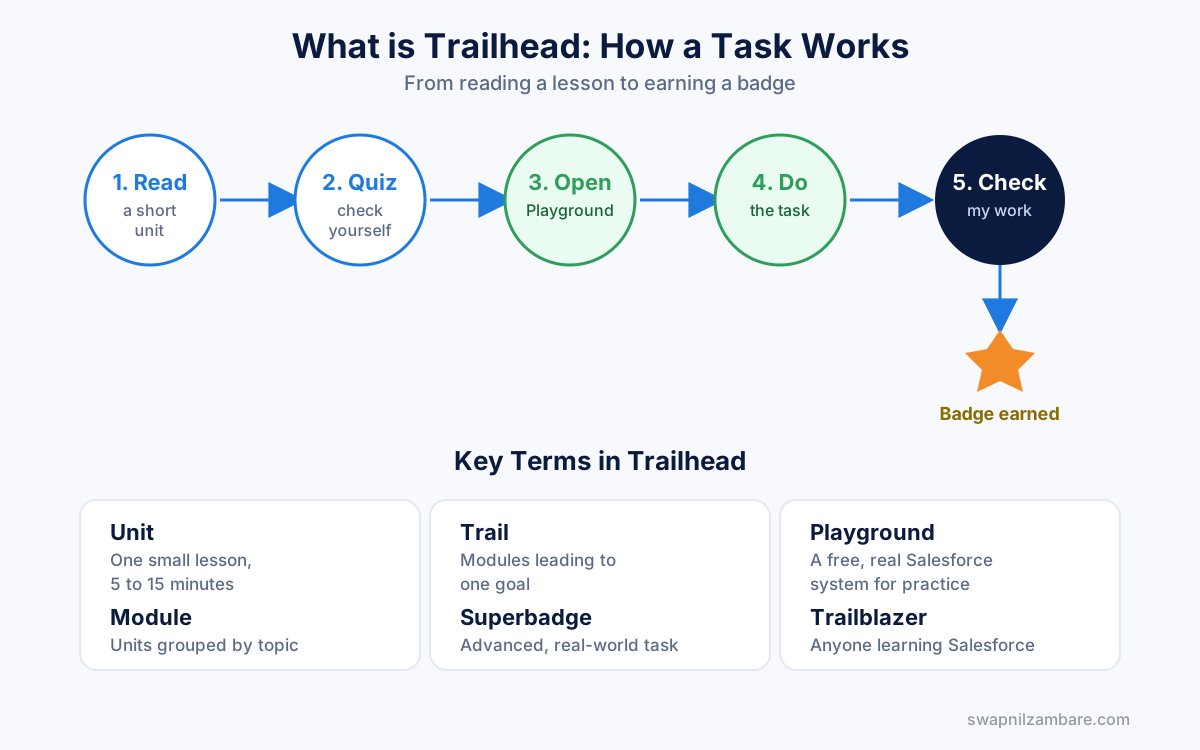
1. Unit
A unit is the smallest piece of content. It usually takes 5 to 15 minutes. You read a short explanation, then answer a few quiz questions or complete a small hands-on task.
2. Module
A module is a group of related units, all about one topic. For example, a module called “Apex Basics” might contain 5 to 6 units covering variables, loops, and conditions.
3. Trail
A trail is a structured sequence of modules that leads toward one clear goal. For example, a trail called “Prepare for Your Salesforce Administrator Credential” will contain many modules, arranged in the right learning order.
4. Trailhead Playground
This is one of the most important features. A Playground is a real, working Salesforce system, given to you completely free, just for practice. You can create fields, build automation, write code, and nothing you do here affects any real company data.
5. Superbadge
A Superbadge is an advanced challenge. Unlike normal units, it does not give you step-by-step instructions. Instead, it gives you a business problem and expects you to solve it yourself, using everything you have learned. This is much closer to real work, and many employers specifically look for Superbadges on a candidate’s profile.
6. Trailblazer
This is simply the nickname for anyone who learns or works with Salesforce. You will see this word often in the community.
Here is a simple table summarizing all of this:
| Term | Simple Meaning | Time Needed |
|---|---|---|
| Unit | One small lesson | 5 to 15 minutes |
| Module | Group of units on one topic | 30 minutes to 2 hours |
| Trail | Full learning path toward a goal | Several hours to weeks |
| Playground | Free practice Salesforce system | Unlimited, ongoing |
| Superbadge | Advanced real-world style challenge | 2 to 6 hours |
| Trailblazer | Nickname for a Salesforce learner | – |
How a Typical Trailhead Task Works (Step by Step)
Let’s walk through an actual example, so you know exactly what to expect.
Example module: “Create a custom field”
- Trailhead first explains, in simple words, what a field is and why it matters.
- It then gives you a short quiz to check your understanding.
- For the hands-on part, Trailhead automatically creates a free Playground for you.
- You are asked to actually go into that Playground and create a real field, following the instructions.
- Once done, you click a button that says “Check my work.”
- Trailhead checks your Playground directly and tells you if you did it correctly.
- If correct, you earn points, and the badge progress updates on your profile.
This cycle (learn a little, then do it yourself, then get checked) repeats across every module.
Is Trailhead Enough by Itself?
This is an honest and important point. Trailhead is an excellent starting point, but here is what it does not fully teach you:
- How to think through a real business problem that has no clear instructions
- How to handle messy, real-world data
- How to work inside a real company’s Salesforce system, which is often more complex than a Playground
So the best approach is this: use Trailhead as your foundation, and combine it with extra practice in your own free Developer org, along with reading real interview questions.
A Full Study Plan Using Trailhead
Here is a simple, practical plan you can follow starting today.
Week 1: Platform Basics
- Create your free Trailhead account
- Complete the “Salesforce Platform Basics” trail
- Learn how to navigate Setup, objects, and fields
Week 2 to 3: Choose Your Direction
- If you want to go the Admin route, start the “Get Started with Automation” trail
- If you want to go the Developer route, start the “Apex Basics” module
Week 4 onward: Deepen Your Skills
- Keep completing modules daily, even 20 to 30 minutes helps
- Practice the same concepts again inside your own free Developer org
- Once comfortable, attempt your first Superbadge
Official Resources
- Trailhead (main site): trailhead.salesforce.com
- Free practice Developer org signup: developer.salesforce.com/signup
- Official Salesforce documentation: developer.salesforce.com/docs
- Official help center: help.salesforce.com
Quick Recap
- Trailhead is Salesforce’s free, official, hands-on learning platform
- You learn through units, grouped into modules, grouped into trails
- A Playground gives you a free, real Salesforce system to practice in
- Superbadges are advanced, real-world style challenges
- Trailhead is a strong foundation, but should be combined with extra practice
What’s Next?
Now that you know how to start learning, the next big question is which career path to follow. Our next post helps you decide: Salesforce Admin vs Developer: A Detailed Guide to Planning Your Study Path.