Let’s Start With a Real Problem
Imagine you run a small shop. Customers call you, email you, and ask for help. You try to remember who said what. You write some things on paper. You forget a few things too.
Now imagine your shop grows. You have 50 customers. Then 500. Then 5,000. Paper and memory stop working. You need one place to keep track of everyone.
That “one place” is exactly what Salesforce gives a business. So, what is Salesforce, and why do so many companies use it? Let us break it down step by step.
So, What is Salesforce?
Salesforce is an online system that helps a business keep track of its customers and everything related to them. This includes calls, emails, support questions, and deals, all stored in one place.
In short, it’s called a CRM, which just means Customer Relationship Management. Don’t worry about the big word. Just remember this simple idea: Salesforce is where a company keeps all information about the people it works with.
A Simple Example
Let’s say “Raj” is a customer. In Salesforce, a company can store:
| Information About Raj | Example |
|---|---|
| Contact details | Name, phone, email |
| What he bought | Order history |
| Support questions he asked | “My delivery is late” |
| Notes from the sales team | “Wants a discount next time” |
Now, anyone on the team (sales, support, or marketing) can open Raj’s profile and see the full picture. No one needs to ask “wait, who spoke to him last?”
Why “Online” (Cloud) Matters
Salesforce runs fully online. You open it in a browser, like Gmail. You don’t install anything on your computer.
This means:
- You can use it from a laptop, tablet, or phone
- Salesforce takes care of all updates and technical maintenance
- Your whole team sees the same live information, at the same time
If the word “cloud” is new to you, we explained it simply in our earlier post: What is Cloud Computing? A Beginner’s Guide.
The Main Parts of Salesforce
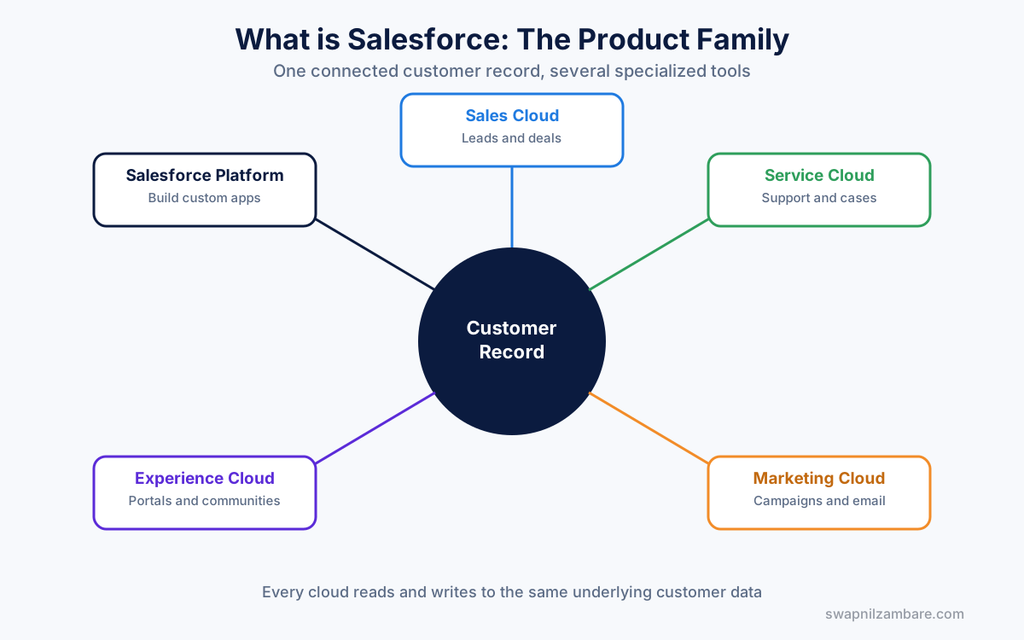
Salesforce is not just one tool. It’s a group of connected tools, often called “Clouds.” Here are the common ones:
| Tool Name | What It Helps With |
|---|---|
| Sales Cloud | Tracking leads and deals |
| Service Cloud | Handling customer support |
| Marketing Cloud | Sending emails and campaigns |
| Experience Cloud | Building portals for customers/partners |
| Salesforce Platform | Building custom apps (this is where developers work) |
As a beginner, you don’t need to learn all of these at once. Most people start with the core platform first.
How Data is Stored (A Tiny Peek)
Later you’ll learn this properly, but here’s a simple peek. Salesforce stores information in “Objects” (think: tables) and “Fields” (think: columns).
Object: Customer
    Field: Name
    Field: Phone
    Field: Email
    Field: Last Purchase Date
That’s it. Every advanced feature in Salesforce (automation, code, reports) is built on top of this simple idea.
Why So Many Companies Choose Salesforce
- It replaces messy spreadsheets and sticky notes
- Small businesses can use it in a simple way, and big companies can build complex custom systems on it
- It gets new features 3 times a year, automatically, with no manual upgrade needed
- It has a very large job market, which is great news if you’re learning it for a career
Official Links to Explore
- Official Salesforce website: salesforce.com
- Free learning platform: trailhead.salesforce.com
- Free practice account (Developer Org): developer.salesforce.com/signup
- Official help center: help.salesforce.com
Quick Recap
- Salesforce helps businesses manage customer information in one place
- It runs fully online (cloud-based), so no installation is needed
- It has several tools (Sales Cloud, Service Cloud, etc.) for different needs
- Everything is built on a simple idea: Objects and Fields
What’s Next?
Now that you know what Salesforce is, the next post explains what Trailhead is. Trailhead is Salesforce’s free learning platform, and the post shows you exactly how to start practicing hands-on, step by step.