Introduction
Every single feature in Salesforce, whether it is a simple contact list or an advanced automation, is built on top of one core idea: the data model. If you truly understand this one topic, almost everything else in Salesforce becomes much easier to learn.
In this post, we will go in detail through Objects, Fields, and Relationships, using real, simple examples.
What is the Data Model?
The data model is simply how Salesforce organizes and stores information. Think of it the same way a filing cabinet organizes paper documents into folders and labels.
Salesforce uses three main building blocks:
| Building Block | Simple Meaning | Real World Comparison |
|---|---|---|
| Object | A category of information | A folder in a filing cabinet |
| Field | One specific piece of information | A label on a form inside the folder |
| Record | One actual entry | One filled-in form inside the folder |
Let us go through each of these in detail.
1. Objects
An Object is a container that holds a certain type of information. Think of it like a table in a spreadsheet, or a folder that holds similar documents.
Salesforce has two types of objects:
Standard Objects
These come built into Salesforce already. Examples include:
- Account: represents a company or organization
- Contact: represents a person connected to an Account
- Opportunity: represents a potential sale or deal
- Case: represents a customer support request
Custom Objects
These are objects you create yourself, for information specific to your business. For example, a school might create a custom object called Student__c or a gym might create one called Membership__c. Custom objects always end with __c in their technical name.
2. Fields
A Field is one specific piece of information stored inside an object. If the object is the folder, a field is one line on the form inside it.
For example, the Contact object might have these fields:
| Field Name | What It Stores | Field Type |
|---|---|---|
| First Name | The person’s first name | Text |
| Last Name | The person’s last name | Text |
| The person’s email address | ||
| Phone | The person’s phone number | Phone |
| Birthdate | The person’s date of birth | Date |
Just like objects, fields can also be standard (built in) or custom (created by you, also ending in __c).
3. Records
A Record is one actual, filled-in entry inside an object. If the Contact object is the folder, and the fields are the blank lines on a form, then a record is one completed form.
For example, a single Contact record might look like this:
Object: Contact
Record:
    First Name: Raj
    Last Name: Sharma
    Email: raj.sharma@example.com
    Phone: 98765xxxxx
Every time someone adds a new customer, that creates one new record.
4. Relationships Between Objects
This is where the real power of Salesforce begins to show. Objects do not exist alone. They are connected to each other, so information stays organized and linked together correctly.
Example: Account and Contact
An Account (a company, like “Sharma Traders”) can have many Contacts (people, like “Raj” and “Priya”) working there.
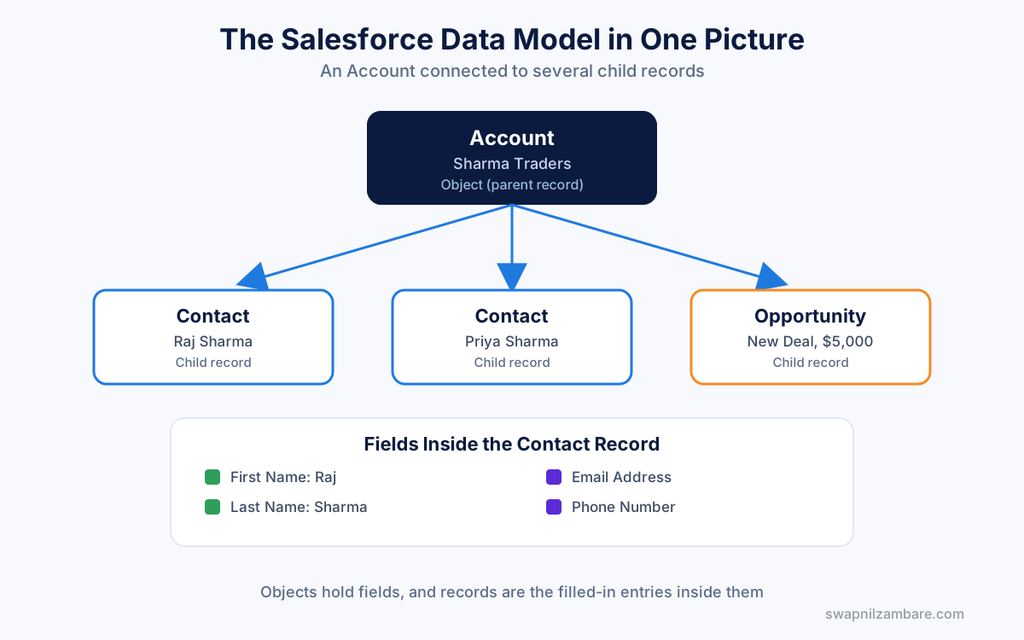
Account: Sharma Traders
    Contact: Raj Sharma
    Contact: Priya Sharma
This is called a Parent to Child relationship. The Account is the parent, and the Contacts are the children linked underneath it.
Common Types of Relationships
| Relationship Type | Simple Meaning | Example |
|---|---|---|
| Lookup Relationship | A loose connection, can exist independently | A Case linked to a Contact |
| Master-Detail Relationship | A tight connection, child cannot exist without parent | Order Line Items linked to an Order |
| Many-to-Many Relationship | Both sides can connect to many records on the other side | Students linked to multiple Courses |
A Visual Way to Think About It
Account (Company)
    |
    |---- Contact (Person 1)
    |---- Contact (Person 2)
    |---- Opportunity (Deal 1)
    |---- Opportunity (Deal 2)
Everything connects back to the Account, giving a complete, organized view of that company.
Why This Matters So Much
Once you understand Objects, Fields, and Relationships, you can understand:
- Why reports pull data the way they do
- Why automation tools like Flow reference specific fields
- Why Apex code constantly refers to objects and fields
- Why Salesforce feels so organized, even with huge amounts of data
This is genuinely the foundation of everything else you will learn.
Official Resources
- Official documentation on objects: developer.salesforce.com/docs
- Free hands-on practice: trailhead.salesforce.com
- Free Developer org signup: developer.salesforce.com/signup
- Official help center: help.salesforce.com
Quick Recap
- Objects are containers, similar to folders or tables
- Fields are individual pieces of information inside an object
- Records are actual filled-in entries
- Relationships connect objects together, such as Accounts linked to Contacts
- This structure is the foundation behind every Salesforce feature
What’s Next?
Now that you understand how data is structured, our next post moves into the tools that use this data every day: Declarative Automation with Flow Builder, explained in detail with a real example.