Governor Limits Interview Questions come up in almost every Salesforce developer interview, because limits are the one thing that separates code that works on one record from code that works on two hundred. This post collects the questions that actually get asked, with answers you can say out loud.
Last reviewed for the Winter ’27 release (November 2026).
The questions fall into five groups. The basics, SOQL and DML, bulkification, CPU and heap, and scenario questions where you have to fix something. Each group is below, with the answer kept short enough to be useful in a real conversation.
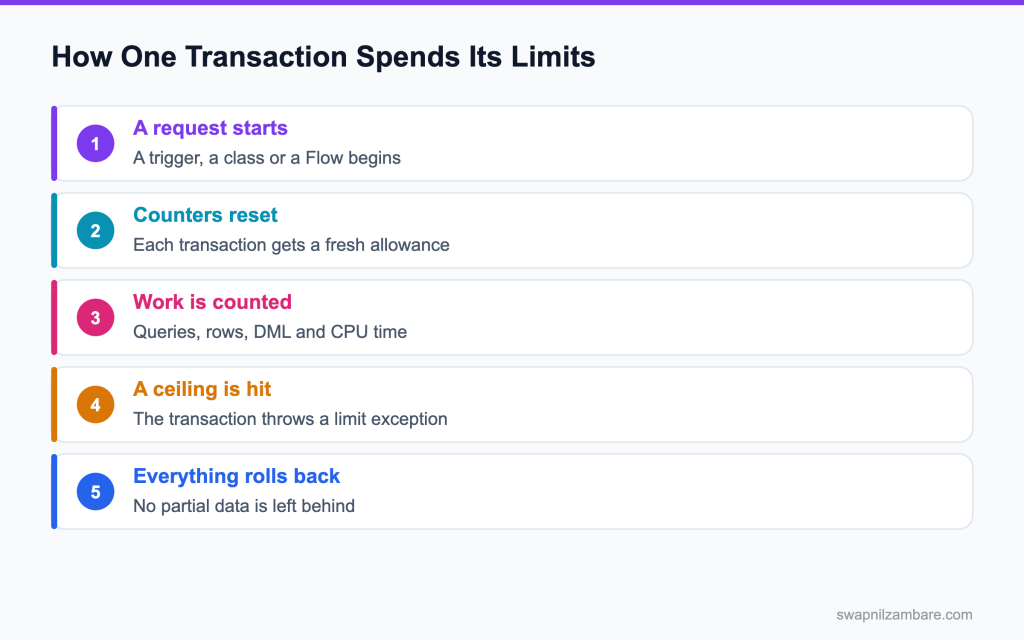
Caption: Every transaction gets a fresh allowance, and a single ceiling hit rolls the whole thing back.
What Governor Limits Interview Questions Cover
Governor Limits Interview Questions start with one definition. A governor limit is a ceiling the platform puts on one transaction. Salesforce is multi tenant, which means your code shares hardware with other companies, so no single transaction is allowed to run away with the machine.
Think of it like a shared office kitchen. Bulk safe code is the other half of the answer, and the post on bulkification covers the pattern in full. You can use the kettle, but you cannot keep it for an hour while twenty other people wait.
Interviewers use Governor Limits Interview Questions to test three things at once. Whether you know the numbers, whether you understand why they exist, and whether your code habits respect them without being told.
How Governor Limits Work in a Transaction
Governor Limits Interview Questions almost always move here next. A transaction is one unit of work that either finishes completely or rolls back. It starts when something triggers execution, and the limit counters start at zero.
| Counter | What it counts |
|---|---|
| SOQL queries | The number of query statements issued |
| Query rows | Rows returned across every query |
| DML statements | Insert, update, delete and similar calls |
| DML rows | Records processed across every DML call |
| CPU time | Work your code performs, excluding waiting |
| Heap size | Memory held at one time |
| Callouts | HTTP requests made |
Everything in that transaction shares the counters, which is why Governor Limits Interview Questions about Flow and Apex together are common. A trigger that fires a Flow that calls Apex is one transaction, which is why a limit can be hit by code you did not write.
The Limits You Must Know by Heart
Five numbers cover most Governor Limits Interview Questions.
| Limit | Synchronous value |
|---|---|
| SOQL queries | 100 |
| Query rows | 50,000 |
| DML statements | 150 |
| DML rows | 10,000 |
| CPU time | 10,000 milliseconds |
If you remember nothing else, remember 100, 50,000, 150, 10,000 and 10,000. The post on governor limits walks through each one with examples.
Synchronous vs Asynchronous Limits
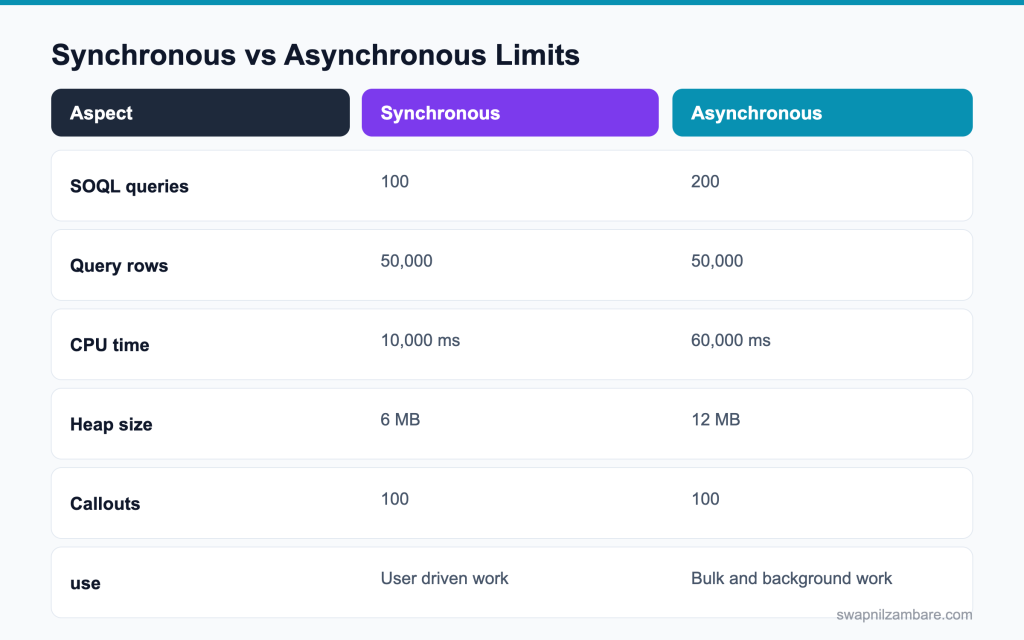
Caption: Asynchronous contexts get more room, which is why heavy work belongs there.
Governor Limits Interview Questions often end here. Asynchronous code gets higher ceilings because nobody is waiting for the screen. That is the real reason to move bulk work into a queueable or a batch job, and the post on asynchronous Apex covers the choices.
Governor Limits Interview Questions on the Basics
Q1: What is a governor limit?
A ceiling the platform puts on one transaction, so no single piece of code uses more than its share of shared resources.
Interview tip: name two limits with numbers in your first answer, like 100 queries and 150 DML statements.
Q2: Why does Salesforce need them?
Because the platform is multi tenant: many companies share the same servers and database.
If one org’s code ran a million queries, every other customer on that server would slow down. Limits give each transaction a fair share, so the platform stays fast for everyone. Think of a shared apartment water tank: each flat gets a fixed amount per hour.
Q3: What is a transaction?
One unit of work that either completes fully or rolls back, with its own fresh set of limit counters.
Follow-up you may get: Does a batch job’s execute share limits with start? No, each execute is its own transaction.
Q4: What happens when a limit is hit?
A limit exception is thrown and the whole transaction rolls back, so no partial data remains.
Interview tip: say “the whole transaction rolls back”. It explains why limits matter for data quality.
Q5: Can you catch a limit exception?
No. A System.LimitException cannot be caught, so the transaction always stops and rolls back.
That is why the only real answer is to stay under the limits: bulkify, query less, and move heavy work to async. You can check usage with the Limits class before a risky step and stop early yourself.
Q6: Do limits reset between triggers in the same save?
No. The whole save is one transaction, so every trigger, flow and class in it shares the same counters.
Example: an Account trigger uses 40 queries and a flow on the same save uses 30, so only 30 are left for everything else.
Q7: Does a Flow calling Apex create a new transaction?
No. A flow calling an Apex action runs in the same transaction, so they share limits.
The flow’s own Get Records and Update Records elements count as SOQL and DML too. Only async paths and scheduled paths start a new transaction.
Interview tip: many candidates think flows have separate limits. Correcting that is a strong answer.
Q8: How do you check limit usage at runtime?
With the Limits class: getQueries(), getQueryRows(), getDmlStatements(), getDmlRows(), getCpuTime() and getHeapSize().
Each returns how much the current transaction has used so far. Example: System.debug(‘SOQL used: ‘ + Limits.getQueries());
Q9: How do you find the ceiling for the current context?
With the matching getLimit method on the same class, like Limits.getLimitQueries() or Limits.getLimitCpuTime().
They return the ceiling for the current context, so the same code shows 100 queries in a trigger and 200 in a queueable. Compare used against limit to see how close you are.
Q10: Where do you see limit usage after the fact?
In the cumulative limit usage section at the end of a debug log.
It lists each limit with used and maximum values, like “Number of SOQL queries: 87 out of 100”. Set the Apex Profiling category to at least INFO to see it.
Follow-up you may get: Which log level shows limits? Apex Profiling at INFO or higher.
Q11: Are limits per user or per transaction?
Most limits are per transaction. A few are counted per org over 24 hours.
| Type | Examples | Resets |
|---|---|---|
| Per transaction | SOQL queries, DML statements, CPU time, heap | At the start of every transaction |
| Per org per 24 hours | API requests, async Apex executions, single emails | Rolling 24 hour window |
Each transaction starts with fresh counters, but daily limits keep adding up across the org.
Q12: Name a daily org level limit.
The number of asynchronous Apex executions in 24 hours, and the daily API request allowance.
Follow-up you may get: How many async Apex executions per day? 250,000 or the number of user licences times 200, whichever is greater.
Q13: What is the difference between per-transaction and per-org limits?
Per transaction limits, like SOQL queries and CPU time, reset for every transaction. Per org limits, like daily API requests and daily async Apex executions, add up across the whole org over 24 hours. A well written job can stay inside every transaction limit and still use up the daily API allowance.
Q14: What is the email limit from Apex?
Single emails sent to external addresses through Apex are limited to 5,000 per org per day, and a transaction can make 10 sendEmail calls. Email to internal users does not count toward the daily limit. Check before sending with Messaging.reserveSingleEmailCapacity.
Q15: Do managed packages share your limits?
Some limits are tracked separately for a namespaced package, but the overall transaction still has a ceiling.
Governor Limits Interview Questions on SOQL and DML
Q16: How many SOQL queries are allowed in a synchronous transaction?
100 SOQL queries in a synchronous transaction.
A trigger, a flow and the classes they call all share these 100. These are the limits interviewers ask about most:
| Limit | Synchronous | Asynchronous |
|---|---|---|
| SOQL queries | 100 | 200 |
| Rows returned by queries | 50,000 | 50,000 |
| DML statements | 150 | 150 |
| Rows processed by DML | 10,000 | 10,000 |
| CPU time | 10 seconds | 60 seconds |
| Heap size | 6 MB | 12 MB |
| Callouts | 100 | 100 |
Q17: How many in an asynchronous transaction?
200 SOQL queries in an asynchronous transaction, like a queueable, batch execute or future method.
Async jobs get higher ceilings because they run in the background, when the user is not waiting.
Q18: How many rows can your queries return in total?
50,000 rows across all queries in the transaction.
It is a total, not per query. Three queries returning 20,000 rows each fail on the third. For more, use Batch Apex, where start can return up to 50 million records.
Interview tip: stress that 50,000 is for the whole transaction, not per query.
Q19: What is the DML statement limit?
150 DML statements per transaction.
One insert of a list counts as one statement whatever the list size, so bulk DML saves statements. Database.setSavepoint and rollback also count as DML statements.
Follow-up you may get: Does an empty list DML count? No, Apex skips it.
Q20: How many records can those statements touch?
10,000 rows in total across all DML statements in the transaction.
Inserting a list of 200 uses one statement and 200 rows. A job that must update 50,000 records needs Batch Apex, so each chunk gets its own 10,000.
Q21: Why is a query inside a loop the classic mistake?
Because a trigger can get 200 records, so one query per record means 200 queries, double the limit of 100.
It passes in testing with one record and fails on the first data load, which is why it is the most common limit bug.
Interview tip: give the math: 200 records times one query is 200, double the limit.
Q22: What is the fix?
Collect the IDs in a Set, query once outside the loop, and keep the results in a Map keyed by ID.
Example: Map<Id, Account> accs = new Map<Id, Account>([SELECT Id, Industry FROM Account WHERE Id IN :accIds]); then accs.get(c.AccountId) inside the loop costs nothing.
Q23: Why is DML inside a loop just as bad?
It uses one DML statement per record instead of one for the whole list.
A loop over 200 records with an update inside uses 200 statements and fails at the 151st. It also fires triggers 200 times instead of once.
Q24: How do you fix that?
Add the records to a List inside the loop, then run one DML statement after the loop.
Example: List<Task> tasks = new List<Task>(); for (Lead l : leads) { tasks.add(new Task(WhoId = l.Id, Subject = ‘Call’)); } insert tasks;
Q25: Does a query for loop help with limits?
It helps with heap, since it processes records in chunks, and it still counts as one query.
Interview tip: say it helps heap, not the query count or the row count.
Q26: What counts against the row limit, the filter or the result?
The rows actually returned, not the rows scanned by the filter.
A query on a million row object that returns 10 rows counts 10. That is why selective filters and LIMIT keep the row count low.
Q27: Does an aggregate query return fewer rows?
Yes. An aggregate query returns one row per group, so a COUNT or SUM is far cheaper than returning the records.
Note that the rows the aggregate reads still count toward the 50,000 row limit, so a COUNT over 60,000 records still fails.
Q28: How many records can one SOQL query return?
Up to 50,000 rows, which is also the total for the whole transaction.
In practice, one query using the full 50,000 leaves no room for anything else, so large reads belong in Batch Apex.
Follow-up you may get: Can LIMIT help with the row count? Yes, it caps the rows returned and counted.
Q29: What happens when you query more than that?
A System.LimitException: Too many query rows: 50001. The transaction rolls back.
Move the work to Batch Apex, or use Apex cursors, so each chunk runs in its own transaction with its own limits.
Q30: Does a sub query count separately?
Rows from a parent to child subquery count toward the row total too.
Example: 500 accounts with 100 contacts each return 50,500 rows, which fails. Filter or limit the subquery, like (SELECT Name FROM Contacts LIMIT 5).
Q31: Do describe calls count against SOQL limits?
No, describe calls do not use SOQL, but they cost CPU time.
Calling Schema.getGlobalDescribe() inside a loop can burn seconds of CPU. Call it once and keep the result in a static variable.
Q32: What is the limit on SOSL searches?
20 SOSL searches per transaction, and each search returns up to 2,000 records. SOSL rows do not count toward the 50,000 SOQL row limit.
Q33: How do Apex cursors help with large queries?
A cursor holds a large query result on the server and lets you fetch it in pieces with fetch(position, count), even across queueable jobs. It suits processing millions of rows when Batch Apex is too rigid, while each fetch still counts toward the limits of the transaction that makes it.
Q34: How does Database.insert with allOrNone false affect limits?
It still counts the statement and the rows, and it lets the successful rows commit.
Note that failed rows still use part of the row count, so a job with many failures uses its limits without saving much.
Governor Limits Interview Questions on Bulkification
Q35: What does bulkification mean?
Writing code that handles a whole list of records in one pass, instead of one record at a time.
Bulk safe code uses the same number of queries and DML statements for 1 record or 200: collect IDs, query once, process with maps, save once.
Q36: Why does a trigger have to be bulk safe?
Because a data load, an API call or a mass update can fire it with 200 records at once.
Code that works for a single save in the UI can fail the first time an integration sends a batch.
Q37: How many records does a trigger receive at most?
Up to 200 records per execution. A larger load is split into chunks of 200 in the same transaction.
So 1,000 records inserted by one DML statement run the trigger five times, all sharing one set of limits.
Interview tip: connect 200 records per chunk to shared limits across chunks.
Q38: What does Trigger.new give you?
A list of the records in the current batch, which is why loops belong inside the trigger logic.
Follow-up you may get: Is Trigger.new always 200 records? No, up to 200; a single save has one.
Q39: Give the simplest bulkification pattern.
Build a Set of IDs in one loop, query once with that Set, then process the records using a Map.
Example: Set<Id> accIds = new Set<Id>(); for (Contact c : Trigger.new) accIds.add(c.AccountId); then one query with WHERE Id IN :accIds, then a second loop that reads from the Map.
Q40: Why use a map instead of nested loops?
A Map lookup is one step, while nested loops multiply the work by the record count.
Two nested loops over 200 contacts and 200 accounts check 40,000 pairs. A Map finds each account directly, which saves a lot of CPU time.
Q41: How do you bulkify a callout?
Send one request with the whole payload where the service allows it, or move the work to a queueable per chunk.
Interview tip: mention the 100 callout limit and the uncommitted work rule together.
Q42: Can you make callouts from a trigger?
Not directly. Use an asynchronous method, like a queueable with Database.AllowsCallouts, so the callout happens after the save.
Callouts are blocked inside a trigger because the record is not committed yet, and the save must not wait on a remote server.
Q43: What is the limit on callouts per transaction?
100 callouts per transaction, with a total timeout of 120 seconds across all of them.
Each callout has a default timeout of 10 seconds, which you can raise with setTimeout up to 120 seconds.
Q44: How do you test that code is bulk safe?
Write a test that inserts 200 records in one DML statement, then assert the result for every record.
Many teams also assert limit usage, like Assert.isTrue(Limits.getQueries() < 10), so a future change that adds a query in a loop fails the test.
Q45: Why is a test with one record misleading?
Because the limit problems only appear at volume, so the test passes while production fails.
Interview tip: say you always test with 200 records, and more for chunk boundaries.
Q46: What is a recursion guard and why does it matter here?
A static flag that stops a trigger firing itself repeatedly, which would multiply limit usage.
Follow-up you may get: Why is a Set of IDs better than a Boolean? It does not skip later chunks of a big load.
Q47: How many future calls and queueable jobs can one transaction start?
Up to 50 future method calls, and up to 50 queueable jobs from a synchronous transaction. From inside a queueable, you can enqueue only one child job.
Q48: Does a platform event trigger share limits with the publisher?
No. The event trigger runs later in its own transaction as the Automated Process user, with its own limits. Publishing the event counts as a DML statement in the publisher’s transaction.
Q49: How do you keep a handler class bulk safe as it grows?
Pass collections between methods rather than single records, so nothing ever loops a query.
Governor Limits Interview Questions on CPU and Heap
Q50: What is the CPU time limit?
10,000 milliseconds (10 seconds) in synchronous Apex and 60,000 milliseconds in asynchronous Apex.
It covers Apex code, flows and validation formulas running in the transaction, so one slow piece affects everything else.
Q51: What does CPU time count?
The time your code spends working. Waiting for a callout response or a database query is not counted.
So a query that takes two seconds in the database does not use CPU time, but looping over its results does.
Follow-up you may get: Do validation rules use CPU time? Yes, formulas evaluated in the transaction count.
Q52: Why can a slow transaction show low CPU time?
Because the time went on waiting, for queries or callouts, which the CPU counter ignores.
Example: a page that takes 8 seconds because of a slow external API may use only 300 ms of CPU. Look at the callout timing in the debug log instead.
Q53: What is the most common cause of a CPU limit error?
Nested loops over two collections, which should be a Map lookup.
Example: for each contact, looping over every account to find its parent. Replace the inner loop with accountMap.get(c.AccountId).
Interview tip: “replace inner loops with maps” is the one line answer they want.
Q54: What is the second most common cause?
A describe or schema call repeated for every record instead of cached once.
Calls like getGlobalDescribe() or getRecordTypeInfosByDeveloperName() inside a loop add up fast. Run them once and keep the result in a static Map.
Q55: What is the heap limit?
6 MB in synchronous Apex and 12 MB in asynchronous Apex.
Heap is the memory your variables use. Large query results, big strings and JSON are the usual cause of “Apex heap size too large”.
Follow-up you may get: How do you check heap usage? Limits.getHeapSize() against Limits.getLimitHeapSize().
Q56: What usually fills the heap?
Large collections held in memory, often with more fields than the code uses.
Example: querying 20,000 cases with their long Description field to read only the Status. Query only the fields you need and clear collections you no longer use.
Q57: Give the best single habit for heap.
Use a for loop directly over a query, a SOQL for loop. It processes records in chunks of 200.
for (List<Case> chunk : [SELECT Id, Status FROM Case WHERE …]) keeps only one chunk in memory at a time, instead of the whole result.
Q58: Does selecting fewer fields help?
Yes. Every extra field is memory for every row.
Long text and rich text fields are the worst, because each value can be up to 131,072 characters. Leave them out unless the code reads them.
Q59: Does serialising a collection to JSON affect heap?
Yes. You hold both the collection and the JSON string, so memory roughly doubles.
Serialise only the fields you need, for example into a small wrapper class, and set big variables to null once you are done.
Q60: How do you measure a block of code?
Read the limit values before and after the block and subtract.
Example: Integer before = Limits.getCpuTime(); doWork(); System.debug(LoggingLevel.ERROR, ‘CPU used: ‘ + (Limits.getCpuTime() – before));
Q61: Why log those readings at error level?
So the measurements still appear when the debug log filters out lower levels.
Logs often run with Apex Code at a low level to keep them small. ERROR level lines always show, so your numbers are not lost.
Q62: Does moving work to a queueable fix inefficient code?
It raises the ceilings, which buys room, but the code is still inefficient.
A queueable gets 60 seconds of CPU and 12 MB of heap instead of 10 seconds and 6 MB, but a query in a loop still breaks at 200 queries. Fix the code first, then choose async for the right reasons.
Interview tip: say async is not a fix for bad code. Interviewers like that honesty.
Q63: Which limit is hardest to debug and why?
CPU time, because the cause is spread across the whole transaction instead of one line.
Triggers, flows, formulas and managed packages all add to it. Use the debug log’s Analysis view or the Apex Replay Debugger to see which units take the most time.
Q64: How do you find which part of a transaction uses the most CPU?
Open the debug log in the Developer Console’s Analysis perspective. The Timeline and Executed Units views show time per trigger, flow and method. Start by fixing the biggest one, then measure again.
Q65: Does a long running SOQL query use CPU time?
No. Time spent waiting for the database is not CPU time. Processing the results in Apex is, so a fast query with a heavy loop over its rows can still hit the CPU limit.
Q66: How does the platform cache help?
It avoids repeated queries for stable data, which saves both queries and CPU.
Org cache can keep a value for up to 48 hours and session cache up to 8 hours. Always fall back to the query when the cache is empty.
Scenario Based Governor Limits Interview Questions
Q67: Scenario: a trigger passes with 50 records and fails with 200. What do you suspect?
Work that grows faster than the record count, which usually means a query or DML inside a loop.
Interview tip: walk through your steps: read the log, find the loop, move the query, add a bulk test.
Q68: Scenario: a data load of 10,000 records fails on DML rows. What is happening?
The logic is touching more than 10,000 rows per transaction, often through related record updates.
Q69: Scenario: a Flow and a trigger both update the same object and a limit is hit. Why?
They run in one transaction, so their query and DML counts add up.
A flow’s Get Records counts as a query and its Update Records as DML, on top of the trigger’s own usage. Check both in the debug log, then move simple field updates into a before save flow or the trigger so the work is done once.
Q70: Scenario: a nightly job hits the query row limit. What is the fix?
Move it to Batch Apex, or to Apex cursors with chained queueables, so each chunk is its own transaction.
Batch Apex can read up to 50 million records through a QueryLocator, and each execute gets fresh limits. Schedule it with Scheduled Apex for the nightly run.
Q71: Scenario: a user sees a CPU time error only on the largest accounts. Why?
The work grows with the number of related records, so the biggest account runs the most loops.
A loop over 5,000 contacts with an inner loop over opportunities is fine for small accounts and fails for large ones. Replace inner loops with Maps, and move heavy roll up work for big accounts to async.
Q72: Scenario: a managed package appears to cause your limit error. What do you check?
Check which code ran in the same transaction, because limits are shared across the whole save.
The debug log shows each namespace’s usage separately in the cumulative limits section. Package code does count, and sometimes your own trigger used most of the limit before the package code ran.
Q73: Scenario: a callout fails with an error about DML. What is the rule?
You cannot make a callout after a DML statement in the same transaction. The error is “You have uncommitted work pending”.
Either make the callout before any DML, or move it to a queueable or future method that runs after the commit.
Follow-up you may get: Can a savepoint rollback clear the pending work? No, the callout is still blocked after DML.
Q74: Scenario: you must process 2 million records. What do you propose?
Batch Apex, or Apex cursors with a chained queueable, so each chunk fits in its own limits.
With Batch Apex, 2 million records at 200 per chunk is 10,000 executes, each with fresh limits. Keep the work per record light, and use Database.Stateful only if you need running totals.
Q75: Scenario: a test class fails on limits but production does not. Why?
The test creates far more data in one transaction than production does.
Test setup DML counts too. Put data creation in @TestSetup and wrap the code under test in Test.startTest and Test.stopTest, which gives it a fresh set of limits.
Q76: Scenario: an integration sends 5,000 records in one call. What do you advise?
Send smaller batches, or use Bulk API 2.0, so each transaction stays inside its limits.
Salesforce splits Bulk API jobs into batches and runs triggers in chunks of 200. A single REST call with 5,000 records in one transaction would run every trigger and flow against one shared set of limits.
Q77: Scenario: a recursive trigger doubles every counter. How do you stop it?
Add a guard: a static Set of processed record IDs, checked before the logic runs, plus a check that relevant fields actually changed.
A static Boolean also stops the loop, but it skips the second and later chunks of a large load, so a Set of IDs is safer.
Q78: Scenario: heap fails only when a field is added to the query. What happened?
The extra field increased memory per row enough to cross the heap limit.
This often happens with long text fields. Remove the field if the code does not need it, use a SOQL for loop to work in chunks, or move the job to async, which has 12 MB of heap.
Q79: Scenario: the same code is fine in a queueable and fails in a trigger. Why?
Asynchronous contexts have higher limits: 200 queries, 60 seconds of CPU and 12 MB of heap, against 100, 10 seconds and 6 MB in a trigger.
Do not just move the code to async to hide the problem. Make the trigger version efficient, and use async only for work that does not need to happen during the save.
Q80: Scenario: you cannot reproduce a limit error locally. What is your next step?
Reproduce it at production volume, then read the cumulative limits section of the debug log.
Load realistic data into a full or partial copy sandbox, run the same action with a trace flag on, and compare used against limit for each counter to find which one fails.
Q81: Scenario: an LWC page calls three Apex methods on load and is slow. What do you suggest?
Combine them into one cacheable method that returns a wrapper with all the data, so the page makes one server call. Each call is a separate transaction, so this does not save limits, but it saves round trips and makes the page much faster.
Q82: Scenario: a batch job’s execute keeps hitting the CPU limit. What do you change first?
Lower the batch size, for example from 200 to 50, so each execute has less work. Then profile one execute with a debug log and fix nested loops or repeated describes.
Q83: Scenario: an interviewer asks you to improve code you cannot see. What do you say?
Ask which limit is failing and at what volume, then describe measuring before changing anything.
Common Mistakes Candidates Make
- Reciting numbers without being able to explain why the limits exist, which Governor Limits Interview Questions are designed to expose
- Saying bulkify without describing the set, query and map pattern
- Confusing the statement limit with the row limit
- Claiming a limit exception can be caught and ignored
- Forgetting that a Flow and a trigger share one transaction
- Suggesting asynchronous code as a fix for inefficient logic
Best Practices to Mention in an Interview
- Query once, then work from a map keyed by record id
- Never put a query, DML or callout inside a loop
- Cache describe results and other repeated lookups in statics
- Select only the fields the code uses
- Test every trigger with 200 records, not one
- Measure with the Limits class before changing anything
- Move genuinely heavy work to batch or a queueable, after fixing the logic
Official Resources
Quick Recap
- Governor Limits Interview Questions test the numbers, the reasons and your habits together
- Remember 100 queries, 50,000 rows, 150 DML statements, 10,000 DML rows and 10,000 milliseconds
- A transaction shares its counters across triggers, Flows and Apex
- Bulkification is the set, query and map pattern, not a slogan
- Asynchronous contexts raise the ceilings but do not fix bad code
- Measure with the Limits class, then fix the biggest cost first
What Is Next
Next, read Apex Testing Interview Questions: Coverage and Mocks (60+ Q&A).


