Asynchronous Apex is Apex that Salesforce runs later, in the background, instead of while the user waits. You use it when work is too slow, too big or not allowed in the current transaction, such as calling another system from a trigger or processing a million records. The user gets a fast save, and the heavy work happens a moment later.
In this post, you will learn what asynchronous means, the four main types of Asynchronous Apex, the higher governor limits they get, and how to monitor jobs. It builds on Apex governor limits, testing async Apex and the Apex order of execution. This is the first post of Level 7: Async Apex.
What is Asynchronous Apex?
Asynchronous Apex is code that Salesforce puts in a queue and runs when resources are free, in its own transaction. Synchronous code runs immediately, in the same transaction as the user’s action. Async jobs usually start within seconds, but Salesforce does not promise an exact time.
Think of ordering food at a busy restaurant. A synchronous order is a cup of tea: the waiter pours it while you wait. An asynchronous order is a biryani: you get a token, sit down, and the kitchen brings it when it is ready. You do not stand at the counter blocking everyone else.
Why Asynchronous Apex Matters
Many real tasks do not fit in one quick transaction. Here is why Asynchronous Apex matters at Bright Path Tutors.
- First, a trigger cannot call a payment system directly, but an async job can.
- Also, a nightly fee update touches 300,000 enrolments, far beyond one transaction.
- Next, a weekly report email should run on a schedule, with no user clicking.
- Async jobs get higher limits for queries, heap and CPU time.
- Finally, users get faster saves when slow work moves to the background.
So async code keeps the app fast and lets you handle big jobs safely.
How Asynchronous Apex Works
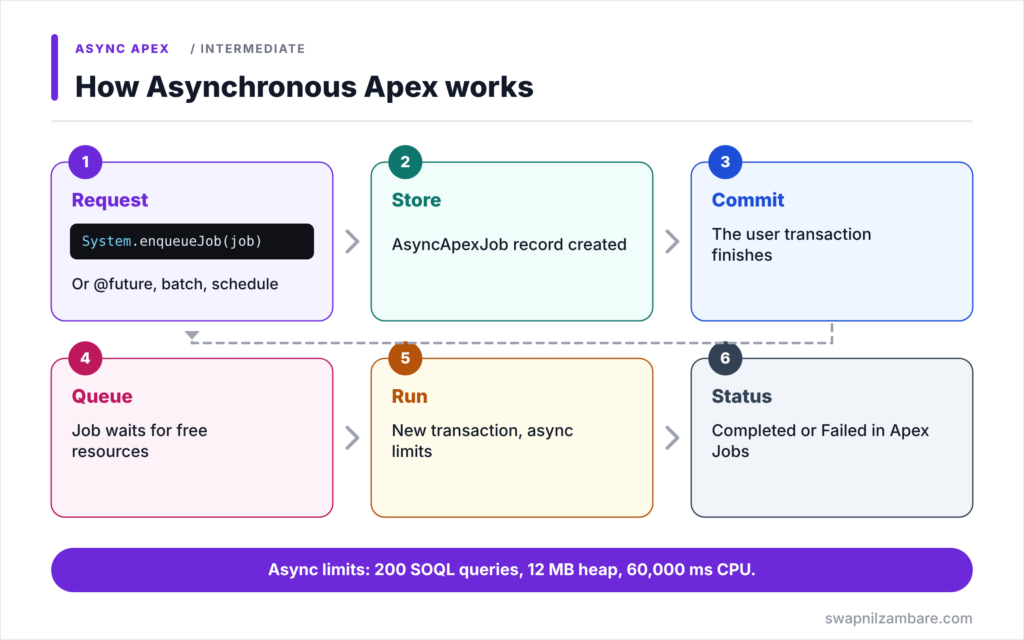
Asynchronous Apex follows the same basic flow for every type. First, synchronous code asks Salesforce to run a job, for example with System.enqueueJob. Next, Salesforce stores the request, usually as an AsyncApexJob record, and the current transaction finishes. Then, after the commit, the job waits in a queue until resources are free. After that, the job runs in a new transaction with its own async limits. Finally, it completes or fails, and you can check its status in Setup or with SOQL.
Future Methods
A future method is a static method marked @future. It is the simplest async tool, good for a quick callout or a small background update. It accepts only primitive parameters.
Queueable Apex
Queueable Apex is a class that implements the Queueable interface. It accepts complex data, returns a job Id, and can chain one job after another. It is the modern default for most background work.
Batch Apex
Batch Apex splits a huge data set into chunks, usually 200 records each, and processes each chunk in its own transaction. Use it for millions of records.
Scheduled Apex
Scheduled Apex runs a class at set times, using a cron expression, such as every night at 2 AM. It often starts a batch job.
Event-Driven Async
Platform events and Change Data Capture also run code later, when an event arrives. We cover them later in this level.
Synchronous vs Asynchronous Limits
The table below compares key per-transaction limits.
| Limit | Synchronous | Asynchronous |
|---|---|---|
| SOQL queries | 100 | 200 |
| Heap size | 6 MB | 12 MB |
| CPU time | 10,000 ms | 60,000 ms |
| DML statements | 150 | 150 |
| Records from SOQL | 50,000 | 50,000 |
Synchronous vs Asynchronous Apex
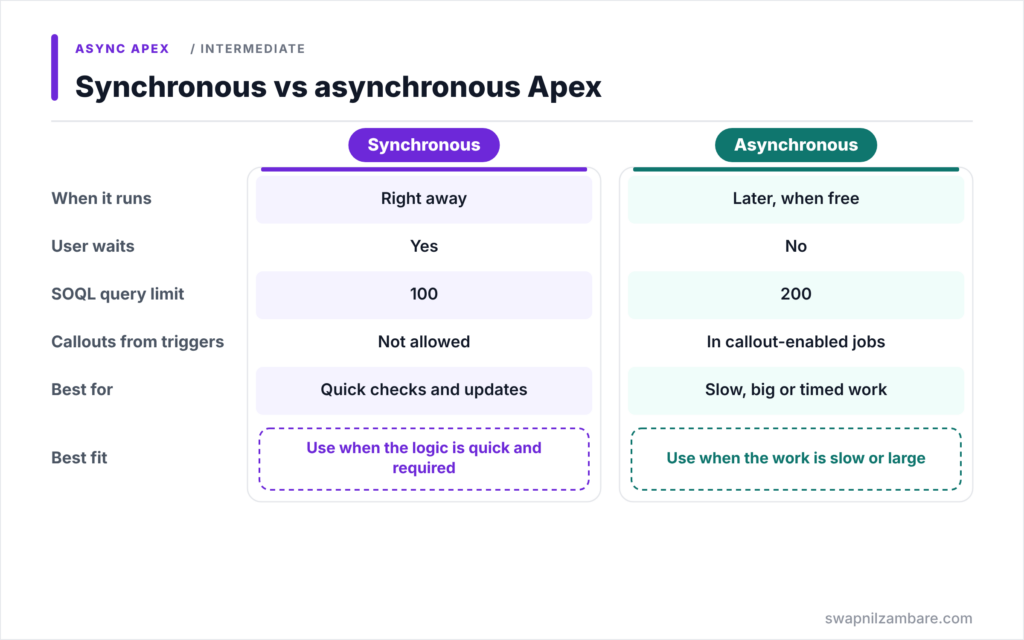
The table below compares the two ways code can run.
| Feature | Synchronous Apex | Asynchronous Apex |
|---|---|---|
| When it runs | Right away | Later, when resources are free |
| User waits | Yes | No |
| Governor limits | Lower | Higher for SOQL, heap, CPU |
| Callouts from triggers | Not allowed | Allowed in callout-enabled jobs |
| Best for | Quick checks and updates | Slow, big or scheduled work |
When to use which is simple. Keep fast, required logic synchronous, such as validation. Move slow, large or outside-system work to Asynchronous Apex.
A Real Asynchronous Apex Example
Let’s use Asynchronous Apex at Bright Path Tutors. When an enrolment is paid, the system must send a receipt request to the payment partner. Triggers cannot make callouts, so the trigger hands the work to a Queueable job.
Step 1: The Queueable Job
public with sharing class ReceiptRequestJob implements Queueable, Database.AllowsCallouts {

    private Set<Id> enrolmentIds;

    public ReceiptRequestJob(Set<Id> enrolmentIds) {
        this.enrolmentIds = enrolmentIds;
    }

    public void execute(QueueableContext ctx) {
        for (Enrolment__c e : [SELECT Id, Amount_Due__c FROM Enrolment__c
                               WHERE Id IN :enrolmentIds]) {
            // Send one receipt request per enrolment (callout code shortened)
            System.debug('Receipt requested for ' + e.Id);
        }
    }
}
The class implements Queueable and Database.AllowsCallouts, so it may call other systems. Next, the constructor stores the Ids, and execute runs later in its own transaction.
Step 2: Start It from the Trigger Handler
when AFTER_UPDATE {
    Set<Id> paidIds = new Set<Id>();
    for (Enrolment__c e : (List<Enrolment__c>) Trigger.new) {
        if (e.Is_Paid__c && !((Enrolment__c) Trigger.oldMap.get(e.Id)).Is_Paid__c) {
            paidIds.add(e.Id);
        }
    }
    if (!paidIds.isEmpty()) {
        Id jobId = System.enqueueJob(new ReceiptRequestJob(paidIds));
        System.debug('Queued job ' + jobId);
    }
}
The handler collects every newly paid enrolment and queues one job for all of them. So a bulk update of 200 records creates one job, not 200.
Step 3: Monitor the Job
SELECT Id, ApexClass.Name, Status, JobItemsProcessed, NumberOfErrors, CreatedDate
FROM AsyncApexJob
WHERE ApexClass.Name = 'ReceiptRequestJob'
ORDER BY CreatedDate DESC
LIMIT 5
This query shows recent runs and their status, such as Queued, Processing, Completed or Failed. You can see the same list in Setup > Apex Jobs.
Daily Limits for Asynchronous Apex
An org can run a set number of async method executions in 24 hours: 250,000, or the number of user licenses multiplied by 200, whichever is greater. Batch, Queueable, future and scheduled jobs all share this allowance. So design jobs to do more work per run instead of queuing one job per record.
Common Mistakes with Asynchronous Apex
- Queuing one job per record inside a loop.
- Expecting async jobs to run at an exact moment.
- Assuming async code sees the same limits as synchronous code for DML.
- Forgetting to monitor failed jobs.
- Using future methods where Queueable would give a job Id and better control.
Best Practices for Asynchronous Apex
- Collect records and queue one job for the whole batch.
- Prefer Queueable for most new background work.
- Use Batch Apex for very large data sets.
- Monitor AsyncApexJob and alert on failures.
- Test every job with Test.startTest and Test.stopTest.
Practice Task
Write a query on AsyncApexJob that lists every failed job from the last 7 days with its ExtendedStatus. Hint: filter on Status = ‘Failed’ and CreatedDate = LAST_N_DAYS:7.
Most Asked Interview Questions on Asynchronous Apex
Async questions appear in nearly every developer interview. Here are the 21 questions asked most about Asynchronous Apex.
Basic Questions on Asynchronous Apex
Q1: What is asynchronous Apex?
Apex that Salesforce runs later, in the background, in its own transaction.
Q2: What are the main types of async Apex?
Future methods, Queueable Apex, Batch Apex and Scheduled Apex.
Q3: Why use async Apex?
For callouts from triggers, large data volumes, scheduled work and higher limits.
Q4: What is the async SOQL query limit?
200 queries per transaction, compared with 100 for synchronous code.
Q5: What is the async heap limit?
12 MB, compared with 6 MB for synchronous code.
Q6: Where can you monitor async jobs?
In Setup > Apex Jobs, or by querying AsyncApexJob.
Q7: Do async jobs run at an exact time?
No. They run when resources are free, usually soon, but timing is not guaranteed.
Code and Scenario Questions on Asynchronous Apex
Q8: How do you call another system from a trigger?
Queue a Queueable job with Database.AllowsCallouts, or call a @future(callout=true) method.
Q9: Why queue one job instead of one per record?
To save async executions and avoid hitting limits on queued jobs.
Q10: Which async type returns a job Id?
Queueable and Batch Apex return Ids. Future methods do not.
Q11: Which type handles millions of records?
Batch Apex.
Q12: Which type runs on a timetable?
Scheduled Apex.
Q13: How do you test async code?
Queue the job between Test.startTest and Test.stopTest, then assert after stopTest.
Q14: What object stores async job status?
AsyncApexJob.
Advanced Questions on Asynchronous Apex
Q15: What is the daily async execution limit?
250,000 or user licenses multiplied by 200, whichever is greater.
Q16: Does async code run after the transaction commits?
Yes. Jobs queued in a transaction start only after it commits, and never run if it fails.
Q17: Why is Queueable usually preferred over future?
It accepts complex types, returns a job Id, supports chaining and finalizers.
Q18: How can async Apex help with mixed DML errors?
Move the setup object DML, such as user updates, into a separate async transaction.
Q19: What happens if an async job throws an exception?
The job fails, its changes roll back, and the error appears in AsyncApexJob.
Q20: Can async code run in a different user context?
It runs as the user who queued it, except scheduled jobs, which run as the user who scheduled them.
Q21: How do you choose the right async type?
Match the need: quick callout, complex job, huge data, schedule or event, then pick the simplest tool that fits.
Official Resources
- Asynchronous Apex (Apex Developer Guide)
- Asynchronous Apex (Trailhead)
- Execution Governors and Limits (Apex Developer Guide)
Quick Recap
- Asynchronous Apex runs later, in its own transaction.
- Future, Queueable, Batch and Scheduled Apex are the main types.
- Async jobs get higher SOQL, heap and CPU limits.
- Jobs start only after the queuing transaction commits.
- Monitor jobs with AsyncApexJob and Setup > Apex Jobs.
What’s Next?
Let’s start with the simplest async tool. Next, read our guide to Apex future methods.


