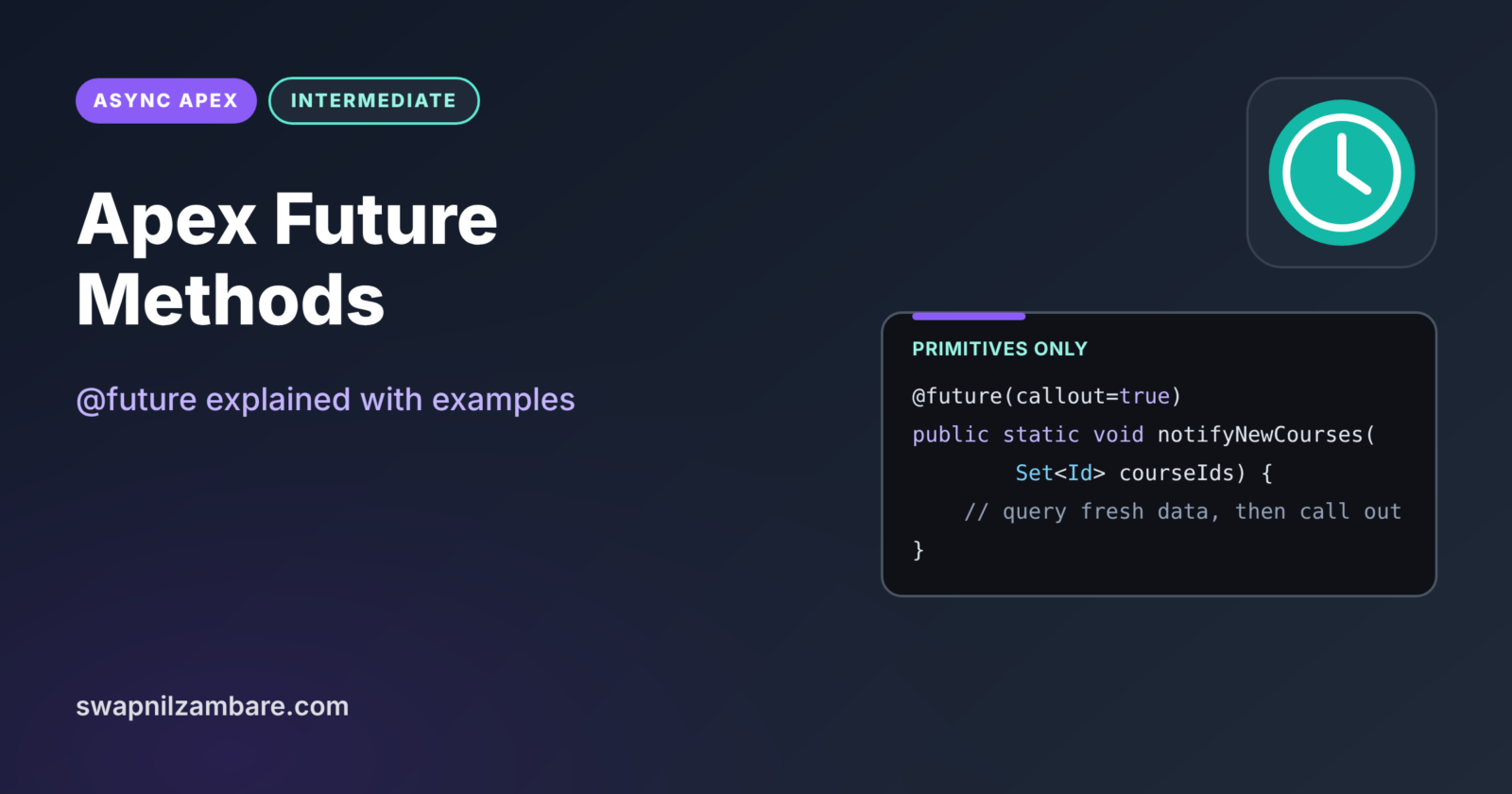
Apex Future Methods are the simplest way to run a piece of Apex in the background. You add the @future annotation to a static method, and Salesforce runs it later in its own transaction. They are perfect for small jobs, such as one callout after a save or one update that must happen in a separate transaction.
In this post, you will learn the rules for @future, why parameters must be primitive, how callout=true works, and how future methods fix mixed DML errors. You will also see their limits and when Queueable is the better choice. It builds on Asynchronous Apex, static vs instance Apex and testing async Apex.
What are Apex Future Methods?
Apex Future Methods are static methods marked @future that Salesforce queues and runs later. They must return void, and their parameters must be primitive types, such as Id, String or Integer, or collections of them. When you call one, the call returns at once, and the work happens after the current transaction commits.
Think of dropping a letter in a post box. You do not wait at the box until it arrives. You also cannot put a parcel with fragile items in it, only a flat envelope. Future methods are that post box: quick, simple, and limited in what they carry.
Why Apex Future Methods Matter
Some small tasks cannot run in the current transaction. Here is why Apex Future Methods matter at Bright Path Tutors.
- First, a trigger must notify a partner system, but triggers cannot make callouts.
- Also, activating a tutor’s user record while updating a course causes a mixed DML error.
- Next, some slow calculations should not delay the user’s save.
- Future methods need no extra class, just one annotation.
- Finally, a lot of existing code uses them, so you must understand them.
So Apex Future Methods are a quick fix for simple background work.
How Apex Future Methods Work
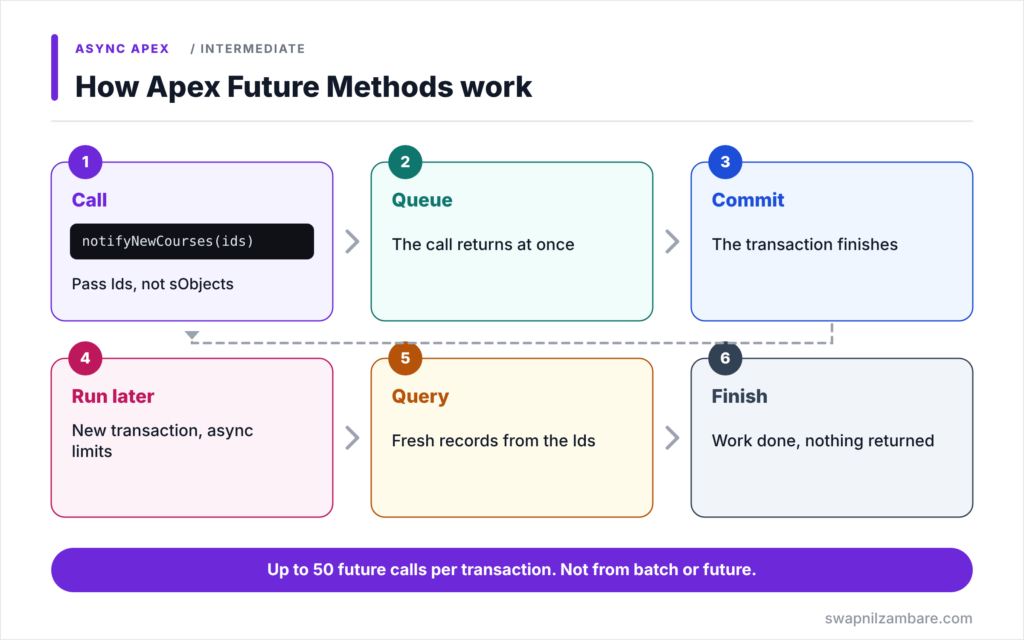
Apex Future Methods follow a short flow. First, synchronous code calls the static @future method with primitive values, often record Ids. Next, Salesforce stores the request and the call returns at once. Then the current transaction finishes and commits. After that, the future method runs in a new transaction with async limits. Finally, it queries fresh data using the Ids, does its work, and ends without returning anything.
The @future Annotation
Mark a public or private static void method with @future. The method cannot return a value, because the caller has already moved on.
Primitive Parameters Only
Parameters must be primitives, arrays of primitives, or collections of primitives. You cannot pass sObjects, because the record might change before the method runs. So pass Ids and query the records inside.
callout=true
Add @future(callout=true) when the method calls another system over HTTP. Without it, callouts are not allowed.
Limits and Rules
You can call up to 50 future methods in one transaction. Also, you cannot call a future method from another future method or from Batch Apex. Finally, the order in which future methods run is not guaranteed.
Apex Future Methods Rules at a Glance
The table below sums up the main rules.
| Rule | Detail |
|---|---|
| Method type | static, returns void |
| Parameters | Primitives or collections of primitives |
| Callouts | Only with @future(callout=true) |
| Calls per transaction | Up to 50 |
| Called from future or batch | Not allowed |
| Job Id returned | No |
Future Methods vs Queueable Apex
The table below compares future methods with Queueable Apex.
| Feature | Future method | Queueable Apex |
|---|---|---|
| Parameters | Primitives only | Any type, including sObjects |
| Job Id to track | No | Yes |
| Chaining | Not possible | One child job per job |
| Code needed | One annotation | A class with execute |
| Best for | Small, simple tasks | Most new async work |
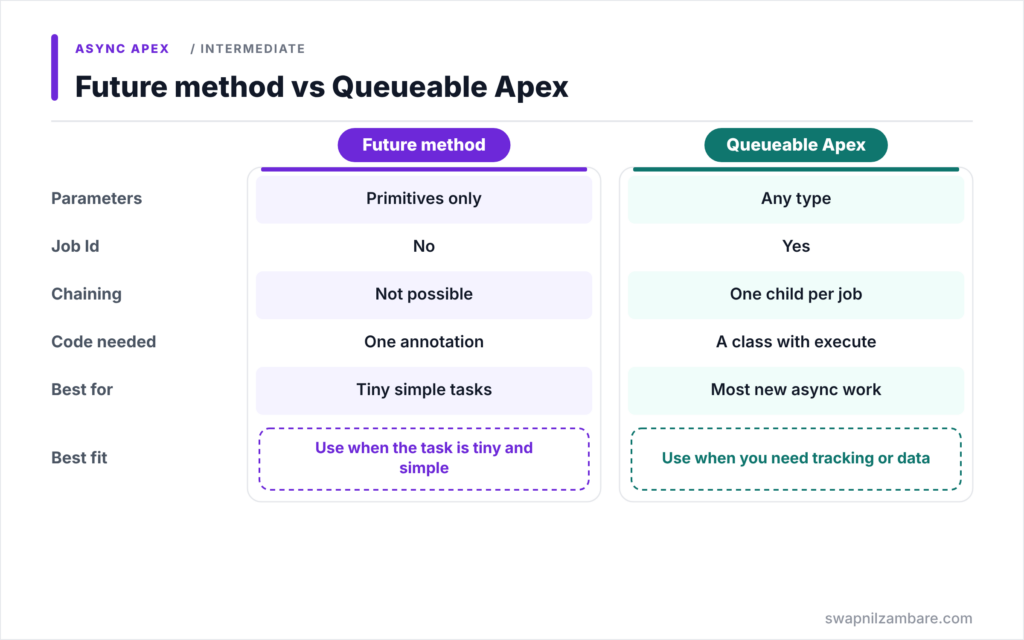
When to use which is simple. Use a future method for a tiny, one-off callout or mixed DML fix. Use Queueable for anything you need to track, chain or pass complex data to.
A Real Apex Future Methods Example
Let’s use Apex Future Methods for two common jobs at Bright Path Tutors.
Step 1: Fix a Mixed DML Error
public with sharing class TutorAccessService {

    // Called after a course update; user changes need their own transaction
    @future
    public static void activateTutors(Set<Id> userIds) {
        List<User> tutors = [SELECT Id, IsActive FROM User WHERE Id IN :userIds];
        for (User u : tutors) {
            u.IsActive = true;
        }
        update tutors;
    }
}
Updating a setup object, such as User, and a normal object, such as Course__c, in one transaction causes a mixed DML error. So the course logic calls activateTutors with the user Ids, and the user update runs later in a separate transaction.
Step 2: Make a Callout from a Trigger
public with sharing class PartnerNotifier {

    @future(callout=true)
    public static void notifyNewCourses(Set<Id> courseIds) {
        for (Course__c c : [SELECT Id, Name, Fee__c FROM Course__c WHERE Id IN :courseIds]) {
            HttpRequest req = new HttpRequest();
            req.setEndpoint('callout:Partner_Catalog/courses');
            req.setMethod('POST');
            req.setBody(JSON.serialize(c));
            HttpResponse res = new Http().send(req);
            System.debug(c.Name + ' sent, status ' + res.getStatusCode());
        }
    }
}
The trigger handler calls notifyNewCourses with all new course Ids at once. Because of callout=true, the method can send HTTP requests. It queries the courses fresh, so it sends the saved values.
Step 3: Call It Once per Transaction
when AFTER_INSERT {
    PartnerNotifier.notifyNewCourses(Trigger.newMap.keySet());
}
With Apex Future Methods, one call handles every course in the batch. So a Data Loader import of 200 courses uses one future call, not 200.
Step 4: Check the Log
Here is a simplified debug log from the future method’s transaction.
CODE_UNIT_STARTED|PartnerNotifier.notifyNewCourses
USER_DEBUG|Apex Basics sent, status 201
USER_DEBUG|SOQL Basics sent, status 201
The log appears as a separate entry, because the future method runs in its own transaction after the save.
Testing Apex Future Methods
Call the code that triggers the future method between Test.startTest and Test.stopTest. Then the future method runs at stopTest, before your asserts. For callouts, also set a mock with Test.setMock first.
Common Mistakes with Apex Future Methods
- Calling a future method inside a loop, once per record.
- Trying to pass sObjects as parameters.
- Calling a future method from Batch Apex or another future method.
- Forgetting callout=true for HTTP calls.
- Relying on the order in which future methods run.
Best Practices for Apex Future Methods
- Pass a Set of Ids and query fresh data inside the method.
- Call each future method once per transaction with all records.
- Check System.isFuture() or System.isBatch() before calling, to avoid errors.
- Prefer Queueable for new code that needs tracking or chaining.
- Always test with Test.startTest and Test.stopTest.
Practice Task
Write a guard that calls PartnerNotifier.notifyNewCourses only when the code is not already running in a future or batch context. Hint: use System.isFuture() and System.isBatch().
Most Asked Interview Questions on Apex Future Methods
Future methods are a classic interview topic. Here are the 21 questions asked most about Apex Future Methods.
Basic Questions on Apex Future Methods
Q1: What is a future method?
A static void method marked @future that Salesforce runs later in its own transaction.
Q2: What return type must a future method have?
void.
Q3: Why must future methods be static?
Because they run in a new transaction with no object instance from the caller.
Q4: What parameter types are allowed?
Primitives, arrays of primitives, and collections of primitives.
Q5: Why can’t you pass sObjects?
The record could change before the method runs, so you pass Ids and query fresh data.
Q6: How do you allow callouts in a future method?
Use @future(callout=true).
Q7: How many future calls are allowed per transaction?
Up to 50.
Code and Scenario Questions on Apex Future Methods
Q8: Can you call a future method from a batch class?
No.
Q9: Can a future method call another future method?
No.
Q10: How do you fix a mixed DML error with a future method?
Move the setup object DML, such as user updates, into a future method.
Q11: How do you get the result of a future method?
You cannot directly. It returns nothing and gives no job Id, so check the data it changed.
Q12: How do you test a future method?
Call it between Test.startTest and Test.stopTest, then assert after stopTest.
Q13: How do you avoid calling a future method from a future context?
Check System.isFuture() before calling it.
Q14: Do future methods run in a set order?
No. Order is not guaranteed.
Advanced Questions on Apex Future Methods
Q15: Why is Queueable often better than future?
It accepts complex types, returns a job Id, supports chaining and finalizers.
Q16: Can a future method be called from a Visualforce constructor?
No. Future methods cannot be used in Visualforce getters, setters or constructors.
Q17: How do you pass complex data to a future method?
Serialize it to a JSON string, then deserialize it inside the method, or switch to Queueable.
Q18: Do future methods count toward the daily async limit?
Yes. They share the org’s daily asynchronous execution allowance.
Q19: What happens if a future method fails?
Its changes roll back and the error appears in Setup > Apex Jobs.
Q20: Which limits apply inside a future method?
Asynchronous limits, such as 200 SOQL queries and 12 MB heap.
Q21: When would you still choose a future method today?
For a tiny, isolated callout or mixed DML fix where tracking is not needed.
Official Resources
Quick Recap
- Apex Future Methods are static void methods marked @future.
- They accept only primitive parameters, so pass Ids.
- Use @future(callout=true) for HTTP callouts.
- Up to 50 future calls are allowed per transaction.
- Prefer Queueable when you need tracking, chaining or complex data.
What’s Next?
Queueable Apex is the modern choice for most background work. Next, read our guide to Queueable Apex with chaining and finalizers.


