Queueable Apex is the modern way to run background work in Salesforce. You write a class that implements the Queueable interface, queue it with System.enqueueJob, and Salesforce runs it in its own transaction. Unlike future methods, Queueable jobs accept any data type, return a job Id, and can start the next job when they finish.
In this post, you will learn how to write and queue a job, how chaining works, how to add a delay, and how finalizers handle failures. It builds on Asynchronous Apex, Apex future methods and Apex exception handling.
What is Queueable Apex?
Queueable Apex is an Apex class that implements the Queueable interface and its execute method. You create an object of the class, fill it with the data it needs, and pass it to System.enqueueJob. Salesforce stores the job, returns an Id, and runs execute later with async limits.
Think of a courier service. You pack a parcel with anything you like, get a tracking number, and the courier delivers it later. If the parcel must go on to a second city, the courier hands it to the next driver. Queueable Apex is that courier: any contents, a tracking Id, and a hand-off to the next job.
Why Queueable Apex Matters
Most background work needs more than a future method offers. Here is why Queueable Apex matters at Bright Path Tutors.
- First, a fee sync job needs a list of course records, not just Ids.
- Also, admins want a job Id to track each sync in Setup.
- Next, a long process runs in steps: update fees, then send receipts.
- A failed job must log the error and try again.
- Finally, callouts to the payment partner need a reliable background job.
So Queueable Apex is the default choice for new async code.
How Queueable Apex Works
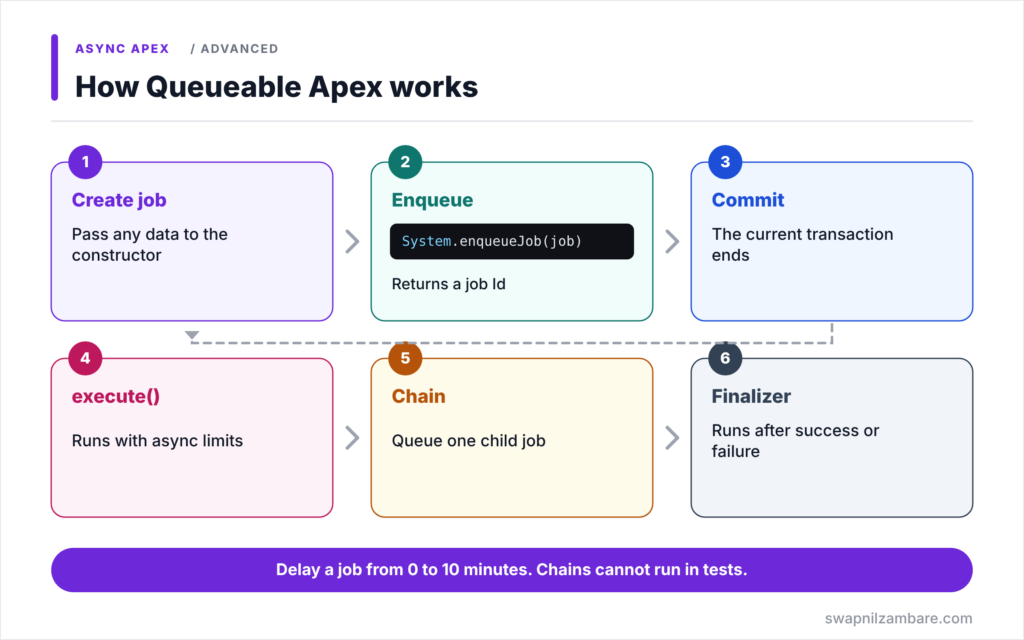
Queueable Apex follows a clear lifecycle. First, you create a job object and pass it any data through its constructor. Next, System.enqueueJob adds it to the queue and returns a job Id. Then, after the current transaction commits, Salesforce runs the execute method in a new transaction. After that, execute may queue one child job to continue the work. Finally, an attached finalizer runs when the job ends, whether it succeeded or failed.
The Queueable Interface
A Queueable class implements one method, execute(QueueableContext ctx). The context gives you the job Id with ctx.getJobId().
Job Ids
System.enqueueJob returns an Id. So you can query AsyncApexJob with that Id to check status, errors and completion time.
Chaining
Inside execute, you can queue one more Queueable job. This is called chaining. Each link runs in its own transaction, so a long process can be split into small, safe steps.
Delays
System.enqueueJob(job, delayInMinutes) waits before running the job, from 0 to 10 minutes. This helps when another system needs time, or to avoid hitting a partner too fast.
Finalizers
A finalizer is a class that implements the Finalizer interface. You attach it inside execute with System.attachFinalizer. It runs after the job, even if the job hit an uncaught exception, so you can log the error or retry.
Callouts
Add Database.AllowsCallouts to the class when execute calls another system over HTTP.
Queueable Apex Limits
The table below lists limits you should know.
| Limit | Value |
|---|---|
| enqueueJob calls in a synchronous transaction | Up to 50 |
| enqueueJob calls inside a Queueable job | 1 child job |
| Chain depth in Developer and trial orgs | 5 jobs |
| Delay with enqueueJob | 0 to 10 minutes |
| Chaining in Apex tests | Not allowed |
Queueable Apex vs Batch Apex
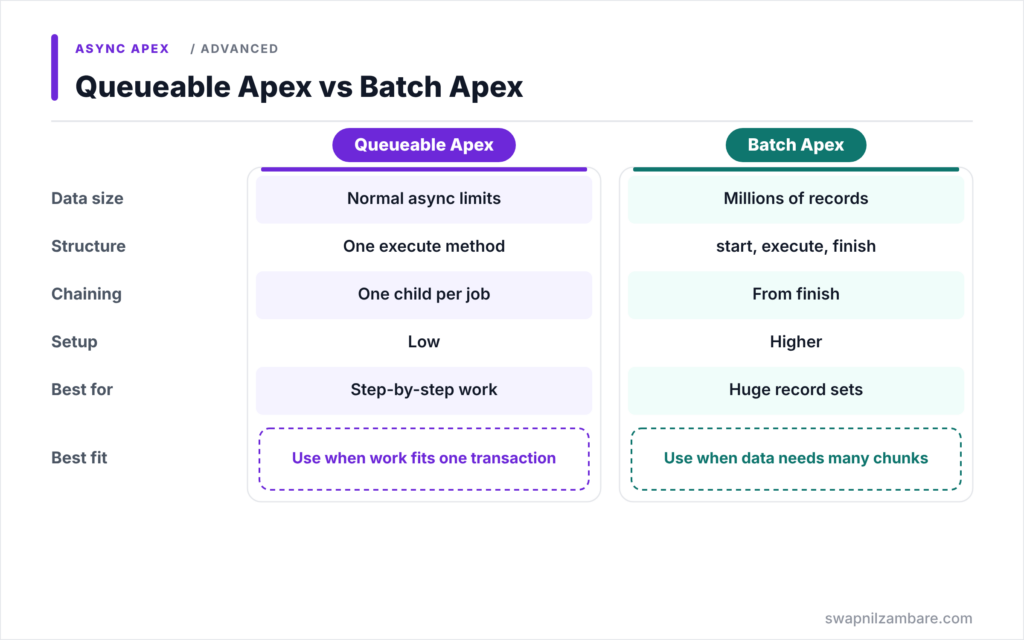
The table below compares Queueable with Batch Apex.
| Feature | Queueable Apex | Batch Apex |
|---|---|---|
| Data size | Up to normal async limits | Millions of records |
| Structure | One execute method | start, execute and finish |
| Chaining | One child per job | finish can start another batch |
| Setup cost | Low | Higher |
| Best for | Medium jobs and step-by-step work | Huge record sets |
When to use which is simple. Use Queueable Apex for most background tasks. Switch to Batch Apex when the data is too large for one transaction’s limits.
A Real Queueable Apex Example
Let’s build Queueable Apex for fee syncing at Bright Path Tutors. When fees change, one job updates unpaid enrolments, then a second job sends receipt requests. A finalizer logs failures.
Step 1: The First Job with a Finalizer
public with sharing class FeeSyncJob implements Queueable {

    private Map<Id, Decimal> newFees;   // course Id to new fee

    public FeeSyncJob(Map<Id, Decimal> newFees) {
        this.newFees = newFees;
    }

    public void execute(QueueableContext ctx) {
        System.attachFinalizer(new JobLogFinalizer('FeeSyncJob'));

        List<Enrolment__c> rows = [SELECT Id, Course__c FROM Enrolment__c
                                   WHERE Course__c IN :newFees.keySet()
                                   AND Is_Paid__c = false];
        for (Enrolment__c e : rows) {
            e.Amount_Due__c = newFees.get(e.Course__c);
        }
        update rows;

        if (!rows.isEmpty() && !Test.isRunningTest()) {
            System.enqueueJob(new ReceiptRequestJob(new Map<Id, Enrolment__c>(rows).keySet()));
        }
    }
}
The constructor takes a Map, which a future method could not accept. Then execute attaches a finalizer, updates unpaid enrolments, and chains the receipt job. The Test.isRunningTest guard skips the chain in tests, where chaining is not allowed.
Step 2: The Finalizer
public class JobLogFinalizer implements Finalizer {

    private String jobName;

    public JobLogFinalizer(String jobName) { this.jobName = jobName; }

    public void execute(FinalizerContext ctx) {
        if (ctx.getResult() == ParentJobResult.UNHANDLED_EXCEPTION) {
            System.debug(LoggingLevel.ERROR, jobName + ' failed: '
                + ctx.getException().getMessage());
            // In a real org, insert an Error_Log__c record here
        }
    }
}
The finalizer runs after FeeSyncJob ends. If the job failed with an uncaught exception, it logs the job name and error. A finalizer can also queue one new job, for example to retry.
Step 3: Queue the Job
Map<Id, Decimal> fees = new Map<Id, Decimal>{ apexBasicsId => 5500 };
Id jobId = System.enqueueJob(new FeeSyncJob(fees));
System.debug('Fee sync queued: ' + jobId);
Here is the debug output and the job status a few seconds later.
USER_DEBUG|Fee sync queued: 7075g00000AbCdEAAX
AsyncApexJob 7075g00000AbCdEAAX  Status: Completed  NumberOfErrors: 0
The job ran, updated the enrolments and queued the receipt job.
Testing Queueable Apex
Queue the job between Test.startTest and Test.stopTest, then assert results after stopTest. Because tests cannot chain jobs, guard the chain or test each job separately, as shown above.
Common Mistakes with Queueable Apex
- Queuing one job per record in a loop.
- Trying to enqueue more than one child job inside execute.
- Chaining forever without a stop condition.
- Forgetting Database.AllowsCallouts for HTTP calls.
- Leaving failures silent instead of using a finalizer.
Best Practices for Queueable Apex
- Pass all the data a job needs through its constructor.
- Keep each job small, and chain steps instead of one huge job.
- Attach a finalizer to log or retry failures.
- Add a clear stop condition to every chain.
- Store and monitor job Ids for important processes.
Practice Task
Change JobLogFinalizer so it retries FeeSyncJob once when it fails. Hint: pass the fee map into the finalizer and call System.enqueueJob inside execute when the result is UNHANDLED_EXCEPTION, along with a retry counter.
Most Asked Interview Questions on Queueable Apex
Queueable questions appear in most mid and senior interviews. Here are the 21 questions asked most about Queueable Apex.
Basic Questions on Queueable Apex
Q1: What is Queueable Apex?
A class that implements the Queueable interface and runs its execute method asynchronously.
Q2: How do you start a Queueable job?
Call System.enqueueJob with an instance of the class.
Q3: What does System.enqueueJob return?
The job Id, which you can use to track the job in AsyncApexJob.
Q4: Can Queueable jobs accept sObjects?
Yes. They can hold any data type in member variables.
Q5: What is job chaining?
Queuing a new Queueable job from inside a running job’s execute method.
Q6: How many child jobs can one Queueable job queue?
One.
Q7: How do you allow callouts in a Queueable job?
Implement Database.AllowsCallouts.
Code and Scenario Questions on Queueable Apex
Q8: How many jobs can you queue from a synchronous transaction?
Up to 50.
Q9: How do you delay a Queueable job?
Pass a delay in minutes, from 0 to 10, as the second argument to System.enqueueJob.
Q10: What is a finalizer?
A class implementing Finalizer that runs after a Queueable job, even when it fails.
Q11: How do you attach a finalizer?
Call System.attachFinalizer inside the job’s execute method.
Q12: How do you check if the job failed inside a finalizer?
Compare ctx.getResult() with ParentJobResult.UNHANDLED_EXCEPTION.
Q13: Can you chain jobs in an Apex test?
No. Guard the chain or test each job separately.
Q14: What is the chain depth limit in Developer Edition?
Five jobs, including the first one.
Advanced Questions on Queueable Apex
Q15: Why is Queueable preferred over future methods?
It accepts complex data, returns a job Id, supports chaining, delays and finalizers.
Q16: How do you stop an endless chain?
Add a stop condition, such as no more records to process or a maximum step count.
Q17: What can a finalizer do?
Log results, send alerts, and queue one new job, such as a retry.
Q18: When should you use Batch Apex instead?
When the data set is too large for one transaction’s limits.
Q19: How do you control chain depth in production?
Use AsyncOptions with a maximum stack depth when you enqueue the job.
Q20: Do Queueable jobs run in order?
Chained jobs run one after another, but separately queued jobs have no guaranteed order.
Q21: How do you make a Queueable job safe to retry?
Make it idempotent, so running it twice gives the same result.
Official Resources
- Queueable Apex (Apex Developer Guide)
- Transaction Finalizers (Apex Developer Guide)
- Control Processes with Queueable Apex (Trailhead)
Quick Recap
- Queueable Apex runs execute in the background and returns a job Id.
- Jobs can hold any data type, including sObjects and maps.
- Each job can chain one child job.
- Delays of 0 to 10 minutes are possible with enqueueJob.
- Finalizers log or retry jobs that fail.
What’s Next?
For millions of records, you need chunks. Next, read our guide to Batch Apex with start, execute and finish.


