Apex Exception Handling is how your code reacts when something goes wrong, such as a missing record, a failed save or a bad value. Instead of showing users a long technical error, good code catches the problem, logs it and shows a clear message. It also cleans up, so data stays consistent.
In this post, you will learn try, catch and finally, the built-in exceptions you meet most, how to create custom exceptions, and how to show errors to users from triggers and Lightning components. This is the last topic of Level 4. It builds on DML operations in Apex, Apex savepoints and rollback and the Apex order of execution.
What is Apex Exception Handling?
An exception is an error that stops the normal flow of code, such as dividing by zero or saving a record with a missing required field. Apex Exception Handling uses try, catch and finally blocks to respond to these errors. You can also create your own exception classes for business rules, such as “course is full”.
Think of a train driver. When a signal turns red, the driver does not crash the train. He stops safely, informs the control room and waits for instructions. Apex Exception Handling is that safety procedure for your code.
Why Apex Exception Handling Matters
Unhandled errors confuse users and leave half-finished work. Here is why Apex Exception Handling matters at Bright Path Tutors.
- First, an enrolment page should say “This course is full”, not show a stack trace.
- Also, a nightly import should log failed rows and continue.
- Next, a payment step must roll back the enrolment if it fails.
- Support teams need error details to fix problems quickly.
- Finally, some errors, such as governor limit errors, cannot be caught at all.
So careful handling keeps users informed and data correct.
How Apex Exception Handling Works
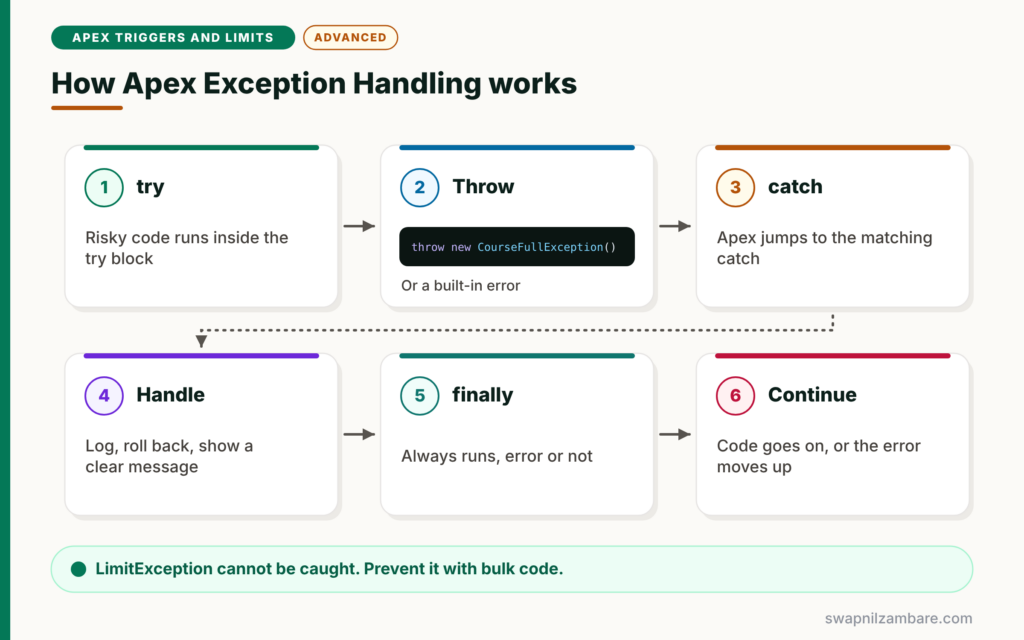
Apex Exception Handling follows a clear flow. First, code that might fail runs inside a try block. Next, if an exception is thrown, Apex jumps to the matching catch block. Then the catch block logs the error, rolls back if needed, and shows or rethrows a clear message. After that, the finally block runs, whether there was an error or not. Finally, the code continues, or the exception moves up to the caller.
try, catch and finally
The try block holds risky code. A catch block handles one exception type, and you can have several. The finally block always runs, which is useful for cleanup or logging.
Built-In Exceptions
Apex has many built-in exception types, such as DmlException, QueryException and NullPointerException. Catch the specific type when you can, and use the general Exception type last.
Custom Exceptions
You create a custom exception by extending the Exception class. Its name must end with Exception, such as CourseFullException.
Exception Methods
Every exception has useful methods. getMessage returns the text, getTypeName returns the class name, getLineNumber returns the line, and getStackTraceString shows where it came from.
LimitException
A LimitException, such as too many queries, cannot be caught. So the transaction always fails, and you must prevent these errors with good code.
Common Built-In Exceptions
The table below lists the exceptions you will meet most often.
| Exception | Common cause | Example |
|---|---|---|
| DmlException | A save fails validation or a required field | insert with a missing Name |
| QueryException | Query assigned to one record finds none | Course__c c = [SELECT …] with no rows |
| NullPointerException | Using a variable that is null | c.Fee__c when c is null |
| ListException | Index outside the list | rows[5] on a list of 3 |
| SObjectException | Reading a field that was not queried | c.Level__c not in SELECT |
| MathException | Dividing by zero | total / 0 |
| LimitException | Governor limit passed, cannot be caught | 101 SOQL queries |
addError vs Throwing an Exception
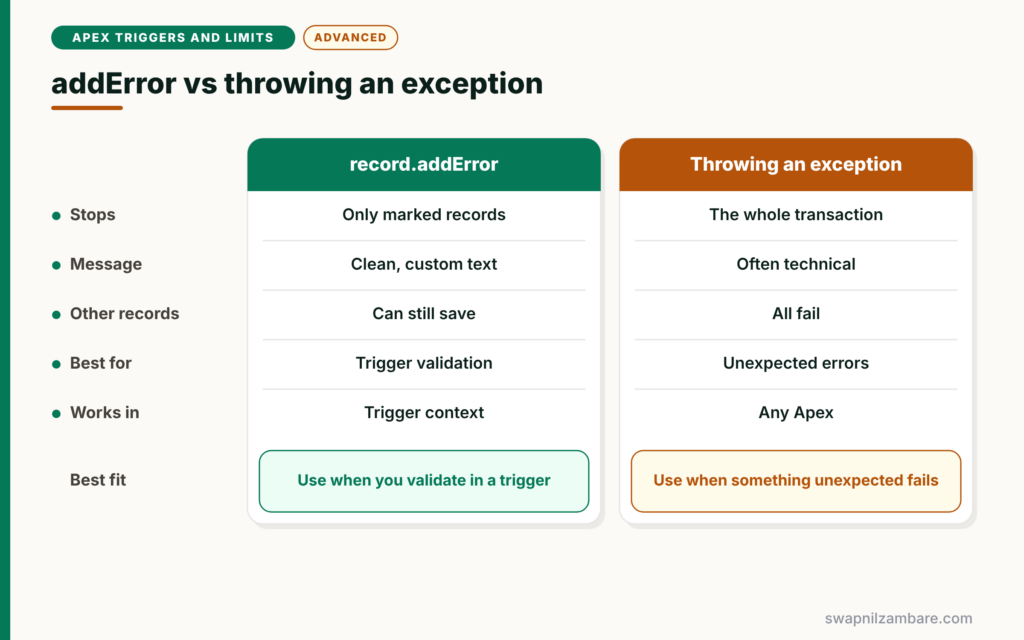
The table below compares two ways to stop a save from a trigger.
| Feature | record.addError | Throwing an exception |
|---|---|---|
| Stops | Only the marked records | The whole transaction |
| Message to the user | Clean, custom text | Often technical |
| Other records in the batch | Can still save with partial success | All fail |
| Best for | Business validation in triggers | Unexpected errors in classes |
| Works in | Trigger context | Any Apex |
When to use which is simple. Use addError for validation in triggers. Throw exceptions in service classes for unexpected problems, and let callers decide how to handle them.
A Real Apex Exception Handling Example
Let’s add Apex Exception Handling to the Bright Path Tutors enrolment service.
Step 1: Create a Custom Exception
public class CourseFullException extends Exception {}That one line is a complete custom exception. You can throw it with a message, such as throw new CourseFullException('Apex Basics is full').
Step 2: Use It in the Service
public with sharing class EnrolmentService {

    public static Id enrol(Id courseId, Id studentId) {
        Course__c c = [SELECT Id, Name, Seats_Booked__c, Max_Seats__c
                       FROM Course__c WHERE Id = :courseId];

        if (c.Seats_Booked__c != null && c.Max_Seats__c != null
                && c.Seats_Booked__c >= c.Max_Seats__c) {
            throw new CourseFullException(c.Name + ' is full. Please choose another batch.');
        }

        Enrolment__c e = new Enrolment__c(Course__c = courseId, Student__c = studentId,
                                          Status__c = 'Active');
        insert e;
        return e.Id;
    }
}
The method checks the seat count first. If the course is full, it throws CourseFullException with a clear message. Otherwise, it saves the enrolment as usual.
Step 3: Handle Errors for a Lightning Component
public with sharing class EnrolmentController {

    @AuraEnabled
    public static Id enrolStudent(Id courseId, Id studentId) {
        try {
            return EnrolmentService.enrol(courseId, studentId);
        } catch (CourseFullException e) {
            throw new AuraHandledException(e.getMessage());
        } catch (DmlException e) {
            ErrorLogger.log('EnrolmentController', e);
            throw new AuraHandledException(e.getDmlMessage(0));
        } catch (Exception e) {
            ErrorLogger.log('EnrolmentController', e);
            throw new AuraHandledException('Something went wrong. Please contact support.');
        } finally {
            System.debug('enrolStudent finished for course ' + courseId);
        }
    }
}
Catch blocks go from the most specific to the most general. The custom exception passes its friendly message to the user through AuraHandledException. DML and unexpected errors are logged first, then shown with a safe message. The finally block always runs.
Step 4: A Simple Error Logger
public without sharing class ErrorLogger {
    public static void log(String source, Exception e) {
        System.debug(LoggingLevel.ERROR, source + ': ' + e.getTypeName() + ' - '
            + e.getMessage() + ' at line ' + e.getLineNumber());
        // In a real org, insert an Error_Log__c record or publish a platform event
    }
}
The logger prints the type, message and line number. In a real org, you would save these details in a custom log object so support teams can review them.
Step 5: Read the Output
Here is what the log shows when a full course is chosen.
USER_DEBUG [21]|DEBUG|enrolStudent finished for course a015g00000AbC12AABThe user sees “Apex Basics is full. Please choose another batch.” on the screen, while the finally block still logs that the method finished.
Apex Exception Handling in Triggers
In triggers, prefer addError for business rules. It blocks only the bad records and shows a clean message. If a trigger throws an unhandled exception, the whole save fails, and users may see a technical error.
Logging Errors Safely
An error log record inserted in the same transaction is rolled back if the transaction fails. So for serious failures, many teams publish a platform event set to publish immediately, or log from async code. We will cover platform events in the async level.
Common Mistakes with Apex Exception Handling
- Catching Exception and doing nothing, which hides real bugs.
- Showing raw technical messages to users.
- Trying to catch LimitException, which is not possible.
- Putting the general catch block before specific ones.
- Logging errors with DML that rolls back with the failed transaction.
Best Practices for Apex Exception Handling
- Catch specific exceptions first and Exception last.
- Use custom exceptions for clear business errors.
- Use addError in triggers and AuraHandledException for Lightning components.
- Log type, message, line number and context for every unexpected error.
- Prevent limit errors with bulk code, because they cannot be caught.
Practice Task
Create a custom exception called InvalidFeeException. Throw it from a service method when a course fee is negative, and catch it in a controller that returns a friendly message. Hint: check Fee__c < 0 before the update.
Most Asked Interview Questions on Apex Exception Handling
Apex Exception Handling questions test whether you write production-ready code. Here are the 21 questions asked most about Apex Exception Handling.
Basic Questions on Apex Exception Handling
Q1: What is an exception in Apex?
It is an error that stops the normal flow of code, such as a failed save or a null value.
Q2: What are try, catch and finally?
try holds risky code, catch handles errors, and finally always runs afterwards.
Q3: How do you create a custom exception?
Create a class that extends Exception. Its name must end with Exception.
Q4: Name some built-in exceptions.
For example, DmlException, QueryException, NullPointerException, ListException, SObjectException and MathException.
Q5: Can you catch a LimitException?
No. Governor limit errors cannot be caught, so the transaction fails.
Q6: What does getMessage return?
The error text of the exception.
Q7: When does the finally block run?
Always, whether an exception happened or not.
Code and Scenario Questions on Apex Exception Handling
Q8: What causes a QueryException?
Often, assigning a query to a single record when no rows or several rows match.
Q9: In what order should catch blocks go?
From the most specific exception to the most general, with Exception last.
Q10: How do you show an error to a Lightning component user?
Throw an AuraHandledException with a clear message from the @AuraEnabled method.
Q11: How do you stop a save from a trigger with a clean message?
Call addError on the record. It blocks only that record and shows your message.
Q12: How do you rethrow an exception?
Use throw e inside the catch block, or wrap it in a custom exception with the original as its cause.
Q13: How do you get the line number of an error?
Call getLineNumber on the exception.
Q14: What does DmlException.getDmlMessage(0) return?
The error message for the first failed record in the DML operation.
Advanced Questions on Apex Exception Handling
Q15: Why should you avoid empty catch blocks?
They hide real bugs, so problems appear later as wrong data with no error trail.
Q16: Does a caught exception roll back DML?
No. If you catch it, earlier DML stays unless you roll back with a savepoint. An unhandled exception rolls back everything.
Q17: How do you log errors that survive a rollback?
Publish a platform event set to publish immediately, or log from asynchronous code.
Q18: How do you pass the original error into a custom exception?
Use the constructor that takes an exception, such as new CourseFullException(e), or call initCause.
Q19: Should controllers expose raw exception messages?
No. Show a friendly message to users and log the technical details for support.
Q20: How do you test that code throws an exception?
Call the method in a try block, assert that the expected exception type was caught, and fail the test if no exception was thrown.
Q21: When would you choose addError over throwing an exception in a trigger?
For business validation. addError blocks only the bad records, while an exception fails the whole batch.
Official Resources
Quick Recap
- Apex Exception Handling uses try, catch and finally to react to errors.
- Catch specific exceptions first and Exception last.
- Custom exceptions extend Exception and end with “Exception”.
- Use addError in triggers and AuraHandledException for components.
- LimitException cannot be caught, so prevent it with bulk code.
What’s Next?
You have finished Level 4: Triggers and Limits. Coming soon: Level 5, starting with Apex test class basics and the 75% coverage rule.


