An Apex Test Class is a special class that runs your code with sample data and checks that the result is correct. Salesforce will not let you deploy Apex to production without tests, so every developer writes them from day one. Good tests also catch bugs before your users do.
In this post, you will learn what a test class looks like, how test data works, what the 75% code coverage rule really means, and how to write your first passing test. It builds on Apex classes and objects, DML operations in Apex and Apex exception handling. This is the first post of Level 5: Testing and Debugging.
What is an Apex Test Class?
An Apex Test Class is a class marked with the @isTest annotation. Its methods create test data, call your real code and then check the results with asserts. Data created inside a test is never saved for real, because Salesforce rolls it back when the test ends.
Think of a driving test. The examiner does not trust that you can drive because you own a car. Instead, they sit next to you, give you real situations and check each move. A test class is the examiner for your code.
Why an Apex Test Class Matters
Tests are not only a deployment rule. Here is why every Apex Test Class matters at Bright Path Tutors.
- First, production deployments need at least 75% code coverage across your Apex code.
- Also, every trigger needs some test coverage before you can deploy it.
- Next, tests catch bugs when someone changes old code months later.
- Salesforce runs your tests before every major release to find platform issues early.
- Finally, a good test explains how the code should behave, like living documentation.
So tests protect your users, your team and your future self.
How an Apex Test Class Works
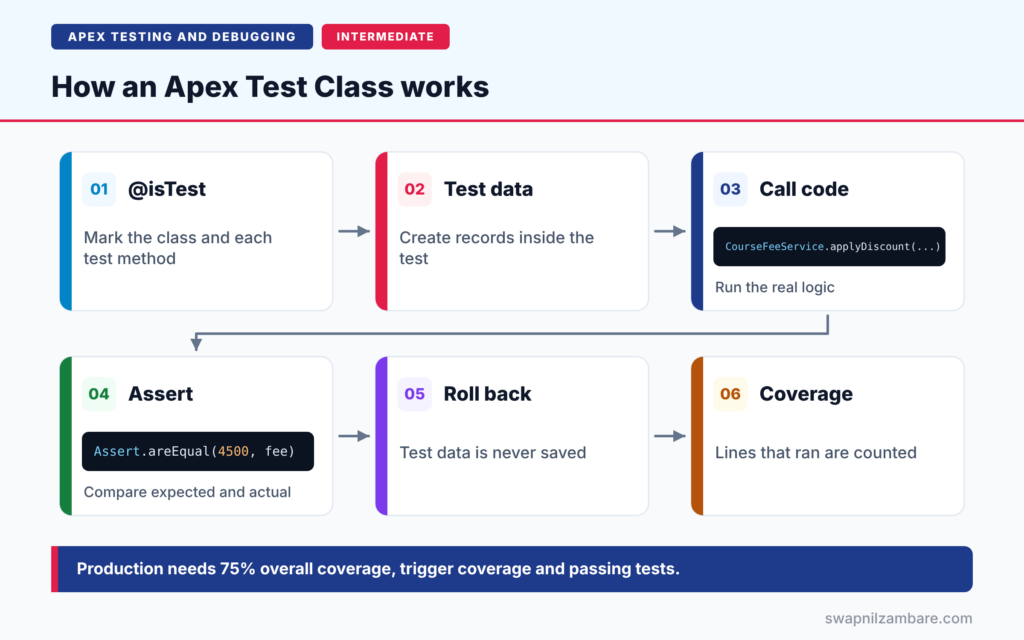
An Apex Test Class follows a clear flow. First, you mark the class and its methods with @isTest. Next, each test method creates its own test data, such as a few Course__c records. Then the method calls the code you want to test. After that, asserts compare the actual result with the expected result. Finally, Salesforce rolls back all test data and records which lines of code ran, which gives you code coverage.
The @isTest Annotation
You put @isTest on the class and on each test method. Test classes are usually private, because nothing else needs to call them. Code inside an @isTest class does not count toward your org’s Apex code size limit.
Test Methods
A test method is static, returns void and takes no parameters. Give it a clear name that says what it checks, such as appliesTenPercentDiscount.
Test Data
By default, tests cannot see the records in your org. So each test creates the data it needs. This keeps tests independent, and they behave the same in every sandbox and in production.
Asserts
An assert checks one fact, such as “the fee is now 4,500”. If the fact is false, the test fails with your message. We cover all the assert methods in a later post.
Code Coverage
Code coverage is the percentage of your code lines that ran during tests. It shows what was executed, not whether the result was right. That is why asserts matter as much as coverage.
Deployment Rules for Apex Tests
The table below lists the rules Salesforce checks when you deploy Apex to production.
| Rule | What it means |
|---|---|
| 75% overall coverage | At least 75% of all Apex lines must run in tests |
| Trigger coverage | Every trigger needs some coverage |
| All tests pass | Any failing test blocks the deployment |
| Test code excluded | Test classes do not count in coverage totals |
| Sandboxes | No coverage rule, but test there anyway |
Normal Class vs Apex Test Class
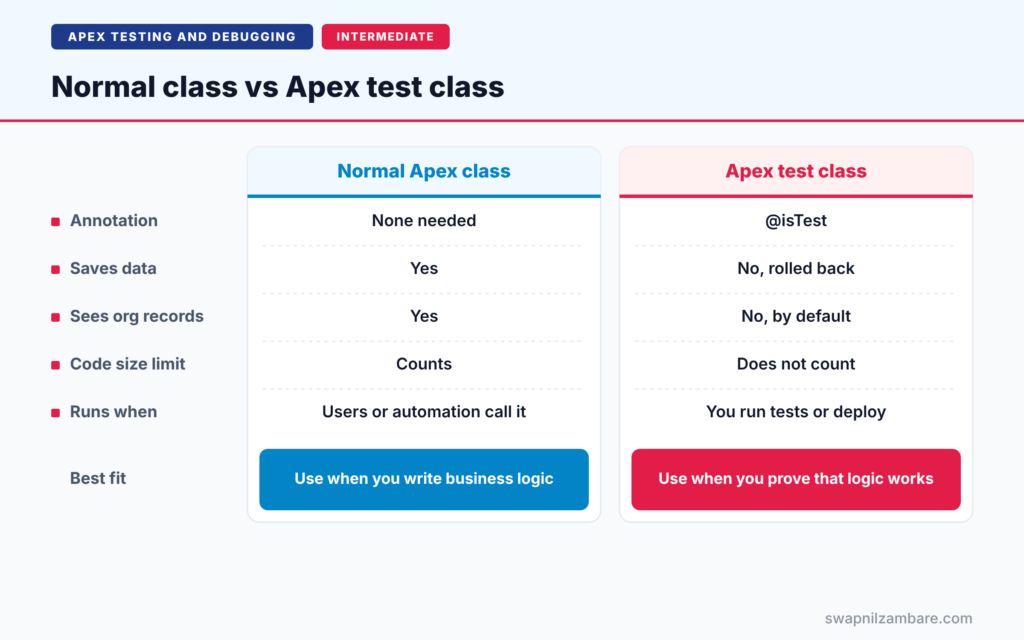
The table below compares a normal class with an Apex Test Class.
| Feature | Normal Apex class | Apex test class |
|---|---|---|
| Annotation | None needed | @isTest |
| Saves data | Yes | No, rolled back |
| Sees org records | Yes | No, by default |
| Counts toward code size limit | Yes | No |
| Runs when | Users or automation call it | You run tests or deploy |
When to use which is simple. Write normal classes for business logic, and write at least one test class for each of them.
A Real Apex Test Class Example
Let’s write an Apex Test Class for a small fee service at Bright Path Tutors. The service gives a discount on course fees, but only between 0% and 50%.
Step 1: The Code to Test
public with sharing class CourseFeeService {

    public static void applyDiscount(List<Course__c> courses, Decimal percent) {
        if (percent == null || percent < 0 || percent > 50) {
            throw new IllegalArgumentException('Discount must be between 0 and 50');
        }
        for (Course__c c : courses) {
            if (c.Fee__c != null) {
                c.Fee__c = c.Fee__c - (c.Fee__c * percent / 100);
            }
        }
        update courses;
    }
}
The method checks the percent first. Then it lowers each fee and saves all courses with one update. So there are two paths to test: a valid discount and an invalid one.
Step 2: Write the Test Class
@isTest
private class CourseFeeServiceTest {

    @isTest
    static void appliesTenPercentDiscount() {
        Course__c c = new Course__c(Name = 'Apex Basics', Fee__c = 5000);
        insert c;

        CourseFeeService.applyDiscount(new List<Course__c>{ c }, 10);

        Course__c saved = [SELECT Fee__c FROM Course__c WHERE Id = :c.Id];
        Assert.areEqual(4500, saved.Fee__c, 'Fee should drop by 10%');
    }

    @isTest
    static void rejectsTooLargeDiscount() {
        Course__c c = new Course__c(Name = 'SOQL Basics', Fee__c = 3000);
        insert c;
        try {
            CourseFeeService.applyDiscount(new List<Course__c>{ c }, 80);
            Assert.fail('Expected an IllegalArgumentException');
        } catch (IllegalArgumentException e) {
            Assert.isTrue(e.getMessage().contains('between 0 and 50'));
        }
    }
}
The first method creates one course, applies a 10% discount, queries the course again and checks the new fee. The second method tries an 80% discount. If no exception is thrown, Assert.fail stops the test. Otherwise, the catch block checks the error message.
Step 3: Run the Tests
In the Developer Console, click Test > New Run, select CourseFeeServiceTest, and click Run. You can also open Setup > Apex Test Execution, or run tests from VS Code.
Step 4: Read the Results
Here is a simplified view of what the results show.
CourseFeeServiceTest.appliesTenPercentDiscount   Pass
CourseFeeServiceTest.rejectsTooLargeDiscount     Pass
Code coverage: CourseFeeService   100%
Both tests pass, and every line of CourseFeeService ran. More importantly, the asserts prove the code gives the right answer, not just that it ran.
Coverage Is Not the Goal
Many teams chase 75% and stop there. However, a test without asserts can reach 100% coverage and still prove nothing. So aim for tests that check real behaviour: valid input, invalid input and bulk data. Coverage then follows naturally.
Common Mistakes with an Apex Test Class
- Writing tests with no asserts, just to raise coverage.
- Using SeeAllData=true, which makes tests depend on org data.
- Testing only the happy path and never the error path.
- Hard-coding record Ids that do not exist in other orgs.
- Putting many unrelated checks in one huge test method.
Best Practices for an Apex Test Class
- Create all test data inside the test, so tests run anywhere.
- Add at least one meaningful assert to every test method.
- Test valid input, invalid input and bulk input of 200 records.
- Name test methods after the behaviour they check.
- Keep one test class per class, with a clear name such as CourseFeeServiceTest.
Practice Task
Add a third test method that applies a 0% discount and checks that the fee does not change. Hint: copy the first method and change the percent and the expected value.
Most Asked Interview Questions on Apex Test Class
Almost every Salesforce developer interview starts with testing questions. Here are the 21 questions asked most about the Apex Test Class.
Basic Questions on Apex Test Class
Q1: What is a test class in Apex?
It is a class marked @isTest that creates test data, runs your code and checks the results with asserts.
Q2: What is the minimum code coverage for production?
75% of all Apex code in the org, and every trigger needs some coverage. All tests must also pass.
Q3: How do you declare a test method?
Use @isTest on a static void method with no parameters.
Q4: Is test data saved to the database?
No. Salesforce rolls back all data created in a test when the test ends.
Q5: Can a test see existing org records?
Not by default. Some setup data, such as users and profiles, is still visible.
Q6: Does test code count toward the Apex code size limit?
No. Classes and methods marked @isTest do not count.
Q7: Where can you run Apex tests?
In the Developer Console, Setup > Apex Test Execution, VS Code or the Salesforce CLI.
Code and Scenario Questions on Apex Test Class
Q8: What does SeeAllData=true do?
It lets the test read real org data. Avoid it, because tests then fail when data changes.
Q9: How do you test that code throws an exception?
Call the code in a try block, call Assert.fail after it, and check the exception in the catch block.
Q10: Why should tests use 200 records?
Triggers receive up to 200 records at a time, so bulk tests prove the code stays inside governor limits.
Q11: Can a test class have a public access modifier?
Yes, but private is common. A public @isTest class is often used for shared test data helpers.
Q12: How do you test code that runs as a specific user?
Use System.runAs with a test user to check sharing and permissions.
Q13: What happens if a test has no asserts?
It can still pass and add coverage, but it proves nothing about the result.
Q14: How do you check the coverage of one class?
Run its tests, then view the coverage in the Developer Console, VS Code or Setup > Apex Classes.
Advanced Questions on Apex Test Class
Q15: Is 75% coverage enough?
It is the minimum. Many teams aim for 85% or more, with meaningful asserts on every path.
Q16: Why do tests that pass in a sandbox fail in production?
Often they rely on org data, hard-coded Ids or settings that differ between orgs.
Q17: Do tests count toward governor limits?
Yes. Test code runs with the same limits as normal Apex in each transaction.
Q18: What is Test.isRunningTest?
It returns true when code runs inside a test. Use it sparingly, because it hides real behaviour.
Q19: Can you test private methods?
Not directly. Mark them @TestVisible, or test them through the public methods that call them.
Q20: Do Salesforce releases run your tests?
Yes. Salesforce runs customer tests before major releases to find platform regressions.
Q21: What makes a good test class?
Its own test data, clear method names, positive, negative and bulk tests, and meaningful asserts.
Official Resources
- Testing Apex (Apex Developer Guide)
- Code Coverage Best Practices (Apex Developer Guide)
- Apex Testing (Trailhead)
Quick Recap
- An Apex Test Class is marked @isTest and checks your code with test data.
- Test data is rolled back and cannot see org records by default.
- Production needs 75% overall coverage, trigger coverage and passing tests.
- Coverage shows what ran, while asserts prove it worked.
- Test valid, invalid and bulk input in every class.
What’s Next?
Creating test data in every method gets repetitive. Next, read our guide to the Apex Test Data Factory and @TestSetup.


