An Apex Test Data Factory is a reusable class that builds test records for all your test classes in one place. Together with the @TestSetup annotation, it removes copy-pasted insert code and makes tests shorter, faster and easier to change.
In this post, you will learn how to build a factory class, how @TestSetup creates shared data once per class, and how both fit together. It builds on Apex test class basics, static vs instance Apex and Apex collections, because the factory uses static methods that return lists.
What is an Apex Test Data Factory?
An Apex Test Data Factory is a public class marked @isTest with static methods such as createCourses or createStudents. Each method builds records with sensible default values and returns them. Your test classes call these methods instead of writing their own insert code.
Think of a bakery that bakes standard bread every morning. Each shop takes what it needs and adds its own toppings. It does not bake from scratch. The factory is that bakery, and each test adds only the details it cares about.
Why an Apex Test Data Factory Matters
Test data grows fast in a real project. Here is why an Apex Test Data Factory matters at Bright Path Tutors.
- First, a new required field on Course__c would otherwise break dozens of test classes.
- Also, many tests need the same base data, such as courses and students.
- Next, shared defaults keep data realistic, so validation rules pass.
- Bulk tests need 200 records, which is easy with a count parameter.
- Finally, short tests are easier to read and review.
So with an Apex Test Data Factory, one change fixes every test at once.
How an Apex Test Data Factory Works with @TestSetup
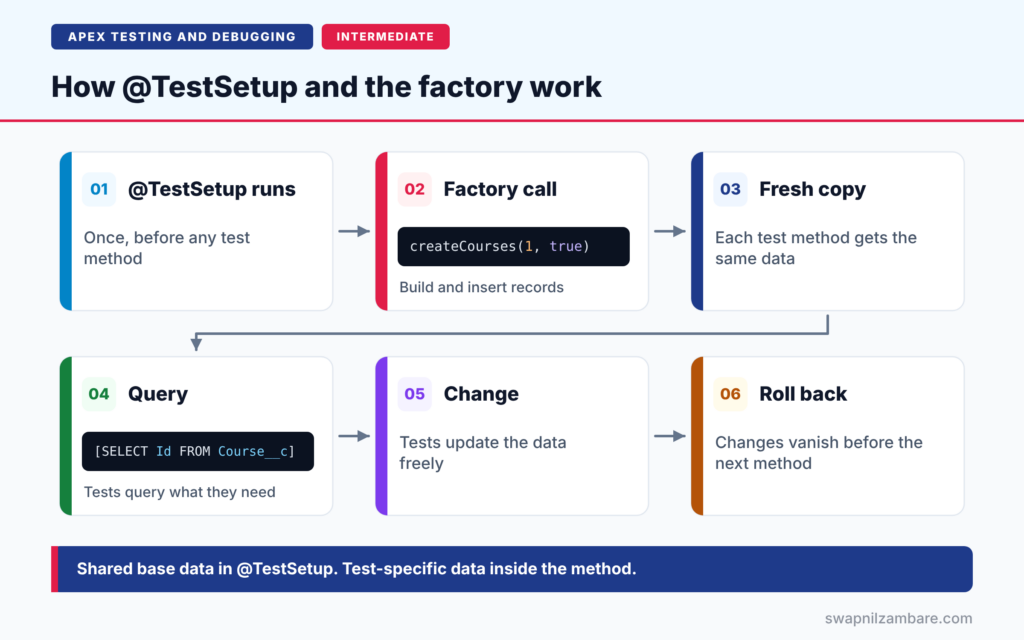
The pieces work in a simple order. First, a @TestSetup method in the test class runs once, before any test method. Next, it calls the factory to create and insert shared records. Then each test method starts with a fresh copy of that data. After that, the method queries the records it needs and changes them freely. Finally, Salesforce rolls back those changes, so the next method sees the original data again.
The Factory Class
The factory is a public @isTest class, so any test class can call it. Because it is test code, it does not count toward your code coverage or code size limit.
Build or Insert
A good factory method takes a count and a doInsert flag. So a test can build records in memory, change a field, and insert them itself.
The @TestSetup Method
A @TestSetup method creates data that every test method in the class can use. A class can have only one. If it fails, every test in that class fails.
Re-Query in Each Test
Test methods do not receive the @TestSetup records as variables. So each test queries what it needs. Static variables set in @TestSetup are also reset, because each test method runs in its own transaction.
Test.loadData
For many records with fixed values, you can store a CSV file as a static resource. Then Test.loadData inserts the rows and returns the records.
Common Factory Methods
The table below shows the factory methods we build for Bright Path Tutors.
| Method | Creates | Default values |
|---|---|---|
| createCourses(count, doInsert) | Course__c records | Name, Fee__c, Max_Seats__c |
| createStudents(count, doInsert) | Contact records | LastName, Email |
| createEnrolments(courses, students) | Enrolment__c records | Status__c = Active |
Data in Each Test vs @TestSetup
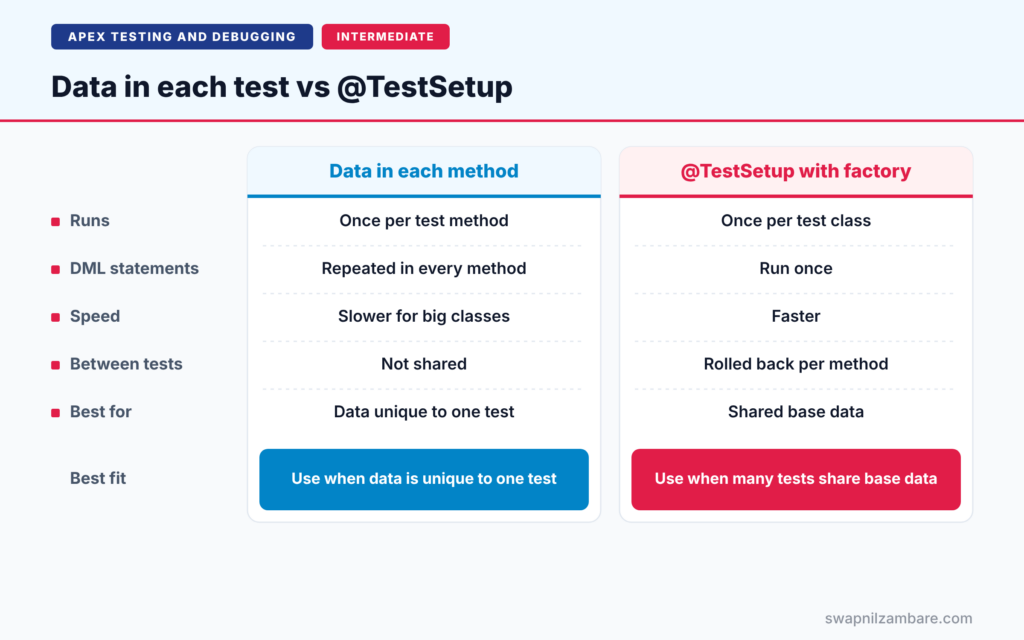
The table below compares creating data in every test method with using @TestSetup.
| Feature | Data in each test method | @TestSetup with factory |
|---|---|---|
| Runs | Once per test method | Once per test class |
| DML statements | Repeated in every method | Run once |
| Speed | Slower for big classes | Faster |
| Changes between tests | Not shared | Rolled back for each method |
| Best for | Data unique to one test | Shared base data |
When to use which is simple. Put shared base data in @TestSetup. Create small, test-specific records inside the method that needs them.
A Real Apex Test Data Factory Example
Let’s build an Apex Test Data Factory for Bright Path Tutors. Enrolment__c links a course to a student, and Student__c is a lookup to Contact.
Step 1: The Factory Class
@isTest
public class TestDataFactory {

    public static List<Course__c> createCourses(Integer count, Boolean doInsert) {
        List<Course__c> courses = new List<Course__c>();
        for (Integer i = 0; i < count; i++) {
            courses.add(new Course__c(
                Name = 'Test Course ' + i,
                Fee__c = 5000,
                Max_Seats__c = 30));
        }
        if (doInsert) { insert courses; }
        return courses;
    }

    public static List<Contact> createStudents(Integer count, Boolean doInsert) {
        List<Contact> students = new List<Contact>();
        for (Integer i = 0; i < count; i++) {
            students.add(new Contact(LastName = 'Student ' + i,
                                     Email = 'student' + i + '@example.com'));
        }
        if (doInsert) { insert students; }
        return students;
    }
}
Each method builds a list in a loop and inserts it with one DML statement, so the factory stays bulk-safe. The doInsert flag lets a test change values before saving.
Step 2: Use It in @TestSetup
@isTest
private class EnrolmentServiceTest {

    @TestSetup
    static void setupData() {
        TestDataFactory.createCourses(1, true);
        TestDataFactory.createStudents(5, true);
    }

    @isTest
    static void enrolsStudent() {
        Course__c c = [SELECT Id FROM Course__c LIMIT 1];
        Contact s = [SELECT Id FROM Contact LIMIT 1];

        Id enrolmentId = EnrolmentService.enrol(c.Id, s.Id);

        Assert.isNotNull(enrolmentId, 'Enrolment should be created');
    }

    @isTest
    static void blocksFullCourse() {
        Course__c c = [SELECT Id FROM Course__c LIMIT 1];
        c.Seats_Booked__c = 30;
        update c;
        Contact s = [SELECT Id FROM Contact LIMIT 1];
        try {
            EnrolmentService.enrol(c.Id, s.Id);
            Assert.fail('Expected CourseFullException');
        } catch (CourseFullException e) {
            Assert.isTrue(e.getMessage().contains('is full'));
        }
    }
}
The setup method creates one course and five students once. Then each test queries them. The second test fills the course, but that change is rolled back, so the first test still sees an empty course.
Step 3: Check the Results
Here is a simplified view of the test run.
EnrolmentServiceTest.enrolsStudent      Pass
EnrolmentServiceTest.blocksFullCourse   Pass
DML in setupData: 2 statements, run once for the class
Both tests pass, and the shared data was inserted only once. In a class with 20 tests, that saves 38 DML statements and a lot of time.
Test.loadData as a Second Option
Sometimes you need many records with exact values, such as a price list with 50 rows. Then a CSV file works better than code. First, create a CSV file whose header row uses API names, such as Name,Fee__c,Max_Seats__c. Next, upload it as a static resource named CourseTestData. Then load it in your test.
List<sObject> rows = Test.loadData(Course__c.sObjectType, 'CourseTestData');
Assert.areEqual(50, rows.size(), 'All CSV rows should load');
Test.loadData inserts the rows and returns them as a list. So it suits fixed reference data, while the Apex Test Data Factory suits data that changes from test to test.
Common Mistakes with an Apex Test Data Factory
- Inserting records one by one inside the factory loop.
- Expecting @TestSetup records to arrive as variables instead of querying them.
- Relying on static variables set in @TestSetup.
- Hard-coding values that clash with validation or duplicate rules.
- Putting test-specific edge cases into the shared factory.
Best Practices for an Apex Test Data Factory
- Keep one factory class, or one per big area, with clear method names.
- Give every method a count and a doInsert parameter.
- Use @TestSetup for shared base data in each test class.
- Create unusual records inside the test that needs them.
- Update the factory first when a new required field appears.
Practice Task
Add a createEnrolments method that takes a list of courses and a list of students and creates one enrolment per pair. Hint: use two nested loops, collect records in one list, and insert once.
Most Asked Interview Questions on Apex Test Data Factory
Interviewers use these questions to see if you write maintainable tests. Here are the 21 questions asked most about the Apex Test Data Factory.
Basic Questions on Apex Test Data Factory
Q1: What is a test data factory?
It is a reusable @isTest class with static methods that create test records for many test classes.
Q2: What does @TestSetup do?
It marks a method that creates shared test data once per class, before the test methods run.
Q3: How many @TestSetup methods can a class have?
Only one.
Q4: Do test methods share changes made to @TestSetup data?
No. Each test method gets the original data, because changes are rolled back after each method.
Q5: Does the factory class count toward code coverage?
No. Classes marked @isTest are excluded from coverage and the code size limit.
Q6: Why should the factory class be public?
So test classes in the org can call its methods.
Q7: What is Test.loadData?
A method that inserts records from a CSV file stored as a static resource.
Code and Scenario Questions on Apex Test Data Factory
Q8: How do test methods get @TestSetup records?
They query them with SOQL at the start of the method.
Q9: Why add a doInsert parameter?
So a test can change field values before inserting, or test insert logic itself.
Q10: Can @TestSetup be used with SeeAllData=true?
No. @TestSetup is not supported in classes that use SeeAllData=true.
Q11: What happens if the @TestSetup method fails?
Every test method in that class fails.
Q12: Do static variables keep values set in @TestSetup?
No. Each test method runs in its own transaction, so static variables start fresh.
Q13: How do you create 200 records for a bulk test?
Call a factory method with a count of 200 and insert the list with one DML statement.
Q14: How do you create a test user in a factory?
Build a User with a profile queried by name, a unique username and the required locale fields, then insert it.
Advanced Questions on Apex Test Data Factory
Q15: Why is @TestSetup faster than creating data in each method?
The DML runs once per class instead of once per method.
Q16: When should you not use @TestSetup?
When each test needs very different data, or when a test must count exactly the records it creates.
Q17: How do you handle new required fields in many tests?
Set the field in the factory’s default values, so every test gets it automatically.
Q18: Can a factory use custom metadata or settings?
Yes. A factory can also insert custom settings that the code under test needs.
Q19: How do you avoid validation rule failures in test data?
Use realistic defaults in the factory that satisfy every active rule.
Q20: Should a factory return records or Ids?
Records are more useful, because tests can read and change their fields.
Q21: How do you keep a factory from growing messy?
Keep methods small, split by area when needed, and avoid one-off edge cases in it.
Official Resources
- Using Test Setup Methods (Apex Developer Guide)
- Common Test Utility Classes for Test Data Creation (Apex Developer Guide)
- Create Test Data for Apex Tests (Trailhead)
Quick Recap
- An Apex Test Data Factory builds reusable test records in one place.
- @TestSetup creates shared data once per test class.
- Each test method sees a fresh copy and must query the records.
- Factory methods take a count and a doInsert flag.
- New required fields are fixed once, in the factory.
What’s Next?
Good data is only half of a test. Next, read our guide to Apex Assert methods to check results clearly.


