Change Data Capture is a Salesforce feature that publishes an event every time a record is created, updated, deleted or undeleted. You do not write any publishing code. You choose the objects, and Salesforce sends change events that other systems or Apex triggers can process after the save commits.
In this post, you will learn how to turn on Change Data Capture, what a change event contains, how to read the ChangeEventHeader, and how to write an Apex change event trigger. It builds on Salesforce Platform Events in Apex, Asynchronous Apex and Apex trigger basics.
What is Change Data Capture?
Change Data Capture (CDC) is a built-in stream of change events for the objects you select. Each change event has a header that describes the change, plus the field values that changed. For example, when a course fee changes, Salesforce publishes a Course__ChangeEvent with Fee__c and its new value.
Think of a bank sending you an SMS for every transaction. You do not ask the bank each hour whether something changed. The bank tells you the moment money moves, with the amount and the time. Change events are those SMS alerts for your records.
Why Change Data Capture Matters
Keeping systems in sync by polling is slow and wasteful. Here is why Change Data Capture matters at Bright Path Tutors.
- First, the public website must show new course fees within seconds.
- Also, the finance system needs every enrolment change, including deletes.
- Next, an audit log of fee changes should not slow down the course save.
- No custom publishing code is needed for each object.
- Finally, events include only changed fields, so payloads stay small.
So CDC gives near real-time sync with very little code.
How Change Data Capture Works
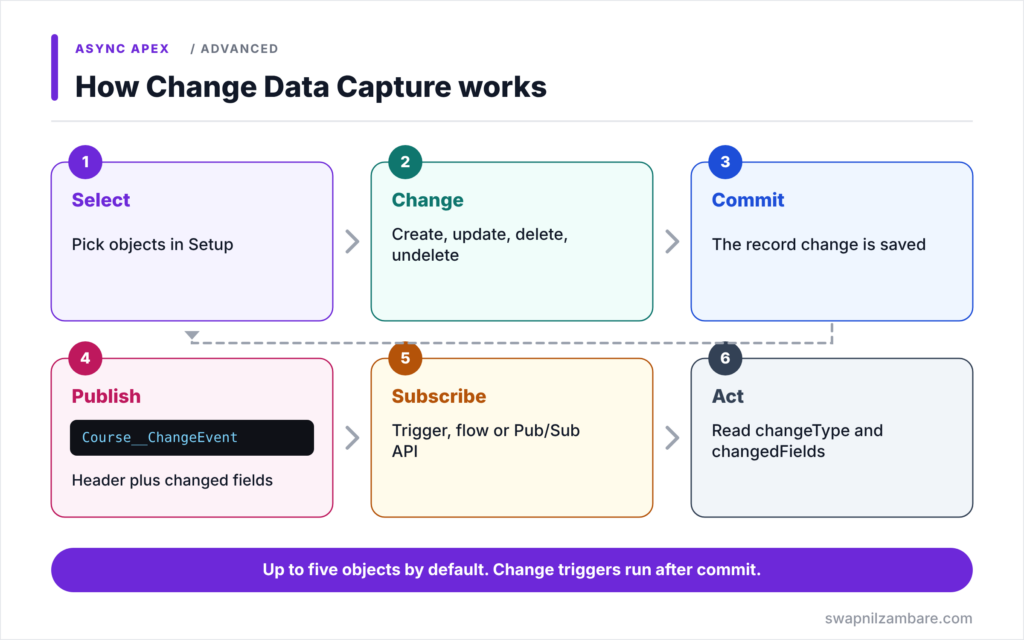
Change Data Capture follows a steady flow. First, an admin selects objects in Setup > Integrations > Change Data Capture. Next, a user or process creates, updates, deletes or undeletes a record of that object. Then, after the transaction commits, Salesforce publishes a change event on the event bus. After that, subscribers receive it: Apex change event triggers, flows or outside systems through the Pub/Sub API. Finally, each subscriber reads the header and changed fields, and acts on them.
Selecting Objects
You select standard and custom objects in Setup. By default, you can select up to five objects across all channels, and add-ons raise this allocation.
Change Event Names
Each object has its own change event. Standard objects use names such as AccountChangeEvent. Custom objects use names such as Course__ChangeEvent.
The ChangeEventHeader
Every change event has a ChangeEventHeader. It includes entityName, recordIds, changeType, changedFields, commitTimestamp, commitUser and transactionKey.
Change Types
changeType is CREATE, UPDATE, DELETE or UNDELETE. Gap and overflow types, such as GAP_UPDATE or GAP_OVERFLOW, mean Salesforce could not send full details, so subscribers should re-read the record.
Apex Change Event Triggers
An Apex trigger on a change event object supports only after insert. It runs asynchronously after the original transaction commits, by default as the Automated Process user.
ChangeEventHeader Fields
The table below lists the header fields you will use most.
| Field | What it tells you |
|---|---|
| entityName | The object, such as Course__c |
| recordIds | The Ids of changed records |
| changeType | CREATE, UPDATE, DELETE or UNDELETE |
| changedFields | Fields that changed in an update |
| commitUser | The user who made the change |
| commitTimestamp | When the change was committed |
Change Data Capture vs Platform Events
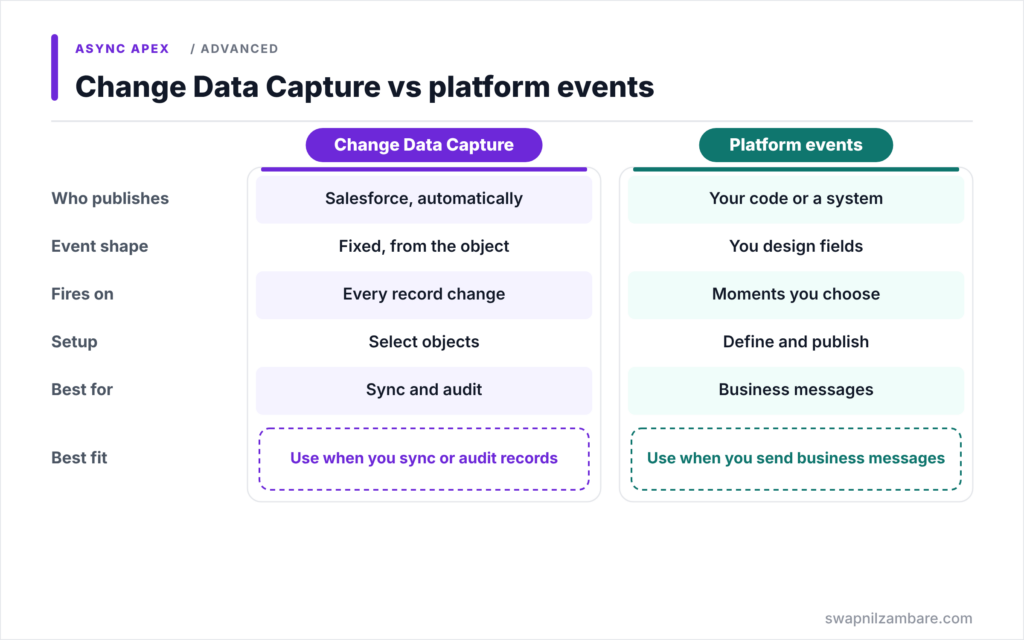
The table below compares CDC with custom platform events.
| Feature | Change Data Capture | Platform events |
|---|---|---|
| Who publishes | Salesforce, automatically | Your code or an outside system |
| Event shape | Fixed, based on the object | You design the fields |
| Trigger | Every record change | Business moments you choose |
| Setup | Select objects | Define event and publish code |
| Best for | Data sync and audit | Business processes and messages |
When to use which is clear. Use Change Data Capture to sync or audit record changes. Use platform events when you want to send a business message, such as “payment received”.
A Real Change Data Capture Example
Let’s use Change Data Capture at Bright Path Tutors to log every course fee change, without adding work to the course save.
Step 1: Turn On CDC for Course
- Go to Setup > Integrations > Change Data Capture.
- Move Course (Course__c) from Available Entities to Selected Entities.
- Click Save.
From now on, Salesforce publishes a Course__ChangeEvent after each committed change to a course.
Step 2: Write the Change Event Trigger
trigger CourseChangeTrigger on Course__ChangeEvent (after insert) {

    List<Fee_Change_Log__c> logs = new List<Fee_Change_Log__c>();

    for (Course__ChangeEvent evt : Trigger.new) {
        EventBus.ChangeEventHeader header = evt.ChangeEventHeader;
        if (header.changeType == 'UPDATE' && header.changedFields.contains('Fee__c')) {
            for (String recordId : header.recordIds) {
                logs.add(new Fee_Change_Log__c(
                    Course__c = recordId,
                    New_Fee__c = evt.Fee__c,
                    Changed_By__c = header.commitUser));
            }
        }
    }
    Database.insert(logs, false, AccessLevel.SYSTEM_MODE);
}
The trigger checks each event’s header. If it is an update that changed Fee__c, it writes one log per record Id. One event can cover several records changed in the same way, which is why the code loops over recordIds.
Step 3: Check the Log
Here is what the trigger writes after a manager changes the Apex Basics fee to 5,500.
Fee_Change_Log__c: Course = Apex Basics, New_Fee = 5500, Changed_By = 005...AshaThe course save stayed fast, because the log was written later by the change event trigger.
Testing Change Data Capture
In a test, call Test.enableChangeDataCapture() first, then change records. Change events are delivered at Test.stopTest, or when you call Test.getEventBus().deliver(). Then assert the records your trigger created.
Common Mistakes with Change Data Capture
- Expecting change event triggers to run before the original save commits.
- Reading only recordIds[0] when one event can hold several records.
- Ignoring gap and overflow change types.
- Selecting many objects without checking allocations.
- Forgetting that unchanged fields are null in update events.
Best Practices for Change Data Capture
- Select only objects that other systems truly need.
- Check changeType and changedFields before acting.
- Loop over every Id in recordIds.
- Re-query the record when you get a gap or overflow event.
- Keep change event triggers bulk-safe and idempotent.
Practice Task
Extend the trigger to also log deleted courses. Hint: check for changeType DELETE, and remember that field values are not sent for deletes, so log only the record Id and the user.
Most Asked Interview Questions on Change Data Capture
CDC questions show up in integration and architect interviews. Here are the 21 questions asked most about Change Data Capture.
Basic Questions on Change Data Capture
Q1: What is Change Data Capture?
A Salesforce feature that publishes events for record creates, updates, deletes and undeletes.
Q2: How do you turn it on for an object?
Select the object in Setup > Integrations > Change Data Capture.
Q3: What is the change event name for a custom object?
The object name with ChangeEvent, such as Course__ChangeEvent.
Q4: What does the ChangeEventHeader contain?
Details such as entityName, recordIds, changeType, changedFields, commitUser and commitTimestamp.
Q5: Which change types exist?
CREATE, UPDATE, DELETE and UNDELETE, plus gap and overflow types.
Q6: Who can subscribe to change events?
Apex change event triggers, flows and outside systems through the Pub/Sub API.
Q7: How many objects can you select by default?
Up to five, across all channels.
Code and Scenario Questions on Change Data Capture
Q8: Which trigger event does a change event trigger support?
Only after insert.
Q9: When does a change event trigger run?
Asynchronously, after the original transaction commits.
Q10: How do you know which fields changed?
Read changedFields in the ChangeEventHeader.
Q11: Why loop over recordIds?
One change event can represent several records changed in the same transaction.
Q12: What values do unchanged fields have in an update event?
They are null, because only changed fields are sent.
Q13: How do you test a change event trigger?
Call Test.enableChangeDataCapture(), change records, then deliver events with stopTest or Test.getEventBus().deliver().
Q14: Which user runs change event triggers by default?
The Automated Process user.
Advanced Questions on Change Data Capture
Q15: What does a gap event mean?
Salesforce could not send full change details, so subscribers should re-read the record.
Q16: What does GAP_OVERFLOW mean?
Too many changes happened in one transaction to send individual events.
Q17: How do you group changes from one transaction?
Use transactionKey and sequenceNumber from the header.
Q18: Why use CDC instead of an after trigger for audit logs?
It moves the work out of the user’s save, keeping saves fast.
Q19: How do outside systems subscribe?
Through the Pub/Sub API, using a channel such as /data/ChangeEvents or an object-specific channel.
Q20: What is changeOrigin used for?
It tells subscribers which client or API made the change, so they can skip their own updates.
Q21: How do you avoid sync loops between two systems?
Ignore changes that your integration user made, using commitUser or changeOrigin.
Official Resources
- Change Data Capture Developer Guide
- Select Objects for Change Notifications in the User Interface
- Change Data Capture Basics (Trailhead)
Quick Recap
- Change Data Capture publishes events for record changes automatically.
- Select objects in Setup, up to five by default.
- The ChangeEventHeader holds changeType, recordIds and changedFields.
- Change event triggers run after commit and support only after insert.
- Use CDC for sync and audit, and platform events for business messages.
What’s Next?
You now know every async tool. Next, read our guide on which async Apex type to use.