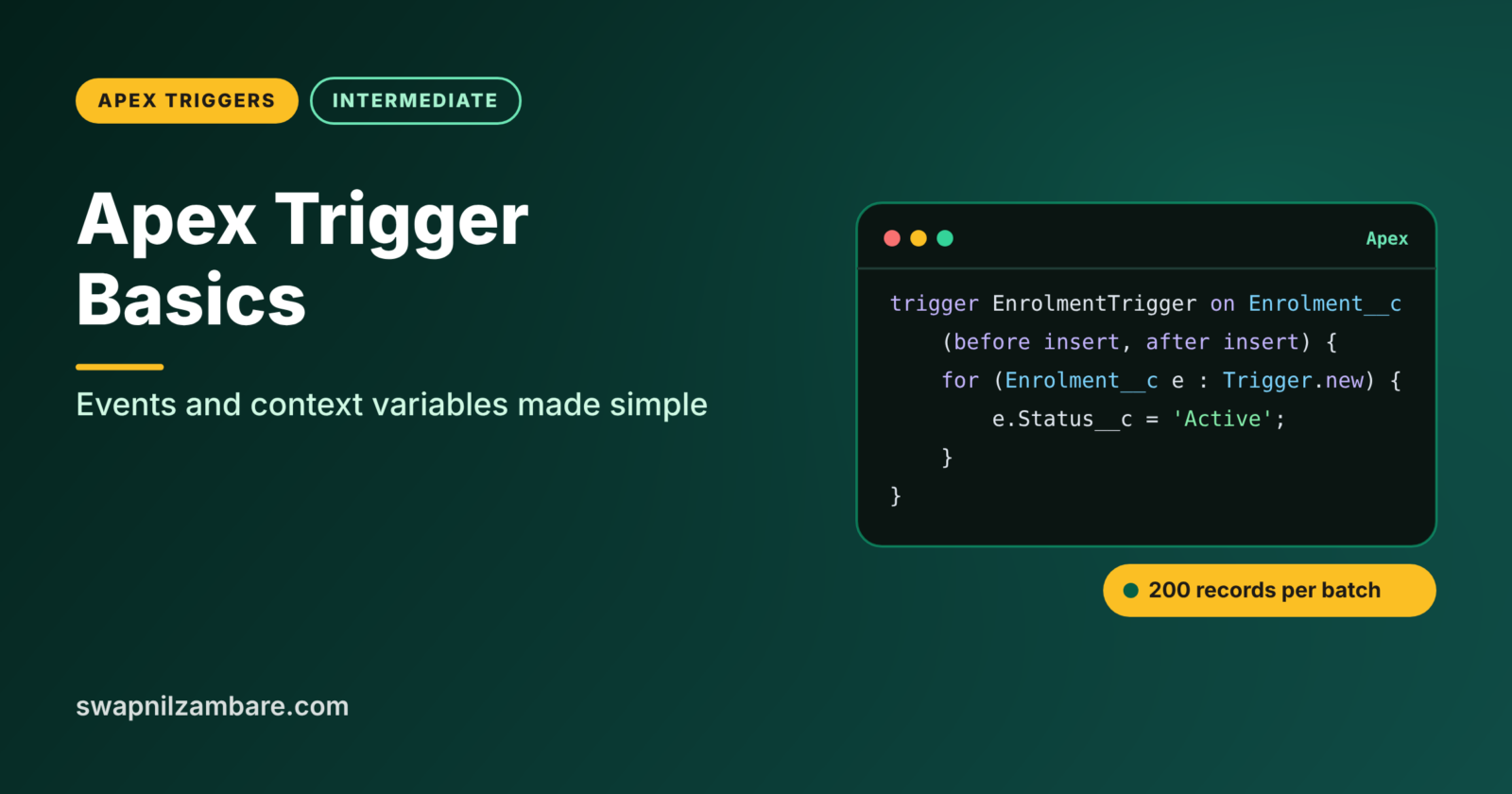
Apex Trigger Basics start with one idea: a trigger is Apex code that runs automatically when records are inserted, updated, deleted or undeleted. You do not call a trigger yourself. Salesforce runs it for you every time the event happens, whether the change comes from a user, Data Loader, an API or a flow.
In this post, you will learn trigger syntax, the seven trigger events and every context variable you need. Then you will write your first real trigger. Learning Apex Trigger Basics well matters because triggers are the heart of most Salesforce code. This post builds on Apex Governor Limits, DML operations in Apex and the admin view of the order of execution.
What are Apex Trigger Basics?
A trigger is a piece of Apex code attached to one object, such as Course__c or Enrolment__c. It declares which events it listens to, such as before insert or after update. When one of those events happens, Salesforce runs the trigger and gives it the records involved through context variables.
Think of a motion-sensor light at your front door. Nobody presses a switch. When someone walks past, the light turns on by itself. A trigger is that sensor for your records: a change happens, and the code runs.
Why Apex Trigger Basics Matter
Some rules are too complex for flows, or must run with full code control. That is where Apex Trigger Basics come in. Here is why Apex Trigger Basics matter at Bright Path Tutors.
- First, every new enrolment must copy the course fee into Amount Due.
- Also, a course cannot be deleted while it still has active enrolments.
- Next, when a course fee changes, all open enrolments must be updated.
- A restored enrolment must update the seat count again.
- Finally, the same rules must run for users, imports and integrations.
So triggers make sure business rules run every time, from every source.
How Apex Trigger Basics Work
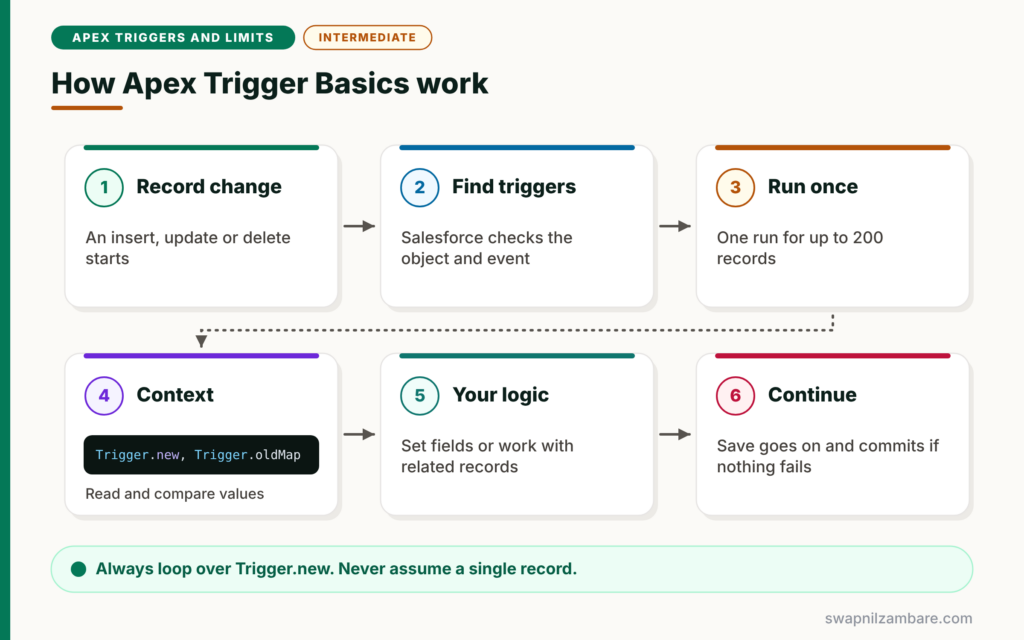
Apex Trigger Basics follow a fixed flow. First, a record change starts, such as an insert of 200 enrolments. Next, Salesforce checks which triggers listen to that event on that object. Then it runs the trigger once for the batch, with all the records in Trigger.new. After that, your code reads and changes values through the context variables. Finally, Salesforce continues the save and commits the data if nothing fails.
Trigger Syntax
A trigger starts with the keyword trigger, its name, the object and a list of events. For example, trigger EnrolmentTrigger on Enrolment__c (before insert, after insert).
The Seven Trigger Events
Triggers can run before insert, before update, before delete, after insert, after update, after delete and after undelete. There is no before undelete event.
Context Variables
Context variables give the trigger information about the records and the event. The most used are Trigger.new, Trigger.old, Trigger.newMap and Trigger.oldMap.
Event Flags
Boolean flags such as Trigger.isInsert, Trigger.isUpdate, Trigger.isBefore and Trigger.isAfter tell the code which event is running. Trigger.operationType gives the same answer as one enum value, such as BEFORE_INSERT.
addError
Calling addError on a record in Trigger.new blocks the save for that record and shows your message to the user. It works much like a validation rule.
Trigger Context Variables at a Glance
The table below lists the context variables and when they are available.
| Variable | What it holds | Available in |
|---|---|---|
| Trigger.new | List of new record versions | Insert, update, undelete |
| Trigger.old | List of old record versions | Update, delete |
| Trigger.newMap | Map of Id to new record | Before update, after insert, update, undelete |
| Trigger.oldMap | Map of Id to old record | Update, delete |
| Trigger.isBefore and isAfter | Timing of the event | All events |
| Trigger.isInsert, isUpdate, isDelete, isUndelete | Type of event | All events |
| Trigger.size | Number of records in this run | All events |
| Trigger.operationType | Enum such as AFTER_UPDATE | All events |
Trigger.new vs Trigger.old
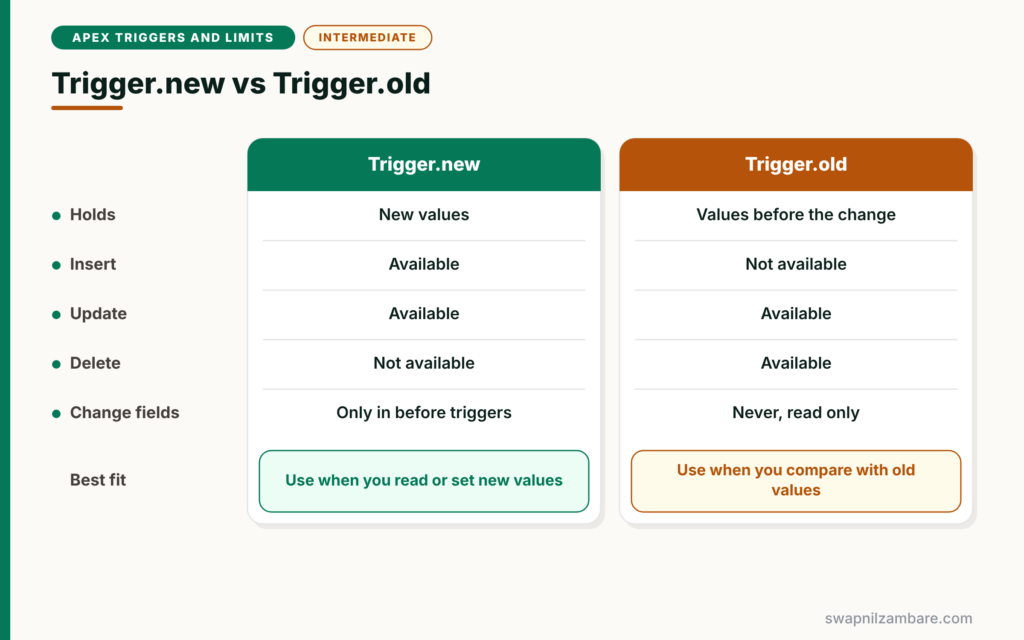
The table below compares the two most important context variables.
| Feature | Trigger.new | Trigger.old |
|---|---|---|
| Holds | New values | Values before the change |
| Insert | Available | Not available |
| Update | Available | Available |
| Delete | Not available | Available |
| Can change fields | Only in before triggers | Never, read only |
When to use which is simple. Use Trigger.new to read or set the values being saved. Use Trigger.old or Trigger.oldMap to compare with the previous values.
A Real Apex Trigger Basics Example
Let’s write a first trigger for Bright Path Tutors. It copies the course fee into each new enrolment and blocks deleting a course that has active enrolments.
Step 1: Enrolment Trigger
Open the Developer Console and choose File > New > Apex Trigger. Name it EnrolmentTrigger and pick Enrolment__c.
trigger EnrolmentTrigger on Enrolment__c (before insert) {

    // Collect course Ids from the new enrolments
    Set<Id> courseIds = new Set<Id>();
    for (Enrolment__c e : Trigger.new) {
        if (e.Course__c != null) {
            courseIds.add(e.Course__c);
        }
    }

    // One query for all courses
    Map<Id, Course__c> courses = new Map<Id, Course__c>(
        [SELECT Id, Fee__c FROM Course__c WHERE Id IN :courseIds]
    );

    // Set Amount Due before the record is saved
    for (Enrolment__c e : Trigger.new) {
        Course__c c = courses.get(e.Course__c);
        if (c != null) {
            e.Amount_Due__c = c.Fee__c;
        }
    }
}
The trigger runs before insert, so we can set fields on Trigger.new directly. No update statement is needed, because Salesforce saves these values with the record. The set and map pattern keeps it to one query for any number of enrolments.
Step 2: Course Delete Trigger
trigger CourseTrigger on Course__c (before delete) {

    // Find courses in this delete that still have active enrolments
    Set<Id> busyCourses = new Set<Id>();
    for (AggregateResult ar : [
            SELECT Course__c courseId FROM Enrolment__c
            WHERE Course__c IN :Trigger.oldMap.keySet() AND Status__c = 'Active'
            GROUP BY Course__c]) {
        busyCourses.add((Id) ar.get('courseId'));
    }

    for (Course__c c : Trigger.old) {
        if (busyCourses.contains(c.Id)) {
            c.addError('This course has active enrolments and cannot be deleted.');
        }
    }
}
In a delete trigger, Trigger.new is not available, so we use Trigger.old and Trigger.oldMap. The aggregate query finds courses that still have active enrolments. Then addError blocks only those courses, while the rest delete normally.
Step 3: Test It
Run this in Execute Anonymous to see the delete rule work.
Course__c c = [SELECT Id FROM Course__c WHERE Name = 'Apex Basics' LIMIT 1];
try {
    delete c;
} catch (DmlException ex) {
    System.debug('Blocked: ' + ex.getDmlMessage(0));
}
Here is the expected debug output.
USER_DEBUG [5]|DEBUG|Blocked: This course has active enrolments and cannot be deleted.Detecting Changed Fields
A key part of Apex Trigger Basics is acting only when a field changes. Compare the new value with the old one from Trigger.oldMap.
for (Course__c c : Trigger.new) {
    Course__c oldC = Trigger.oldMap.get(c.Id);
    if (c.Fee__c != oldC.Fee__c) {
        System.debug(c.Name + ' fee changed from ' + oldC.Fee__c + ' to ' + c.Fee__c);
    }
}
This check stops your logic from running on every save. As a result, triggers stay faster and avoid needless updates.
Common Mistakes with Apex Trigger Basics
- Using Trigger.new in a delete trigger, where it is null.
- Running update DML on Trigger.new records in a before trigger.
- Changing fields on Trigger.new in an after trigger, which throws an error.
- Writing logic for one record, such as Trigger.new[0].
- Acting on every update instead of checking if the field changed.
Best Practices for Apex Trigger Basics
- Always loop over all records in Trigger.new or Trigger.old.
- Use before triggers to set fields on the same records.
- Use maps and one query per object.
- Compare with Trigger.oldMap before acting on updates.
- Keep logic out of the trigger body, as you will learn with the handler pattern.
Practice Task
Write a before update trigger on Course__c that blocks lowering the fee by more than 20%. Hint: compare c.Fee__c with Trigger.oldMap.get(c.Id).Fee__c and call addError.
Most Asked Interview Questions on Apex Trigger Basics
Trigger questions appear in every Apex interview. Here are the 21 questions asked most about Apex Trigger Basics, with short answers.
Basic Questions on Apex Trigger Basics
Q1: What is an Apex trigger?
It is Apex code that runs automatically before or after records are inserted, updated, deleted or undeleted.
Q2: Name the trigger events.
Before insert, before update, before delete, after insert, after update, after delete and after undelete.
Q3: Is there a before undelete event?
No. Undelete only has an after event.
Q4: What is Trigger.new?
It is a list of the new versions of the records in the trigger.
Q5: What is Trigger.oldMap?
It is a map of record Id to the old version of each record. It is available in update and delete triggers.
Q6: What does Trigger.operationType return?
An enum value such as BEFORE_INSERT or AFTER_UPDATE, which tells you the exact event.
Q7: How many records can a trigger receive at once?
Up to 200 records per run. Larger saves are split into chunks of 200.
Code and Scenario Questions on Apex Trigger Basics
Q8: Is Trigger.new available in a delete trigger?
No. Use Trigger.old or Trigger.oldMap instead.
Q9: Is Trigger.old available in an insert trigger?
No, because the records did not exist before.
Q10: How do you set a field on the same record in a trigger?
Use a before trigger and assign the value on Trigger.new. No DML is needed.
Q11: Can you change Trigger.new values in an after trigger?
No. They are read only, so you would need a separate DML on new record instances.
Q12: How do you check if a field changed?
Compare the value in Trigger.new with the value from Trigger.oldMap for the same Id.
Q13: How do you show an error to the user from a trigger?
Call addError on the record, such as record.addError(‘message’).
Q14: Is Trigger.newMap available in before insert?
No, because new records do not have Ids yet in before insert.
Advanced Questions on Apex Trigger Basics
Q15: What is Trigger.isExecuting?
It returns true when the current code runs inside a trigger, which helps shared classes know their context.
Q16: Do triggers run for Data Loader and API saves?
Yes. Triggers run for every source, including the UI, Data Loader, the API and flows.
Q17: Can you control the order of two triggers on the same object?
No. Salesforce does not guarantee their order. So keep one trigger per object.
Q18: Do triggers run for mass deletes and merges?
Yes. Mass delete runs delete triggers. A merge runs delete triggers for the losing records and update triggers for the winner.
Q19: Do triggers fire when fields change through a formula?
No. Formula fields calculate on read, so they do not save a change or fire a trigger.
Q20: Why should a trigger not use Trigger.new[0]?
Because the trigger can receive up to 200 records. Using only the first one skips the rest.
Q21: What is the difference between addError and throwing an exception?
addError blocks only the records it marks and shows a clean message. An unhandled exception fails the whole transaction.
Official Resources
- Triggers (Apex Developer Guide)
- Trigger Context Variables (Apex Developer Guide)
- Trailhead: Apex Triggers
Quick Recap
- Apex Trigger Basics cover syntax, seven events and context variables.
- Trigger.new holds new values, and Trigger.old holds previous ones.
- Before triggers can set fields on the same records without DML.
- addError blocks a save with a clear message.
- Always handle all records, up to 200 at a time.
What’s Next?
Before and after triggers suit different jobs. Next, read our guide to before vs after triggers in Apex.


