Before vs After Triggers is one of the first design choices in every trigger you write. A before trigger runs before Salesforce saves the record, so it is perfect for changing or checking the record’s own fields. An after trigger runs once Salesforce saves the record, so it is right for working with other records that need its Id.
In this post, you will learn exactly what each timing can and cannot do, see the same business rule built both ways, and learn a simple rule for picking the right one. It builds on Apex Trigger Basics and DML operations in Apex. It also uses the Salesforce order of execution to explain when each trigger runs.
What are Before vs After Triggers?
A before trigger runs before Salesforce writes the record to the database. At that moment, you can still change the values in Trigger.new, and Salesforce saves your changes with no extra DML. An after trigger runs after Salesforce saves the record but before the transaction commits. At that point, the record has its Id and system fields, but Trigger.new is read only.
Think of posting a parcel. Before you seal the box, you can still add or remove items, which is a before trigger. Once you seal the box and the courier adds a tracking number, you can only use that number to tell other people about it, which is an after trigger.
Why Before vs After Triggers Matter
With Before vs After Triggers, picking the wrong timing causes errors, extra DML and slower saves. Here is why Before vs After Triggers matter at Bright Path Tutors.
- First, setting Amount Due on a new enrolment belongs in before insert.
- Also, creating a welcome task for a new enrolment needs its Id, so it belongs in after insert.
- Next, blocking a fee drop larger than 20% belongs in before update.
- Updating the parent course’s seat count belongs in after insert and after delete.
- Finally, the wrong choice can mean an extra update that runs triggers again.
So the right timing gives simpler, faster and safer code.
How Before vs After Triggers Work
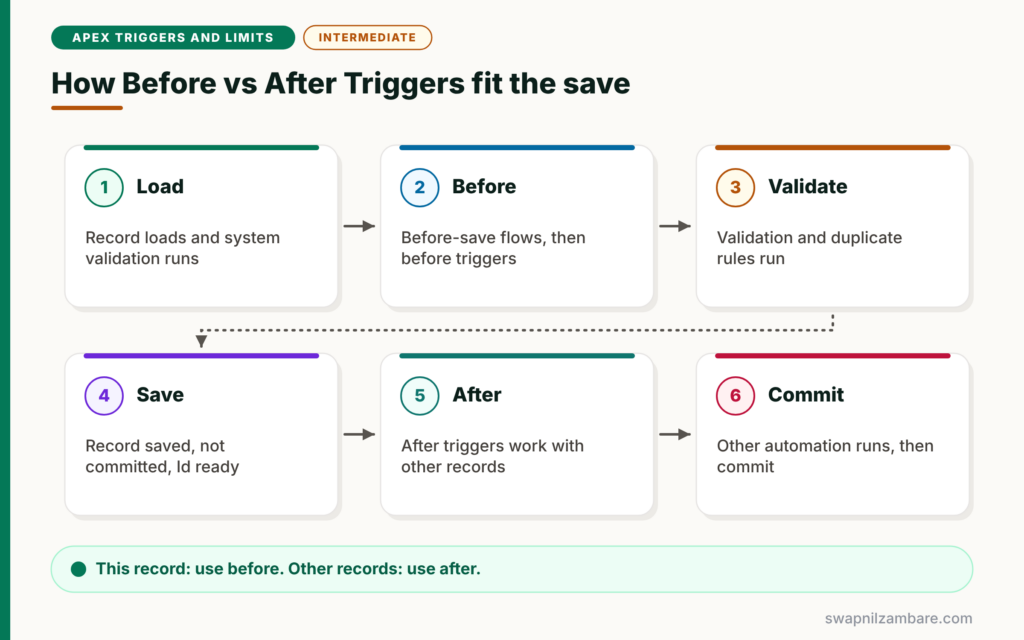
Before vs After Triggers sit at different points of the save. First, Salesforce loads the record and runs system validation. Next, before-save flows and before triggers run, and they can still change the record. Then Salesforce runs validation rules and duplicate rules, and saves the record to the database without committing. After that, after triggers run, with the record’s Id available. Finally, other automation runs and the transaction commits.
Before Triggers
Use before triggers to set or correct fields on the records in the save, and to validate them with addError. Changes go straight into the save with no DML.
After Triggers
Use after triggers to create or update other records, such as child records, parent totals or tasks. They also suit work that needs the record Id, CreatedDate or other system values.
Ids and System Fields
In before insert, new records have no Id yet. Then, in after insert, every record has its Id, so you can link related records to it.
Read-Only Records in After Triggers
By contrast, after triggers treat Trigger.new as read only. To change the same record, you would need a new DML statement, which runs the triggers again. So set your own fields in before triggers instead.
Before vs After Triggers at a Glance
The table below shows which jobs belong to each timing.
| Job | Before trigger | After trigger |
|---|---|---|
| Set fields on the same record | Yes, best choice | Needs extra DML, avoid |
| Validate with addError | Yes, best choice | Possible, but later |
| Use the new record Id | No Id in insert | Yes |
| Create child or related records | Possible but no Id in insert | Yes, best choice |
| Update parent records | Possible | Yes, best choice |
| Trigger.new editable | Yes | No, read only |
Before vs After Triggers Compared
The table below compares the two timings on key points.
| Feature | Before trigger | After trigger |
|---|---|---|
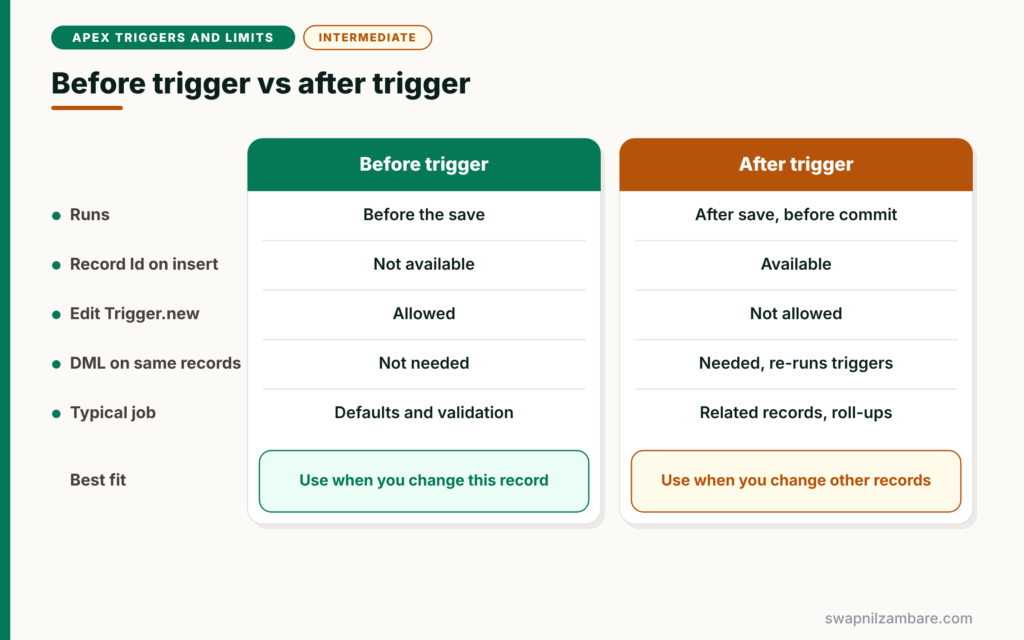
| Runs | Before the save | After the save, before commit |
| Record Id in insert | Not available | Available |
| Edit Trigger.new | Allowed | Not allowed |
| DML on the same records | Not needed | Needed, and re-runs triggers |
| Typical job | Defaults and validation | Related records and roll-ups |
When to use which comes down to one question: does the change affect this record or another record? Use before for this record. Use after for other records.
A Real Before vs After Triggers Example
Let’s build one Enrolment__c trigger at Bright Path Tutors that uses both timings. Before insert sets Amount Due. After insert creates a welcome task and updates the course’s booked seats.
Step 1: The Trigger
trigger EnrolmentTrigger on Enrolment__c (before insert, after insert) {

    if (Trigger.isBefore && Trigger.isInsert) {
        EnrolmentLogic.setAmountDue(Trigger.new);
    }

    if (Trigger.isAfter && Trigger.isInsert) {
        EnrolmentLogic.createWelcomeTasks(Trigger.new);
        EnrolmentLogic.updateSeatsBooked(Trigger.new);
    }
}
The trigger only decides which method runs for each timing. The real work sits in a class, which keeps the trigger short and easy to read.
Step 2: The Logic Class
public with sharing class EnrolmentLogic {

    // BEFORE: change the records being saved, no DML needed
    public static void setAmountDue(List<Enrolment__c> rows) {
        Set<Id> courseIds = new Set<Id>();
        for (Enrolment__c e : rows) { courseIds.add(e.Course__c); }
        Map<Id, Course__c> courses = new Map<Id, Course__c>(
            [SELECT Id, Fee__c FROM Course__c WHERE Id IN :courseIds]);
        for (Enrolment__c e : rows) {
            if (courses.containsKey(e.Course__c)) {
                e.Amount_Due__c = courses.get(e.Course__c).Fee__c;
            }
        }
    }

    // AFTER: records now have Ids, so link new tasks to them
    public static void createWelcomeTasks(List<Enrolment__c> rows) {
        List<Task> tasks = new List<Task>();
        for (Enrolment__c e : rows) {
            tasks.add(new Task(WhatId = e.Id, Subject = 'Send welcome kit',
                               ActivityDate = Date.today().addDays(2)));
        }
        insert tasks;
    }

    // AFTER: update parent courses with a fresh count
    public static void updateSeatsBooked(List<Enrolment__c> rows) {
        Set<Id> courseIds = new Set<Id>();
        for (Enrolment__c e : rows) { courseIds.add(e.Course__c); }
        List<Course__c> toUpdate = new List<Course__c>();
        for (AggregateResult ar : [SELECT Course__c cId, COUNT(Id) n FROM Enrolment__c
                                   WHERE Course__c IN :courseIds GROUP BY Course__c]) {
            toUpdate.add(new Course__c(Id = (Id) ar.get('cId'),
                                       Seats_Booked__c = (Integer) ar.get('n')));
        }
        update toUpdate;
    }
}
setAmountDue changes the enrolments directly, with no DML, because it runs before the save. createWelcomeTasks needs each enrolment Id for WhatId, so it must run after insert. updateSeatsBooked changes other records, the parent courses, so it also belongs in after insert.
Step 3: Read the Output
After inserting three enrolments, a quick check in Execute Anonymous shows results like these.
USER_DEBUG [3]|DEBUG|Amount Due set: 4500
USER_DEBUG [8]|DEBUG|Welcome tasks created: 3
USER_DEBUG [9]|DEBUG|Apex Basics seats booked: 21
Before vs After Triggers for Validation
With Before vs After Triggers, you can validate in both timings, but before triggers are usually better. They stop bad data early, before other automation runs. Use after triggers for validation only when the rule needs data that exists after the save, such as checking a total across all child records.
Common Mistakes with Before vs After Triggers
- Running update on Trigger.new inside an after trigger to change a field.
- Trying to use record Ids in before insert.
- Creating child records in before insert, where the parent has no Id.
- Putting parent updates in before triggers, so they run before the save is valid.
- Forgetting after delete and after undelete when keeping totals correct.
Best Practices for Before vs After Triggers
- Set and validate this record’s fields in before triggers.
- Create or update other records in after triggers.
- Keep totals right across insert, update, delete and undelete.
- Keep trigger bodies short and move logic into classes.
- Ask one question every time: this record or another record?
Practice Task
Add an after delete branch that recalculates Seats_Booked__c when enrolments are deleted. Hint: use Trigger.old to collect the course Ids, then reuse updateSeatsBooked.
Most Asked Interview Questions on Before vs After Triggers
Interviewers love Before vs After Triggers because the topic shows whether you understand the save process. Here are the 21 questions asked most about Before vs After Triggers.
Basic Questions on Before vs After Triggers
Q1: What is the difference between before and after triggers?
Before triggers run before Salesforce saves the record and can change its fields. After triggers run after the save and can use its Id.
Q2: When would you use a before trigger?
To set default values, correct data or validate fields on the same records.
Q3: When would you use an after trigger?
To create or update related records, or when you need the record Id or system fields.
Q4: Can you get the record Id in before insert?
No. New records get their Ids only after Salesforce saves them.
Q5: Is Trigger.new editable in after triggers?
No. It is read only in after triggers.
Q6: Do you need DML to change fields in a before trigger?
No. Changes to Trigger.new save automatically with the record.
Q7: Which events have only an after version?
Undelete. There is only an after undelete event.
Code and Scenario Questions on Before vs After Triggers
Q8: Where should you create a task for a new record?
In after insert, because the task needs the record Id for WhatId.
Q9: Where should you update a parent roll-up value?
In after triggers on the child, so the child record is already saved.
Q10: What happens if you update the same record in its after trigger?
It runs a new DML, which fires the triggers again and can cause recursion.
Q11: Where should a fee validation rule in Apex go?
In a before trigger, using addError, so bad data stops early.
Q12: Can before triggers do DML on other objects?
Yes, but after triggers are usually better for other records, because the current save is already valid by then.
Q13: How do you keep a parent count correct?
Recalculate it in after insert, after update, after delete and after undelete.
Q14: Which context variables help in after update?
Trigger.newMap and Trigger.oldMap, which let you compare values and use Ids.
Advanced Questions on Before vs After Triggers
Q15: When do before triggers run compared with validation rules?
Before triggers run first. So validation rules check the values your before trigger set.
Q16: Do after triggers see field values set by workflow?
Only in a later run. A workflow field update runs before and after update triggers one more time.
Q17: Can an after trigger roll back the save?
Yes. An unhandled exception or addError in an after trigger rolls back the transaction or the marked records.
Q18: Why are before triggers faster for field updates?
They need no extra DML. After triggers would need another update, which runs triggers and automation again.
Q19: Where do before-save flows run compared with before triggers?
Before-save flows run first, then before triggers.
Q20: Can you see formula field values in a before trigger?
Not reliably. Formula fields on Trigger.new are not recalculated during a before trigger. If you need fresh values, call Formula.recalculateFormulas on the records.
Q21: How do you choose between before and after quickly?
Ask if the change is to this record or another record. This record means before, another record means after.
Official Resources
Quick Recap
- Before vs After Triggers depends on which record you change.
- Before triggers set and validate this record with no DML.
- After triggers use Ids and change other records.
- Trigger.new is read only in after triggers.
- Keep totals correct across insert, update, delete and undelete.
What’s Next?
Triggers must handle 200 records at once. Next, read our guide to Apex bulkification best practices.


