Apex Governor Limits are the rules that cap how much work one piece of Apex code can do in a single transaction. They limit queries, DML statements, CPU time, memory and more. Every Salesforce developer meets them in the first week, usually through a red error message.
In this post, you will learn why limits exist, the limits you will hit most, how to check usage with the Limits class, and how to write code that stays safely inside them. This starts Level 4 of our developer series. It builds on SOQL Basics, DML operations in Apex and the multi-tenant architecture post, which explains why limits are needed.
What are Apex Governor Limits?
Apex Governor Limits are hard limits that Salesforce enforces on every Apex transaction. A transaction is everything that runs from one start event, such as a button click or a record save, until the work finishes. If code goes over a limit, Salesforce stops it with a LimitException and rolls back the whole transaction.
Think of an apartment building with one shared water tank. Each flat gets a fair daily share, so one family cannot empty the tank for everyone. Salesforce servers are that shared tank, and governor limits are each tenant’s fair share.
Why Apex Governor Limits Matter
Salesforce runs many customers on the same servers, which we call multi-tenancy. Apex Governor Limits stop one org’s slow code from hurting everyone else. Here is why Apex Governor Limits matter at Bright Path Tutors.
- First, a data load of 200 enrolments runs every trigger with 200 records at once.
- Also, a query inside a loop works with 5 records but fails with 200.
- Next, a large report job can run out of memory without warning.
- An integration that calls outside systems must respect callout limits.
- Finally, a LimitException cannot be caught, so the whole save fails.
So code that ignores limits works in testing and breaks in production.
How Apex Governor Limits Work
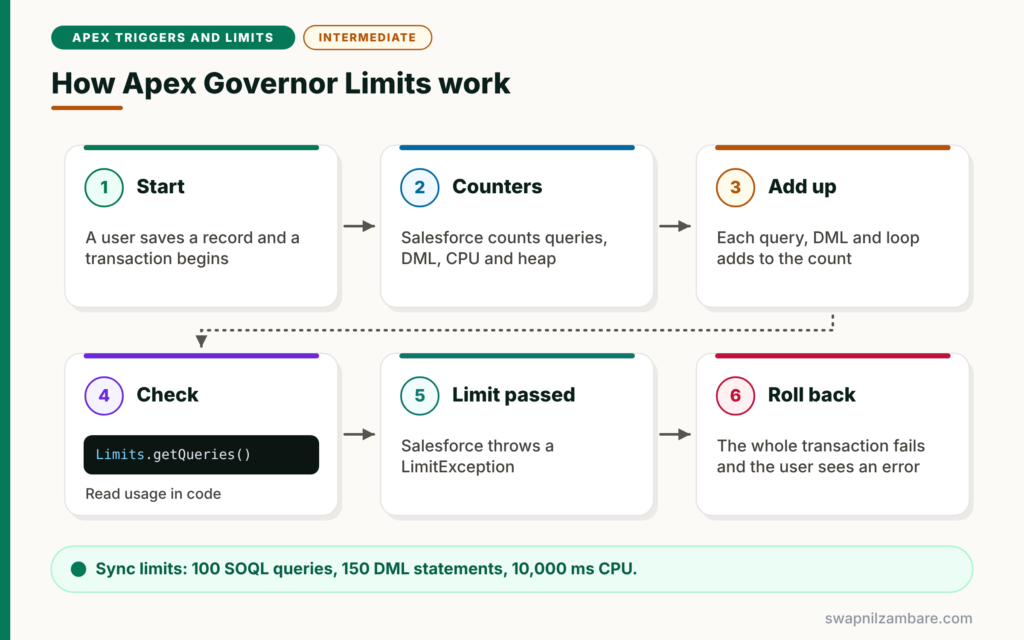
Apex Governor Limits work per transaction. First, a transaction starts, for example when a user saves a record. Next, Salesforce starts counters for queries, DML, CPU time and other resources. Then each query, DML statement and loop adds to those counters. After that, if any counter passes its limit, Salesforce throws a LimitException. Finally, the whole transaction rolls back, and the user sees an error.
Per-Transaction Limits
Most limits apply to one transaction, such as 100 SOQL queries in synchronous code. They reset when the next transaction starts.
Synchronous vs Asynchronous Limits
Asynchronous Apex, such as Batch Apex and Queueable jobs, gets higher limits for some resources. For example, it gets 200 SOQL queries instead of 100 and more heap memory.
Per-Org Limits
Some limits apply to the whole org over 24 hours, such as the number of asynchronous Apex executions. These matter for large orgs with many background jobs.
The Limits Class
The Limits class tells you how much of each resource your code has used so far. For example, Limits.getQueries() returns the queries used, and Limits.getLimitQueries() returns the maximum.
The Most Common Apex Governor Limits
The table below lists the per-transaction limits developers hit most often.
| Resource | Synchronous limit | Asynchronous limit |
|---|---|---|
| SOQL queries | 100 | 200 |
| Records returned by SOQL | 50,000 | 50,000 |
| DML statements | 150 | 150 |
| Records processed by DML | 10,000 | 10,000 |
| SOSL searches | 20 | 20 |
| CPU time | 10,000 ms | 60,000 ms |
| Heap size | 6 MB | 12 MB |
| Callouts | 100 | 100 |
Unsafe Code vs Limit-Safe Code
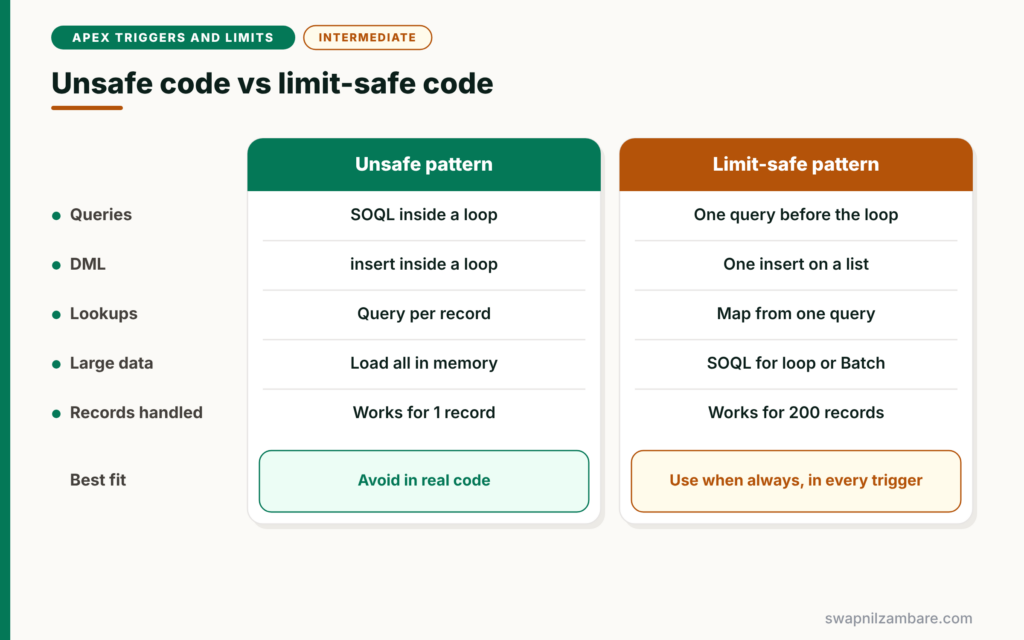
The table below compares code that hits limits with code that stays safe.
| Feature | Unsafe pattern | Limit-safe pattern |
|---|---|---|
| Queries | SOQL inside a loop | One query before the loop |
| DML | insert inside a loop | One insert on a list |
| Lookups | Query per record | Map built from one query |
| Large data | Load everything in memory | SOQL for loop or Batch Apex |
| Records handled | Works for 1 record | Works for 200 records |
When to use which is simple. Always write the limit-safe version, because triggers can receive up to 200 records at a time.
A Real Apex Governor Limits Example
Let’s fix a real problem with Apex Governor Limits at Bright Path Tutors. A trigger on Enrolment__c needs each course’s fee. The first version queries inside a loop.
Step 1: The Code That Breaks
// BAD: one query per enrolment
for (Enrolment__c e : Trigger.new) {
    Course__c c = [SELECT Fee__c FROM Course__c WHERE Id = :e.Course__c];
    e.Amount_Due__c = c.Fee__c;
}
With 5 enrolments, this runs 5 queries. However, a Data Loader batch of 200 enrolments needs 200 queries. That passes the limit of 100, so the whole load fails with “Too many SOQL queries: 101”.
Step 2: The Limit-Safe Version
// GOOD: one query for all enrolments
Set<Id> courseIds = new Set<Id>();
for (Enrolment__c e : Trigger.new) {
    courseIds.add(e.Course__c);
}

Map<Id, Course__c> courses = new Map<Id, Course__c>(
    [SELECT Id, Fee__c FROM Course__c WHERE Id IN :courseIds]
);

for (Enrolment__c e : Trigger.new) {
    Course__c c = courses.get(e.Course__c);
    if (c != null) {
        e.Amount_Due__c = c.Fee__c;
    }
}
First, we collect every course Id into a set. Next, one query loads all those courses into a map. Then the second loop reads each fee from the map, with no more queries. As a result, 200 enrolments use one query instead of 200.
Step 3: Check Usage with the Limits Class
System.debug('SOQL used: ' + Limits.getQueries() + ' / ' + Limits.getLimitQueries());
System.debug('DML used: ' + Limits.getDmlStatements() + ' / ' + Limits.getLimitDmlStatements());
System.debug('CPU used: ' + Limits.getCpuTime() + ' ms / ' + Limits.getLimitCpuTime() + ' ms');
System.debug('Heap used: ' + Limits.getHeapSize() + ' / ' + Limits.getLimitHeapSize());
Each pair shows the amount used and the maximum. Add these lines while testing to see how close your code gets to each limit.
Step 4: Read the Output
Here is an example of the debug log for the safe version with 200 enrolments.
USER_DEBUG [1]|DEBUG|SOQL used: 1 / 100
USER_DEBUG [2]|DEBUG|DML used: 0 / 150
USER_DEBUG [3]|DEBUG|CPU used: 38 ms / 10000 ms
USER_DEBUG [4]|DEBUG|Heap used: 51234 / 6000000
Apex Governor Limits in the Debug Log
The debug log also prints a summary of Apex Governor Limits usage at the end of each transaction. Look for the section called “LIMIT_USAGE_FOR_NS”. It lists every limit with the amount used, which helps you find the most expensive part of your code.
CPU Time and Heap Size
CPU time counts the time your Apex code and some automation spend running, not time waiting for the database. Long nested loops are the usual cause of CPU limit errors. Heap size is the memory your variables use. Large lists and big strings fill the heap, so use SOQL for loops and clear lists you no longer need.
Common Mistakes with Apex Governor Limits
- Writing SOQL or DML inside loops.
- Testing with one record instead of 200.
- Trying to catch a LimitException, which is not possible.
- Building large strings or lists in memory without need.
- Using nested loops over two big lists instead of a map.
Best Practices for Apex Governor Limits
- Query once and use maps for lookups.
- Use one DML statement per object per transaction where possible.
- Test every trigger with 200 records.
- Move heavy work to Batch Apex or Queueable jobs.
- Check the Limits class and debug log summary during testing.
Practice Task
Write a trigger-style loop that sets each enrolment’s Course Name field from its parent course, using one query. Then check Limits.getQueries() after running it with 200 test records. Hint: reuse the set and map pattern from Step 2.
Most Asked Interview Questions on Apex Governor Limits
Apex Governor Limits come up in every Salesforce developer interview, at every level. Here are the 21 questions asked most, with short answers.
Basic Questions on Apex Governor Limits
Q1: What are governor limits?
They are limits Salesforce enforces on each Apex transaction, such as the number of queries and DML statements.
Q2: Why does Salesforce have governor limits?
Because many customers share the same servers. So limits stop one org’s code from slowing down everyone else.
Q3: What is a transaction in Apex?
It is all the work that runs from one starting event, such as a record save, until it finishes.
Q4: How many SOQL queries can a synchronous transaction run?
100 queries. Asynchronous Apex gets 200.
Q5: How many DML statements are allowed?
150 DML statements per transaction.
Q6: How many records can DML process in one transaction?
10,000 records in total.
Q7: What is the CPU time limit?
10,000 milliseconds for synchronous Apex and 60,000 milliseconds for asynchronous Apex.
Code and Scenario Questions on Apex Governor Limits
Q8: What error do you get when you run too many queries?
System.LimitException: Too many SOQL queries: 101.
Q9: Can you catch a LimitException?
No. It cannot be caught, so the transaction fails and rolls back.
Q10: How do you avoid the SOQL limit in triggers?
Collect Ids in a set, run one query outside the loop and store the results in a map.
Q11: How do you check how many queries your code used?
Use Limits.getQueries() and compare it with Limits.getLimitQueries().
Q12: What is the heap size limit?
6 MB for synchronous Apex and 12 MB for asynchronous Apex.
Q13: How many records can SOQL return in one transaction?
50,000 records across all queries.
Q14: Why test triggers with 200 records?
Because Data Loader and the API send up to 200 records to a trigger at once. So that is the real-world worst case.
Advanced Questions on Apex Governor Limits
Q15: How does asynchronous Apex help with limits?
It runs in a separate transaction with higher limits for queries, CPU and heap.
Q16: What usually causes CPU time limit errors?
Nested loops over large lists, complex calculations and too much automation on one save.
Q17: How do you reduce heap usage?
Use SOQL for loops, select only needed fields and clear large collections when you are done.
Q18: Do managed packages share your limits?
Certified managed packages get their own limits for many resources, but some limits, such as CPU time, are shared across the transaction.
Q19: What is the callout limit?
100 callouts per transaction, with a total timeout of 120 seconds.
Q20: Where can you see limit usage after a transaction?
In the debug log, in the limit usage summary at the end of the transaction.
Q21: How would you process 1 million records?
Use Batch Apex, which splits the work into many small transactions, each with its own limits.
Official Resources
Quick Recap
- Apex Governor Limits cap queries, DML, CPU, heap and more per transaction.
- The key numbers are 100 queries, 150 DML statements and 10,000 DML rows.
- A LimitException cannot be caught and rolls back everything.
- Query once, use maps and run one DML per list.
- Use async Apex and Batch Apex for heavy work.
What’s Next?
Triggers are where limits matter most. Next, read our guide to Apex Trigger Basics and context variables.


