Apex Assert Methods are the checks inside a test that decide whether it passes or fails. Without them, a test only proves that code ran, not that it gave the right answer. With clear asserts, a failing test tells you exactly what went wrong and where.
In this post, you will learn every method of the Assert class, how it compares with the older System.assert methods, and how to write assert messages that save debugging time. It builds on Apex test class basics, the Apex Test Data Factory and Apex exception handling.
What are Apex Assert Methods?
Apex Assert Methods compare what your code did with what you expected. If the two match, the test continues. If not, the test stops at once and reports a failure with your message.
Think of a teacher marking an exam with an answer key. For each question, the teacher compares the student’s answer with the key. One wrong answer gets a red mark and a short note. An assert is that red mark, and your message is the note.
Why Apex Assert Methods Matter
Coverage alone is easy to fake. Here is why Apex Assert Methods matter at Bright Path Tutors.
- First, a fee bug can pass every test if no test checks the fee.
- Also, a clear message such as “Fee should drop by 10%” points straight at the problem.
- Next, asserts on record counts prove that bulk code handled all 200 records.
- Some checks confirm that the right error was thrown for bad input.
- Finally, reviewers read asserts to understand what the code should do.
So meaningful asserts turn coverage into real confidence.
How Apex Assert Methods Work
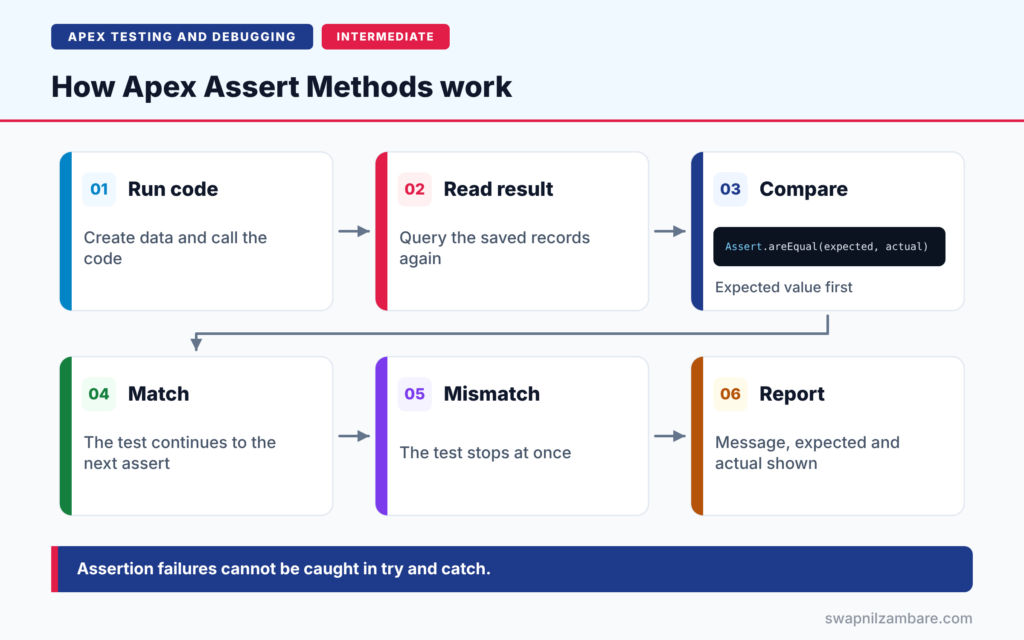
Apex Assert Methods follow a simple flow in each test. First, the test creates data and calls your code. Next, it reads the result, often by querying the records again. Then an assert compares the actual value with the expected value. After that, a match lets the test continue to the next assert. Finally, a mismatch stops the test, and Salesforce shows the failure with your message, the expected value and the actual value.
Equality Checks
Assert.areEqual(expected, actual, message) passes when both values are equal. Assert.areNotEqual passes when they differ. Always put the expected value first.
True and False Checks
Assert.isTrue and Assert.isFalse check a Boolean condition, such as saved.Fee__c < 5000 or results.isEmpty().
Null Checks
Assert.isNull and Assert.isNotNull check whether a value exists. For example, a new enrolment Id should never be null.
Type Checks
Assert.isInstanceOfType(value, Type, message) checks the class of an object. It is handy for checking which exception your code threw.
Assert.fail
Assert.fail(message) always fails. You put it where the code should never reach, such as right after a call that must throw an exception.
The Assert Class Methods
The table below lists every method in the Assert class.
| Method | Passes when |
|---|---|
| areEqual(expected, actual, msg) | Both values are equal |
| areNotEqual(notExpected, actual, msg) | The values differ |
| isTrue(condition, msg) | The condition is true |
| isFalse(condition, msg) | The condition is false |
| isNull(value, msg) | The value is null |
| isNotNull(value, msg) | The value is not null |
| isInstanceOfType(value, type, msg) | The value is of that type |
| isNotInstanceOfType(value, type, msg) | The value is not of that type |
| fail(msg) | Never, it always fails |
Assert Class vs System.assert Methods
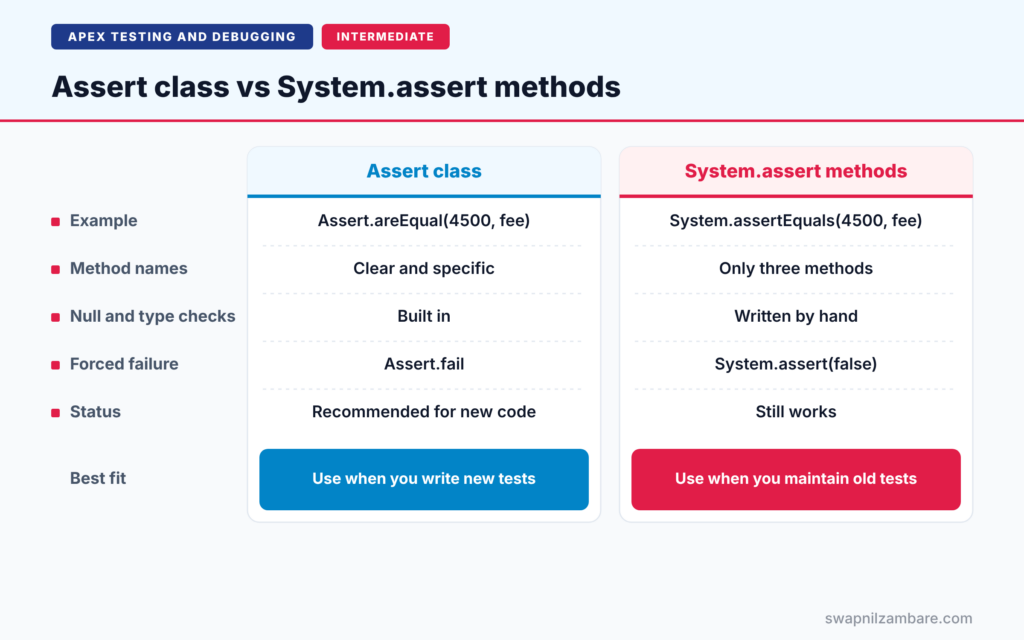
The table below compares the newer Assert class with the older System methods.
| Feature | Assert class | System.assert methods |
|---|---|---|
| Example | Assert.areEqual(4500, fee) | System.assertEquals(4500, fee) |
| Method names | Clear and specific | Only three methods |
| Null and type checks | Built in | Written by hand |
| Forced failure | Assert.fail | System.assert(false) |
| Status | Recommended for new code | Still works |
When to use which is easy. Use the Assert class in all new tests. You do not need to rewrite old tests, because System.assert still works.
A Real Apex Assert Methods Example
Let’s add strong Apex Assert Methods to tests for the enrolment service at Bright Path Tutors.
Step 1: Equality, Null and Count Checks
@isTest
static void enrolsStudentWithActiveStatus() {
    Course__c c = [SELECT Id FROM Course__c LIMIT 1];
    Contact s = [SELECT Id FROM Contact LIMIT 1];

    Id enrolmentId = EnrolmentService.enrol(c.Id, s.Id);

    Assert.isNotNull(enrolmentId, 'Enrolment Id should be returned');
    Enrolment__c e = [SELECT Status__c, Course__c FROM Enrolment__c
                      WHERE Id = :enrolmentId];
    Assert.areEqual('Active', e.Status__c, 'New enrolments should be Active');
    Assert.areEqual(c.Id, e.Course__c, 'Enrolment should link to the course');
}
The first assert checks that an Id came back. Then the test queries the saved record and checks two field values. Each assert has a message that explains the rule, not just the value.
Step 2: Exception and Type Checks
@isTest
static void throwsCourseFullException() {
    Course__c c = [SELECT Id FROM Course__c LIMIT 1];
    c.Seats_Booked__c = 30;
    update c;
    Contact s = [SELECT Id FROM Contact LIMIT 1];

    Exception caught;
    try {
        EnrolmentService.enrol(c.Id, s.Id);
    } catch (Exception e) {
        caught = e;
    }

    Assert.isNotNull(caught, 'An exception should be thrown for a full course');
    Assert.isInstanceOfType(caught, CourseFullException.class,
        'Wrong exception type');
    Assert.isTrue(caught.getMessage().contains('is full'),
        'Message should say the course is full');
}
This pattern stores the exception in a variable. Then three asserts check that an exception happened, that it was the right type, and that the message is clear. So the test fails with a precise message if any part breaks.
Step 3: Read a Failure
Suppose a bug stops the status from being set. Here is a simplified version of the failure you would see.
System.AssertException: Assertion Failed: New enrolments should be Active:
Expected: Active, Actual: null
The message names the rule, and the values show what went wrong. You know where to look without opening a debug log.
Apex Assert Methods in Bulk Tests
Bulk tests need two kinds of Apex Assert Methods. First, assert the total count, so you know no record was skipped. Then loop through the records and assert each important field. Here is a short version for 200 courses.
List<Course__c> saved = [SELECT Name, Fee__c FROM Course__c];
Assert.areEqual(200, saved.size(), 'All 200 courses should be saved');
for (Course__c c : saved) {
    Assert.areEqual(4500, c.Fee__c, 'Wrong fee on ' + c.Name);
}
The message includes the course name. So if one record fails, you see which one at once, instead of guessing.
Writing Good Assert Messages
A good message says what should be true, such as “Fee should drop by 10%”. A weak message such as “error” or “check failed” forces you to read the code. Also, keep one idea per assert, so each failure points to one problem.
Common Mistakes with Apex Assert Methods
- Swapping expected and actual in areEqual, which makes failures confusing.
- Writing tests with no asserts at all.
- Using Assert.isTrue(a == b) instead of areEqual, which hides the actual values.
- Forgetting Assert.fail after code that should throw an exception.
- Leaving out messages, so failures say only “Assertion Failed”.
Best Practices for Apex Assert Methods
- Use the Assert class for all new test code.
- Put the expected value first in areEqual and areNotEqual.
- Write messages that describe the business rule.
- Query records again after DML before asserting field values.
- Assert counts in bulk tests, such as 200 records updated.
Practice Task
Write a bulk test that inserts 200 courses, applies a 10% discount, and asserts that all 200 fees equal 4,500. Hint: query the courses, loop through them, and use Assert.areEqual inside the loop with a message that includes the course name.
Most Asked Interview Questions on Apex Assert Methods
Interviewers ask about asserts to check how you prove code works. Here are the 21 questions asked most about Apex Assert Methods.
Basic Questions on Apex Assert Methods
Q1: What is an assert in Apex?
It is a check in a test that compares an expected result with the actual result and fails the test if they differ.
Q2: Which class holds the newer assert methods?
The Assert class, with methods such as areEqual, isTrue, isNull and fail.
Q3: What is the order of parameters in Assert.areEqual?
Expected first, then actual, then an optional message.
Q4: What does Assert.fail do?
It always fails the test. Use it where the code should never reach.
Q5: Do old System.assertEquals tests still work?
Yes. The System methods still work, but the Assert class is recommended for new code.
Q6: Is the message parameter required?
No, but you should always add one, because it explains failures.
Q7: What happens when an assert fails?
The test stops at once and reports an AssertException with the message and values.
Code and Scenario Questions on Apex Assert Methods
Q8: Can you catch an assertion failure in try and catch?
No. Assertion failures cannot be caught, even though they are logged as exceptions.
Q9: How do you check that the right exception was thrown?
Store it in a variable in the catch block, then use Assert.isInstanceOfType and check its message.
Q10: Why prefer areEqual over isTrue(a == b)?
areEqual shows both the expected and actual values in the failure, so debugging is faster.
Q11: How do you assert on a field after an update?
Query the record again, then assert on the queried value.
Q12: How do you assert that a list is empty?
Use Assert.isTrue(rows.isEmpty(), message) or Assert.areEqual(0, rows.size(), message).
Q13: How do you assert in a bulk test?
Assert the record count, then loop and assert each important field.
Q14: How do you check a value is not null?
Use Assert.isNotNull(value, message).
Advanced Questions on Apex Assert Methods
Q15: Why put one idea in each assert?
So each failure points to one specific problem.
Q16: How do you assert Decimal values with many decimals?
Round them first with setScale, or assert that the difference is very small.
Q17: How do you test that no records were created?
Count the records before and after, then assert that the count did not change.
Q18: How do you assert error messages from addError?
Use Database methods with allOrNone set to false, then check the errors in each SaveResult.
Q19: Should every test method have an assert?
Yes. A test without an assert proves only that the code ran.
Q20: What is isNotInstanceOfType used for?
To confirm that an object is not of a specific type, such as checking a fallback path.
Q21: How do asserts help code reviewers?
They show the expected behaviour clearly, so reviewers understand the rules being tested.
Official Resources
Quick Recap
- Apex Assert Methods decide whether a test passes or fails.
- areEqual takes the expected value first, then the actual value.
- Use isInstanceOfType and Assert.fail to test exceptions.
- Assertion failures cannot be caught in try and catch.
- Clear messages make failures easy to understand.
What’s Next?
Triggers need special tests for bulk data and bad data. Next, read our guide to testing Apex triggers.


