Testing Apex Triggers means proving that your trigger works for one record, for 200 records, for bad data and for different users. A trigger runs on every save, so a hidden bug can block an entire data load. Good trigger tests catch those bugs before they reach production.
In this post, you will learn the four kinds of trigger tests, how to check addError messages, and how to test insert, update and delete events. We test the enrolment trigger from the Apex trigger handler pattern post. It also builds on Apex bulkification, Apex assert methods and the Apex Test Data Factory.
What is Testing Apex Triggers?
Testing Apex Triggers means writing test methods that perform DML on an object, which fires its trigger, and then checking the results. You never call a trigger directly. Instead, you insert, update, delete or undelete records, and Salesforce runs the trigger for you.
Think of testing a smoke alarm. You do not open it and read the wiring. You press the test button and listen for the beep. In the same way, the DML is the test button and your asserts listen for the right result.
Why Testing Apex Triggers Matters
Triggers touch every save, from every source. Here is why Testing Apex Triggers matters at Bright Path Tutors.
- First, a trigger that fails at 101 queries blocks a Data Loader import of 500 enrolments.
- Also, a validation in a trigger must block bad saves with a clear message.
- Next, delete and undelete events often get forgotten until seat counts go wrong.
- Some users have a bypass permission, so logic must run only for the right people.
- Finally, every trigger needs some coverage before you can deploy it.
So a full set of trigger tests protects every way data enters the org.
How Testing Apex Triggers Works
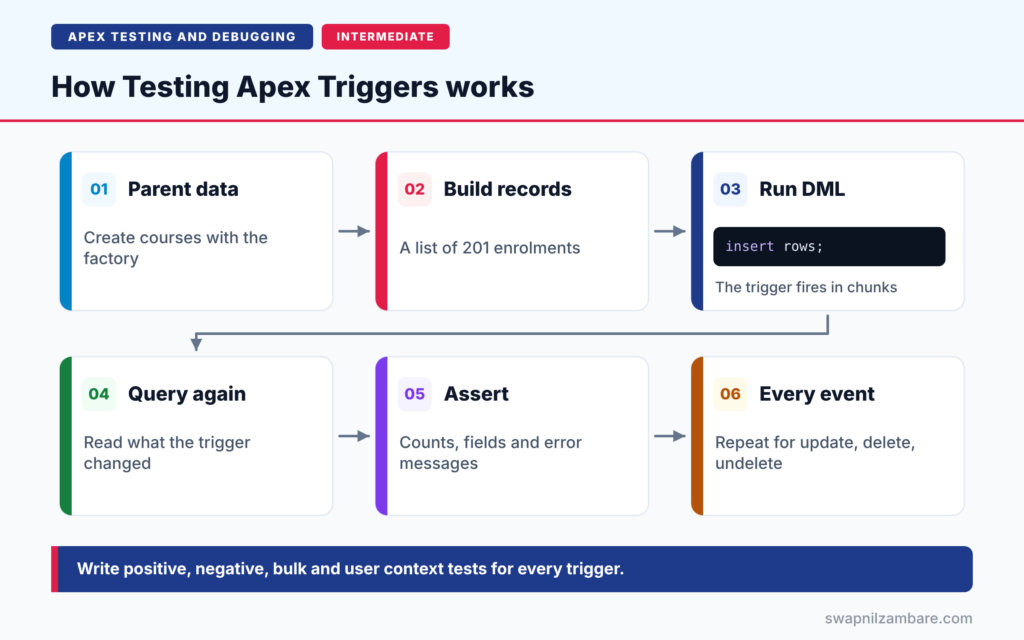
Testing Apex Triggers follows a steady pattern. First, create parent data, such as a course, with the test data factory. Next, build the records that will fire the trigger. Then run the DML statement on the whole list. After that, query the records again to read what the trigger changed. Finally, assert the results, including counts, field values and error messages.
Positive Tests
A positive test uses good data and checks that the trigger did its job. For example, a new enrolment gets Amount_Due__c copied from the course fee.
Bulk Tests
A bulk test saves 200 or more records in one DML statement. It proves that the trigger stays inside governor limits. Use 201 records when you want to cover two trigger chunks of 200.
Negative Tests
A negative test uses bad data and checks that the trigger blocks it. For example, cancelling a paid enrolment must fail with a clear message.
User and Permission Tests
System.runAs runs code as a specific test user. So you can check that a bypass permission or sharing rule changes the behaviour as expected.
Every Event
Test each event the trigger handles: insert, update, delete and undelete. Each one runs a different branch of the handler.
Trigger Test Checklist
The table below lists the tests a trigger usually needs.
| Test | DML used | What to assert |
|---|---|---|
| Single record | insert one record | Field set correctly |
| Bulk | insert 200 or 201 records | Every record set, no limit error |
| Negative | update with bad data | Error message returned |
| Update branch | update changed field | Logic runs only on change |
| Delete and undelete | delete, then undelete | Counts go down, then back up |
| User context | DML inside System.runAs | Bypass or access respected |
Positive Tests vs Negative Tests
The table below compares the two most important kinds of trigger tests.
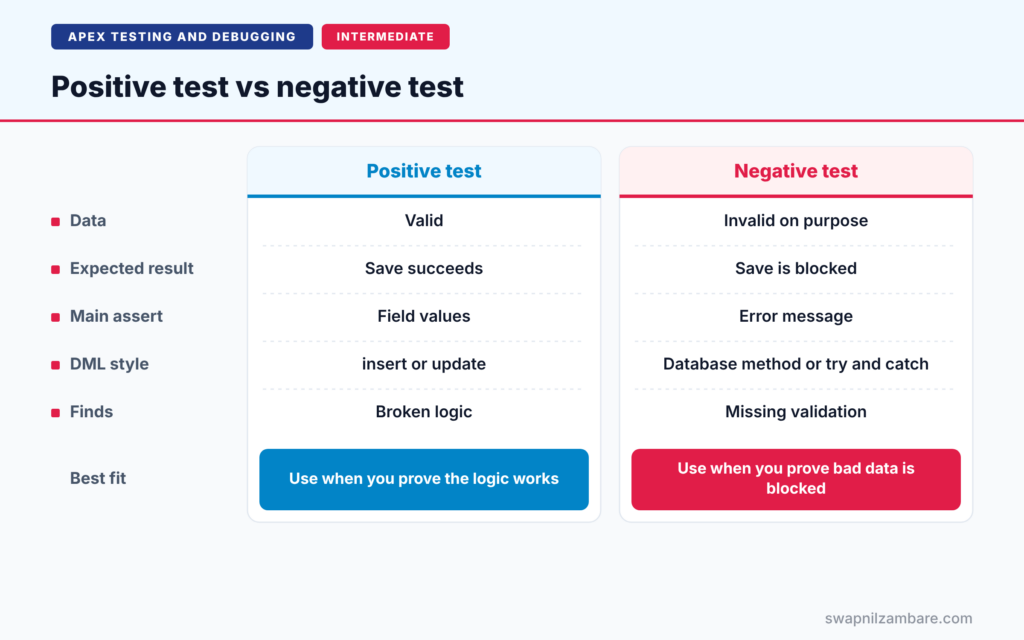
| Feature | Positive test | Negative test |
|---|---|---|
| Data | Valid | Invalid on purpose |
| Expected result | Save succeeds | Save is blocked |
| Main assert | Field values | Error message |
| DML style | insert or update | Database method or try and catch |
| Finds | Broken logic | Missing validation |
When to use which is easy. Write both for every rule. A trigger with only positive tests can let bad data in without anyone noticing.
A Real Testing Apex Triggers Example
Let’s put Testing Apex Triggers into practice for EnrolmentTrigger at Bright Path Tutors. The handler sets Amount_Due__c on insert, blocks cancelling a paid enrolment on update, and refreshes Seats_Booked__c after insert, delete and undelete.
Step 1: Positive and Bulk Test
@isTest
private class EnrolmentTriggerTest {

    @TestSetup
    static void setupData() {
        TestDataFactory.createCourses(1, true);
        TestDataFactory.createStudents(201, true);
    }

    @isTest
    static void setsAmountDueInBulk() {
        Course__c c = [SELECT Id, Fee__c FROM Course__c LIMIT 1];
        List<Enrolment__c> rows = new List<Enrolment__c>();
        for (Contact s : [SELECT Id FROM Contact]) {
            rows.add(new Enrolment__c(Course__c = c.Id, Student__c = s.Id,
                                      Status__c = 'Active'));
        }

        insert rows;

        List<Enrolment__c> saved = [SELECT Amount_Due__c FROM Enrolment__c];
        Assert.areEqual(201, saved.size(), 'All enrolments should save');
        for (Enrolment__c e : saved) {
            Assert.areEqual(c.Fee__c, e.Amount_Due__c, 'Amount due should match the fee');
        }
    }
}
The setup creates one course and 201 students. Then one insert fires the trigger in two chunks, 200 and 1. The asserts check the count and every Amount_Due__c value.
Step 2: Negative Test with addError
@isTest
static void blocksCancellingPaidEnrolment() {
    Course__c c = [SELECT Id FROM Course__c LIMIT 1];
    Contact s = [SELECT Id FROM Contact LIMIT 1];
    Enrolment__c e = new Enrolment__c(Course__c = c.Id, Student__c = s.Id,
                                      Status__c = 'Active', Is_Paid__c = true);
    insert e;

    e.Status__c = 'Cancelled';
    Database.SaveResult result = Database.update(e, false);

    Assert.isFalse(result.isSuccess(), 'Paid enrolment should not be cancelled');
    Assert.isTrue(result.getErrors()[0].getMessage().contains('must be refunded'),
        'Error should explain the refund rule');
}
Database.update with allOrNone set to false returns a SaveResult instead of throwing an exception. So the test can read the exact addError message and assert on it.
Step 3: Delete and Undelete Test
@isTest
static void refreshesSeatsOnDeleteAndUndelete() {
    Course__c c = [SELECT Id FROM Course__c LIMIT 1];
    Contact s = [SELECT Id FROM Contact LIMIT 1];
    Enrolment__c e = new Enrolment__c(Course__c = c.Id, Student__c = s.Id,
                                      Status__c = 'Active');
    insert e;

    delete e;
    Assert.areEqual(0, [SELECT Seats_Booked__c FROM Course__c].Seats_Booked__c,
        'Seat count should drop after delete');

    undelete e;
    Assert.areEqual(1, [SELECT Seats_Booked__c FROM Course__c].Seats_Booked__c,
        'Seat count should return after undelete');
}
This test covers two more trigger branches. It assumes refreshSeats sets Seats_Booked__c to the number of active enrolments on each course.
Step 4: Read the Results
Here is a simplified view of the test run.
EnrolmentTriggerTest.setsAmountDueInBulk                Pass
EnrolmentTriggerTest.blocksCancellingPaidEnrolment      Pass
EnrolmentTriggerTest.refreshesSeatsOnDeleteAndUndelete  Pass
Code coverage: EnrolmentTrigger 100%, EnrolmentTriggerHandler 93%
All three tests pass. The handler is not at 100%, because the bypass branch has no test yet. That gap is your practice task below.
Testing Apex Triggers with System.runAs
System.runAs runs a block of code as a test user. It also starts a new context for DML on setup objects, such as users and permission set assignments. So you can create a user, assign a permission set with the bypass permission, and check that the trigger skips its logic for that user.
Common Mistakes with Testing Apex Triggers
- Testing with only one record, which hides SOQL and DML inside loops.
- Skipping negative tests, so missing validations go unnoticed.
- Forgetting update, delete and undelete branches.
- Asserting on the in-memory list instead of querying saved records.
- Catching every exception and passing the test anyway.
Best Practices for Testing Apex Triggers
- Test every event and every branch the handler routes to.
- Use 200 or 201 records in at least one test per trigger.
- Check addError messages with Database methods and SaveResult.
- Use System.runAs for bypass and permission logic.
- Keep trigger logic in services, so you can also test services directly.
Practice Task
Write a test that creates a user, assigns a permission set that grants Bypass_Enrolment_Triggers, and inserts an enrolment inside System.runAs. Then assert that Amount_Due__c stays empty. Hint: insert the user and the PermissionSetAssignment inside a System.runAs block that runs as the current user.
Most Asked Interview Questions on Testing Apex Triggers
Trigger testing comes up in almost every developer interview. Here are the 21 questions asked most about Testing Apex Triggers.
Basic Questions on Testing Apex Triggers
Q1: How do you test a trigger?
Perform DML on the object in a test method, then query the records and assert the results.
Q2: Can you call a trigger directly?
No. Triggers run only when DML or another save fires them.
Q3: What is a bulk trigger test?
A test that saves 200 or more records in one DML statement to prove the trigger stays within limits.
Q4: What is a negative test?
A test that uses invalid data and checks that the save is blocked with the right error.
Q5: How much coverage does a trigger need to deploy?
Every trigger needs some coverage, and the org needs 75% overall.
Q6: Why query records again after DML?
Because the in-memory list may not show changes made by after triggers or other automation.
Q7: Which events should trigger tests cover?
Every event the trigger handles, such as insert, update, delete and undelete.
Code and Scenario Questions on Testing Apex Triggers
Q8: How do you check an addError message in a test?
Use a Database method with allOrNone set to false, then read the errors from the SaveResult.
Q9: Can you check addError with try and catch?
Yes. A normal DML statement throws a DmlException, and you can assert its getDmlMessage(0).
Q10: Why test with 201 records?
Trigger code runs in chunks of 200, so 201 records cover two chunks.
Q11: How do you test an update branch that runs only on change?
Update a record with and without changing the field, and assert that logic runs only on the change.
Q12: What does System.runAs do in trigger tests?
It runs DML as a specific user, so you can test permissions, bypasses and sharing.
Q13: How do you test delete and undelete logic?
Delete the record and assert, then undelete it and assert again.
Q14: How do you test a trigger that calls a future method?
Wrap the DML in Test.startTest and Test.stopTest, so the future method runs before your asserts.
Advanced Questions on Testing Apex Triggers
Q15: Why keep logic in a handler and services for testing?
You can test service methods directly with simple inputs, while trigger tests cover the wiring.
Q16: How do you test recursion protection?
Run a bulk update that causes re-entry, then assert each record was processed exactly once.
Q17: How do you test a trigger with a bypass custom permission?
Assign a permission set with the permission to a test user, then run DML inside System.runAs.
Q18: How do you avoid mixed DML errors in trigger tests?
Put DML on setup objects, such as users, inside System.runAs, separate from DML on normal records.
Q19: Should trigger tests check governor limits?
Bulk tests check them indirectly. You can also assert values from the Limits class.
Q20: How do you test partial success in a bulk save?
Use Database.insert with allOrNone set to false, mixing valid and invalid records, then assert each result.
Q21: What makes a complete trigger test class?
Positive, negative and bulk tests, every event, user context tests and meaningful asserts.
Official Resources
- Testing Apex Triggers (Trailhead)
- Using the runAs Method (Apex Developer Guide)
- Testing Best Practices (Apex Developer Guide)
Quick Recap
- Testing Apex Triggers means firing them with DML and asserting the results.
- Write positive, negative, bulk and user context tests.
- Use 201 records to cover two trigger chunks.
- Read addError messages from SaveResult or DmlException.
- Cover every event, including delete and undelete.
What’s Next?
Some triggers start future or Queueable jobs. Next, read our guide to testing async Apex with startTest and stopTest.


