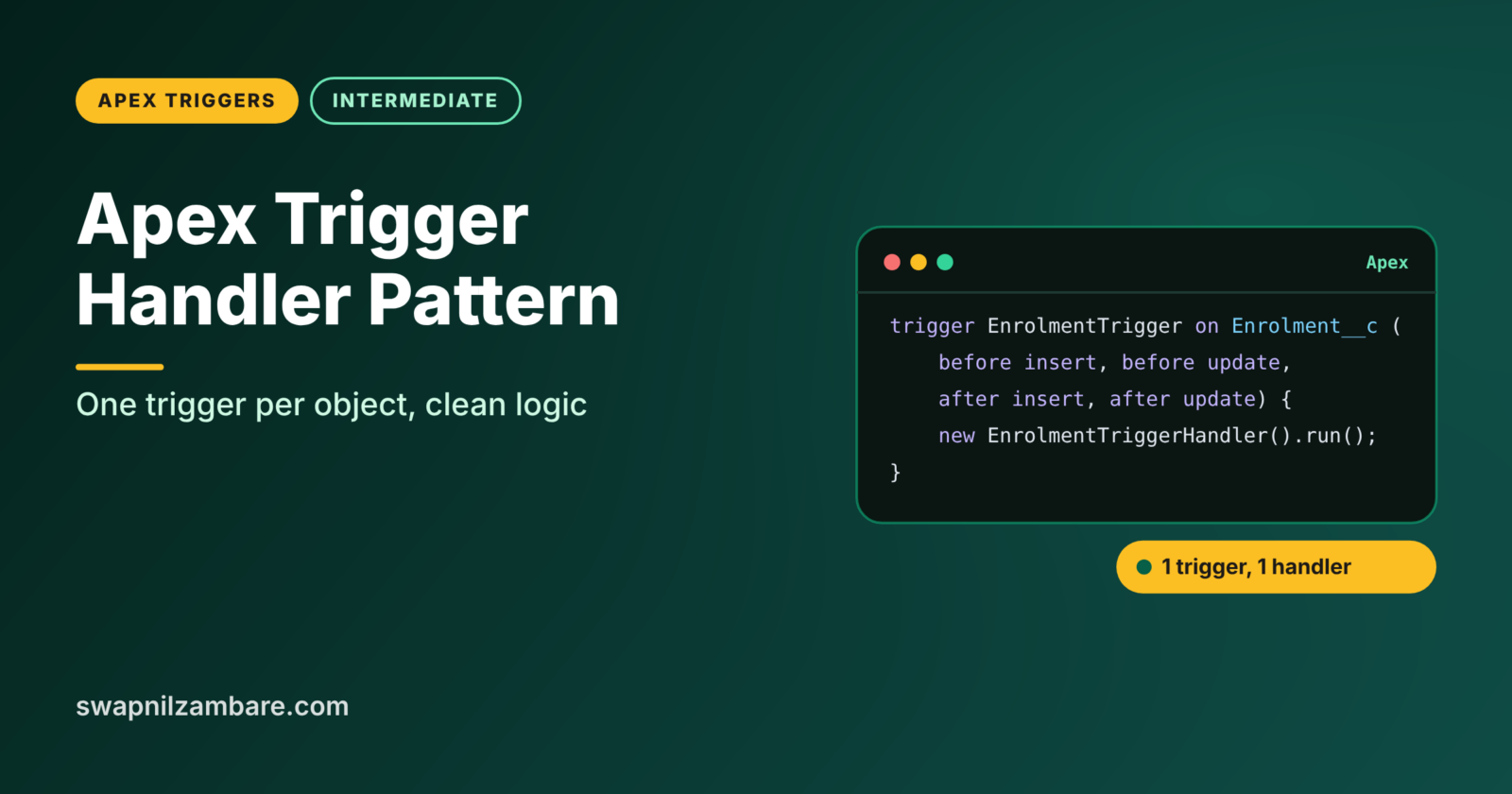
The Apex Trigger Handler Pattern keeps triggers tiny and moves all the real logic into a handler class. Each object gets one trigger, and that trigger simply passes control to its handler. This makes code easier to read, test, reuse and switch off when needed.
In this post, you will learn why the pattern exists, how its parts fit together, and how to build a clean handler with a bypass switch for Bright Path Tutors. It builds on Apex Trigger Basics, before vs after triggers and Apex bulkification. We will also reuse ideas from Apex classes and objects.
What is the Apex Trigger Handler Pattern?
The Apex Trigger Handler Pattern is a way of organising trigger code. The trigger itself contains almost no logic. Instead, it calls a handler class, which has one method for each trigger event, such as beforeInsert or afterUpdate. Those methods then call service classes that hold the business rules.
Think of a hotel reception desk. The receptionist does not cook, clean or fix the air conditioning. She takes each request and sends it to the right team. The trigger is the receptionist, and the handler and services are the teams.
Why the Apex Trigger Handler Pattern Matters
Without a pattern, triggers grow into hundreds of lines of mixed logic. Here is why the Apex Trigger Handler Pattern matters at Bright Path Tutors.
- First, three developers once wrote three triggers on Enrolment__c, and nobody knew which ran first.
- Also, logic inside triggers cannot be called from other code or tested on its own.
- Next, a data migration needs to switch off trigger logic for a few hours.
- New rules must be added without breaking old ones.
- Finally, reviewers want to see all the logic for an object in one place.
So the pattern brings order, testability and control.
How the Apex Trigger Handler Pattern Works
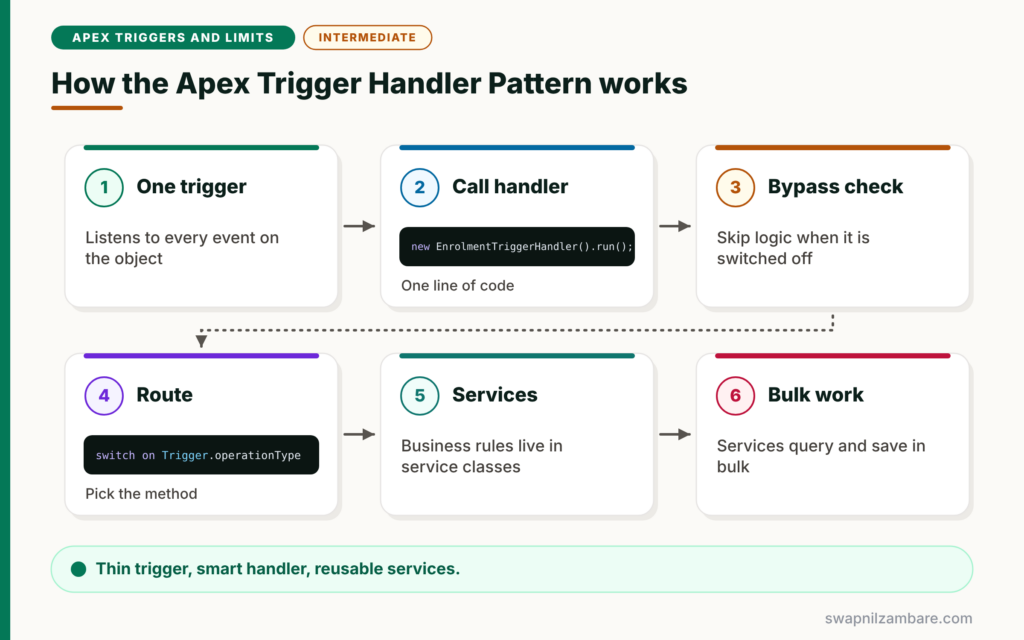
The Apex Trigger Handler Pattern has three layers. First, one trigger per object listens to all the events it needs. Next, the trigger creates the handler and calls one run method. Then the handler checks if logic is bypassed and uses the operation type to call the right method. After that, each handler method calls service methods that hold the business rules. Finally, the service methods use bulk patterns to query and save data.
One Trigger Per Object
Salesforce does not guarantee the order of several triggers on the same object. So keep exactly one trigger per object, which listens to every event you need.
The Logic-Less Trigger
The trigger body is one or two lines. It only creates the handler and calls it, so it rarely needs to change.
The Handler Class
The handler routes each event to a method, such as beforeInsert. It often uses a switch on Trigger.operationType, which is clearer than many if statements.
Service Classes
Service classes hold the business rules, such as setting Amount Due. Because they take lists as input, flows, batch jobs and other classes can reuse them too.
Bypass Switch
A bypass lets you turn off trigger logic for data loads or tests. It can use a custom permission, custom metadata or a static variable.
Parts of the Apex Trigger Handler Pattern
The table below shows each layer and its job.
| Layer | Example name | Job |
|---|---|---|
| Trigger | EnrolmentTrigger | Listen to events and call the handler |
| Handler | EnrolmentTriggerHandler | Route each event to a method |
| Service | EnrolmentService | Hold business rules |
| Bypass | Bypass_Enrolment_Triggers permission | Switch logic off when needed |
| Test class | EnrolmentTriggerHandlerTest | Test each method in bulk |
Logic in Triggers vs the Handler Pattern
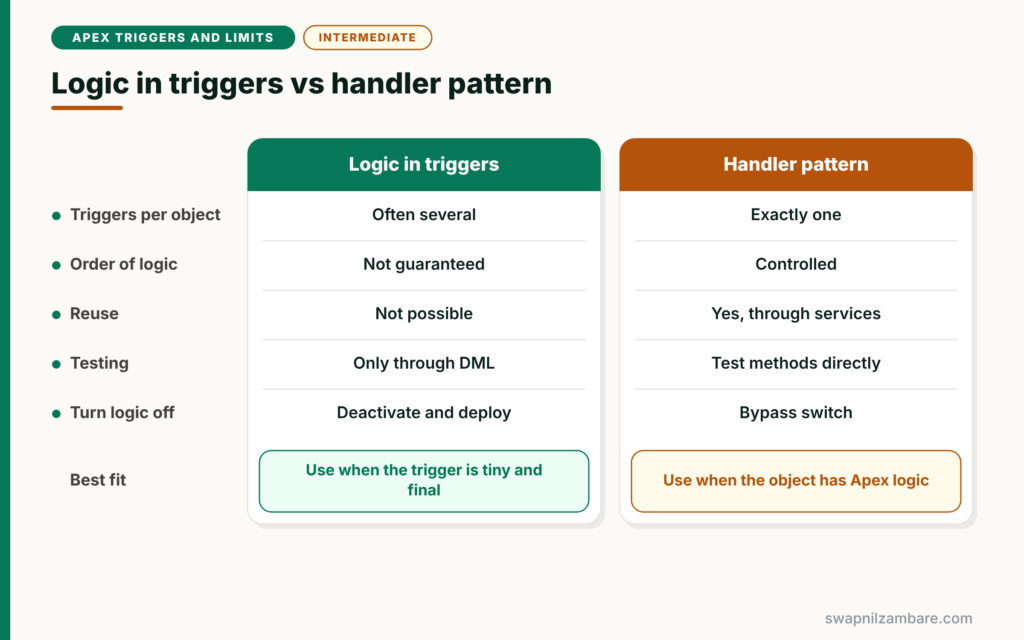
The table below compares the two styles.
| Feature | Logic inside triggers | Handler pattern |
|---|---|---|
| Triggers per object | Often several | Exactly one |
| Order of logic | Not guaranteed | Controlled in the handler |
| Reuse from other code | Not possible | Yes, through services |
| Testing | Only through DML | Methods can be tested directly |
| Turning logic off | Deactivate and deploy | Bypass switch |
When to use which is simple. Use the handler pattern for every object with Apex logic. A single tiny trigger with no future plans is the only exception.
A Real Apex Trigger Handler Pattern Example
Let’s build the Apex Trigger Handler Pattern for Enrolment__c at Bright Path Tutors.
Step 1: The Logic-Less Trigger
trigger EnrolmentTrigger on Enrolment__c (
    before insert, before update, after insert, after update, after delete, after undelete
) {
    new EnrolmentTriggerHandler().run();
}
The trigger lists every event the object needs, then hands everything to the handler. You will rarely edit this file again.
Step 2: The Handler Class
public with sharing class EnrolmentTriggerHandler {

    public void run() {
        // Bypass for data loads: users with this custom permission skip the logic
        if (FeatureManagement.checkPermission('Bypass_Enrolment_Triggers')) {
            return;
        }

        switch on Trigger.operationType {
            when BEFORE_INSERT {
                EnrolmentService.setAmountDue((List<Enrolment__c>) Trigger.new);
            }
            when BEFORE_UPDATE {
                EnrolmentService.blockPaidCancellations(
                    (List<Enrolment__c>) Trigger.new, (Map<Id, Enrolment__c>) Trigger.oldMap);
            }
            when AFTER_INSERT, AFTER_UNDELETE {
                EnrolmentService.refreshSeats((List<Enrolment__c>) Trigger.new);
            }
            when AFTER_DELETE {
                EnrolmentService.refreshSeats((List<Enrolment__c>) Trigger.old);
            }
            when AFTER_UPDATE {
                EnrolmentService.refreshSeats((List<Enrolment__c>) Trigger.new);
            }
        }
    }
}
The run method first checks the bypass custom permission. Then switch on Trigger.operationType sends each event to the right service method. Because Trigger.new is a generic list, we cast it to List<Enrolment__c>.
Step 3: The Service Class
public with sharing class EnrolmentService {

    public static void setAmountDue(List<Enrolment__c> rows) {
        Set<Id> courseIds = new Set<Id>();
        for (Enrolment__c e : rows) { courseIds.add(e.Course__c); }
        Map<Id, Course__c> courses = new Map<Id, Course__c>(
            [SELECT Id, Fee__c FROM Course__c WHERE Id IN :courseIds]);
        for (Enrolment__c e : rows) {
            Course__c c = courses.get(e.Course__c);
            if (c != null) { e.Amount_Due__c = c.Fee__c; }
        }
    }

    public static void blockPaidCancellations(List<Enrolment__c> rows, Map<Id, Enrolment__c> oldMap) {
        for (Enrolment__c e : rows) {
            Boolean nowCancelled = e.Status__c == 'Cancelled' && oldMap.get(e.Id).Status__c != 'Cancelled';
            if (nowCancelled && e.Is_Paid__c) {
                e.addError('Paid enrolments must be refunded before cancelling.');
            }
        }
    }

    public static void refreshSeats(List<Enrolment__c> rows) {
        // Recount seats per course, as shown in the bulkification post
    }
}
Each service method takes a list, so it works for one record or 200. Other code, such as a flow action or a batch job, can call these methods too.
Step 4: Test a Service Method Directly
@IsTest
static void setsAmountDueFromCourse() {
    Course__c c = new Course__c(Name = 'Apex Basics', Fee__c = 4500);
    insert c;
    List<Enrolment__c> rows = new List<Enrolment__c>{ new Enrolment__c(Course__c = c.Id) };

    EnrolmentService.setAmountDue(rows);

    System.assertEquals(4500, rows[0].Amount_Due__c);
}
This test calls the service method without any DML on Enrolment__c. As a result, it runs fast and checks the rule on its own.
Popular Trigger Frameworks
Many teams use a ready-made framework instead of writing their own Apex Trigger Handler Pattern. Open source options include simple handler base classes and larger enterprise frameworks with metadata-driven routing. They all follow the same core idea: one trigger per object, logic in classes and a way to bypass.
Common Mistakes with the Apex Trigger Handler Pattern
- Keeping logic in the trigger as well as in the handler.
- Creating a second trigger on the same object for a new rule.
- Writing service methods that accept one record instead of a list.
- Hard-coding a bypass that nobody can switch off later.
- Forgetting to list an event in the trigger, so its handler branch never runs.
Best Practices for the Apex Trigger Handler Pattern
- Keep exactly one logic-less trigger per object.
- Use switch on Trigger.operationType for clear routing.
- Put business rules in bulk-safe service methods.
- Add a bypass using a custom permission or custom metadata.
- Test service methods directly and the trigger with 200 records.
Practice Task
Build the pattern for Course__c with a trigger, a handler and a service method that blocks deleting courses with active enrolments. Hint: route BEFORE_DELETE to the service and pass Trigger.old.
Most Asked Interview Questions on the Apex Trigger Handler Pattern
Senior developer interviews almost always include the Apex Trigger Handler Pattern. Here are the 21 questions asked most.
Basic Questions on the Apex Trigger Handler Pattern
Q1: What is the trigger handler pattern?
It moves trigger logic into a handler class, so the trigger only calls the handler.
Q2: Why use one trigger per object?
Because Salesforce does not guarantee the order of several triggers on the same object.
Q3: What is a logic-less trigger?
A trigger whose body only calls the handler, with no business rules inside.
Q4: What does the handler class do?
It routes each trigger event to the right method, such as beforeInsert or afterUpdate.
Q5: What is a service class?
A class that holds business rules in reusable, bulk-safe methods.
Q6: Why should service methods accept lists?
So they work for one record or 200, and so other code can reuse them.
Q7: How do you route events in the handler?
Use switch on Trigger.operationType, or if statements on Trigger.isBefore and Trigger.isInsert.
Code and Scenario Questions on the Apex Trigger Handler Pattern
Q8: How do you turn off trigger logic for a data load?
Use a bypass, such as a custom permission checked with FeatureManagement.checkPermission.
Q9: Why do you cast Trigger.new in the handler?
Trigger.new is a generic list of sObjects, so you cast it to the specific type to use its fields.
Q10: How do you test handler logic without DML?
Call the service methods directly with records built in memory.
Q11: Where should you add a new rule for Enrolment__c?
In a service method, called from the right branch of the existing handler.
Q12: How do you pass old values to a service method?
Pass Trigger.oldMap, cast to the specific Map type, as a parameter.
Q13: Can flows reuse trigger logic in this pattern?
Yes. An invocable method can call the same service methods the handler uses.
Q14: What happens if you forget an event in the trigger definition?
That event never fires the trigger, so its handler branch never runs.
Advanced Questions on the Apex Trigger Handler Pattern
Q15: How can custom metadata help a trigger framework?
It can store bypass flags or the list of handlers to run, so admins change behaviour without deploying code.
Q16: How does the pattern help prevent recursion?
The handler is one central place to add recursion guards, such as static sets of processed Ids.
Q17: What is a base handler class?
A virtual class with empty methods for each event and a run method. Each object’s handler extends it and overrides what it needs.
Q18: How does the pattern help code reviews?
All logic for an object sits in one handler and its services, so reviewers can see every rule in one place.
Q19: Should handlers use with sharing?
Usually yes, unless a rule needs system access. Then put that rule in a separate without sharing class.
Q20: How do you control the order of logic in the handler?
Call service methods in the order you need inside each branch.
Q21: Can the pattern work with before-save flows on the same object?
Yes, but plan carefully. Before-save flows run before before triggers, so avoid setting the same field in both.
Official Resources
Quick Recap
- The Apex Trigger Handler Pattern keeps one logic-less trigger per object.
- The handler routes events, often with switch on Trigger.operationType.
- Service classes hold bulk-safe, reusable business rules.
- A bypass switch turns logic off for data loads.
- Test service methods directly and the trigger in bulk.
What’s Next?
Triggers can call themselves again by accident. Next, read our guide to Apex trigger recursion prevention.


