Apex Trigger Recursion happens when a trigger causes its own object to be saved again, so the same trigger runs again and again. Sometimes it only wastes limits. Sometimes it loops until Salesforce stops it with a “maximum trigger depth exceeded” error.
In this post, you will learn what causes recursion, how to spot it, and the safe ways to prevent it, including why a simple static Boolean is often the wrong fix. It builds on the Apex trigger handler pattern, before vs after triggers and static vs instance Apex, because static variables play a big part here.
What is Apex Trigger Recursion?
Apex Trigger Recursion is a trigger running again inside the same transaction because of its own work. For example, an after update trigger on Course__c updates the same courses. That update fires the after update trigger again, which updates the courses again, and so on.
Think of two mirrors facing each other. Each reflects the other, which reflects the first, forever. A trigger that updates its own records creates the same endless reflection.
Why Apex Trigger Recursion Matters
Recursion causes errors, wrong data and wasted limits. Here is why Apex Trigger Recursion matters at Bright Path Tutors.
- First, a course trigger that stamps Last Fee Change re-runs on its own update.
- Also, an enrolment trigger updates the course, and a course trigger updates its enrolments, which loops between objects.
- Next, a workflow field update fires update triggers one more time.
- Some flows update records that then fire triggers again.
- Finally, duplicate emails or tasks appear when logic runs twice.
So every developer must know how to stop unwanted repeats.
How Apex Trigger Recursion Happens
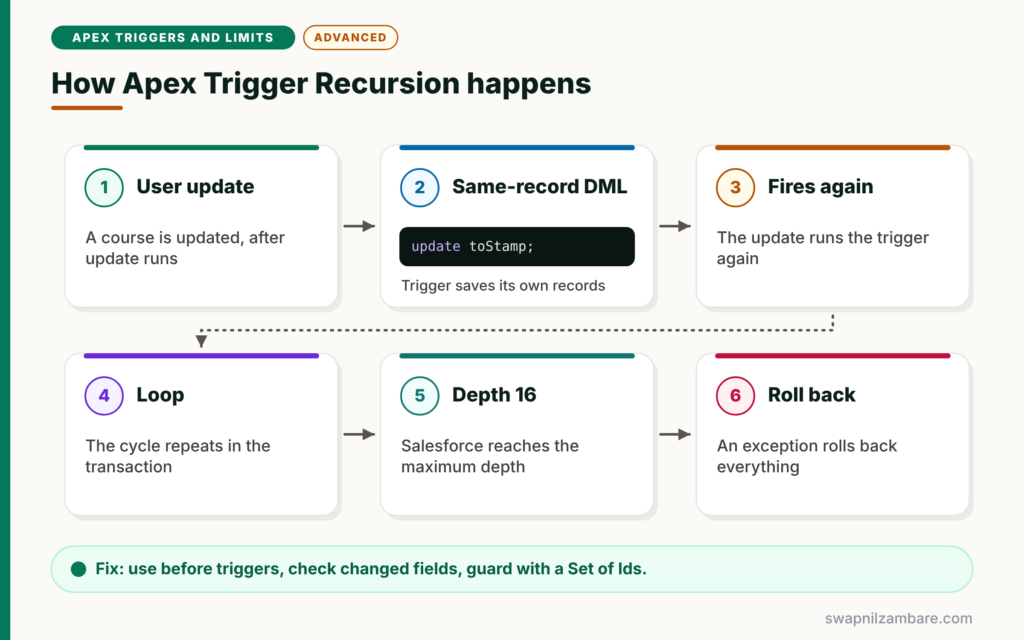
Apex Trigger Recursion follows a loop. First, a user updates a course, and the after update trigger runs. Next, the trigger runs an update DML on the same courses. Then that update fires the after update trigger again. After that, the loop continues until the logic stops or Salesforce reaches the maximum trigger depth of 16. Finally, at that point, Salesforce throws an exception and rolls back everything.
Direct Recursion
The trigger updates its own records, usually in an after trigger. This is the most common case.
Indirect Recursion
Two objects update each other. For example, Enrolment updates Course, and Course updates Enrolment.
Re-Runs from Other Automation
Workflow field updates and some flows save the record again. So update triggers run another time in the same transaction.
Chunks of 200 Records
A save of 500 records runs the trigger in chunks of 200, 200 and 100. Static variables keep their values across these chunks, which matters for recursion guards.
Ways to Prevent Apex Trigger Recursion
The table below compares the common prevention techniques.
| Technique | How it works | Risk |
|---|---|---|
| Use before triggers | Set fields without DML | None, the best first choice |
| Check changed fields | Act only when oldMap differs | Low |
| Static Set of processed Ids | Skip records already handled | Low, the recommended guard |
| Static Boolean flag | Run only once per transaction | High, skips later chunks |
| Bypass flag in handler | Turn logic off during own DML | Medium, must reset correctly |
Static Boolean vs Static Set of Ids
The table below compares the two most common guards.
| Feature | Static Boolean | Static Set of Ids |
|---|---|---|
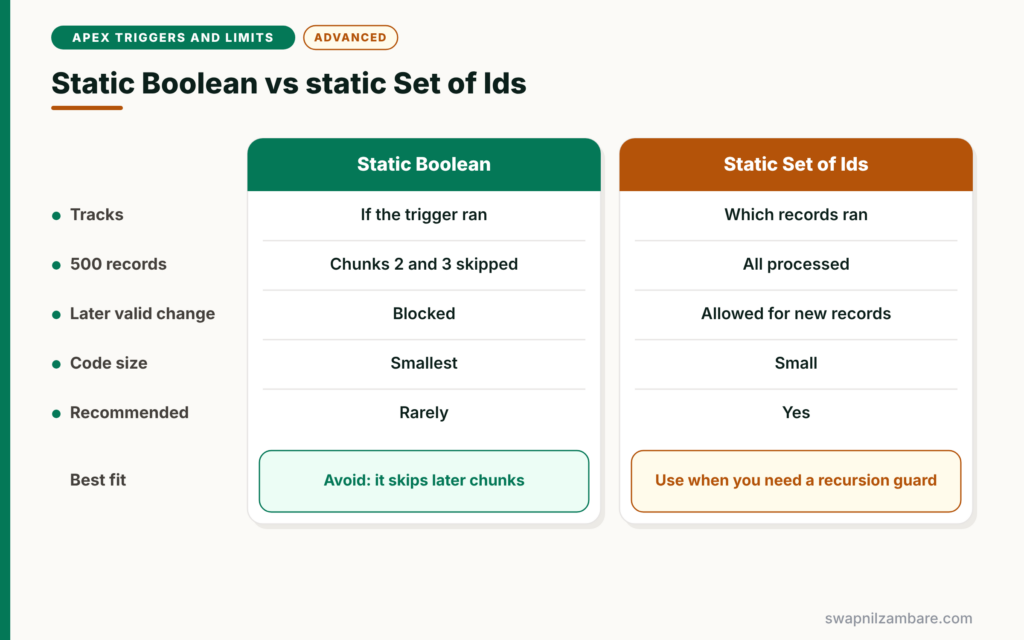
| Tracks | Whether the trigger ran at all | Which records were processed |
| Works for 500 records | No, chunks 2 and 3 are skipped | Yes |
| Allows a later valid change | No | Yes, for new records |
| Code size | Smallest | Small |
| Recommended | Rarely | Yes |
When to use which is clear. Prefer changed-field checks first, then add a static set of Ids when you still need a guard. Avoid a single static Boolean.
A Real Apex Trigger Recursion Example
Let’s fix Apex Trigger Recursion at Bright Path Tutors. When a course fee changes, an after update trigger stamps Last_Fee_Change__c on the course.
Step 1: The Recursive Version
// BAD: updates the same records in an after trigger
trigger CourseTrigger on Course__c (after update) {
    List<Course__c> toStamp = new List<Course__c>();
    for (Course__c c : Trigger.new) {
        toStamp.add(new Course__c(Id = c.Id, Last_Fee_Change__c = System.now()));
    }
    update toStamp;   // fires this trigger again, and again
}
Every update fires the trigger, and the trigger updates the courses again. The loop stops only when Salesforce reaches the maximum trigger depth.
Step 2: Best Fix, Use a Before Trigger
trigger CourseTrigger on Course__c (before update) {
    for (Course__c c : Trigger.new) {
        if (c.Fee__c != Trigger.oldMap.get(c.Id).Fee__c) {
            c.Last_Fee_Change__c = System.now();
        }
    }
}
The before trigger sets the field directly, so no DML runs and no recursion is possible. Also, the changed-field check stamps only courses whose fee really changed.
Step 3: When You Need a Guard, Use a Static Set
Sometimes after-trigger logic must update related records that update the parent back. Then use a static set of processed Ids.
public class TriggerGuard {
    private static Set<Id> processed = new Set<Id>();

    // Returns only the records not yet handled in this transaction
    public static List<SObject> firstTime(List<SObject> records) {
        List<SObject> fresh = new List<SObject>();
        for (SObject r : records) {
            if (!processed.contains(r.Id)) {
                processed.add(r.Id);
                fresh.add(r);
            }
        }
        return fresh;
    }
}
A static variable lives for the whole transaction. So when the trigger runs again, firstTime returns only records it has not seen. Records in the second and third chunks of a large load are still new, so they are processed correctly.
Step 4: Use the Guard in the Handler
when AFTER_UPDATE {
    List<Course__c> fresh = (List<Course__c>) TriggerGuard.firstTime(Trigger.new);
    if (!fresh.isEmpty()) {
        CourseService.syncEnrolmentFees(fresh, (Map<Id, Course__c>) Trigger.oldMap);
    }
}
The handler passes only fresh records to the service. If the enrolment update causes the course trigger to run again, the guard returns an empty list, and the loop ends.
Why a Static Boolean Fails
Many tutorials show static Boolean hasRun = false. It stops recursion, but it also stops the trigger for every later chunk in the same transaction. So in a load of 500 courses, only the first 200 get processed, and the other 300 silently skip the logic. That bug is very hard to find.
Common Mistakes with Apex Trigger Recursion
- Updating the same records in an after trigger to set a field.
- Using a single static Boolean as a recursion guard.
- Forgetting that workflow field updates re-run update triggers.
- Acting on every update instead of checking changed fields.
- Never testing with more than 200 records.
Best Practices for Apex Trigger Recursion
- Set fields on the same record in before triggers.
- Act only when relevant fields change.
- Use a static set of processed Ids when a guard is needed.
- Keep guards in one place, such as the handler.
- Test with 201 or more records to cover several chunks.
Practice Task
Write a test that inserts 450 courses and updates all their fees in one statement. Then assert that all 450 have Last_Fee_Change__c set. Hint: this test would fail with a static Boolean guard and pass with the static set.
Most Asked Interview Questions on Apex Trigger Recursion
Questions on Apex Trigger Recursion separate junior from senior developers. Here are the 21 questions asked most about Apex Trigger Recursion.
Basic Questions on Apex Trigger Recursion
Q1: What is trigger recursion?
It is a trigger running again in the same transaction because of its own DML or other automation.
Q2: What is the maximum trigger depth?
- After that, Salesforce throws an exception and rolls back the transaction.
Q3: What usually causes recursion?
An after trigger that updates its own records, or two objects that update each other.
Q4: How does a before trigger help?
It sets fields without DML, so it never fires the trigger again.
Q5: Why do static variables help with recursion?
They keep their value for the whole transaction, so later trigger runs can see what earlier runs did.
Q6: Do workflow field updates cause triggers to run again?
Yes. A workflow field update fires before and after update triggers one more time.
Q7: What is indirect recursion?
When two objects update each other, such as a parent and its children, in a loop.
Code and Scenario Questions on Apex Trigger Recursion
Q8: Why is a static Boolean a weak guard?
It blocks every later chunk in the same transaction, so records after the first 200 are skipped.
Q9: What is a better guard?
A static Set of processed record Ids, so only records already handled are skipped.
Q10: How do changed-field checks prevent recursion?
They run logic only when a field really changes. The second run sees no change, so it does nothing.
Q11: How do you stamp a date when a field changes?
In a before update trigger, compare with Trigger.oldMap and set the date field directly.
Q12: How would you test recursion handling?
Insert and update more than 200 records in one statement and assert that every record was processed once.
Q13: Where should recursion guards live?
In one central place, such as the trigger handler or a small guard class.
Q14: Can a flow cause trigger recursion?
Yes. An after-save flow that updates the same record can fire update triggers again.
Advanced Questions on Apex Trigger Recursion
Q15: Do static variables reset between trigger chunks?
No. They keep their values for the whole transaction, across all chunks.
Q16: Why can a static set of Ids still miss a valid update?
If a record legitimately changes twice in one transaction, the second change is skipped. So combine the guard with changed-field checks.
Q17: How do you handle recursion between parent and child triggers?
Use changed-field checks on both sides and a shared guard, and update only records whose values actually differ.
Q18: Can you reset a static guard?
Yes, by clearing the set, but do it carefully. Resetting at the wrong time brings the loop back.
Q19: What happens to static variables in test methods?
Each test method runs in its own transaction, so static variables start fresh in each test.
Q20: How does recursion affect governor limits?
Each extra run uses more queries, DML and CPU time, so recursion often causes limit errors before reaching the maximum depth.
Q21: What is the safest overall strategy?
Prefer before triggers, check changed fields, avoid same-record DML in after triggers, and use a static set guard only when needed.
Official Resources
- Triggers and Order of Execution (Apex Developer Guide)
- Static and Instance Methods, Variables (Apex Developer Guide)
Quick Recap
- Apex Trigger Recursion is a trigger re-running because of its own work.
- Salesforce stops loops at a maximum trigger depth of 16.
- Before triggers and changed-field checks prevent most recursion.
- A static set of processed Ids is safer than a static Boolean.
- Test with more than 200 records to cover every chunk.
What’s Next?
Not every rule needs a trigger. Next, read our guide to Apex Trigger vs Flow to choose the right tool.


