Apex Trigger vs Flow is a decision every Salesforce team makes for every new automation. Record-triggered flows can now handle most simple and medium rules without code. Apex triggers still win for complex logic, large data volumes and fine control. Knowing where the line sits saves time and avoids messy, mixed automation.
In this post, you will compare the two tools feature by feature, learn a simple decision rule, and see one rule built both ways. You will also learn how flows can call Apex when they need help. This builds on the Flow types guide, Apex trigger handler pattern and Apex trigger recursion.
What is Apex Trigger vs Flow?
Both tools run automatically when a record is created, updated or deleted. A record-triggered flow is built with clicks in Flow Builder. An Apex trigger is written in code. The question of Apex Trigger vs Flow is about which one to use for a given rule, and how to use both together without conflicts.
Think of a restaurant. Many dishes come from a standard recipe card that any trained cook can follow, which is Flow. A few special dishes need the head chef’s skill and custom technique, which is Apex. A good kitchen uses both and knows which dish goes to whom.
Why Apex Trigger vs Flow Matters
Picking the wrong tool creates cost later. Here is why the Apex Trigger vs Flow choice matters at Bright Path Tutors.
- First, admins can maintain flows without a developer.
- Also, some rules process thousands of records and need careful bulk code.
- Next, mixing flows and triggers on the same object can set the same field twice.
- Complex calculations are easier to test in Apex unit tests.
- Finally, Salesforce keeps adding Flow features, so the line moves each release.
So a clear decision rule keeps automation simple and maintainable.
How Apex Trigger vs Flow Runs on Save
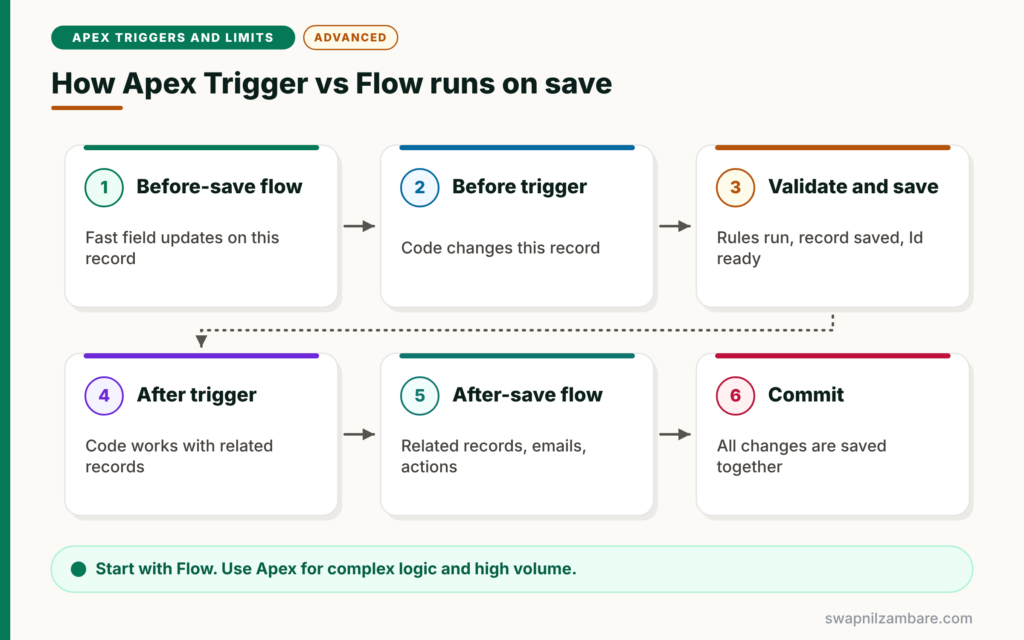
On each save, both tools run at set points. First, before-save flows run. Next, before triggers run. Then Salesforce validates and saves the record. After that, after triggers run. Finally, after-save flows run, with other automation, before the transaction commits.
Before-Save Flows
Before-save flows, also called fast field updates, change fields on the triggering record with no DML. They are very fast, much like before triggers.
After-Save Flows
After-save flows create or update related records, send emails, post notifications and call actions. They can also use asynchronous paths for callouts.
Apex Triggers
Triggers give full code control, complex data structures, detailed error handling and unit testing. They also suit high-volume processing and tricky logic across many objects.
Invocable Apex
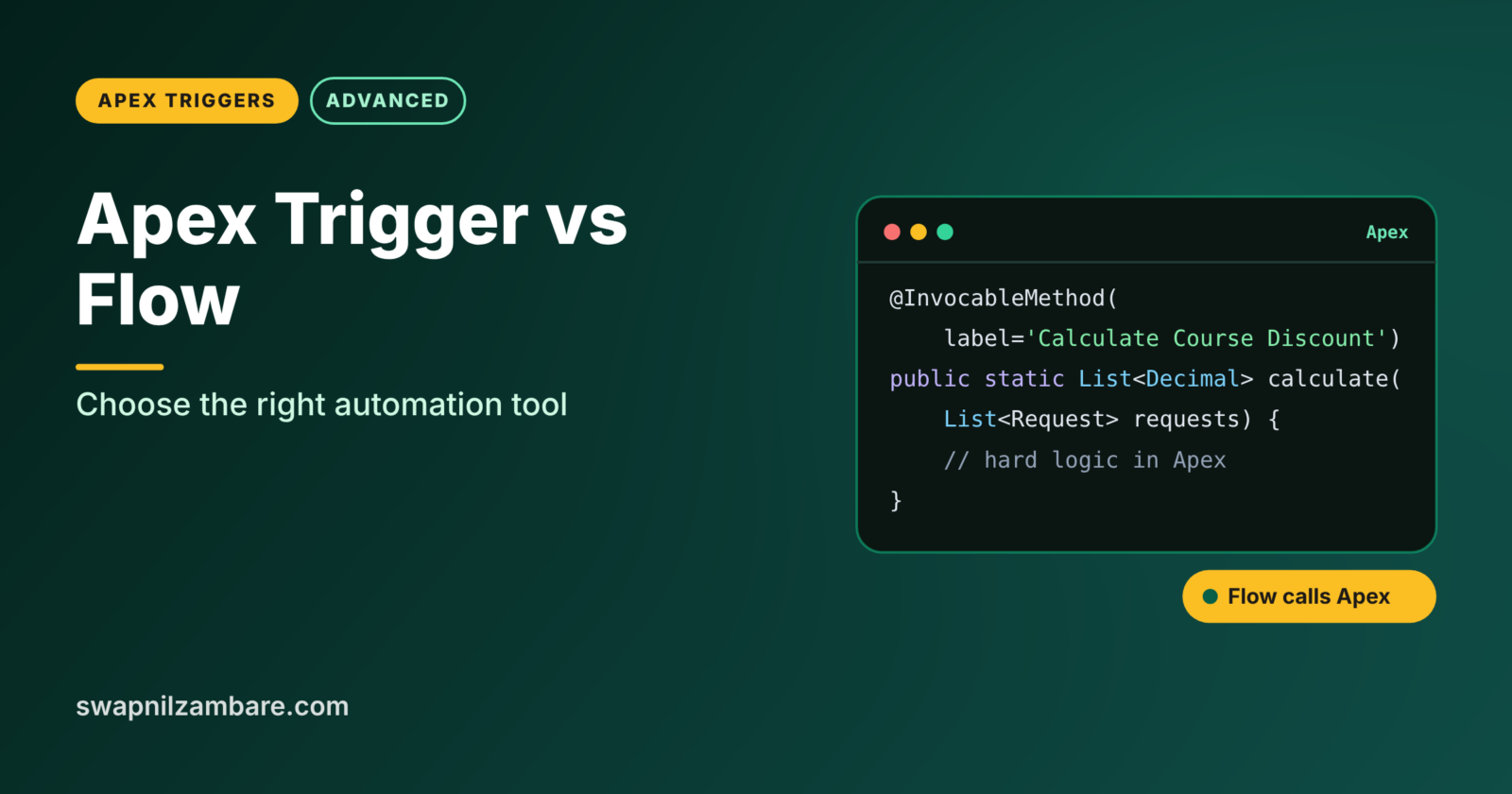
A flow can call an Apex method marked @InvocableMethod. This lets admins build the process in Flow while a developer writes the hard part in Apex.
Apex Trigger vs Flow Compared
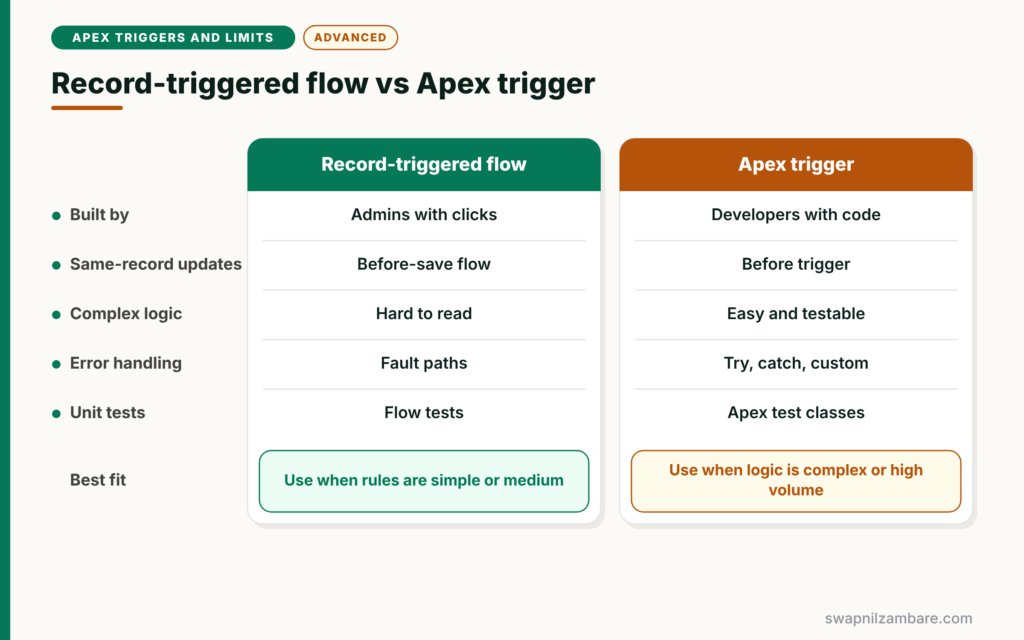
The table below compares the two tools.
| Feature | Record-triggered flow | Apex trigger |
|---|---|---|
| Built by | Admins with clicks | Developers with code |
| Same-record field updates | Before-save flow, very fast | Before trigger, very fast |
| Complex logic and data structures | Possible but hard to read | Easy and testable |
| High data volumes | Good for simple logic | Best for complex logic |
| Error handling | Fault paths | Try, catch and custom exceptions |
| Unit tests | Flow tests | Apex test classes |
| Ordering many automations | Trigger order in Flow Trigger Explorer | Handler controls order |
When to use which follows a simple rule. Start with Flow for simple and medium rules. Choose Apex when logic is complex, data volume is high or you need fine control. Use invocable Apex when a flow needs one hard step.
Apex Trigger vs Flow Decision Guide
The table below gives quick Apex Trigger vs Flow answers for common rules at Bright Path Tutors.
| Requirement | Best tool | Why |
|---|---|---|
| Default a field on new enrolments | Before-save flow | Simple and fast |
| Create a welcome task | After-save flow | Simple related record |
| Recalculate seats across many courses | Apex trigger | Bulk logic across objects |
| Complex discount rules with many tiers | Invocable Apex called from a flow | Hard logic, admin-owned process |
| Call an outside API after save | Flow async path or Queueable Apex | Callouts need async |
| Block delete with a complex check | Apex trigger | Detailed validation |
A Real Apex Trigger vs Flow Example
Let’s test Apex Trigger vs Flow by building the same rule both ways at Bright Path Tutors: when an enrolment is created, set Amount Due from the course fee.
Option 1: Before-Save Flow
- In Setup > Flows, click New Flow and choose Record-Triggered Flow.
- Select Enrolment__c, trigger when a record is created, and choose Fast Field Updates.
- Next, add an Update Triggering Record element.
- Then set Amount_Due__c to {!$Record.Course__r.Fee__c} and activate the flow.
The flow reads the course fee through the relationship and sets the field. No code is needed, and admins can change it later.
Option 2: Apex Trigger
trigger EnrolmentTrigger on Enrolment__c (before insert) {
    Set<Id> courseIds = new Set<Id>();
    for (Enrolment__c e : Trigger.new) { courseIds.add(e.Course__c); }

    Map<Id, Course__c> courses = new Map<Id, Course__c>(
        [SELECT Id, Fee__c FROM Course__c WHERE Id IN :courseIds]);

    for (Enrolment__c e : Trigger.new) {
        if (courses.containsKey(e.Course__c)) {
            e.Amount_Due__c = courses.get(e.Course__c).Fee__c;
        }
    }
}
The trigger does the same job with a bulk-safe query. For this simple rule, the flow is the better choice because admins can own it. The trigger makes sense only if the object already has Apex logic you want to keep in one place.
Option 3: Flow Plus Invocable Apex
Now the discount rule gets complex: it depends on seat count, student type and a promo table. The admin builds the flow, and a developer writes one invocable method.
public with sharing class DiscountCalculator {

    public class Request {
        @InvocableVariable(required=true) public Id courseId;
        @InvocableVariable(required=true) public Integer seats;
    }

    @InvocableMethod(label='Calculate Course Discount')
    public static List<Decimal> calculate(List<Request> requests) {
        List<Decimal> results = new List<Decimal>();
        for (Request r : requests) {
            Decimal pct = r.seats >= 50 ? 0.20 : (r.seats >= 20 ? 0.10 : 0);
            results.add(pct);
        }
        return results;
    }
}
The method takes a list of requests, because flows send many records at once. It returns one result per request, in the same order. In Flow Builder, the admin adds an Action element called “Calculate Course Discount” and uses the result.
Mixing Apex Trigger vs Flow on One Object
With Apex Trigger vs Flow, many objects end up with both. That is fine if you follow a few rules. Never set the same field in both a flow and a trigger. Keep one record-triggered flow per object and timing where possible, and use trigger order in Flow Trigger Explorer when you have several. Also document which tool owns which rule.
Common Mistakes with Apex Trigger vs Flow
- Building complex, high-volume logic in a giant flow nobody can read.
- Writing Apex for simple field defaults that admins could own.
- Setting the same field in a flow and a trigger.
- Forgetting that flows also run in bulk and have limits.
- Not documenting which tool owns each rule.
Best Practices for Apex Trigger vs Flow
- Start with Flow for simple and medium rules.
- Use Apex for complex logic, high volume and detailed error handling.
- Use invocable Apex to add hard steps to admin-owned flows.
- Keep one owner per field and document it.
- Review automation on each object once a year.
Practice Task
List five automations in your org and decide the best tool for each using the decision table. Hint: look for complex calculations and large data volumes first, since those usually point to Apex.
Most Asked Interview Questions on Apex Trigger vs Flow
Interviewers ask about Apex Trigger vs Flow to check your design judgement. Here are the 21 questions asked most.
Basic Questions on Apex Trigger vs Flow
Q1: What is a record-triggered flow?
It is a flow that runs automatically when a record is created, updated or deleted.
Q2: What is a before-save flow?
A record-triggered flow that updates the triggering record’s fields before the save, with no DML. It is also called a fast field update.
Q3: When do before-save flows run compared with before triggers?
Before-save flows run first, then before triggers.
Q4: When do after-save flows run?
After after triggers, later in the save, before the transaction commits.
Q5: Who usually maintains flows?
Admins, because flows are built with clicks.
Q6: When is Apex better than Flow?
For complex logic, high data volumes, detailed error handling and complex data structures.
Q7: What is an invocable method?
An Apex method marked @InvocableMethod that flows can call as an action.
Code and Scenario Questions on Apex Trigger vs Flow
Q8: How should an invocable method handle input?
It should accept a list and return a list in the same order, because flows send many records at once.
Q9: How do you pass several inputs to an invocable method?
Create an inner class with @InvocableVariable fields and use a list of that class as the parameter.
Q10: Can a flow make a callout after save?
Yes, using an asynchronous path or an Apex action that runs asynchronously.
Q11: What happens if a flow and a trigger set the same field?
The value depends on the order of execution, which causes confusing results. So only one tool should own each field.
Q12: How do you order several record-triggered flows?
Set trigger order values and review them in Flow Trigger Explorer.
Q13: Which tool would you use to default a field on create?
A before-save flow, because it is simple, fast and admin-friendly.
Q14: Which tool would you use for complex roll-ups across many objects?
Apex, because it handles bulk logic, maps and testing more cleanly.
Advanced Questions on Apex Trigger vs Flow
Q15: Do flows have governor limits?
Yes. Flows share the same transaction limits as Apex, such as SOQL queries and DML statements.
Q16: Can flows run in bulk?
Yes. Salesforce batches flow interviews for records saved together, so well-built flows are bulk-safe.
Q17: How do you test flows and triggers?
Use flow tests or Test Mode for flows, and Apex test classes for triggers. Apex tests also run flows during DML.
Q18: When would you migrate a flow to Apex?
When the flow becomes too complex to read, too slow, or needs logic Flow cannot express cleanly.
Q19: Can Apex call a flow?
Yes. Apex can start an autolaunched flow with the Flow.Interview class.
Q20: What is Salesforce’s general guidance?
Use declarative tools where they fit, and use code for complex or high-volume needs.
Q21: How do you avoid conflicts between flows and triggers?
Assign one owner per field, document each automation and review the object’s automation together.
Official Resources
- Record-Triggered Automation Decision Guide (Salesforce Architects)
- InvocableMethod Annotation (Apex Developer Guide)
Quick Recap
- Apex Trigger vs Flow is a choice made for every new automation.
- Before-save flows and before triggers both update the same record fast.
- Flow suits simple and medium rules that admins own.
- Apex suits complex logic, high volume and detailed control.
- Invocable Apex lets flows call code for hard steps.
What’s Next?
To mix tools safely, you need to know exactly when each runs. Next, read our guide to the Apex order of execution for developers.


