Apex Cursors give you a pointer to a large SOQL result set and let you pull it back in pieces. The query runs once, the matching record ids are fixed at that moment, and each chunk you fetch sits comfortably inside one transaction.
The reason this exists is heap and row limits. A query returning 400,000 rows cannot be held in a list, and a plain query loop makes you accept whatever chunk size the platform gives you. A cursor lets you decide.
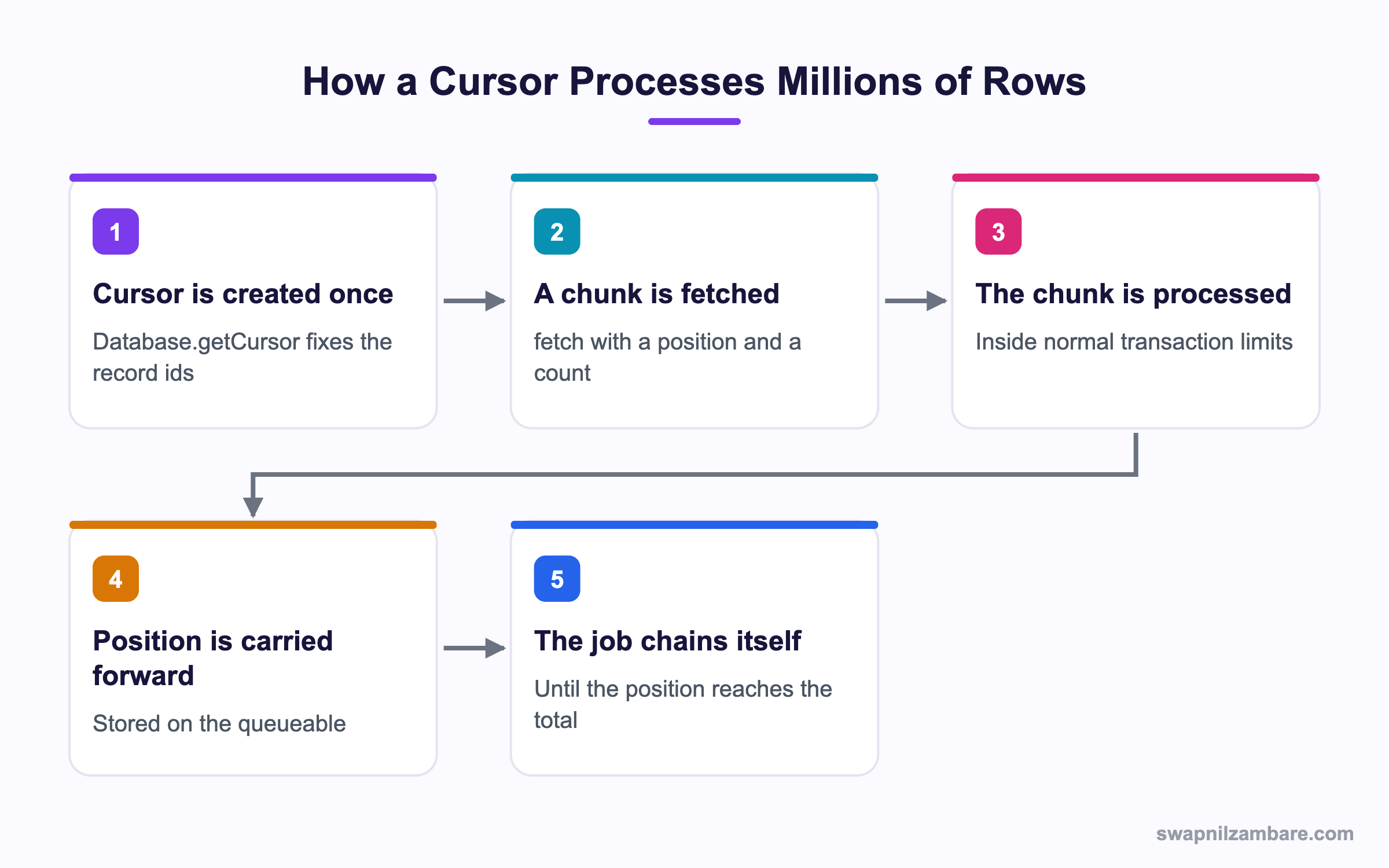
Caption: The cursor is created once, and every later job reuses the same fixed set of record ids.
What Are Apex Cursors
Apex Cursors are created with Database.getCursor and read with fetch.
Database.Cursor locator = Database.getCursor(
    'SELECT Id FROM Contact WHERE LastActivityDate = LAST_N_DAYS:400',
    AccessLevel.USER_MODE
);

Integer total = locator.getNumRecords();
List<Contact> first = locator.fetch(0, 200);
List<Contact> second = locator.fetch(200, 200);| Member | What it does |
|---|---|
| Database.getCursor | Creates a cursor from a query string |
| Database.getCursorWithBinds | The same, with bind variables |
| fetch(position, count) | Returns that slice of the result |
| getNumRecords() | The total number of rows in the set |
Two properties shape everything else. Apex Cursors fix the record ids when the cursor is created, so records changed afterwards do not alter the set. And they are stateless, which means you have to track the position yourself.
The Queueable Pattern
The real use of Apex Cursors is a queueable that holds the cursor and the position, and chains itself until the work is done.
public with sharing class QueryChunkingQueueable implements Queueable {

    private Database.Cursor locator;
    private Integer position;

    public QueryChunkingQueueable() {
        locator = Database.getCursor(
            'SELECT Id, Email FROM Contact WHERE LastActivityDate = LAST_N_DAYS:400',
            AccessLevel.USER_MODE
        );
        position = 0;
    }

    public void execute(QueueableContext ctx) {
        List<Contact> scope = locator.fetch(position, 200);
        position += scope.size();

        archive(scope);

        if (position < locator.getNumRecords()) {
            System.enqueueJob(this);
        }
    }
}
Apex Cursors belong in the constructor, created once. Creating it inside execute is the mistake to avoid, because every run would build a new cursor and burn through the daily cursor and cursor row allowances.
Why Apex Cursors Matter
| Benefit | What it gives you |
|---|---|
| Chunk size you control | 50 rows or 2,000, per fetch |
| Plain state | Ordinary fields rather than a stateful interface |
| Queueable flexibility | Chaining, finalizers and normal error handling |
| A fixed working set | Later data changes do not shift the scope |
| No heap problems | Only one chunk is in memory at a time |
The state point is quietly important. Batch Apex needs the stateful interface to carry values between chunks, with the serialisation rules that come with it. A queueable with Apex Cursors just uses fields. The post on queueable jobs covers chaining and finalizers.
Pagination Cursors for Screens
Apex Cursors come in a second kind built for user interfaces. A pagination cursor returns a complete page, skipping rows deleted after the cursor was created, so a list shows a consistent number per page.
Database.PaginationCursor pag = Database.getPaginationCursor(
    'SELECT Id, Name FROM Course__c ORDER BY Name'
);

Database.CursorFetchResult page = pag.fetchPage(0, 20);
List<SObject> rows = page.getRecords();| Kind | Behaviour on deleted rows | Built for |
|---|---|---|
| Standard cursor | The slice shrinks | Data processing |
| Pagination cursor | The page stays full | Screens and lists |
The difference between the two Apex Cursors types is easy to picture. With a result of 100 rows where the first five were deleted afterwards, a standard fetch of 20 from position zero returns 15 rows. A pagination fetch of 20 returns 20.
Pagination cursors are the smaller of the two Apex Cursors types, holding up to 100,000 rows, which is far less than a standard cursor, because nobody pages through a million rows by hand. Pagination cursors also do not support Data 360 data model objects.
Apex Cursors vs Batch Apex
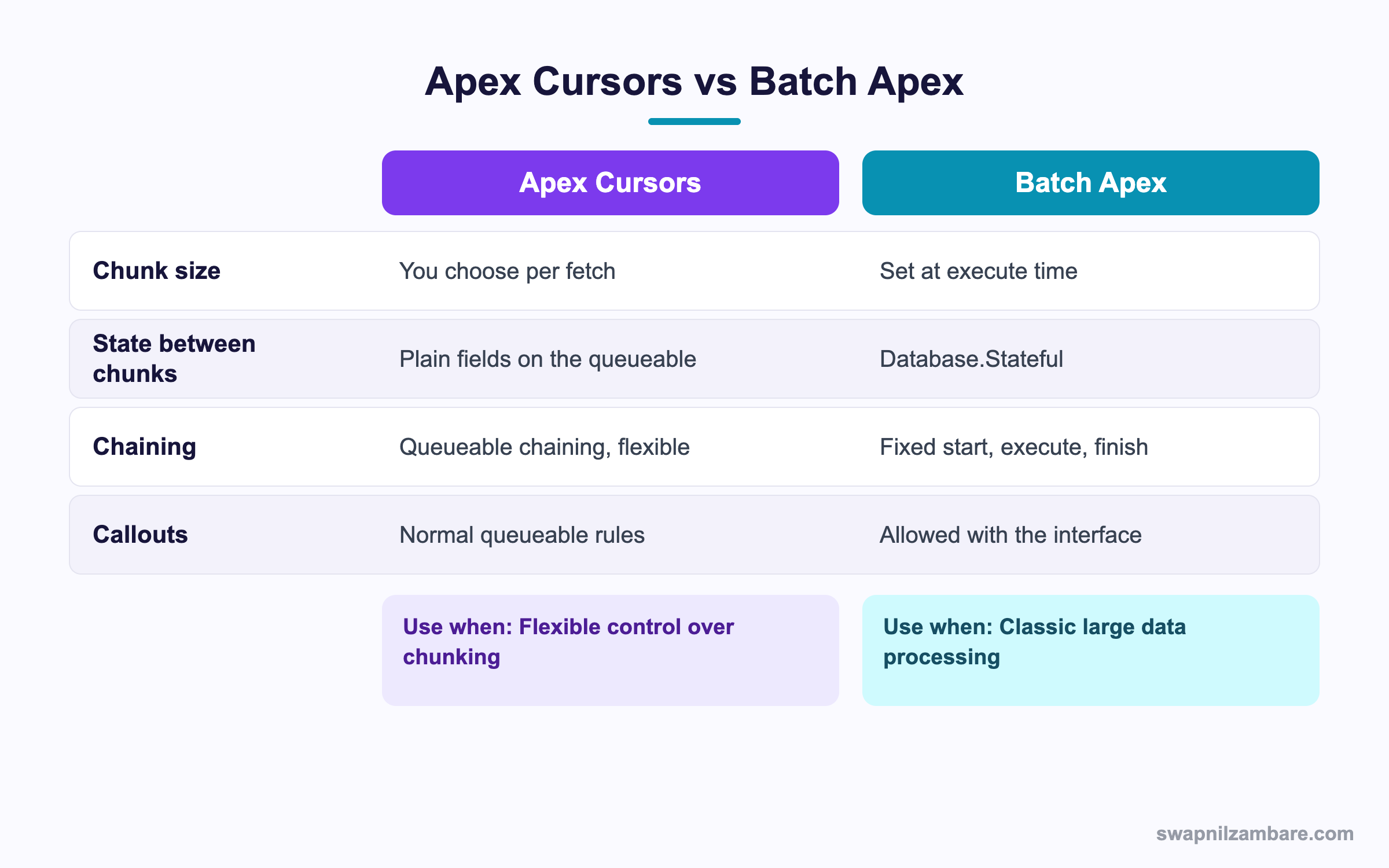
Caption: Batch Apex is still fine, and cursors give you control it never offered.
| Need | Pick |
|---|---|
| Chunk size that varies by record type | Apex Cursors |
| Simple state between chunks | Apex Cursors |
| A classic nightly data job | Batch Apex |
| Work that must survive a long queue | Batch Apex |
| A finalizer for reliable error handling | Apex Cursors with a queueable |
| Processing a Data 360 data model object | Apex Cursors |
| Reporting progress to a record as it goes | Either, with a counter |
The honest summary is that Apex Cursors plus a chained queueable is now a real alternative to batch Apex, not a replacement for it. Batch Apex still suits scheduled bulk work, and the post on batch Apex covers that path.
A Real Apex Cursors Example
Apex Cursors replaced a batch job for us. Bright Path Tutors archives enrolment records older than four years. The job touches around 380,000 rows and has to skip any record flagged for a dispute.
The first build used batch Apex with a scope of 200.
| Problem | What happened |
|---|---|
| Fixed scope size | Dispute checks needed smaller chunks, archiving needed bigger ones |
| Database.Stateful serialisation | A counter class had to stay simple |
| No finalizer | A failed chunk needed a manual restart |
| Restart meant a rerun | The query returned different rows each time |
We rebuilt it with a cursor and a chained queueable.
| Measure | Batch Apex | Apex Cursors |
|---|---|---|
| Chunk size | Fixed at 200 | 50 for disputes, 2,000 for plain rows |
| Total run time | 94 minutes | 38 minutes |
| Recovery after a failure | Manual rerun from the start | Resume from the stored position |
| Rows that shifted between runs | Yes | No, the set is fixed |
The fixed set is what made recovery honest. With batch Apex, a restart queried again and the scope had moved. With the cursor, the position is the only thing you need to resume.
Limits and Exceptions
| Limit | The rule |
|---|---|
| Fetch calls per transaction | A maximum of 100 |
| Fetch calls and SOQL | Each fetch counts against the SOQL query limit |
| Rows fetched | They count against the SOQL query row limit |
| Pagination cursor rows | Up to 100,000 per cursor instance |
| Daily cursors and cursor rows | Org allowances over a rolling 24 hours |
| Expiration | The same expiration rules as API query cursors |
Apex Cursors throw two exceptions and they mean different things.
| Exception | What to do |
|---|---|
| System.TransientCursorException | Retry the transaction, since it may succeed |
| System.FatalCursorException | Do not retry, since the cursor is unusable |
Reading the Apex Cursors limits at runtime is straightforward, and worth logging in a long job.
System.debug('Cursors: ' + Limits.getApexCursors()
    + '/' + Limits.getLimitApexCursors());
System.debug('Cursor rows: ' + Limits.getApexCursorRows()
    + '/' + Limits.getLimitApexCursorRows());
System.debug('Fetch calls: ' + Limits.getFetchCallsOnApexCursor()
    + '/' + Limits.getLimitFetchCallsOnApexCursor());
The daily Apex Cursors allowance is the one that catches teams out, because it is an org wide number over a rolling window. Creating a cursor inside the execute method of a chained job exhausts it quickly, which is exactly why the cursor belongs in the constructor. The post on governor limits covers the wider set.
Common Mistakes with Apex Cursors
| Mistake | What you see | Fix |
|---|---|---|
| Creating the cursor inside execute | Daily cursor limits exhausted | Create it once in the constructor |
| Assuming fetch is free | SOQL query limit errors | Count each fetch as a query |
| Forgetting to add the fetched size | An endless loop or skipped rows | Advance the position by scope.size |
| Retrying a fatal exception | Repeated failures | Only retry the transient exception |
| Expecting new records to appear | Rows created later are missing | The set is fixed at creation, by design |
| Using a pagination cursor for data jobs | A 100,000 row ceiling | Use a standard cursor |
| No progress record | No idea where a long job stopped | Store the position somewhere readable |
Best Practices for Apex Cursors
- Create the cursor once, in the constructor of the queueable
- Advance the position by the size of the chunk you actually received
- Choose a chunk size that fits the heaviest work in the loop
- Catch the transient exception and retry, and let the fatal one stop the job
- Store the position on a record so a long job is resumable and visible
- Use
AccessLevel.USER_MODEunless you have a reason not to - Use a pagination cursor for screens and a standard cursor for data work
- Attach a finalizer so a failed chunk is logged rather than lost
Most Asked Apex Cursors Interview Questions
Q1: What problem do Apex Cursors solve?
They let you process a very large SOQL result in chunks that fit inside one transaction.
Q2: How do you create one?
With Database.getCursor, or getCursorWithBinds when you need bind variables.
Q3: How do you read records from it?
With fetch, passing a position and a count.
Q4: How do you know how many rows there are?
With getNumRecords on the cursor.
Q5: Are cursors stateful?
No. They are stateless, so you track the position yourself.
Q6: What happens to records changed after the cursor is created?
The set of record ids is fixed at creation, so later changes do not alter the scope.
Q7: Where should the cursor be created in a chained queueable?
In the constructor, once, since creating it in execute burns the daily allowance.
Q8: How many fetch calls can one transaction make?
Up to 100.
Q9: Does a fetch count as a SOQL query?
Yes, and the rows returned count against the query row limit.
Q10: What is a pagination cursor for?
User interface paging, where each page should show a consistent number of rows.
Q11: How does a pagination cursor handle deleted rows?
It skips them so the page stays full, where a standard fetch returns fewer rows.
Q12: What does fetchPage return?
A CursorFetchResult, which carries the rows plus information for the next call.
Q13: What is the row ceiling on a pagination cursor?
100,000 rows per instance.
Q14: Which cursor type supports Data 360 data model objects?
The standard cursor. Pagination cursors do not support them.
Q15: Name the two cursor exceptions.
TransientCursorException and FatalCursorException.
Q16: Which one is worth retrying?
The transient one. A fatal exception means the cursor is unusable.
Q17: How do you check cursor limits at runtime?
With the Limits methods for cursors, cursor rows and fetch calls.
Q18: How does this compare with batch Apex?
Cursors give you chunk size control and plain state, where batch Apex has a fixed scope and the stateful interface.
Q19: Is batch Apex obsolete now?
No. It still suits classic scheduled bulk work.
Q20: Why is recovery easier with a cursor?
Because the set is fixed, so resuming from a stored position gives you the same rows.
Q21: Can the chunk size vary between runs?
Yes, which is one of the main advantages over a fixed batch scope.
Q22: Should you run a cursor in user mode?
Yes by default, so sharing and field access apply as they would for the user.
Q23: Scenario: the job stops after a few chunks with a limit error. What happened?
Most likely a new cursor was created in execute rather than in the constructor.
Q24: Scenario: the job loops forever. What is wrong?
The position is not advancing by the size of the chunk received.
Q25: Scenario: rows created during the run are never processed. Is that a bug?
No. The record ids were fixed when the cursor was created.
Q26: Scenario: a chunk fails and nobody notices. What is missing?
A finalizer, and a log entry for the failed position.
Q27: How do you make a long cursor job visible to support?
Store the current position and the total on a record that someone can open.
Q28: Do cursors expire?
Yes, under the same expiration rules as API query cursors.
Q29: What is the one habit that makes cursor jobs reliable?
Create the cursor once, advance by the real chunk size, and store the position for recovery.
Q30: Can two jobs share one cursor?
A cursor can be carried on a queueable that chains itself, which is the normal pattern, rather than shared across unrelated jobs.
Q31: How do you decide the chunk size?
Size it for the heaviest work inside the loop, since one slow record per chunk sets the pace.
Q32: Is a cursor useful in a synchronous transaction?
Occasionally, for a controlled read of a few chunks, though the real value shows in chained asynchronous work.
Official Resources
What Is Next
Next, read DataWeave in Apex for Data Transformation Explained.


