Apex Error Logging is the difference between a support ticket you can act on and one that says the page showed an error. Without a log, every failure investigation starts with asking the user what time it happened and hoping a debug log still exists.
Debug logs are not Apex Error Logging. They need to be set up before the problem, they expire, and nobody is watching them at two in the morning. A log record in the org is permanent, reportable and visible to support.
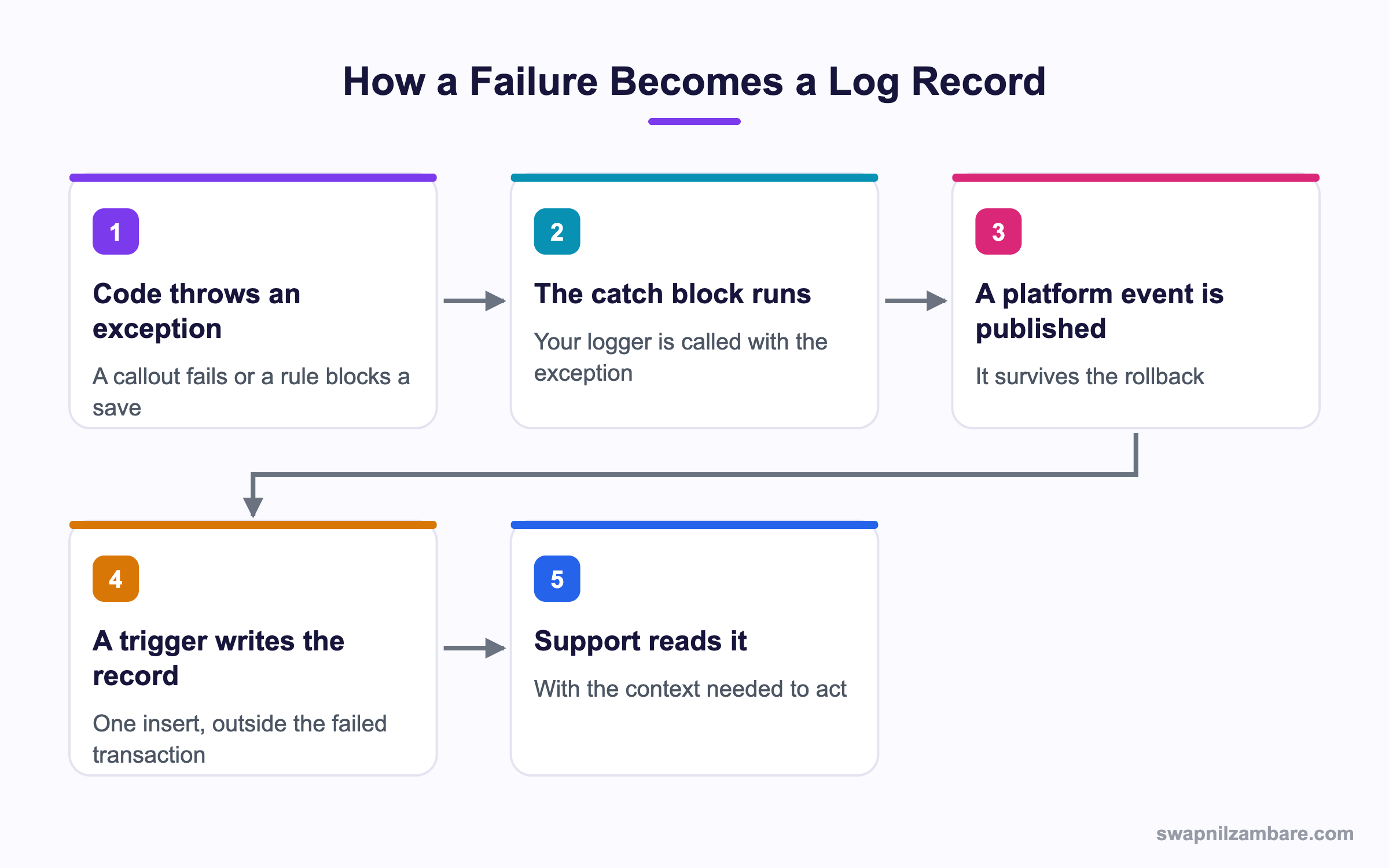
Caption: The platform event is what lets a log survive the rollback that follows a thrown exception.
Why Apex Error Logging Needs a Platform Event
This is the part most homemade Apex Error Logging gets wrong. If your code catches an exception, inserts a log record, and then rethrows, the rollback takes your log record with it. The failure happened and no trace remains.
A platform event is not rolled back in the same way. Publish it, let the transaction fail, and a trigger on the event writes the record afterwards in its own transaction.
| Approach | Log survives a rollback |
|---|---|
| Insert the record directly | No |
| Publish a platform event | Yes |
| Write to a debug log only | It expires |
| Send an email | Yes, but unreportable |
The Two Objects You Need
| Component | What it holds |
|---|---|
| Log_Event__e | A platform event with the same fields as the log |
| Log__c | A custom object holding the stored records |
| LogEventTrigger | A trigger on the event that inserts the records |
| Logger | The Apex class your code actually calls |
Building the Apex Error Logging Class
public with sharing class Logger {

    public static void error(Exception e, String source) {
        EventBus.publish(new Log_Event__e(
            Level__c = 'Error',
            Source__c = source,
            Message__c = truncate(e.getMessage(), 255),
            Stack__c = truncate(e.getStackTraceString(), 32000),
            Exception_Type__c = e.getTypeName(),
            Request_Id__c = Request.getCurrent().getRequestId(),
            Quiddity__c = String.valueOf(Request.getCurrent().getQuiddity()),
            User_Id__c = UserInfo.getUserId()
        ));
    }

    private static String truncate(String value, Integer max) {
        if (value == null) {
            return null;
        }
        return value.length() > max ? value.substring(0, max) : value;
    }
}
Two Apex Error Logging fields do most of the work during an investigation. The request id ties every log from one transaction together, and the quiddity tells you what started it, such as a Flow, a trigger, a queueable or a Visualforce page.
| Field | Why support needs it |
|---|---|
| Request_Id__c | Groups every log from one transaction |
| Quiddity__c | Says what kind of execution it was |
| Source__c | Names the class or Flow that failed |
| Stack__c | Points at the exact line |
| User_Id__c | Identifies who hit it |
| Exception_Type__c | Separates a validation failure from a callout failure |
The Event Trigger
trigger LogEventTrigger on Log_Event__e (after insert) {
    List<Log__c> logs = new List<Log__c>();
    for (Log_Event__e e : Trigger.new) {
        logs.add(new Log__c(
            Level__c = e.Level__c,
            Source__c = e.Source__c,
            Message__c = e.Message__c,
            Stack__c = e.Stack__c,
            Request_Id__c = e.Request_Id__c,
            Quiddity__c = e.Quiddity__c,
            Logged_User__c = e.User_Id__c
        ));
    }
    insert logs;
}
Apex Error Logging triggers should be deliberately dull. No logic, no filtering, no enrichment. Anything that can fail in here fails silently and takes your logging with it. The post on platform events covers how these triggers behave.
Apex Error Logging in Real Code
public with sharing class EnrolmentService {

    public void enrol(Id courseId, Id contactId) {
        try {
            doEnrol(courseId, contactId);
        } catch (Exception e) {
            Logger.error(e, 'EnrolmentService.enrol');
            throw new AuraHandledException('We could not complete the enrolment');
        }
    }
}
Notice the two different messages. Apex Error Logging keeps them apart on purpose. The log holds the technical detail, and the user sees a sentence they can read. Showing a stack trace to a user tells them nothing and tells an attacker something.
Logging Partial Failures
A Database.insert with allOrNone set to false returns results per row, and those are worth logging individually.
List<Database.SaveResult> results = Database.insert(records, false);
for (Integer i = 0; i < results.size(); i++) {
    if (!results[i].isSuccess()) {
        Logger.warn(
            results[i].getErrors()[0].getMessage(),
            'EnrolmentService.bulkInsert row ' + i
        );
    }
}
This is where Apex Error Logging earns its place in batch work. A nightly job that quietly skips 40 rows is a data problem nobody finds for a month.
Direct Insert or Platform Event
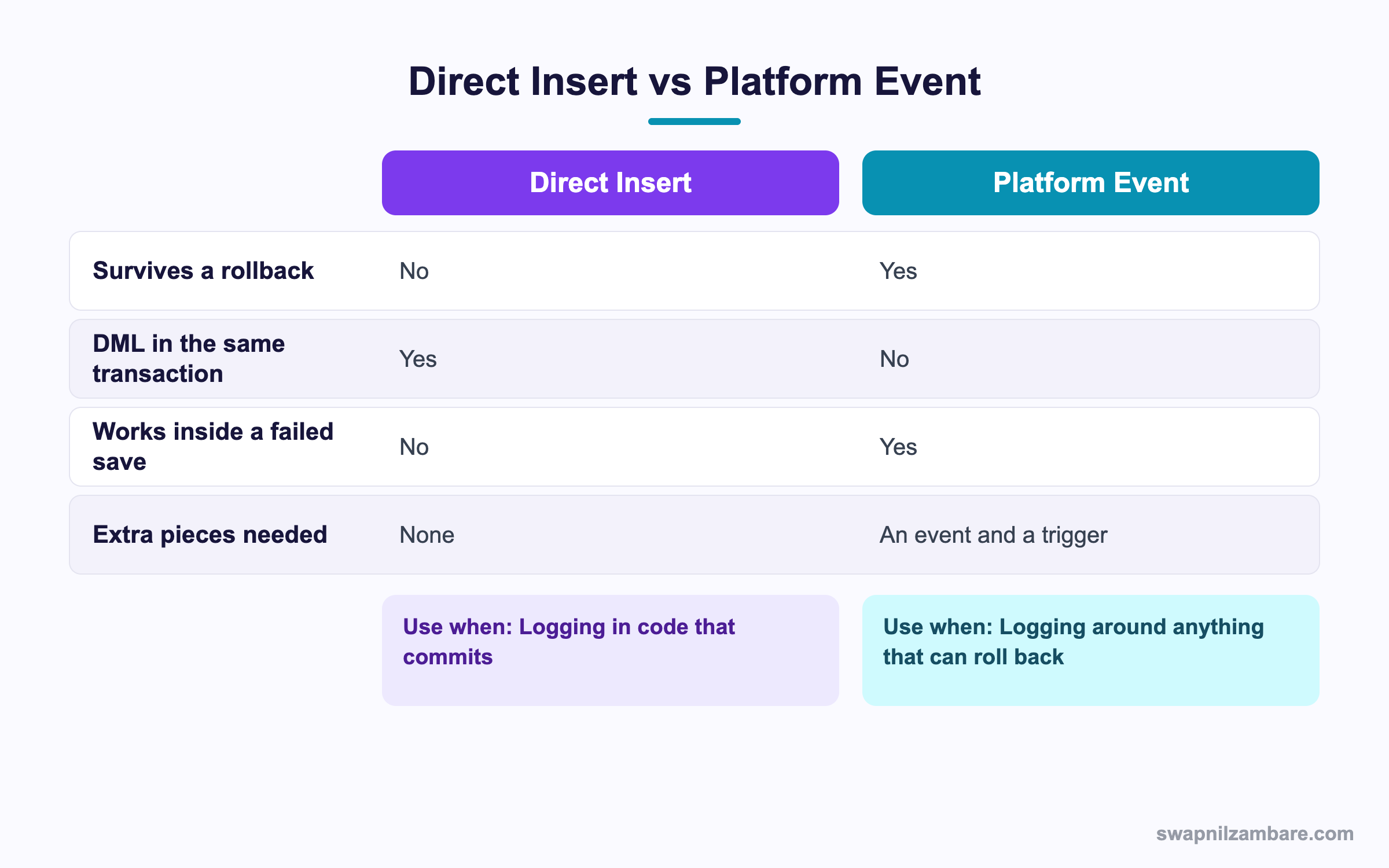
Caption: The platform event route costs two extra components and solves the rollback problem.
| Situation | Pick |
|---|---|
| A catch block that rethrows | Platform event |
| A trigger that may be rolled back | Platform event |
| A batch job that commits each chunk | Either works |
| A scheduled job writing a summary | Direct insert |
| A Flow fault path | Platform event, published from Flow |
Flow can publish a platform event directly, which means admins get the same logging without any Apex. That single fact tends to decide the design, since a fault path in a Flow is otherwise invisible.
A Real Apex Error Logging Example
Bright Path Tutors had no logging at all. A failed enrolment showed a generic message, and support had one question they could not answer, which was what actually went wrong.
| Problem | What it cost |
|---|---|
| No record of failures | Every ticket started from nothing |
| Debug logs set up after the fact | A wait for the problem to happen again |
| Silent partial failures in batches | 212 skipped rows found in an audit |
| No way to spot a pattern | The same bug reported four times |
We added the four components above and logged from every catch block and Flow fault path.
| Measure | Before | After |
|---|---|---|
| Average time to diagnose a failure | 2 days | Under an hour |
| Silent batch skips found | 0 | 212 in the first week |
| Repeat reports of the same bug | Common | Spotted on the first report |
| Debug log requests to users | Weekly | None |
The 212 skipped rows were the shock. They had been failing for months, and nothing anywhere said so.
Keeping Apex Error Logging Useful
Apex Error Logging nobody reads is worse than no log, because it creates false confidence. Three habits keep it alive.
- A report of errors by source for the last seven days, on a dashboard someone sees
- A severity field so a real failure is not buried under information rows
- A scheduled job that deletes rows older than your retention policy
global class LogCleanup implements Schedulable {
    global void execute(SchedulableContext ctx) {
        Database.executeBatch(new LogPurgeBatch(), 2000);
    }
}
Without the cleanup job, the log object grows forever and eventually becomes a storage conversation. Ninety days is a common retention choice. The post on batch Apex covers writing the purge job.
Limits and Things to Watch
- Published events count against your platform event allocations
- A log row holds data, so a chatty logger has a storage cost
- Never log personal data you would not want in a report
- The event trigger runs as the automated process user, so field level security differs
- An exception inside the logger itself must never break the calling code
- Logs are records, so sharing and visibility need a deliberate decision
The personal data point in Apex Error Logging deserves care. Shaping what you store is covered in the post on JSON in Apex. A stack trace is fine, a full record payload is not, and a logger that serialises an entire object into a message field can put names, addresses and more into a log that everyone in support can read.
Common Mistakes with Apex Error Logging
| Mistake | What you see | Fix |
|---|---|---|
| Inserting the log in the failing transaction | No log after a rollback | Publish a platform event |
| Logic in the event trigger | Silent logging failures | Keep the trigger to a plain insert |
| Showing the stack trace to the user | A confusing and leaky message | Log the detail, show a sentence |
| No request id | Unrelated logs that cannot be grouped | Record the request id every time |
| No cleanup job | A growing storage problem | Purge on a retention schedule |
| Everything logged at error level | Real failures buried | Use levels and report on errors |
| Serialising whole records | Personal data in a log | Log identifiers, not payloads |
Best Practices for Apex Error Logging
- Publish a platform event rather than inserting directly from a catch block
- Record the request id and the quiddity on every entry
- Name the source as class and method so support can find it
- Keep the event trigger to one plain insert with no logic
- Log identifiers rather than whole record payloads
- Put a seven day error report on a dashboard somebody reads
- Schedule a purge job from the first day, not after storage becomes a problem
- Give Flow builders the same event to publish from fault paths
Most Asked Apex Error Logging Interview Questions
Q1: Why not just insert a log record in the catch block?
If the transaction rolls back, the log goes with it and no trace remains.
Q2: How does a platform event solve that?
The event is not rolled back in the same way, so a trigger writes the record in its own transaction.
Q3: Why not rely on debug logs?
They have to be set up in advance, they expire, and nobody is watching them overnight.
Q4: What should the event trigger contain?
One plain insert, with no logic, since anything that fails there loses the log.
Q5: What is the request id used for?
It groups every log from the same transaction, which is what makes a trace readable.
Q6: What does the quiddity tell you?
What kind of execution it was, such as a Flow, a trigger, a queueable or a page.
Q7: Why log the source as class and method?
So support can point a developer at a line instead of a feature.
Q8: What should the user see when something fails?
A readable sentence, while the detail goes to the log.
Q9: Why not show the stack trace?
It helps the user not at all and tells an attacker about your internals.
Q10: How do you log partial failures from a bulk insert?
Loop the save results and log a warning per failed row with its index.
Q11: Why does that matter in batch jobs?
Because a job that silently skips rows creates a data problem nobody notices.
Q12: Can Flow write to the same log?
Yes. Flow can publish the platform event from a fault path with no Apex.
Q13: Why is that significant?
Fault paths are otherwise invisible, so admin built automation gets the same coverage.
Q14: What levels are worth having?
At least error, warning and information, so real failures are not buried.
Q15: Why do you need a purge job?
The log object grows forever otherwise, and eventually becomes a storage conversation.
Q16: What retention is common?
Around ninety days, though your own policy decides.
Q17: Which user does the event trigger run as?
The automated process user, so field access and sharing behave differently from a user transaction.
Q18: Do published events count against limits?
Yes, against your platform event allocations, so avoid logging on every successful call.
Q19: What must never happen inside the logger?
It must never throw, since a broken logger would break the calling code.
Q20: How do you guard against that?
Keep it simple, truncate long strings, and avoid queries and logic inside it.
Q21: Why truncate the message?
A text field has a length limit, and an oversized value causes an insert failure.
Q22: What should never go in a log?
Personal data and full record payloads, since logs are readable and reportable.
Q23: Scenario: nothing is logged after a failed save. What is the cause?
A direct insert in the catch block, removed by the rollback.
Q24: Scenario: logs exist but nobody acts on them. What is missing?
A report on a dashboard, and a severity field so errors stand out.
Q25: Scenario: the log object is the largest object in the org. What happened?
Everything is logged at error level with no purge job.
Q26: Scenario: a support agent sees a customer address in a log. How?
A whole record was serialised into the message field.
Q27: Can you reuse a managed logging package instead?
Yes, and several good ones exist. The design ideas here are the same ones they use.
Q28: Should logging be added to every method?
No. Log at the boundaries, which are entry points, catch blocks and fault paths.
Q29: What is the one habit that makes logging pay off?
A weekly error report somebody owns, since a log nobody reads is false comfort.
Official Resources
What Is Next
Next, read Apex Cursors for Very Large Query Results Explained.


