LWC Offline is what lets a Lightning web component keep working on a phone with no signal. Records are downloaded in advance, the component reads them from the device, and edits are held as drafts until a connection returns.
LWC Offline is a different problem from the one most components solve. A component on a desktop can assume the server is there. A component in a basement, a warehouse or a rural site cannot, and the design has to start from that.
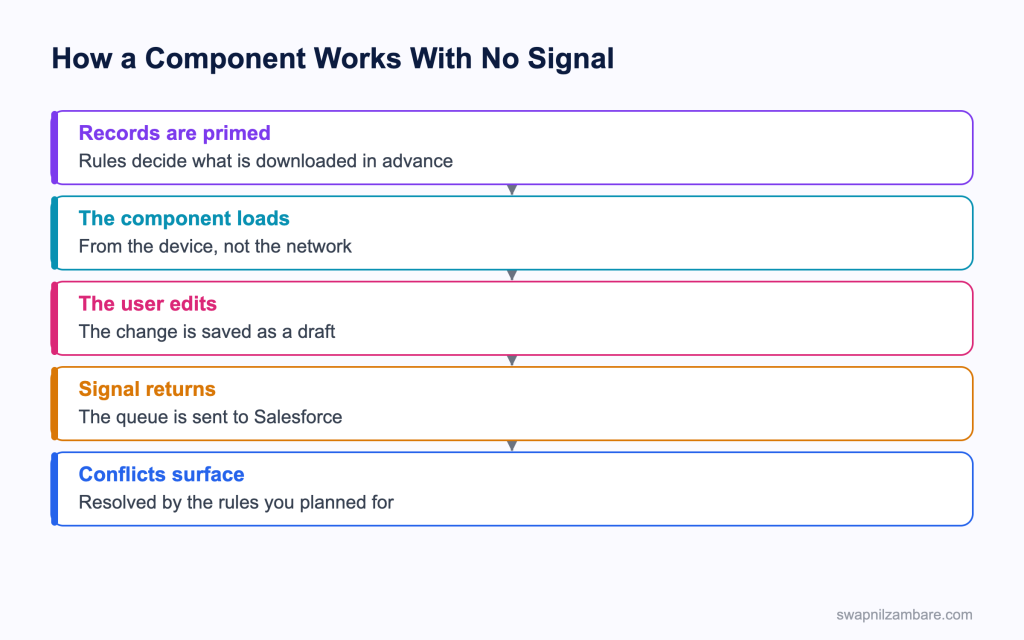
Caption: Priming happens before the user loses signal, which is why the rules matter more than the code.
What LWC Offline Actually Gives You
| Piece | What it does |
|---|---|
| Priming rules | Decide which records are downloaded before the user goes offline |
| Local data access | The component reads records already on the device |
| Draft records | Edits and new records queued while there is no signal |
| Automatic sync | The queue is sent when a connection returns |
| Device capabilities | Camera, location, barcode and similar, from the component |
The important realisation about LWC Offline is that most of it is configuration rather than code. An admin defines what gets primed, and your component then works against whatever is there.
| Question to answer early | Why it decides the design |
|---|---|
| Which records does the user need | Priming cannot download everything |
| How old can the data be | It is as fresh as the last sync |
| What happens to two conflicting edits | Somebody has to choose a rule |
| Does the task need data the user cannot see | Sharing still applies to what is primed |
Writing a Component That Survives No Signal
Three habits separate real LWC Offline from a component from one that only looks like it does.
Assume Every Read May Be Local
Use the wire adapters and the record forms that the platform supports offline rather than imperative Apex, because an Apex call needs a server. A component built on getRecord and a record form keeps working, and a component built on a custom Apex method stops.
| Approach | Works with no signal |
|---|---|
| Wire adapters over the record API | Yes, for primed records |
| A record form | Yes |
| An imperative Apex call | No |
| A callout to an outside service | No |
Show State Honestly
get statusLabel() {
  if (this.isDraft) {
    return 'Saved on this device, waiting to sync';
  }
  return 'Saved';
}
A user who cannot tell whether their work reached Salesforce will enter it twice. Saying so plainly is the single most valuable thing an offline component does.
Plan the Conflict
Two people editing the same record offline is not an edge case, it is a Tuesday. Decide early whether the last write wins, whether a field level merge is acceptable, or whether a human has to look at it. Writing the rule down before the build is far cheaper than discovering it afterwards.
Device Capabilities From a Component
LWC Offline components reach the hardware through the lightning/mobileCapabilities module, which gives access to the hardware, and it is the part developers enjoy most.
import { LightningElement } from 'lwc';
import { getBarcodeScanner } from 'lightning/mobileCapabilities';

export default class AssetLookup extends LightningElement {
  scanner;
  code;
  error;

  connectedCallback() {
    this.scanner = getBarcodeScanner();
  }

  get canScan() {
    return this.scanner && this.scanner.isAvailable();
  }

  async handleScan() {
    try {
      const result = await this.scanner.beginCapture({
        barcodeTypes: [this.scanner.barcodeTypes.QR]
      });
      this.code = result.value;
    } catch (e) {
      this.error = 'Scan cancelled or unavailable';
    } finally {
      this.scanner.endCapture();
    }
  }
}| Capability | Typical use |
|---|---|
| Barcode scanner | Finding an asset or a product by its code |
| Location service | Stamping where a visit happened |
| Biometrics service | Protecting a sensitive screen |
| Document scanner | Capturing a signed form |
| Contacts and calendar | Reading what is already on the device |
| Notifications | Local reminders |
Components built this way follow the same performance rules as any other, which the post on component performance covers, and they are tested the same way, as in Jest testing.
Two rules apply to all of them. Always check availability first, because the same component may run on a desktop where the hardware does not exist. And always end a capture session, since leaving the camera open drains a battery and annoys the user. The post on LWC lifecycle hooks covers where that cleanup belongs.
When the Mobile SDK Is the Answer Instead
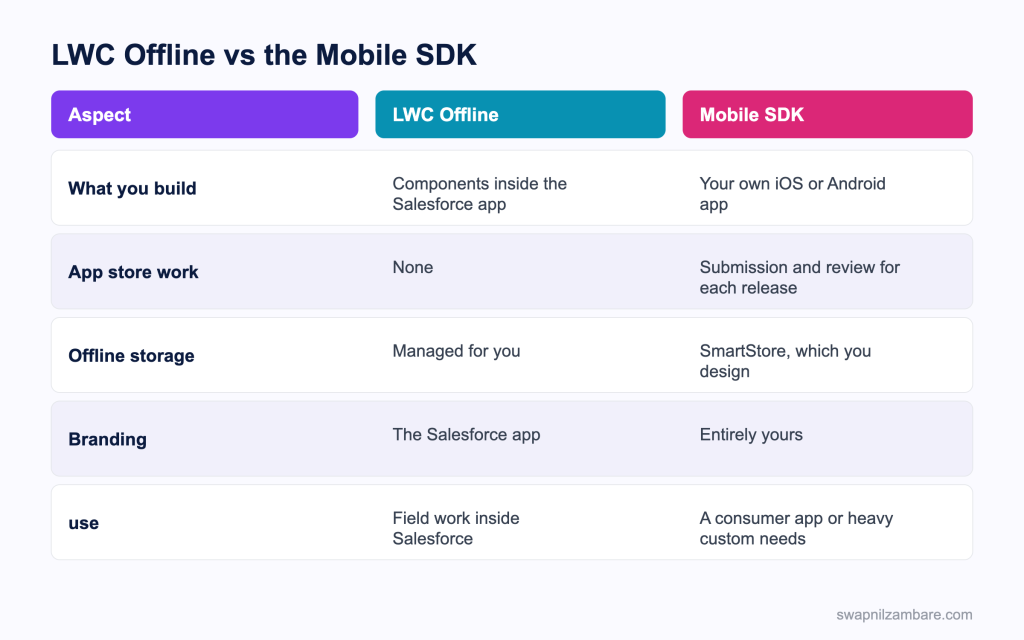
Caption: Working inside the Salesforce app is far less work, so the SDK needs a reason.
The Mobile SDK is the alternative to LWC Offline, and it builds a separate app that you own, publish and support. Offline is your responsibility there, with a local store and a sync layer the SDK provides.
| Piece | What it does |
|---|---|
| SmartStore | An encrypted local database on the device |
| Mobile Sync | Moves records between SmartStore and Salesforce |
| Soups and indexes | How you organise and query the local data |
| Sync up and sync down | The two directions, each with a conflict strategy |
| Need | Pick |
|---|---|
| Field work by Salesforce users | LWC Offline |
| A branded app for customers | Mobile SDK |
| A screen inside the Salesforce app | LWC Offline |
| Hardware the mobile capabilities do not cover | Mobile SDK |
| An app that must work for people with no Salesforce licence | Mobile SDK |
| Shipping this quarter with no app store review | LWC Offline |
The app store line decides more projects than any technical argument. An SDK app means a submission, a review and a release process for every change, which is a commitment a small team should make deliberately.
A Real LWC Offline Example
LWC Offline replaced paper for us. Bright Path Tutors sends tutors to schools, several of which have no usable signal inside the building. Attendance was recorded on paper and typed up later.
| Problem | What it cost |
|---|---|
| Paper registers | A day of typing a week |
| Typing errors | Invoices queried by two schools |
| Nothing visible until Friday | No view of attendance during the week |
| A proposed custom app | A quarter of work and an app store process |
We built two components for the Salesforce mobile app instead.
| Measure | Paper | LWC Offline |
|---|---|---|
| Typing time per week | A full day | None |
| Attendance visible | Friday | Within minutes of signal |
| Invoice queries per term | Two | None so far |
| Build time | Not applicable | Three weeks |
The deciding factor was not the technology. It was that tutors already had the Salesforce app on their phones, so there was nothing to install and nothing to review.
Limits and Things to Watch
- Only primed records are available, so the priming rules decide what the user can do
- Data is as fresh as the last sync, which is not always obvious to the user
- Imperative Apex and callouts do not work with no signal
- Not every standard component behaves offline, so test the real screen on a real device
- Device storage is finite, so priming everything is not an option
- Conflicts need a rule, and the platform cannot invent one for you
- Device capabilities are unavailable on a desktop, so always check first
Testing LWC Offline on a real device with the network switched off is not optional. A component that works in a browser with the developer tools set to offline can still fail on a phone, because the two are not the same environment.
Common Mistakes with LWC Offline
| Mistake | What you see | Fix |
|---|---|---|
| Imperative Apex for a read | A blank component with no signal | Use wire adapters or a record form |
| No draft indicator | Users entering work twice | Show the saved and pending states plainly |
| No conflict rule | Silent overwrites | Agree the rule before the build |
| Priming everything | Slow syncs and full devices | Prime what the task needs |
| Capability used without a check | Errors on desktop | Check availability first |
| A capture session left open | Battery drain | End the session in a finally block |
| Testing only in a browser | Failures found in the field | Test on a device with the network off |
Best Practices for LWC Offline
- Decide the priming rules with the business before writing any code
- Build every read on adapters that work without a server
- Show the user plainly whether their work has synced
- Write down the conflict rule and test it deliberately
- Check capability availability on every device feature
- End every capture session, in a finally block
- Keep the screen small, because a tutor in a corridor is not reading a dashboard
- Test on a real phone with the network switched off, every release
Most Asked LWC Offline Interview Questions
Q1: What problem does LWC Offline solve?
It lets components keep working in the mobile app when there is no signal.
Q2: Where does the data come from with no signal?
From records primed onto the device in advance.
Q3: Who decides what is primed?
An admin, through priming rules, which is configuration rather than code.
Q4: What happens to an edit made offline?
It is held as a draft and sent when a connection returns.
Q5: Does an imperative Apex call work offline?
No. It needs a server, so reads should use adapters that work locally.
Q6: Which approaches do work offline?
Wire adapters over the record API, and record forms, for primed records.
Q7: How fresh is offline data?
As fresh as the last sync, which the interface should make clear.
Q8: Why does a draft indicator matter so much?
Without it a user cannot tell whether work was saved, so they enter it again.
Q9: What happens when two people edit the same record offline?
A conflict, which needs a rule you decided in advance.
Q10: What are the usual conflict strategies?
Last write wins, a field level merge, or a human review.
Q11: Which module gives a component device access?
The mobile capabilities module in the lightning namespace.
Q12: Name four capabilities it offers.
Barcode scanning, location, biometrics and document scanning, among others.
Q13: Why check availability before using one?
The same component may run on a desktop, where the hardware does not exist.
Q14: Why end a capture session?
An open camera session drains the battery and blocks the screen.
Q15: Where should that cleanup go?
In a finally block, and in the disconnected lifecycle hook if the session can outlive the action.
Q16: Does sharing still apply to primed records?
Yes. A user only receives records they can already see.
Q17: Can you prime everything to be safe?
No. Device storage and sync time make that impractical.
Q18: What is the Mobile SDK for?
Building your own iOS or Android app rather than components inside the Salesforce app.
Q19: What provides local storage there?
SmartStore, an encrypted database on the device.
Q20: What moves data in and out of it?
Mobile Sync, with a sync down and a sync up direction.
Q21: What is a soup?
The SmartStore structure that holds a set of records, with indexes you define.
Q22: What is the main cost of the SDK route?
You own the app, including app store submission and review for every release.
Q23: When is that cost justified?
A branded app, users with no Salesforce licence, or hardware the capabilities do not cover.
Q24: Which route ships faster?
Components in the Salesforce app, since there is nothing to install or review.
Q25: Scenario: a component is blank in a basement. What is the likely cause?
It reads through imperative Apex, which needs a server.
Q26: Scenario: tutors report duplicate attendance records. What is missing?
A clear indicator of whether the first save had synced.
Q27: Scenario: a record the user needs is not on the device. Why?
The priming rules do not cover it, which is a configuration conversation.
Q28: Scenario: the scanner errors on a laptop. What went wrong?
No availability check before the capability was used.
Q29: Scenario: batteries drain during a school visit. What would you check?
Capture sessions left open, and priming far more data than the task needs.
Q30: What is the one habit that makes offline work reliable?
Decide priming and conflict rules first, build reads on local adapters, and test on a device with the network off.
Official Resources
- Lightning Web Components Developer Guide
- Mobile SDK Development Guide
- Salesforce Mobile App Customization on Trailhead
What Is Next
That completes the Salesforce Developer track from Apex basics through to mobile and AI. The Developer interview question series continues next.


