Data Cloud in Apex looks like ordinary SOQL and behaves like nothing of the sort. The objects live outside your org, a static query against one counts as a callout, security works differently, and every query spends credits from your subscription.
None of that makes Data Cloud in Apex a bad tool. It makes it a tool worth understanding before a trigger starts querying it two hundred times in a loop.
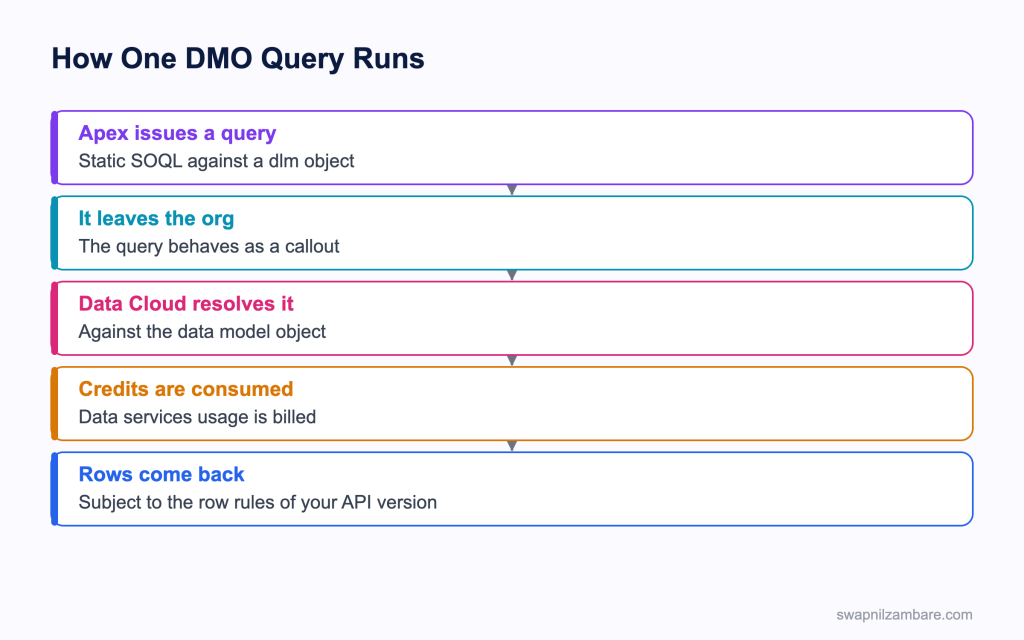
Caption: The query leaving the org is the fact that explains almost every rule that follows.
Data Cloud in Apex Object Types
| Suffix | What it is |
|---|---|
| __dlm | A data model object, the mapped and shaped data |
| __dll | A data lake object, closer to the raw ingested data |
| __cio | A calculated insight object, holding computed measures |
| Unified objects | Data model objects holding the resolved single profile |
With Data Cloud in Apex the object you query most is a data model object, and the most familiar example is the unified individual.
List<UnifiedIndividual__dlm> matches = [
    SELECT Id, ssot__FirstName__c, ssot__LastName__c
    FROM UnifiedIndividual__dlm
    WHERE ssot__LastName__c = :surname
    LIMIT 50
];
Static SOQL is the simplest Data Cloud in Apex route, and it is the preferred one over dynamic SOQL or the Connect API when a plain read is all you need.
The Rules That Catch People
| Rule | What it means |
|---|---|
| A static query acts as a callout | Callout restrictions apply, including after a DML statement |
| Query locators and for loops need API 61.0 or later | Earlier versions return only the first 201 rows |
| Batch Apex with a query locator is blocked | Use the iterable form of batch instead |
| Queries consume data services credits | A loop that queries per record is expensive |
| Relationship traversal across these objects is limited | You cannot replace a SQL join with dot notation |
| Aggregates work on data model objects only | Not on data lake objects |
| Calculated insight objects cannot be queried this way | Use the Connect API route |
The silent 201 row truncation is the worst of these, because a class created on an older API version returns a short list and reports no problem at all. Checking the class API version is the first thing to do when a count looks wrong.
Data Cloud in Apex Security Behaves Differently
This is the part to read twice before a security review.
| Expectation | Reality for these objects |
|---|---|
| Sharing rules apply | They do not, in the way they do for CRM records |
| A permission set gates access | Data model objects are reachable from Apex in system mode regardless |
| USER_MODE enforces field access | It can check object level access only |
| stripInaccessible filters fields | Again, object level only |
So the filter in your query is the control, not the platform. If a component should only show one person’s profile, the query has to constrain it, and a code review has to check that it does. The post on CRUD and field level security covers how this differs from ordinary objects.
One more practical note. A global describe does not list these objects, so use a describe call with the known API names instead of looking for them in a loop.
List<Schema.DescribeSObjectResult> described =
    Schema.describeSObjects(new List<String>{ 'UnifiedIndividual__dlm' });
The Connect API Route for Data Cloud in Apex
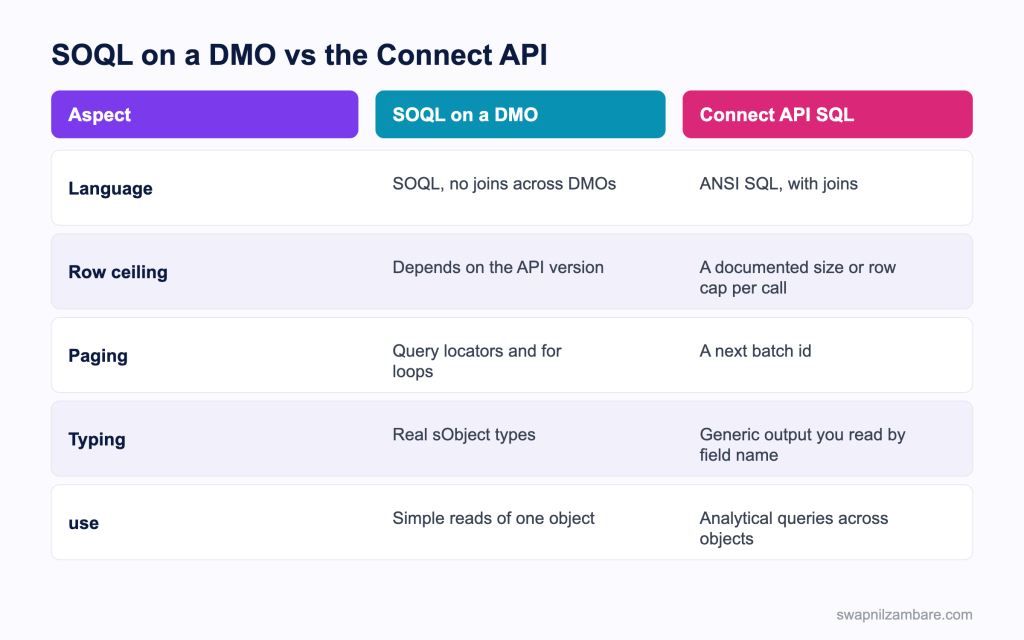
Caption: Simple reads go through SOQL, and anything analytical goes through SQL.
When SOQL runs out for Data Cloud in Apex, the ConnectApi.CdpQuery class runs SQL across data model, lake, unified and linked objects.
ConnectApi.CdpQueryInput input = new ConnectApi.CdpQueryInput();
input.sql = 'SELECT ssot__FirstName__c, ssot__LastName__c '
    + 'FROM UnifiedIndividual__dlm LIMIT 100';

ConnectApi.CdpQueryOutputV2 output = ConnectApi.CdpQuery.queryAnsiSqlV2(input);| Method | What it does |
|---|---|
| queryAnsiSqlV2 | Runs SQL and returns up to a documented payload size |
| nextBatchAnsiSqlV2 | Fetches the next batch, using the next batch id |
| queryANSISql | The older method, returning up to a few thousand rows |
| queryProfileApi | Queries a profile object with filters and a search key |
| getProfileMetadata | Returns fields, types and indexes for a profile object |
The batch id is how you page. The first call returns rows and an id, and you pass that id back for the next batch, for a limited period afterwards. That is a different shape from a SOQL query locator, so a client written for one does not translate to the other.
Newer releases keep adding dedicated Apex support for Data Cloud SQL, so check the current developer guide rather than an older article before you settle on a route.
Keeping the Credit Cost Down
Data Cloud in Apex credits are the part that turns a working feature into an uncomfortable conversation.
| Habit | Why it saves credits |
|---|---|
| Query once per transaction, never per record | A loop multiplies the cost by the record count |
| Select only the fields you use | Smaller results cost less to move |
| Cache a result on the record when it is stable | A profile summary rarely changes within a day |
| Keep queries out of triggers | A bulk load would query on every save |
| Use a scheduled job for aggregates | One query a night rather than one per page view |
public with sharing class ProfileSummaryBatch implements Database.Batchable<SObject>, Iterable<SObject> {
    // the iterable form, since a query locator is blocked for these objects
}
A Real Data Cloud in Apex Example
Data Cloud in Apex cost us real money before we fixed it. Bright Path Tutors unified student records from the portal, the finance system and Salesforce. A component on the contact page showed the unified profile.
The first version queried on every page load.
| Problem | What it cost |
|---|---|
| A query per page view | Credits consumed all day |
| A trigger that also queried | Bulk loads multiplied it |
| An old class API version | Only the first 201 rows, silently |
| Sharing assumed to apply | A review finding, since it does not |
We changed four things and left the feature itself alone.
| Change | Result |
|---|---|
| A nightly job writing a summary field | Credit use fell sharply |
| The component reads the summary field | Instant page load |
| The class moved to a current API version | Full result sets |
| The query constrained by contact | The review finding cleared |
| Measure | Before | After |
|---|---|---|
| Data Cloud queries per day | Thousands | Around one per contact |
| Contact page load | Two seconds | Immediate |
| Rows the old query missed | Everything past 201 | None |
The silent truncation was the most dangerous Data Cloud in Apex problem of the four, because the feature looked like it worked. A student with a long history simply showed an incomplete picture.
Testing Data Cloud in Apex Without Real Records
Data Cloud in Apex cannot insert a row into a data model object in a test, which is a genuine problem for coverage. Apex provides stub methods that let a test return prepared rows for a data model object query, so the test exercises your handling rather than the data store.
| Approach | What it gives you |
|---|---|
| SOQL stub methods for these objects | Prepared rows a test can assert on |
| A thin service class around the query | Somewhere to stub with the Apex Stub API |
| An assertion on your mapping logic | The part that actually breaks |
Wrapping Data Cloud in Apex behind a small service is worth it on its own, and the Data Cloud basics for admins post covers the reporting side, because that service becomes the one place where the credit cost lives. The post on the Apex Stub API covers stubbing that service.
Common Mistakes with Data Cloud in Apex
| Mistake | What you see | Fix |
|---|---|---|
| An old class API version | Only the first 201 rows, with no error | Move the class to a current version |
| A query inside a loop | Credits consumed and slow transactions | Query once and map in memory |
| A query in a trigger | Bulk loads multiply the cost | Move it to an asynchronous job |
| Assuming sharing applies | A security finding | Constrain the query yourself |
| Relying on USER_MODE for field access | Field level gaps | Remember it checks object level only |
| A query locator in batch Apex | A blocked job | Use the iterable form |
| Looking for the objects in a global describe | Nothing found | Describe the known API names |
| Expecting dot notation joins | Query errors | Use the SQL route for joins |
Best Practices for Data Cloud in Apex
- Treat every query as a callout, because that is what it is
- Keep every query behind one small service class
- Query once per transaction and map results in memory
- Select only the fields the feature uses
- Store a stable summary on a record rather than querying on each view
- Keep queries out of triggers entirely
- Constrain every query by the person or record in scope
- Use the SQL route when you need joins or analytical shapes
- Keep classes on a current API version and say why in a comment
Most Asked Data Cloud in Apex Interview Questions
Q1: What suffix marks a data model object?
A double l m suffix on the API name.
Q2: What is a data lake object?
The object closer to the raw ingested data, before mapping, with its own suffix.
Q3: What is a calculated insight object?
An object holding computed measures, which SOQL cannot query.
Q4: What is the unified individual?
A data model object holding the resolved single profile for a person.
Q5: Why is a static query against one treated as a callout?
Because the data lives outside your org, so the query leaves it.
Q6: What follows from that?
Callout restrictions apply, including the rule about callouts after DML in a transaction.
Q7: What happens on an older class API version?
Only the first 201 rows are returned, with no error.
Q8: Which API version changed that?
Support for query locators and for loops arrived in version 61.0.
Q9: Can batch Apex use a query locator on these objects?
No. Use the iterable form of the batch interface instead.
Q10: What does a query cost?
Data services credits from your subscription, so volume matters.
Q11: Do sharing rules apply?
Not in the way they do for CRM records, so the query filter is the control.
Q12: What can USER_MODE enforce for these objects?
Object level access only, not field level.
Q13: Does stripInaccessible help?
Only at the object level, for the same reason.
Q14: Why does a global describe not show them?
They are not listed that way, so describe the known API names directly.
Q15: Can you traverse relationships with dot notation?
Not in the way ordinary SOQL allows, which is why joins go through the SQL route.
Q16: Which class runs SQL from Apex?
The CdpQuery class in the Connect API namespace.
Q17: Which method is the current SQL entry point?
The ANSI SQL method that returns a batch of data plus a next batch id.
Q18: How do you page through SQL results?
Pass the next batch id back on a following call, within the allowed window.
Q19: What does queryProfileApi do?
Queries a profile object with filters and a search key, without writing SQL.
Q20: What does getProfileMetadata return?
The fields, data types and indexes available for a profile object.
Q21: Where do aggregates work?
On data model objects, not on data lake objects.
Q22: How do you test code that queries these objects?
With the SOQL stub methods for them, and by keeping the query behind a service you can stub.
Q23: Why can you not just insert test rows?
The data is not stored in your org, so there is nothing to insert into.
Q24: What is the single biggest cost mistake?
Querying per record or per page view instead of once, or on a schedule.
Q25: Scenario: a list looks short but nothing failed. What do you check?
The class API version, since an old one truncates at 201 rows.
Q26: Scenario: credits spiked after a data load. What happened?
A trigger is querying Data Cloud, so every saved record caused a query.
Q27: Scenario: a reviewer says a component leaks profiles. Why?
The query is not constrained, and sharing is not doing the work you assumed.
Q28: Scenario: a batch job will not start. What is wrong?
It uses a query locator, which is blocked for these objects.
Q29: Scenario: you need a join across two objects. What now?
Use the SQL route through the Connect API rather than SOQL.
Q30: What is the one habit that keeps this safe and affordable?
One service class, one query per transaction, a constrained filter, and a summary stored for reuse.
Official Resources
What Is Next
Next, read LWC Offline and the Salesforce Mobile SDK Explained.


