Prompt Templates in Apex let your code run a template that an admin wrote and maintains in Prompt Builder. The wording, the grounding and the model configuration stay in the template. Your Apex supplies the inputs and reads the generated text.
That split is the point. A marketing lead can change the tone of a generated blurb on a Tuesday afternoon without a deployment, and your code keeps working, because the only contract between them is the set of input names.
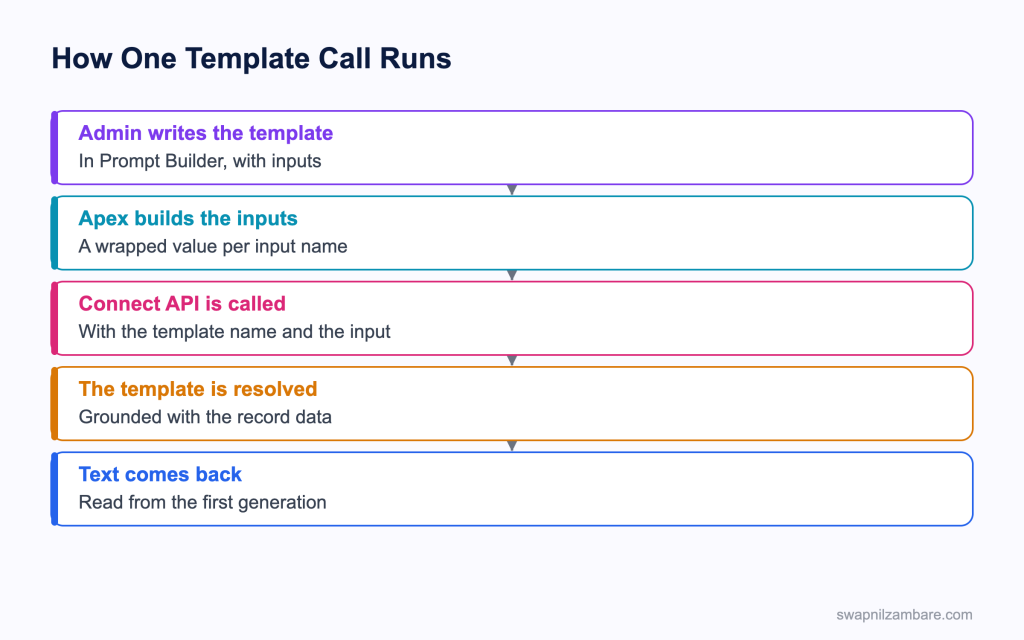
Caption: The template holds the wording, and Apex holds only the inputs and the result.
Calling Prompt Templates in Apex
Prompt Templates in Apex are called through the ConnectApi.EinsteinLLM class, and the call takes a template name and an input object.
public with sharing class CourseBlurb {

    @AuraEnabled
    public static String generate(Id courseId) {
        Map<String, ConnectApi.WrappedValue> inputParams =
            new Map<String, ConnectApi.WrappedValue>();

        ConnectApi.WrappedValue courseValue = new ConnectApi.WrappedValue();
        courseValue.value = new Map<String, String>{ 'id' => courseId };
        inputParams.put('Input:Course', courseValue);

        ConnectApi.EinsteinPromptTemplateGenerationsInput input =
            new ConnectApi.EinsteinPromptTemplateGenerationsInput();
        input.isPreview = false;
        input.inputParams = inputParams;
        input.additionalConfig = new ConnectApi.EinsteinLlmAdditionalConfigInput();
        input.additionalConfig.applicationName = 'PromptBuilderPreview';

        ConnectApi.EinsteinPromptTemplateGenerationsRepresentation output =
            ConnectApi.EinsteinLLM.generateMessagesForPromptTemplate('Course_Blurb', input);

        return output.generations[0].text;
    }
}| Piece | What it does |
|---|---|
| WrappedValue | Holds one input value, often a record id |
| inputParams | Maps each input name to its wrapped value |
| isPreview | False sends the prompt to the model, true only resolves it |
| additionalConfig | Configuration for the call, including the application name |
| generations | The list of results, with the text on the first one |
The input names are the awkward part of Prompt Templates in Apex. They come from the template, and they carry a prefix, so an input called Course is referenced as Input:Course. Get that string wrong and the template resolves without the record, which produces generic text rather than an error.
Previewing Instead of Generating
Prompt Templates in Apex have a preview mode. Setting isPreview to true resolves the template with the data and returns the prompt without sending it to the model. That is the fastest way to debug grounding, because you can read exactly what the template built.
input.isPreview = true;
ConnectApi.EinsteinPromptTemplateGenerationsRepresentation out =
    ConnectApi.EinsteinLLM.generateMessagesForPromptTemplate('Course_Blurb', input);
System.debug(out.prompt);
Why Prompt Templates in Apex Matter
| Benefit | What it gives you |
|---|---|
| One source of wording | Flow, Apex and agents use the same template |
| Change without a deploy | An admin edits the prompt, not the code |
| Grounding handled for you | Record fields and related data pulled in by the template |
| Trust layer applied | Masking, scoring and audit on every call |
| Model chosen in configuration | Swapped in setup rather than in Apex |
The single source point is the one that pays off over a year. Without it, the same business wording ends up copied into a Flow, an Apex class and an email template, and the three drift apart.
Calling It From a Component
There is one rule about Prompt Templates in Apex that surprises people. A Connect API call consumes a DML statement, so the method cannot be marked cacheable, which means it cannot be wired.
| Call style | Works with a prompt template |
|---|---|
| Imperative Apex call | Yes |
| Wire adapter | No, since the method cannot be cacheable |
import generate from '@salesforce/apex/CourseBlurb.generate';

async handleClick() {
  this.loading = true;
  try {
    this.blurb = await generate({ courseId: this.recordId });
  } catch (e) {
    this.error = e.body ? e.body.message : 'Could not generate the text';
  } finally {
    this.loading = false;
  }
}
Prompt Templates in Apex can take several seconds, so a spinner and a disabled button are not optional. The post on calling Apex covers the two call styles in detail.
Prompt Template or a Raw Model Call
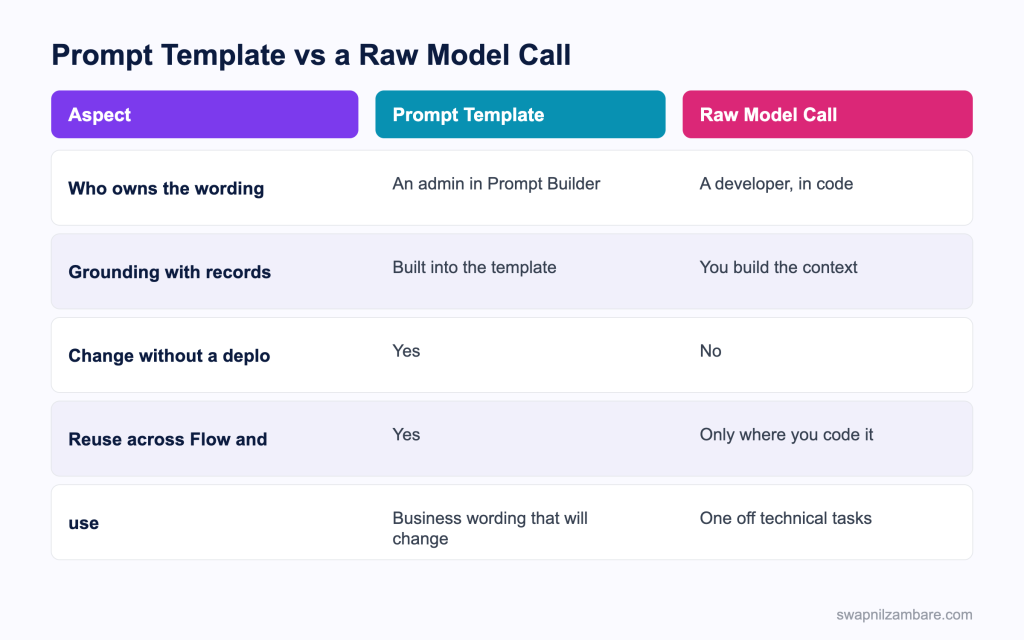
Caption: Business wording belongs in a template, and technical one offs belong in code.
| Need | Pick |
|---|---|
| A customer facing blurb marketing will tweak | Prompt template |
| A summary wording the business owns | Prompt template |
| The same output needed in Flow and Apex | Prompt template |
| Classifying text into a picklist value | A raw model call |
| Generating embeddings | A raw model call |
| A technical transformation nobody will edit | A raw model call |
The raw route is the Models API, which the post on the Agent API and Models API covers. Both go through the trust layer, so the choice is about ownership rather than safety.
A Real Prompt Templates in Apex Example
Prompt Templates in Apex took wording out of our code. Bright Path Tutors generates a short promotional blurb for each course. The first version had the wording inside an Apex class.
| Problem | What it cost |
|---|---|
| Wording in code | A deployment for every tone change |
| Three copies of similar wording | A Flow, a class and an email template |
| No preview | Grounding problems debugged by guesswork |
| Marketing waiting on a developer | Days per change |
We moved the wording into one template and called it from Apex.
| Measure | Wording in Apex | Prompt template |
|---|---|---|
| Time for a tone change | 2 days | Minutes, by the marketing lead |
| Copies of the wording | 3 | 1 |
| Debugging grounding | Trial and error | The preview mode |
| Apex lines for the feature | 140 | 24 |
The preview mode is what shortened the first build. Reading the resolved prompt showed immediately that one input name was wrong, which had been producing confident and completely generic text.
Listing Templates
The same class behind Prompt Templates in Apex can list the templates in the org, which is useful for an admin facing component.
ConnectApi.EinsteinPromptRecordCollectionOutputRepresentation list =
    ConnectApi.EinsteinLLM.getPromptTemplates(
        'Summarize', 'CreatedDate', 0, 5, null, 'einstein_gpt__flex', null, true
    );
That lets you build a picker rather than hard coding a template name, which matters when several teams maintain their own templates. The same template can also sit behind an agent action, which the post on building agents with Agentforce DX covers.
Limits and Things to Watch
- The call consumes a DML statement, so the method cannot be cacheable
- A generation can take several seconds, so keep it out of a trigger
- Input names come from the template and carry a prefix, which is easy to mistype
- A wrong input name produces generic text rather than an error
- Model output is never guaranteed, so validate anything that reaches a record
- Usage is metered, so a component that generates on every render is expensive
- Rate limits apply, so bulk generation needs batching
The silent failure in Prompt Templates in Apex is the one to design around. A mistyped input name gives you fluent text that ignores the record, which no exception will tell you about. Preview mode and one assertion on a known field are the cheap defences.
Common Mistakes with Prompt Templates in Apex
| Mistake | What you see | Fix |
|---|---|---|
| A wrong input name | Confident but generic text | Check the name and prefix, and use preview mode |
| Trying to use a wire adapter | A cacheable error | Call it imperatively |
| Calling it from a trigger | Slow saves and limit errors | Move it behind a button or an asynchronous job |
| Generating on every render | A metered bill nobody expected | Generate on an action, and store the result |
| No loading state | Users clicking twice | Show a spinner and disable the button |
| Saving output without checks | Wrong data on records | Validate before the write |
| Wording duplicated in code | Drift between Flow and Apex | Keep one template |
Best Practices for Prompt Templates in Apex
- Keep the wording in the template and the inputs in the code
- Use preview mode while building, to read the resolved prompt
- Assert on one known value in a test so a broken input name is caught
- Store a generated result on the record rather than regenerating it
- Trigger generation from a user action, never from a save
- Show progress, since a call can take seconds
- Validate output before anything is written
- Build a template picker when several teams maintain templates
Most Asked Prompt Templates in Apex Interview Questions
Q1: Which class calls a prompt template from Apex?
The EinsteinLLM class in the Connect API namespace.
Q2: Which method runs the template?
The method that generates messages for a prompt template, taking the template name and an input object.
Q3: Can you pass a template id instead of a name?
Yes. The developer name or the record id both work.
Q4: What is a WrappedValue?
A wrapper holding one input value, often a map containing a record id.
Q5: How are inputs passed in?
As a map of input names to wrapped values on the input object.
Q6: Why do input names look unusual?
They come from the template and carry a prefix, so an input called Course becomes Input:Course.
Q7: What happens if the input name is wrong?
The template resolves without the record, so you get fluent generic text and no error.
Q8: How do you catch that quickly?
Set the preview flag and read the resolved prompt.
Q9: What does the preview flag do?
True resolves the template with data and returns the prompt without calling the model.
Q10: Where is the generated text?
On the first entry of the generations list in the response.
Q11: Can the method be cacheable?
No. The call consumes a DML statement, so it cannot be marked cacheable.
Q12: What does that mean for a component?
You call it imperatively, since a wire adapter needs a cacheable method.
Q13: Should it run in a trigger?
No. A generation takes seconds, which does not belong in a save.
Q14: Where should it run instead?
Behind a user action, or in an asynchronous job for bulk work.
Q15: What does the trust layer do on these calls?
It applies masking, toxicity scoring and audit to every generation.
Q16: Who should own the wording?
An admin or business owner in Prompt Builder, not a developer in code.
Q17: What is the benefit of that split?
Tone and wording change without a deployment, and Flow and Apex share one source.
Q18: Which model does the call use?
The one configured for the template, which can be changed in setup.
Q19: Can you list the templates in the org from Apex?
Yes, with the get prompt templates method on the same class.
Q20: Why would you list them?
To build a picker instead of hard coding a template name.
Q21: How do you test this in Apex?
Keep the call behind a thin service you can stub, and assert on your own handling rather than the model output.
Q22: Why not assert on the generated text?
Because output varies, so an exact match assertion will fail eventually.
Q23: How do you avoid repeated cost?
Store the generated result on the record and regenerate only when asked.
Q24: Scenario: the text reads well but ignores the course. What is wrong?
An input name is wrong, so the record never reached the template.
Q25: Scenario: a wire adapter will not compile against your method. Why?
The method cannot be cacheable, so it must be called imperatively.
Q26: Scenario: saves became slow after this feature shipped. What happened?
The generation is running in a trigger rather than from a user action.
Q27: Scenario: the bill jumped. What is the likely cause?
A component generating text on every render instead of on an action.
Q28: Scenario: marketing wants a different tone weekly. What does that argue for?
Keeping the wording in the template, which is the whole reason for this pattern.
Q29: Does the same template work for an agent action?
Yes, which is part of why keeping one template is worthwhile.
Q30: What is the one habit that keeps this clean?
Wording in the template, inputs in code, preview mode while building, and validation before any write.
Official Resources
What Is Next
Next, read Data Cloud in Apex Queries and Objects Explained.


