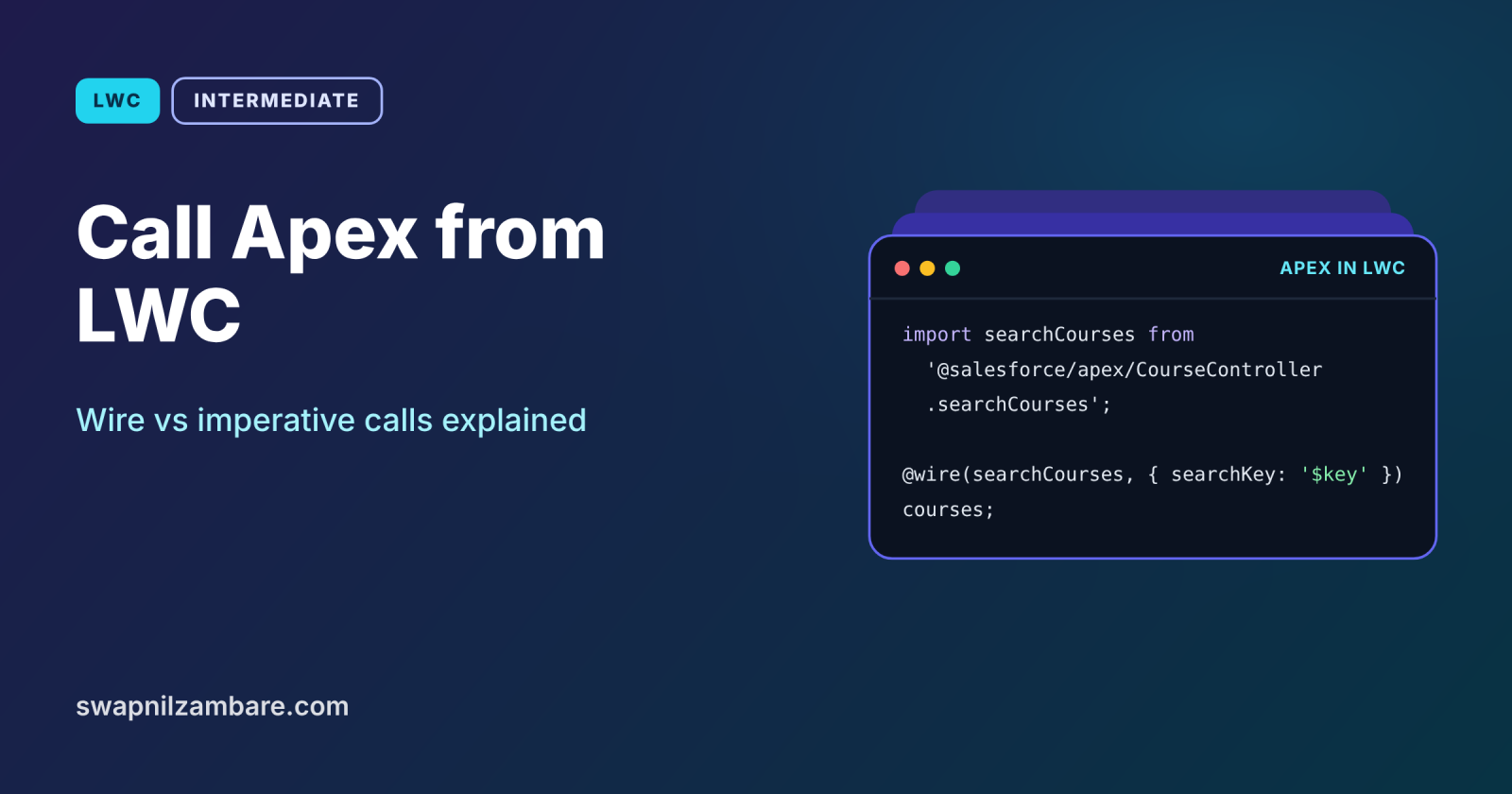
To Call Apex from LWC, you mark an Apex method with @AuraEnabled, import it into your component, and then either wire it or call it imperatively. Wiring is reactive and cached, which suits reading data. Imperative calls run exactly when you choose, which suits saving data or loading on a button click.
In this post, you will learn both styles, the cacheable rule, how to pass parameters, how to refresh wired data with refreshApex, and how to handle errors. It builds on LWC wire adapters, Apex CRUD and FLS and SOQL basics in Apex.
What Does It Mean to Call Apex from LWC?
When you Call Apex from LWC, a component runs a public static Apex method on the server and gets its result back in JavaScript. The method needs @AuraEnabled. If you want to wire it, it also needs cacheable=true. The component imports the method from @salesforce/apex/ClassName.methodName.
Think of a restaurant with a menu and a phone. Reading the menu on the wall is like a wired call: it is always there and updates when the chef changes it. Phoning in a special order is like an imperative call: you decide exactly when to call and what to ask for.
Why You Call Apex from LWC
Wire adapters cannot do everything. Here is why you Call Apex from LWC at Bright Path Tutors.
- First, a course search needs SOQL with a LIKE filter and sorting.
- Also, enrolling a student must check seats and create a record in one step.
- Next, a dashboard card needs aggregates such as total fees by level.
- Some logic spans several objects in one transaction.
- Finally, existing Apex services can be reused by components.
So Apex fills the gaps that Lightning Data Service and UI API adapters leave.
How You Call Apex from LWC
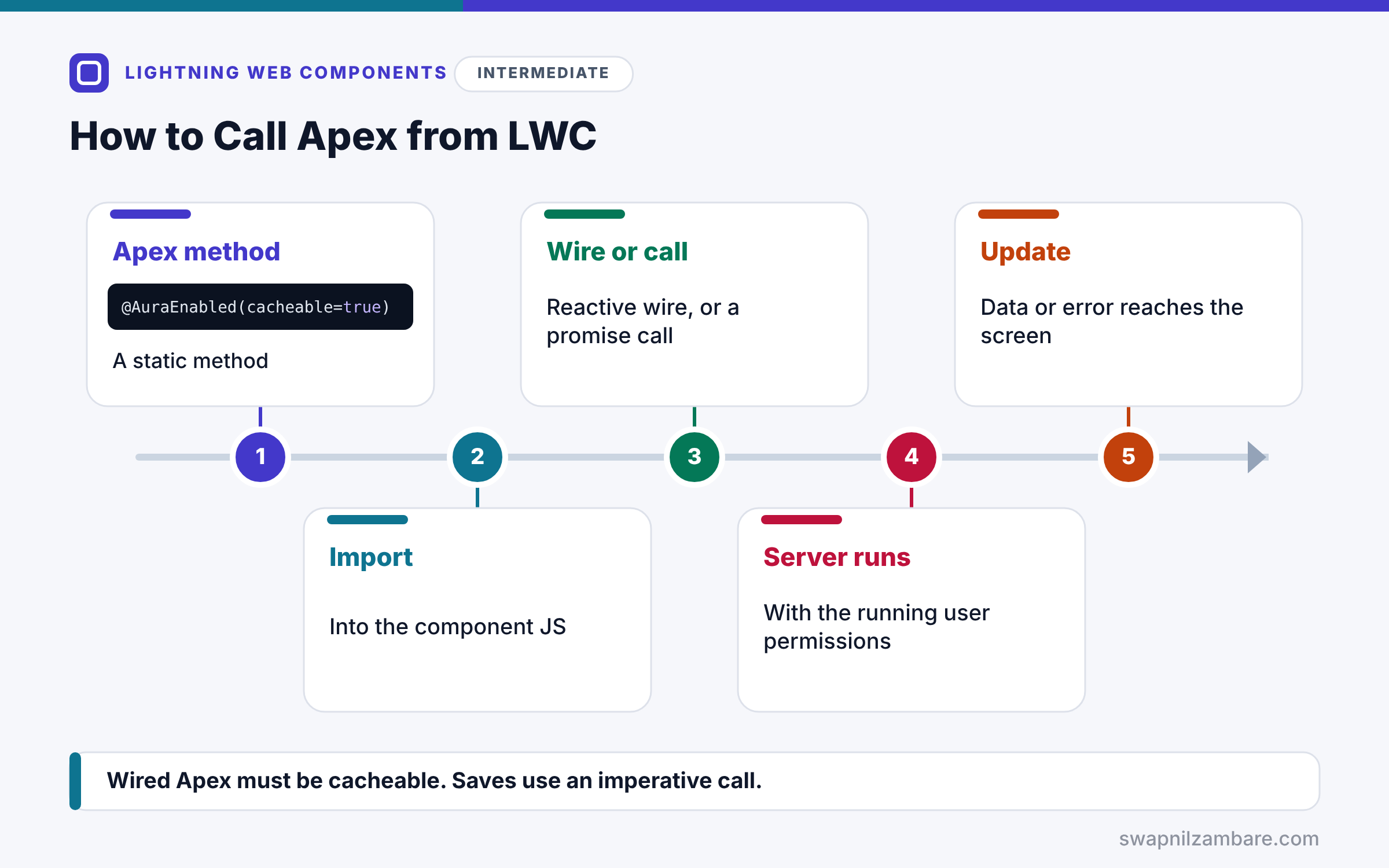
The flow is the same for both styles. First, you write a static Apex method marked @AuraEnabled, adding cacheable=true for reads. Next, you import it into the component. Then you either wire it with reactive parameters, or call it as a function that returns a promise. After that, the server runs the method with the running user’s permissions. Finally, the component receives data or an error and updates the screen.
@AuraEnabled and cacheable=true
@AuraEnabled exposes the method to components. Adding cacheable=true lets LWC cache the result and is required for wiring. Cacheable methods cannot perform DML.
Wiring an Apex Method
@wire(getCourses, { searchKey: ‘$searchKey’ }) runs the method when the component loads and whenever searchKey changes. The result has data and error.
Imperative Calls
Call the imported method like a function, such as enrol({ courseId }). It returns a promise, so use async and await or then and catch.
Parameters
Pass an object whose keys match the Apex parameter names exactly. For example, searchKey in JavaScript matches String searchKey in Apex.
refreshApex
Wired Apex data is cached. After a save, call refreshApex with the stored wired result to fetch fresh data.
Apex Method Rules
The table below sums up what the Apex side needs.
| Rule | Detail |
|---|---|
| Annotation | @AuraEnabled |
| For wiring | cacheable=true |
| Method type | static |
| Access | public or global |
| DML in cacheable methods | Not allowed |
Wired Apex vs Imperative Apex
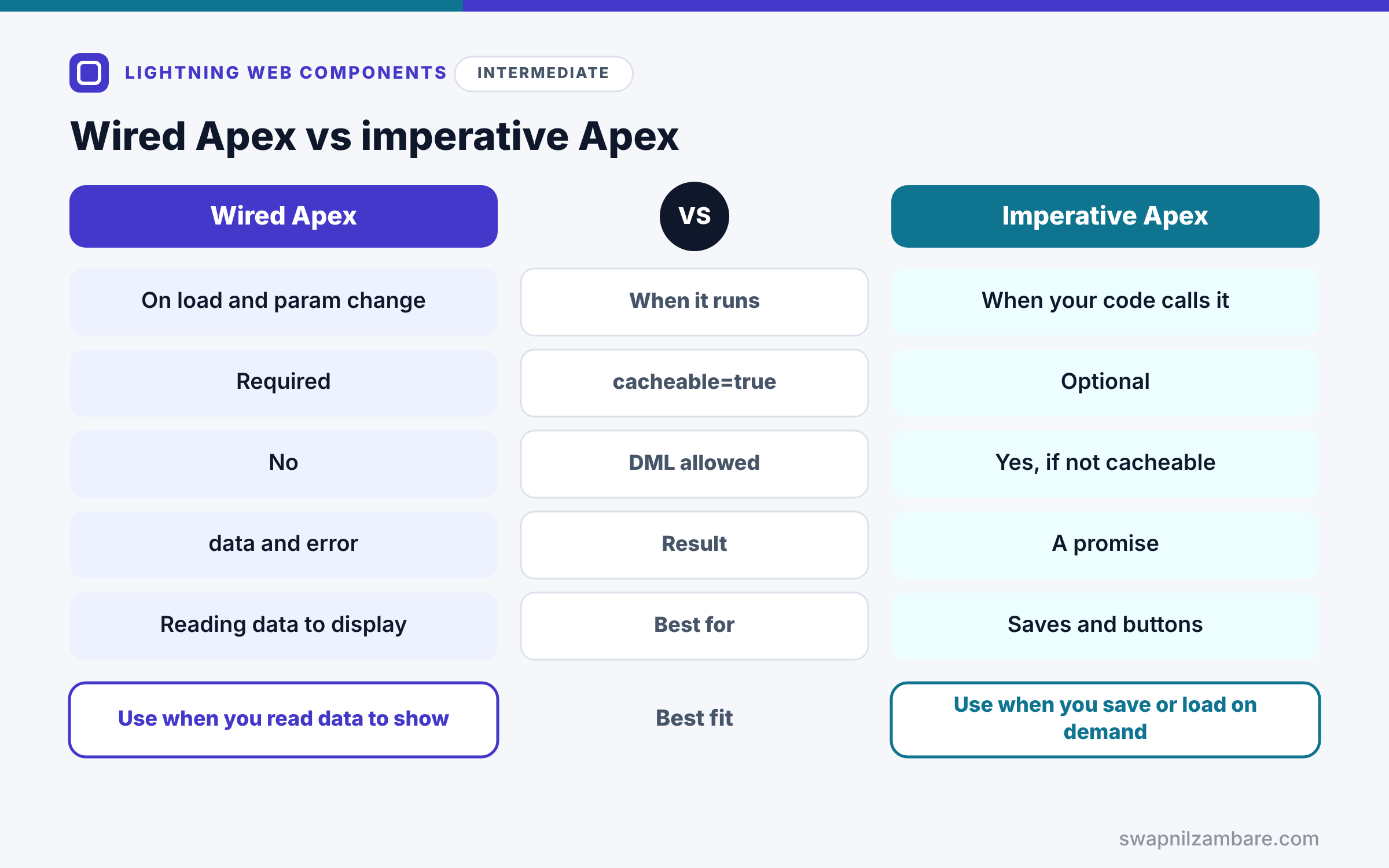
The table below compares the two ways to Call Apex from LWC.
| Feature | Wired Apex | Imperative Apex |
|---|---|---|
| When it runs | Automatically, on load and param change | When your code calls it |
| cacheable=true | Required | Optional |
| DML allowed | No | Yes, if not cacheable |
| Result | data and error | A promise |
| Best for | Reading data to display | Saving, buttons, on-demand loads |
When to use which is simple. Wire cacheable methods to read data for display. Call methods imperatively for saves and for loads you trigger yourself.
A Real Call Apex from LWC Example
Let’s Call Apex from LWC at Bright Path Tutors. A course search wires a cacheable method, and an Enrol button calls a second method imperatively, then refreshes the list.
Step 1: The Apex Controller
public with sharing class CourseController {

    @AuraEnabled(cacheable=true)
    public static List<Course__c> searchCourses(String searchKey) {
        String pattern = '%' + (searchKey == null ? '' : searchKey) + '%';
        return [SELECT Id, Name, Fee__c, Seats_Booked__c, Max_Seats__c
                FROM Course__c
                WHERE Name LIKE :pattern
                WITH USER_MODE
                ORDER BY Name LIMIT 50];
    }

    @AuraEnabled
    public static void enrol(Id courseId) {
        Course__c c = [SELECT Seats_Booked__c FROM Course__c WHERE Id = :courseId WITH USER_MODE];
        c.Seats_Booked__c = (c.Seats_Booked__c == null ? 0 : c.Seats_Booked__c) + 1;
        update as user c;
    }
}
searchCourses is cacheable and only reads, so LWC can wire it. Then enrol changes data, so it is not cacheable. Both run in user mode, which respects the user’s access.
Step 2: The Component
import { LightningElement, wire } from 'lwc';
import { refreshApex } from '@salesforce/apex';
import searchCourses from '@salesforce/apex/CourseController.searchCourses';
import enrol from '@salesforce/apex/CourseController.enrol';

export default class CourseSearch extends LightningElement {
    searchKey = '';
    wiredResult;      // keep the whole result for refreshApex
    courses = [];
    message = '';

    @wire(searchCourses, { searchKey: '$searchKey' })
    wiredCourses(result) {
        this.wiredResult = result;
        if (result.data) { this.courses = result.data; }
        else if (result.error) { this.message = result.error.body.message; }
    }

    handleSearch(event) {
        this.searchKey = event.target.value;
    }

    async handleEnrol(event) {
        try {
            await enrol({ courseId: event.currentTarget.dataset.id });
            this.message = 'Enrolled.';
            await refreshApex(this.wiredResult);
        } catch (error) {
            this.message = error.body ? error.body.message : error.message;
        }
    }
}
Typing in the search box changes searchKey, so the wire runs again. Then handleEnrol calls enrol imperatively, and refreshApex reloads the cached list with the new seat count.
Step 3: See It Work
Here is what the component shows after searching “Apex” and enrolling once.
Apex Basics   seats 29 / 30   [Enrol]
Enrolled.
The seat count changed from 28 to 29 because refreshApex fetched fresh data.
Call Apex from LWC: Error Handling
Apex errors arrive with a body object. For AuraHandledException and DML errors, error.body.message holds the text. For field errors, check error.body.fieldErrors or pageErrors. Always show a friendly message instead of raw details.
Common Mistakes When You Call Apex from LWC
- Wiring a method that is not cacheable.
- Doing DML inside a cacheable method.
- Using parameter names that do not match the Apex method.
- Passing result.data to refreshApex instead of the whole result.
- Ignoring errors, so users see nothing when a call fails.
Best Practices When You Call Apex from LWC
- Wire cacheable methods for display data.
- Use imperative calls for saves and button-driven loads.
- Run Apex queries and DML in user mode.
- Store the wired result and use refreshApex after changes.
- Return only the fields the component needs.
Practice Task
Add a debounce to handleSearch so the wire runs only 300 milliseconds after the user stops typing. Hint: use setTimeout, and clear the previous timer before starting a new one.
Most Asked Interview Questions on How to Call Apex from LWC
Knowing how to Call Apex from LWC is a top interview topic. Here are the 21 questions asked most about how to Call Apex from LWC.
Basic Questions on How to Call Apex from LWC
Q1: How do you expose an Apex method to LWC?
Mark a static public or global method with @AuraEnabled.
Q2: How do you import an Apex method?
Import it from @salesforce/apex/ClassName.methodName.
Q3: What does cacheable=true do?
It lets LWC cache the result, and it is required for wiring.
Q4: Can a cacheable method do DML?
No, so use a non-cacheable method for saves.
Q5: What are the two ways to call Apex?
Wiring with @wire and calling imperatively as a function.
Q6: What does an imperative call return?
A promise.
Q7: How do you pass parameters?
Use an object whose keys match the Apex parameter names.
Code and Scenario Questions on How to Call Apex from LWC
Q8: How do you refresh wired Apex data?
Call refreshApex with the stored wired result.
Q9: Why store the whole wired result?
Because refreshApex needs the full object, not just its data.
Q10: How do you read an Apex error message?
Use error.body.message for most errors.
Q11: When should you call Apex imperatively?
For saves, button clicks and loads that must run at a specific time.
Q12: How do you rerun a wired method with a new value?
Change a reactive parameter that starts with $.
Q13: Can a wired Apex method take no parameters?
Yes, so you write @wire(getCourses) without a params object.
Q14: Can you call a cacheable method imperatively?
Yes, and the result may come from the cache.
Advanced Questions on How to Call Apex from LWC
Q15: Why use user mode in Apex called from LWC?
Because users trigger the call, so their permissions should apply.
Q16: How do you throw a friendly error from Apex?
Throw an AuraHandledException with a clear message.
Q17: Why limit the fields an Apex method returns?
Because smaller results load faster and expose less data.
Q18: How do you avoid too many server calls during typing?
Debounce the input before changing the reactive parameter.
Q19: Can Apex return custom classes to LWC?
Yes, if their properties are marked @AuraEnabled.
Q20: How do you keep LDS in sync after Apex DML?
Call notifyRecordUpdateAvailable with the changed record Ids.
Q21: When is LDS better than Apex?
For single-record reads and saves, because it needs no Apex and shares a cache.
Official Resources
Quick Recap
- To Call Apex from LWC, mark static methods @AuraEnabled.
- Wire cacheable methods for reactive, cached reads.
- Call methods imperatively for saves and on-demand loads.
- Use refreshApex with the stored wired result after changes.
- Handle errors with error.body.message.
What’s Next?
Knowing when code runs is key to all of this. Next, read our guide to LWC lifecycle hooks.


