Apex CRUD and FLS checks make sure your code respects what a user may do with an object and which fields they may see or edit. CRUD means create, read, update and delete permissions on an object. FLS means field-level security. Sharing keywords decide which records a user can reach, and CRUD and FLS decide what they can do with those records.
In this post, you will learn user mode and system mode, the WITH USER_MODE clause, Security.stripInaccessible and describe checks. You will also see how the default changed in API version 67.0. It builds on Apex sharing keywords, profiles and permission sets and dynamic SOQL in Apex.
What is Apex CRUD and FLS?
Apex CRUD and FLS enforcement means your code checks the running user’s object and field permissions before it reads or changes data. Admins set these permissions in profiles and permission sets. If code ignores them, a user could see a salary field through a Lightning component even though the page layout hides it.
Think of a hotel key card. Sharing decides which rooms your card opens. CRUD decides whether you may enter, clean or empty a room. FLS decides which drawers inside the room you may open. A secure app checks all three.
Why Apex CRUD and FLS Matters
Hidden fields are not secure fields. Here is why Apex CRUD and FLS matters at Bright Path Tutors.
- First, tutors must not read Instructor_Pay__c, even through custom components.
- Also, support agents may view courses but must not change Fee__c.
- Next, Experience Cloud students must only see public course fields.
- AppExchange security review fails code that skips these checks.
- Finally, a single unprotected @AuraEnabled method can expose a whole object.
So every query and DML that users can trigger needs Apex CRUD and FLS protection.
How Apex CRUD and FLS Checks Work
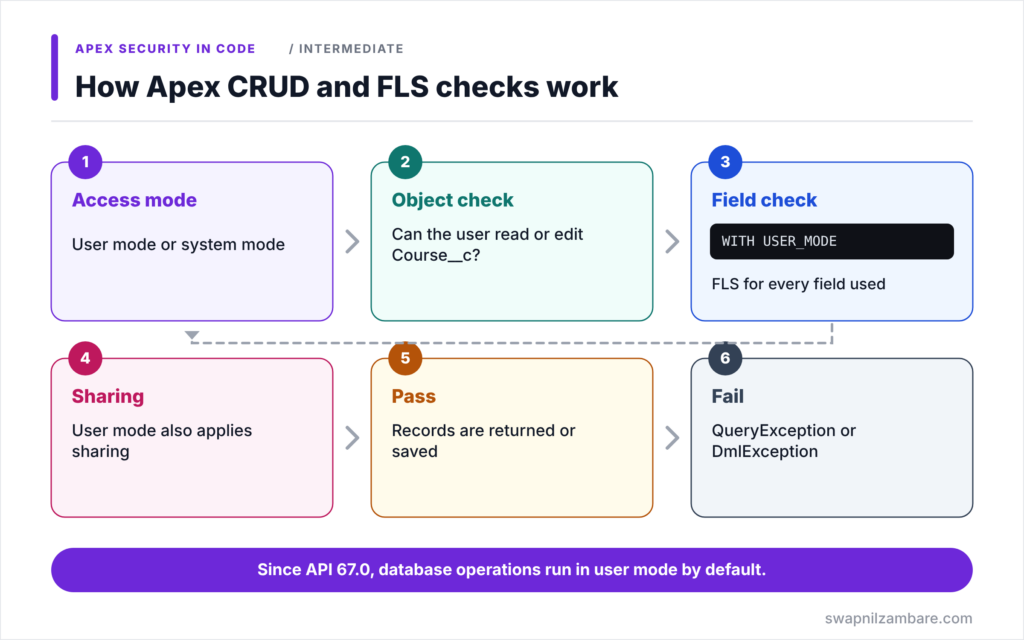
Apex CRUD and FLS checks happen through the access mode of each database operation. First, Salesforce decides whether the operation runs in user mode or system mode. Next, in user mode, it checks the user’s object permission for the query or DML. Then it checks field-level security for every field used. After that, it applies the user’s sharing to choose records. Finally, if any check fails, Salesforce throws an exception instead of returning or saving data.
User Mode
User mode applies the running user’s CRUD, FLS and sharing. In API version 67.0 and later, it is the default for SOQL, SOSL and DML. You can also write it explicitly with WITH USER_MODE, insert as user or AccessLevel.USER_MODE.
System Mode
System mode ignores CRUD and FLS, and record access then follows the class’s sharing keyword. In API 66.0 and earlier, it was the default. Now you must ask for it with WITH SYSTEM_MODE, update as system or AccessLevel.SYSTEM_MODE.
Security.stripInaccessible
Security.stripInaccessible removes fields the user cannot access from a list of records, instead of throwing an exception. Use it when you want a partial result, such as showing a course without its hidden pay field.
Describe Checks
Describe methods, such as Schema.sObjectType.Course__c.isUpdateable(), let you check permissions yourself. They are handy for hiding a button or skipping optional logic.
WITH SECURITY_ENFORCED
WITH SECURITY_ENFORCED is an older query clause that only checks reads. Salesforce now recommends WITH USER_MODE, because it also covers sharing, DML and more query types.
Ways to Enforce Apex CRUD and FLS
The table below lists the tools and when each fits.
| Tool | Checks | On failure |
|---|---|---|
| WITH USER_MODE in SOQL | CRUD, FLS, sharing | QueryException |
| insert as user | CRUD, FLS, sharing | DmlException |
| AccessLevel.USER_MODE | CRUD, FLS, sharing | Exception |
| Security.stripInaccessible | CRUD and FLS | Removes fields |
| Describe methods | What you ask for | Your own logic |
User Mode vs System Mode
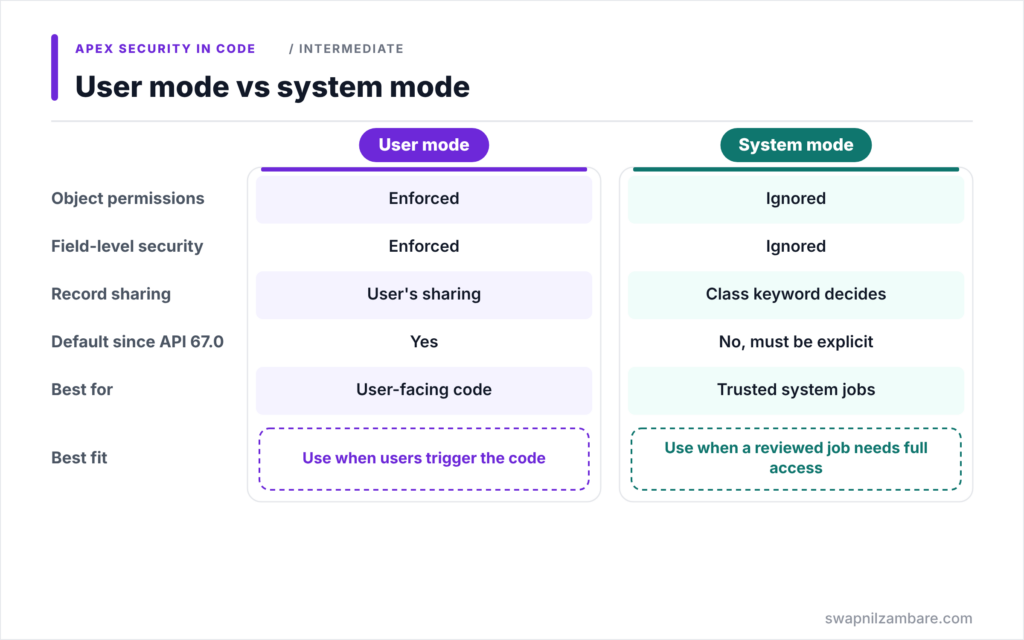
The table below compares the two access modes.
| Feature | User mode | System mode |
|---|---|---|
| Object permissions | Enforced | Ignored |
| Field-level security | Enforced | Ignored |
| Record sharing | User’s sharing | Class keyword decides |
| Default since API 67.0 | Yes | No, must be explicit |
| Best for | User-facing code | Trusted system jobs |
When to use which is clear. Use user mode for anything a user triggers. Use system mode only for narrow, reviewed logic, such as a nightly recalculation, and say so in the code.
A Real Apex CRUD and FLS Example
Let’s protect Course__c data at Bright Path Tutors with Apex CRUD and FLS checks. Tutors cannot read Instructor_Pay__c, and only managers can edit Fee__c.
Step 1: Query in User Mode
public with sharing class CourseController {

    @AuraEnabled(cacheable=true)
    public static List<Course__c> getCourses() {
        return [SELECT Id, Name, Fee__c, Instructor_Pay__c
                FROM Course__c
                WITH USER_MODE
                ORDER BY Name];
    }
}
The query asks for Instructor_Pay__c. In user mode, a tutor without read access to that field gets a QueryException, so no pay data leaks. In API 67.0 and later, the query would run in user mode even without the clause, but writing it makes the intent clear.
Step 2: Strip Hidden Fields Instead
@AuraEnabled(cacheable=true)
public static List<Course__c> getCoursesSafe() {
    List<Course__c> rows = [SELECT Id, Name, Fee__c, Instructor_Pay__c
                            FROM Course__c WITH SYSTEM_MODE];
    SObjectAccessDecision decision =
        Security.stripInaccessible(AccessType.READABLE, rows);
    System.debug('Removed: ' + decision.getRemovedFields());
    return (List<Course__c>) decision.getRecords();
}
The query runs in system mode, then stripInaccessible removes any field the user cannot read. So tutors get the courses without the pay field, and managers get everything. getRemovedFields shows which fields were stripped.
Step 3: Save Only What the User May Edit
@AuraEnabled
public static void saveFee(Id courseId, Decimal newFee) {
    if (!Schema.sObjectType.Course__c.fields.Fee__c.isUpdateable()) {
        throw new AuraHandledException('You cannot change course fees.');
    }
    update as user new Course__c(Id = courseId, Fee__c = newFee);
}
The describe check gives a friendly message early. Then update as user enforces CRUD, FLS and sharing again at save time. So even if someone skips the check, the update still fails safely.
Step 4: See the Results
Here is what Asha Mehta, a tutor, gets in the debug log.
getCourses()      -> QueryException (Instructor_Pay__c is not accessible)
getCoursesSafe()  -> Removed: {Course__c={Instructor_Pay__c}}
saveFee(...)      -> AuraHandledException: You cannot change course fees.
Each method protects the data in its own way. In real code, pick one style per method and stay consistent.
Apex CRUD and FLS for Older Code
Classes saved at API 66.0 or earlier still run in system mode by default. So when you edit an old class, either raise its API version and test it, or add WITH USER_MODE and as user to every operation users can reach.
Common Mistakes with Apex CRUD and FLS
- Thinking with sharing also checks object and field permissions.
- Relying on page layouts to hide sensitive fields.
- Using system mode in @AuraEnabled methods without a clear reason.
- Raising a class to a new API version without retesting permission errors.
- Ignoring the fields that stripInaccessible removed.
Best Practices for Apex CRUD and FLS
- Write an explicit access mode on every query and DML.
- Use user mode for anything a user can trigger.
- Use stripInaccessible when a partial result is better than an error.
- Add describe checks for friendly messages and hidden buttons.
- Test with a restricted permission set inside System.runAs.
Practice Task
Create a permission set that gives read access to Course__c but not Fee__c. Then write a test that runs getCoursesSafe inside System.runAs and asserts that Fee__c is not populated. Hint: use isSet('Fee__c') on the returned record.
Most Asked Interview Questions on Apex CRUD and FLS
Security questions are now standard in developer interviews. Here are the 21 questions asked most about Apex CRUD and FLS.
Basic Questions on Apex CRUD and FLS
Q1: What do CRUD and FLS mean?
CRUD is create, read, update and delete permission on an object. FLS is field-level security on each field.
Q2: Do sharing keywords enforce CRUD and FLS?
No. They control record access only.
Q3: What is user mode?
An access mode that applies the user’s CRUD, FLS and sharing to a database operation.
Q4: What is system mode?
An access mode that ignores CRUD and FLS, with record access decided by the class keyword.
Q5: What is the default mode in API 67.0 and later?
User mode.
Q6: How do you run a query in user mode?
Add WITH USER_MODE to the SOQL query.
Q7: How do you run DML in user mode?
Use insert as user, update as user, or a Database method with AccessLevel.USER_MODE.
Code and Scenario Questions on Apex CRUD and FLS
Q8: What does Security.stripInaccessible return?
An SObjectAccessDecision with the cleaned records and the removed fields.
Q9: Which AccessType values does stripInaccessible support?
READABLE, CREATABLE, UPDATABLE and UPSERTABLE.
Q10: What happens when a user-mode query includes a hidden field?
It throws a QueryException.
Q11: How do you check if a user can edit a field?
Call isUpdateable on the field describe, such as Schema.sObjectType.Course__c.fields.Fee__c.isUpdateable().
Q12: How do you run dynamic SOQL in user mode?
Pass AccessLevel.USER_MODE to Database.query or Database.queryWithBinds.
Q13: When would you choose stripInaccessible over user mode?
When you want to return the record without hidden fields instead of failing.
Q14: How do you test FLS in Apex?
Create a user with a restricted permission set and run the code inside System.runAs.
Advanced Questions on Apex CRUD and FLS
Q15: Why is WITH USER_MODE preferred over WITH SECURITY_ENFORCED?
It also enforces sharing, supports more query types and works with DML through matching options.
Q16: What should you check when raising an old class to API 67.0?
That its queries and DML still work in user mode for every user who runs them.
Q17: Can stripInaccessible protect data from JSON input?
Yes. It can sanitize records deserialized from untrusted input before DML.
Q18: Do Automated Process users pass CRUD and FLS checks?
Not by default. They need permission sets assigned for object and field checks to pass.
Q19: How do object permissions and sharing interact?
Object and field permissions take precedence. Sharing cannot grant access the user’s permissions deny.
Q20: When is system mode acceptable?
For trusted system processes, such as recalculations or integrations, with a clear comment and review.
Q21: How do you find code that skips CRUD and FLS?
Run Salesforce Code Analyzer, which flags violations such as ApexCRUDViolation.
Official Resources
- Enforce Object and Field Permissions (Apex Developer Guide)
- Set an Access Mode for Database Operations (Apex Developer Guide)
- Enforce Security with the stripInaccessible Method (Apex Developer Guide)
Quick Recap
- Apex CRUD and FLS checks protect objects and fields, not records.
- User mode enforces CRUD, FLS and sharing, and is the default since API 67.0.
- System mode must now be explicit and should stay rare.
- stripInaccessible removes hidden fields instead of throwing errors.
- Describe checks help with friendly messages and UI decisions.
What’s Next?
Sometimes you must share records through code. Next, read our guide to Apex managed sharing.


