Apex Managed Sharing lets your code give a user or group access to a record when sharing rules cannot express the rule. For example, a course should be shared with the instructor named in a lookup field, and that access should move when the instructor changes. Sharing rules cannot read a lookup to a user, but Apex can.
In this post, you will learn share objects, the RowCause field, Apex sharing reasons and how to keep shares in sync with a trigger. It builds on Salesforce sharing rules, roles and OWD, Apex sharing keywords and Apex CRUD and FLS.
What is Apex Managed Sharing?
Apex Managed Sharing is record sharing created by Apex code, using a special share object and an Apex sharing reason. Every custom object with a Private or Public Read Only org-wide default has a share object, such as Course__Share. Each share row says which user or group gets which access to which record, and why.
Think of a guest list at a wedding. The owner of the hall decides who enters. A share row is one name on the list, with a note saying “family” or “photographer”. When plans change, you remove names with that note, without touching the others.
Why Apex Managed Sharing Matters
Some access rules depend on data that sharing rules cannot read. Here is why Apex Managed Sharing matters at Bright Path Tutors.
- First, each course has an Instructor__c lookup to a user who must edit it.
- Also, instructors change during a term, so access must move with them.
- Next, criteria-based sharing rules cannot share with a user named in a field.
- Access must survive an owner change, unlike manual sharing.
- Finally, you need a clear reason on each share for audits.
So Apex Managed Sharing fills the gap between declarative sharing and business rules.
How Apex Managed Sharing Works
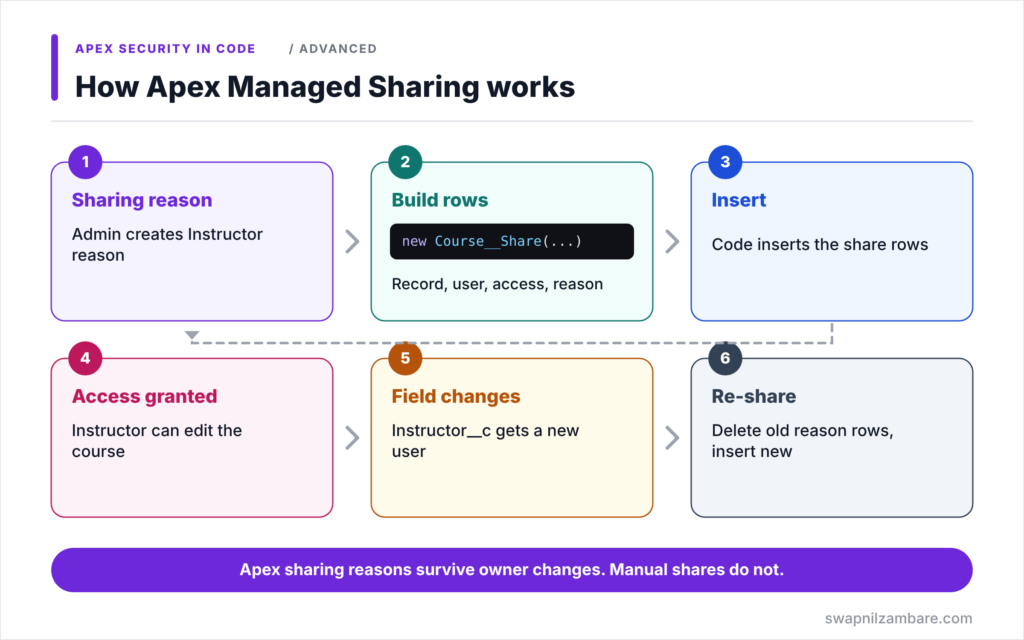
Apex Managed Sharing follows a simple cycle. First, an admin creates an Apex sharing reason on the object, such as Instructor. Next, a trigger or service builds Course__Share rows with the record Id, user Id, access level and that reason. Then the code inserts those rows. After that, Salesforce grants the access and shows the reason on the record’s sharing page. Finally, when the instructor changes, the code deletes rows with that reason and inserts new ones.
Share Objects
Custom object shares are named ObjectName__Share, such as Course__Share. Standard objects use names such as AccountShare and OpportunityShare.
Share Fields
A custom share row has four key fields: ParentId for the record, UserOrGroupId for the user or group, AccessLevel and RowCause.
Access Levels
AccessLevel can be Read or Edit for Apex shares. Full Access comes only from ownership and the role hierarchy, not from share rows.
RowCause and Apex Sharing Reasons
RowCause stores why the share exists. Manual shares use the value Manual and disappear when the owner changes. Apex sharing reasons, such as Instructor__c, survive owner changes and let you find your own shares easily.
Creating Sharing Reasons
Apex sharing reasons exist only on custom objects. You create them in Salesforce Classic on the object’s detail page, in the Apex Sharing Reasons related list. Then you reference them as Schema.Course__Share.RowCause.Instructor__c.
Manual Sharing vs Apex Managed Sharing
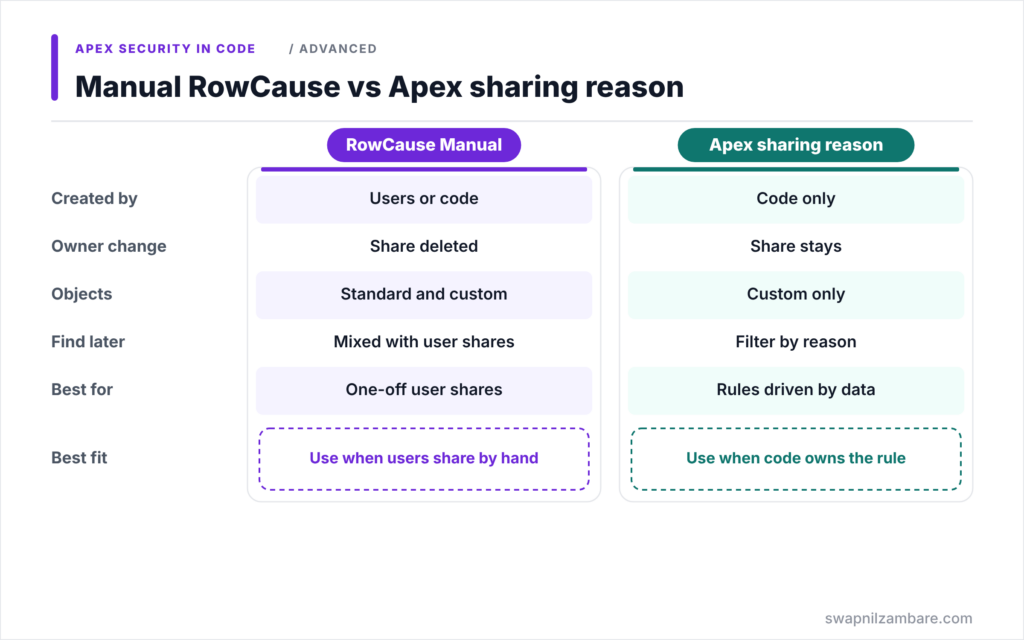
The table below compares manual shares created by code with shares that use an Apex sharing reason.
| Feature | RowCause Manual | Apex sharing reason |
|---|---|---|
| Created by | Users or code | Code only |
| Survives owner change | No, deleted | Yes |
| Objects | Standard and custom | Custom only |
| Easy to find later | Mixed with user shares | Filter by RowCause |
| Best for | One-off user shares | Rules driven by data |
When to use which is clear. Use an Apex sharing reason for every rule your code owns. Leave Manual row causes to users who click the Sharing button.
Course__Share Fields
The table below lists the values our code sets.
| Field | Value in our example |
|---|---|
| ParentId | The Course__c Id |
| UserOrGroupId | The Instructor__c user Id |
| AccessLevel | Edit |
| RowCause | Schema.Course__Share.RowCause.Instructor__c |
A Real Apex Managed Sharing Example
Let’s build Apex Managed Sharing for instructors at Bright Path Tutors. Course__c has a Private org-wide default and an Instructor__c lookup to User.
Step 1: The Sharing Service
public without sharing class CourseSharingService {

    public static void shareWithInstructors(List<Course__c> courses) {
        Set<Id> courseIds = new Map<Id, Course__c>(courses).keySet();

        // Remove old instructor shares for these courses
        delete [SELECT Id FROM Course__Share
                WHERE ParentId IN :courseIds
                AND RowCause = :Schema.Course__Share.RowCause.Instructor__c
                WITH SYSTEM_MODE];

        List<Course__Share> shares = new List<Course__Share>();
        for (Course__c c : courses) {
            if (c.Instructor__c != null && c.Instructor__c != c.OwnerId) {
                shares.add(new Course__Share(
                    ParentId = c.Id,
                    UserOrGroupId = c.Instructor__c,
                    AccessLevel = 'Edit',
                    RowCause = Schema.Course__Share.RowCause.Instructor__c));
            }
        }
        Database.insert(shares, false, AccessLevel.SYSTEM_MODE);
    }
}
The service deletes only shares with the Instructor reason, so manual shares stay. Then it builds one Edit share per course. It skips owners, because owners already have full access. Database.insert with allOrNone set to false keeps going if one user is inactive.
Step 2: Call It from the Trigger Handler
when AFTER_INSERT {
    CourseSharingService.shareWithInstructors((List<Course__c>) Trigger.new);
}
when AFTER_UPDATE {
    List<Course__c> changed = new List<Course__c>();
    for (Course__c c : (List<Course__c>) Trigger.new) {
        if (c.Instructor__c != ((Course__c) Trigger.oldMap.get(c.Id)).Instructor__c) {
            changed.add(c);
        }
    }
    if (!changed.isEmpty()) { CourseSharingService.shareWithInstructors(changed); }
}
Shares need a record Id, so this runs in after triggers. On update, only courses whose instructor changed are processed. That keeps the logic bulk-safe and cheap.
Step 3: Check the Shares
Here is a query result after Rahul is set as the instructor of Apex Basics.
ParentId            UserOrGroupId   AccessLevel  RowCause
a015g00000AbC12AAB  005...Rahul     Edit         Instructor__c
The record’s sharing page now shows Rahul with Edit access and the reason Instructor. When the course owner changes, the share stays.
Apex Managed Sharing Recalculation
If sharing rules or data change a lot, shares can drift. So you can register a Batch Apex class as the object’s Apex sharing recalculation class. Admins then click Recalculate to rebuild every Apex share. We cover Batch Apex in Level 7.
Common Mistakes with Apex Managed Sharing
- Using RowCause Manual, so shares vanish when the owner changes.
- Trying to share records whose org-wide default is Public Read/Write.
- Deleting all share rows instead of only your own reason.
- Inserting shares in before triggers, where the record has no Id.
- Letting one inactive user fail the whole insert.
Best Practices for Apex Managed Sharing
- Create one Apex sharing reason per business rule.
- Keep sharing logic in one service class with a clear name.
- Delete and recreate shares only for records whose key field changed.
- Use Database.insert with allOrNone false and log failures.
- Provide a recalculation batch for large data changes.
Practice Task
Add a second sharing reason called Coordinator. Then share each course with a public group named Course Coordinators with Read access. Hint: UserOrGroupId accepts a group Id, which you can query from the Group object by DeveloperName.
Most Asked Interview Questions on Apex Managed Sharing
Sharing in code is a favourite senior-level topic. Here are the 21 questions asked most about Apex Managed Sharing.
Basic Questions on Apex Managed Sharing
Q1: What is Apex managed sharing?
Sharing records through Apex by inserting share object rows with an Apex sharing reason.
Q2: What is the share object for Course__c?
Course__Share.
Q3: What fields does a custom share row need?
ParentId, UserOrGroupId, AccessLevel and RowCause.
Q4: Which access levels can Apex shares grant?
Read or Edit.
Q5: What is RowCause?
The reason the share exists, such as Manual or a custom Apex sharing reason.
Q6: Where do you create Apex sharing reasons?
On the custom object’s detail page in Salesforce Classic, in the Apex Sharing Reasons related list.
Q7: Do standard objects support Apex sharing reasons?
No. Standard objects can only use Manual and other built-in reasons.
Code and Scenario Questions on Apex Managed Sharing
Q8: What happens to Manual shares when the owner changes?
Salesforce deletes them.
Q9: What happens to shares with an Apex sharing reason when the owner changes?
They remain.
Q10: Why run sharing code in an after trigger?
Because share rows need the record Id, which exists only after the save.
Q11: How do you reference a sharing reason in Apex?
Use Schema.Course__Share.RowCause.Instructor__c.
Q12: Can you share with a public group?
Yes. Put the group Id in UserOrGroupId.
Q13: Why use Database.insert with allOrNone false for shares?
So one bad row, such as an inactive user, does not stop the other shares.
Q14: Can you create shares when the OWD is Public Read/Write?
No. Share rows only make sense when the OWD is more restrictive than the access you grant.
Advanced Questions on Apex Managed Sharing
Q15: What is an Apex sharing recalculation class?
A Batch Apex class registered on the object that rebuilds Apex shares when an admin clicks Recalculate.
Q16: How do you update shares when the instructor changes?
Delete shares with that reason for the record, then insert new ones for the new instructor.
Q17: Should sharing code run in user or system mode?
Usually system mode in a small without sharing service, because users often cannot create shares themselves.
Q18: How do you avoid sharing with the owner?
Skip rows where the target user is already the owner, since owners have full access.
Q19: How do Apex shares affect performance?
Many share rows add to sharing calculations, so share with groups where possible.
Q20: How do you test Apex managed sharing?
Insert records in a test, query the share object for your RowCause, and check access with System.runAs.
Q21: When should you use a sharing rule instead?
When the rule depends on owner, role, group or simple field criteria that sharing rules support.
Official Resources
- Understanding Apex Managed Sharing (Apex Developer Guide)
- Sharing a Record Using Apex (Apex Developer Guide)
Quick Recap
- Apex Managed Sharing shares records by inserting share object rows.
- Each row sets ParentId, UserOrGroupId, AccessLevel and RowCause.
- Apex sharing reasons survive owner changes, while Manual shares do not.
- Run sharing code in after triggers and only for changed records.
- A recalculation batch can rebuild shares after big changes.
What’s Next?
Secure data access also means secure input and output. Next, read our guide to Apex secure coding against XSS, CSRF and injection.


