Apex Secure Coding means writing Apex, Visualforce and Lightning code that attackers cannot trick into leaking or changing data. Sharing, CRUD and FLS protect data from honest users. Secure coding protects it from people who send unexpected input on purpose, through a URL, a form field or a crafted link.
In this post, you will learn the attacks Salesforce developers meet most: SOQL injection, cross-site scripting (XSS), cross-site request forgery (CSRF), open redirects and hard-coded secrets. For each one, you will see unsafe code and the safe fix. It builds on dynamic SOQL and SOQL injection, Apex CRUD and FLS and Apex managed sharing.
What is Apex Secure Coding?
Apex Secure Coding is a set of habits that treat every outside value as untrusted until you check it. Outside values include URL parameters, form inputs, JSON from a component and data from other systems. Safe code keeps that input as data, never as code, query text or HTML.
Think of a bank teller. When a customer hands over a note saying “Give me 500 rupees”, a careful teller checks the account and the amount. However, a careless teller follows any note, even one saying “Also open the vault”. Secure code is the careful teller.
Why Apex Secure Coding Matters
Salesforce protects the platform, but your custom code is your responsibility. Here is why Apex Secure Coding matters at Bright Path Tutors.
- First, a search box on a public course page passes text straight into a query.
- Also, a Visualforce page shows a student’s comment, which might contain script.
- Next, a link that cancels an enrolment could be clicked from a phishing email.
- A login page redirect could send students to a fake site.
- Finally, an API key in Apex code is visible to anyone who can read the class.
So without Apex Secure Coding, one weak line can undo every sharing rule you set.
How Apex Secure Coding Works
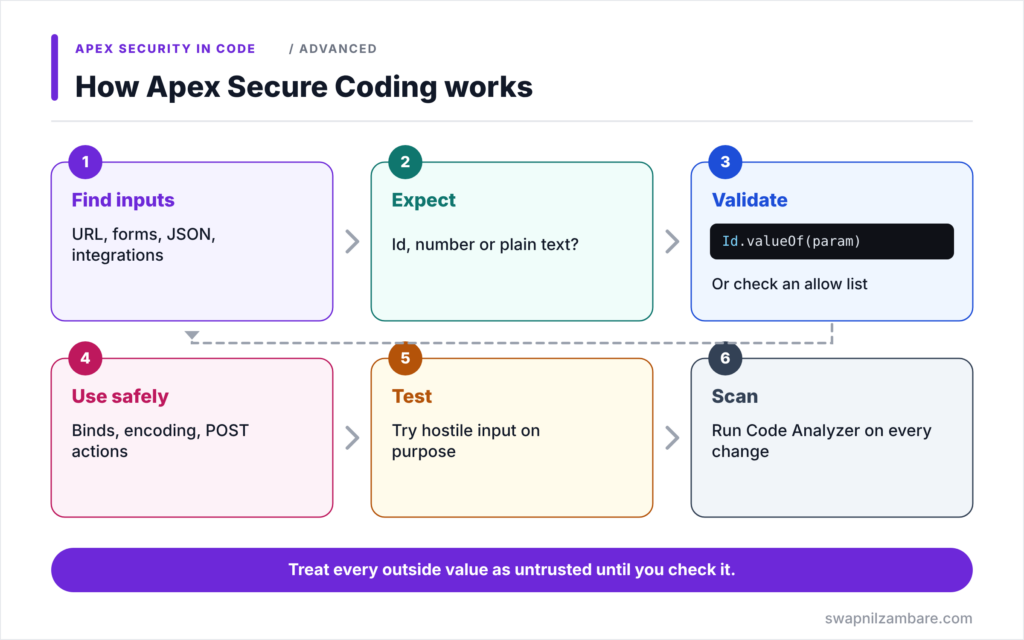
Apex Secure Coding follows the same steps for any input. First, find every place where outside data enters your code. Next, decide what that data should look like, such as an Id, a number or plain text. Then validate it, for example with an allow list or Id.valueOf. After that, use it safely: bind variables in queries, encoding in HTML, and POST requests for changes. Finally, test the code with hostile input and run Code Analyzer.
SOQL Injection
SOQL injection happens when user text is joined into a dynamic query, so the user can change its logic. Bind variables or String.escapeSingleQuotes stop it.
Cross-Site Scripting (XSS)
XSS happens when user input is shown as HTML, so a script runs in another user’s browser. Visualforce and LWC escape output by default. The risk appears when you turn escaping off, such as escape=”false” or setting innerHTML.
Cross-Site Request Forgery (CSRF)
CSRF tricks a logged-in user into sending a request they did not intend. In Visualforce, the risk appears when code changes data on page load, in a constructor or an action attribute. Salesforce protects normal form posts with a token.
Open Redirects
An open redirect sends users to any URL passed in a parameter, such as retURL. Attackers use it to make phishing links look trusted. So allow only relative URLs or known domains.
Hard-Coded Secrets
Passwords, tokens and API keys in Apex are readable by anyone with code access. Store them in named credentials, external credentials or protected custom metadata instead.
Common Attacks and Fixes
The table below sums up each attack and its fix.
| Attack | Unsafe pattern | Safe fix |
|---|---|---|
| SOQL injection | Joining user text into a query | Bind variables |
| XSS | escape=”false” or innerHTML | Default escaping, HTMLENCODE |
| CSRF | DML in constructor or page action | Change data only on user POST |
| Open redirect | Redirect to any retURL | Allow relative URLs only |
| Hard-coded secret | Key in an Apex string | Named or external credential |
XSS vs CSRF
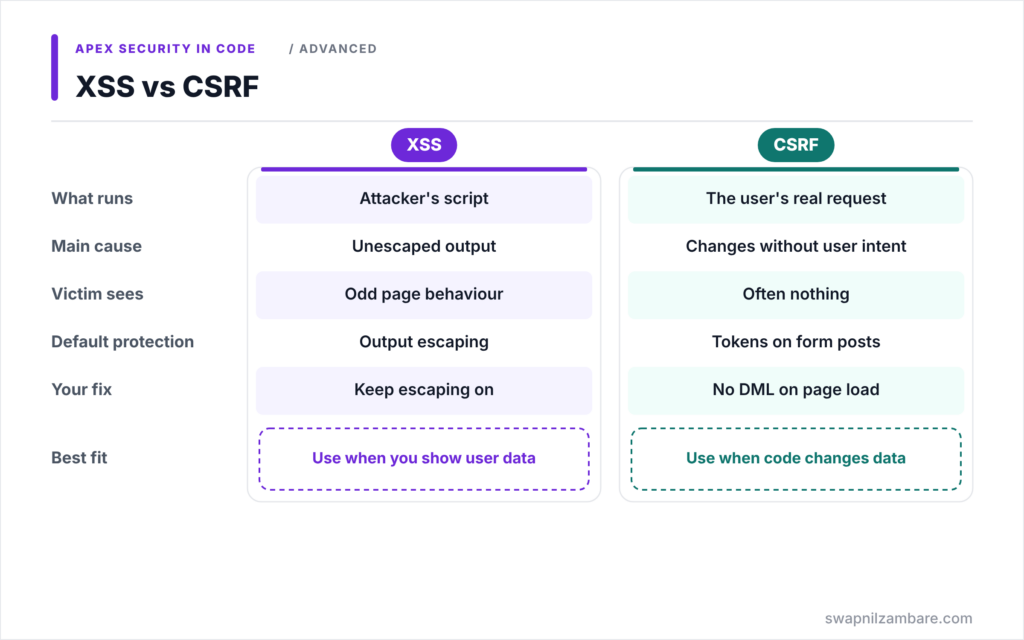
The table below compares the two web attacks people mix up most.
| Feature | XSS | CSRF |
|---|---|---|
| What runs | Attacker’s script in the page | A real request from the user |
| Main cause | Unescaped output | Data changes without user intent |
| Victim sees | A page that behaves oddly | Often nothing at all |
| Salesforce default protection | Output escaping | Tokens on form posts |
| Your fix | Keep escaping on | No DML on page load |
When to use which fix depends on the attack. For XSS, protect output. For CSRF, protect actions that change data.
A Real Apex Secure Coding Example
Let’s apply Apex Secure Coding to three pieces of code at Bright Path Tutors.
Step 1: Fix SOQL Injection
// UNSAFE: user text becomes part of the query
String q = 'SELECT Id, Name FROM Course__c WHERE Name LIKE \'%' + searchText + '%\'';
List<Course__c> bad = Database.query(q);

// SAFE: user text stays a bind value
String pattern = '%' + searchText + '%';
List<Course__c> good = [SELECT Id, Name FROM Course__c
                        WHERE Name LIKE :pattern
                        WITH USER_MODE];
In the unsafe version, a search such as x' OR Name != ' changes the filter and returns every course. In the safe version, the text is only a value, so the query logic cannot change.
Step 2: Fix XSS in Visualforce
<!-- UNSAFE: student comment rendered as HTML -->
<apex:outputText value="{!enrolment.Comment__c}" escape="false"/>

<!-- SAFE: default escaping, and encoding inside JavaScript -->
<apex:outputText value="{!enrolment.Comment__c}"/>
<script>
    var comment = '{!JSENCODE(enrolment.Comment__c)}';
</script>
With escape=”false”, a comment containing a script tag runs in the tutor’s browser. The safe version keeps escaping on. Inside JavaScript, JSENCODE stops the text from breaking out of the string. In LWC, the same rule means binding text with {comment} instead of setting innerHTML.
Step 3: Fix CSRF in a Visualforce Controller
public with sharing class CancelEnrolmentController {

    public Id enrolmentId { get; set; }

    // UNSAFE: cancelling inside the constructor runs on a simple GET link
    // public CancelEnrolmentController() { cancel(); }

    public CancelEnrolmentController() {
        enrolmentId = ApexPages.currentPage().getParameters().get('id');
    }

    // SAFE: runs only when the user clicks the Cancel button (a POST)
    public PageReference cancel() {
        update as user new Enrolment__c(Id = enrolmentId, Status__c = 'Cancelled');
        return null;
    }
}
The constructor only reads the Id. The update happens in an action method bound to a command button, which Salesforce protects with a CSRF token. So a link in an email cannot cancel enrolments on its own.
Step 4: Check with a Test
Here is what a quick security test of the search method shows.
search('x\' OR Name != \'')  -> 0 courses (safe)
search('Apex')               -> 3 courses
As a result, the hostile input finds nothing, while normal searches still work.
Apex Secure Coding for Secrets and Redirects
Never write an API key in Apex. Instead, store it in a named credential, which Level 9 covers. For redirects, accept only values that start with a single slash, or compare the domain against an allow list, before calling new PageReference(url).
Common Mistakes with Apex Secure Coding
- Joining user input into dynamic SOQL.
- Turning off escaping to show formatted text.
- Running DML in constructors or page action attributes.
- Redirecting to any URL from a parameter.
- Storing passwords and tokens in Apex or plain custom settings.
Best Practices for Apex Secure Coding
- Treat every outside value as untrusted.
- Use bind variables and allow lists for dynamic queries.
- Keep default escaping on, and encode for the context.
- Change data only on explicit user actions, never on page load.
- Run Salesforce Code Analyzer on every change.
Practice Task
Write a method that sorts courses by a field name passed from a component. Allow only Name, Fee__c and Start_Date__c, and reject anything else. Hint: check the value against a Set<String> before building the ORDER BY clause.
Most Asked Interview Questions on Apex Secure Coding
Security review questions appear in many senior interviews. Here are the 21 questions asked most about Apex Secure Coding.
Basic Questions on Apex Secure Coding
Q1: What is SOQL injection?
An attack where user input changes the logic of a dynamic SOQL query.
Q2: How do you prevent SOQL injection?
Use bind variables, allow lists, and String.escapeSingleQuotes when binding is impossible.
Q3: What is XSS?
Cross-site scripting, where attacker input runs as script in another user’s browser.
Q4: Does Visualforce escape output by default?
Yes, unless you set escape=”false”.
Q5: What is CSRF?
Cross-site request forgery, where a user is tricked into sending a request that changes data.
Q6: Where should you store API keys?
In named credentials or external credentials, not in Apex code.
Q7: What is an open redirect?
A redirect to any URL taken from user input, often used in phishing.
Code and Scenario Questions on Apex Secure Coding
Q8: Why is DML in a Visualforce constructor risky?
It runs on a simple GET request, so a link can change data without a CSRF token.
Q9: What does JSENCODE do?
It encodes text so it is safe inside a JavaScript string.
Q10: When would you use HTMLENCODE?
When you output user data inside HTML that is not escaped automatically.
Q11: How does LWC protect against XSS?
Template bindings escape values. Risk appears when you set innerHTML or use lwc:dom=”manual” with user data.
Q12: How do you safely allow a dynamic sort field?
Check it against an allow list of field names before adding it to the query.
Q13: Is String.escapeSingleQuotes enough on its own?
It helps for string values, but binds and allow lists are safer and cover more cases.
Q14: How do you validate an Id parameter?
Convert it with Id.valueOf inside try and catch, and check its object type.
Advanced Questions on Apex Secure Coding
Q15: Why do sharing and CRUD checks not stop XSS?
They control data access, while XSS abuses how allowed data is displayed.
Q16: How do you protect redirects such as retURL?
Allow only relative paths or known domains.
Q17: Should error pages show stack traces?
No. Show a friendly message and log the details, because traces reveal code structure.
Q18: What does the AppExchange security review check?
Injection, XSS, CSRF, CRUD and FLS, sharing, secrets and insecure endpoints, among others.
Q19: How do you protect JSON input from a component?
Deserialize into typed classes, validate values, and run user mode or stripInaccessible before DML.
Q20: Is data from an integration trusted?
No. Validate it like user input, because the other system may be compromised.
Q21: Which tool finds many of these issues automatically?
Salesforce Code Analyzer, with PMD and other engines.
Official Resources
- Security Tips for Apex and Visualforce Development (Apex Developer Guide)
- SOQL Injection (Apex Developer Guide)
- Cross Site Scripting (XSS) (Visualforce Developer Guide)
Quick Recap
- Apex Secure Coding treats every outside value as untrusted.
- Bind variables and allow lists stop SOQL injection.
- Default escaping and encoding stop XSS.
- Changing data only on user POST actions stops CSRF.
- Secrets belong in named or external credentials.
What’s Next?
Tools can catch many of these issues before review. Next, read our guide to Salesforce Code Analyzer and PMD.


