LWC Wire Adapters are ready-made data sources that you connect to a component with the @wire decorator. You tell the wire which adapter to use and which parameters to send, and it delivers data to your component, then delivers it again whenever those parameters change. Most of them use the User Interface API, the same API that Lightning pages use.
In this post, you will learn how @wire works on properties and functions, what reactive parameters are, and how to use getObjectInfo, getPicklistValues and getRelatedListRecords. It builds on Lightning Data Service in LWC, LWC data binding and SOQL relationship queries, because related lists follow the same parent and child idea.
What are LWC Wire Adapters?
LWC Wire Adapters are functions that supply data to a component through the wire service. You write @wire(adapter, { params }) above a property or function. The wire service calls the adapter, then sends the result as an object with data and error. When a reactive parameter changes, the adapter runs again with the new value.
Think of a newspaper subscription. You tell the agency your address once, and the paper arrives every morning. If you move house, you update the address, and the paper follows you. The adapter is the agency, the parameters are your address, and the data is the paper.
Why LWC Wire Adapters Matter
Components need labels, picklist values and related records, not just one record. Here is why LWC Wire Adapters matter at Bright Path Tutors.
- First, a level filter needs the current picklist values of Level__c.
- Also, field labels should come from Salesforce, so translations work.
- Next, a course page must list its enrolments without Apex.
- Wires reload automatically when the record Id changes.
- Finally, adapters share the Lightning Data Service cache and enforce security.
So LWC Wire Adapters give you live, secure data with very little code.
How LWC Wire Adapters Work
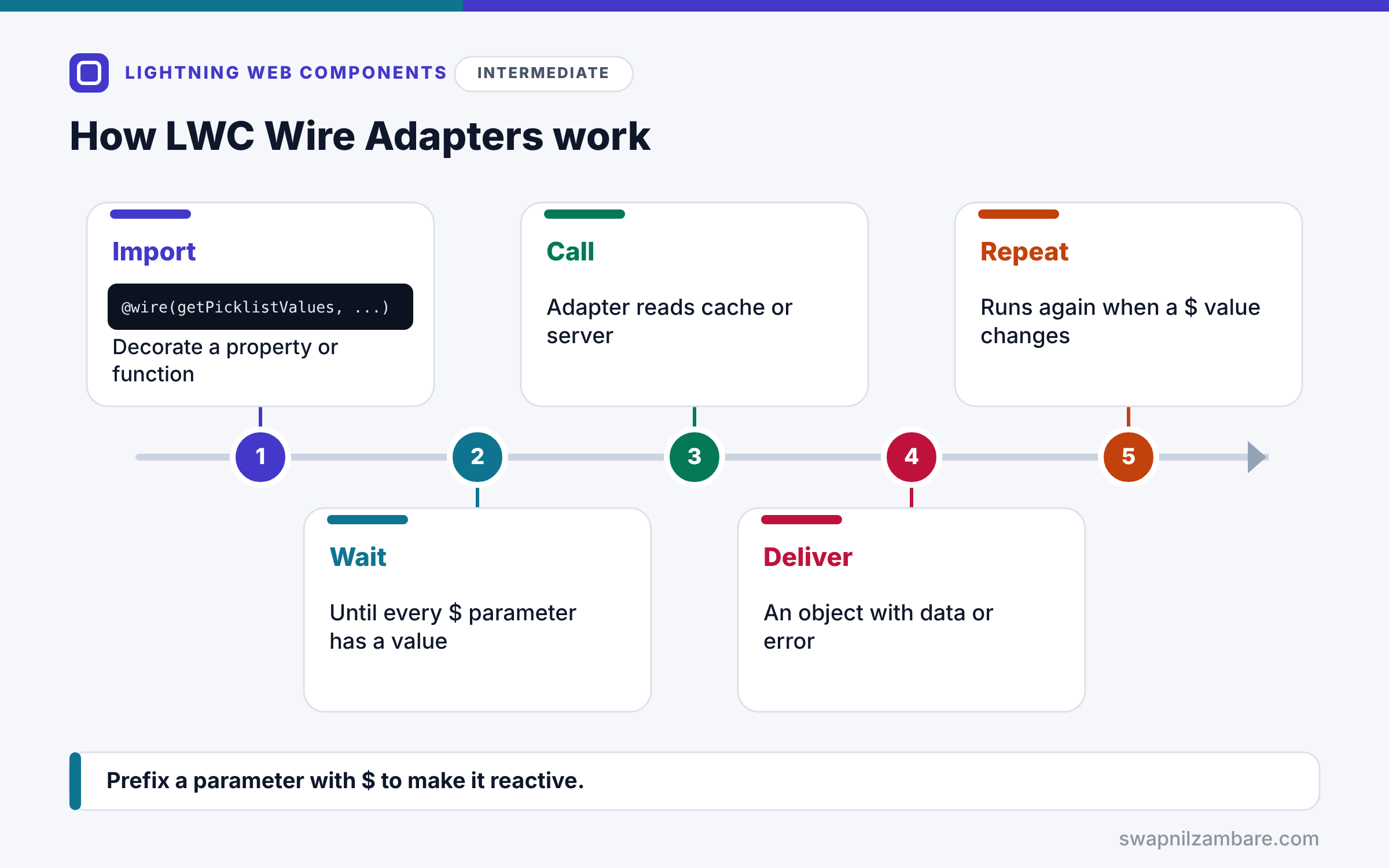
LWC Wire Adapters follow a reactive cycle. First, you import an adapter, such as getPicklistValues, and decorate a property or function with @wire. Next, the wire service waits until every reactive parameter has a value. Then it calls the adapter, which reads from the cache or the server. After that, it delivers an object with data or error to your property or function. Finally, if a parameter that starts with $ changes, the cycle runs again.
Wiring a Property
@wire(getObjectInfo, { objectApiName: COURSE_OBJECT }) courseInfo; stores the result in courseInfo, with courseInfo.data and courseInfo.error.
Wiring a Function
@wire(adapter, params) wiredCourse({ data, error }) { … } lets you run code when the data arrives, for example to reshape it.
Reactive Parameters
A parameter written as ‘$recordId’ is reactive. The wire reruns when recordId changes, and waits while it is undefined.
getObjectInfo
getObjectInfo from lightning/uiObjectInfoApi returns object metadata: field labels, data types and the default record type Id.
getPicklistValues
getPicklistValues needs a record type Id and a field. It returns the values the user may pick for that record type.
getRelatedListRecords
getRelatedListRecords from lightning/uiRelatedListApi loads child records, such as enrolments of a course, using the relationship name.
Common Wire Adapters
The table below lists adapters you will use often.
| Adapter | Module | Returns |
|---|---|---|
| getRecord | lightning/uiRecordApi | Fields of one record |
| getObjectInfo | lightning/uiObjectInfoApi | Object and field metadata |
| getPicklistValues | lightning/uiObjectInfoApi | Picklist values for a field |
| getRelatedListRecords | lightning/uiRelatedListApi | Child records of a parent |
| graphql | lightning/uiGraphQLApi | Records from a GraphQL query |
Wire to a Property vs Wire to a Function
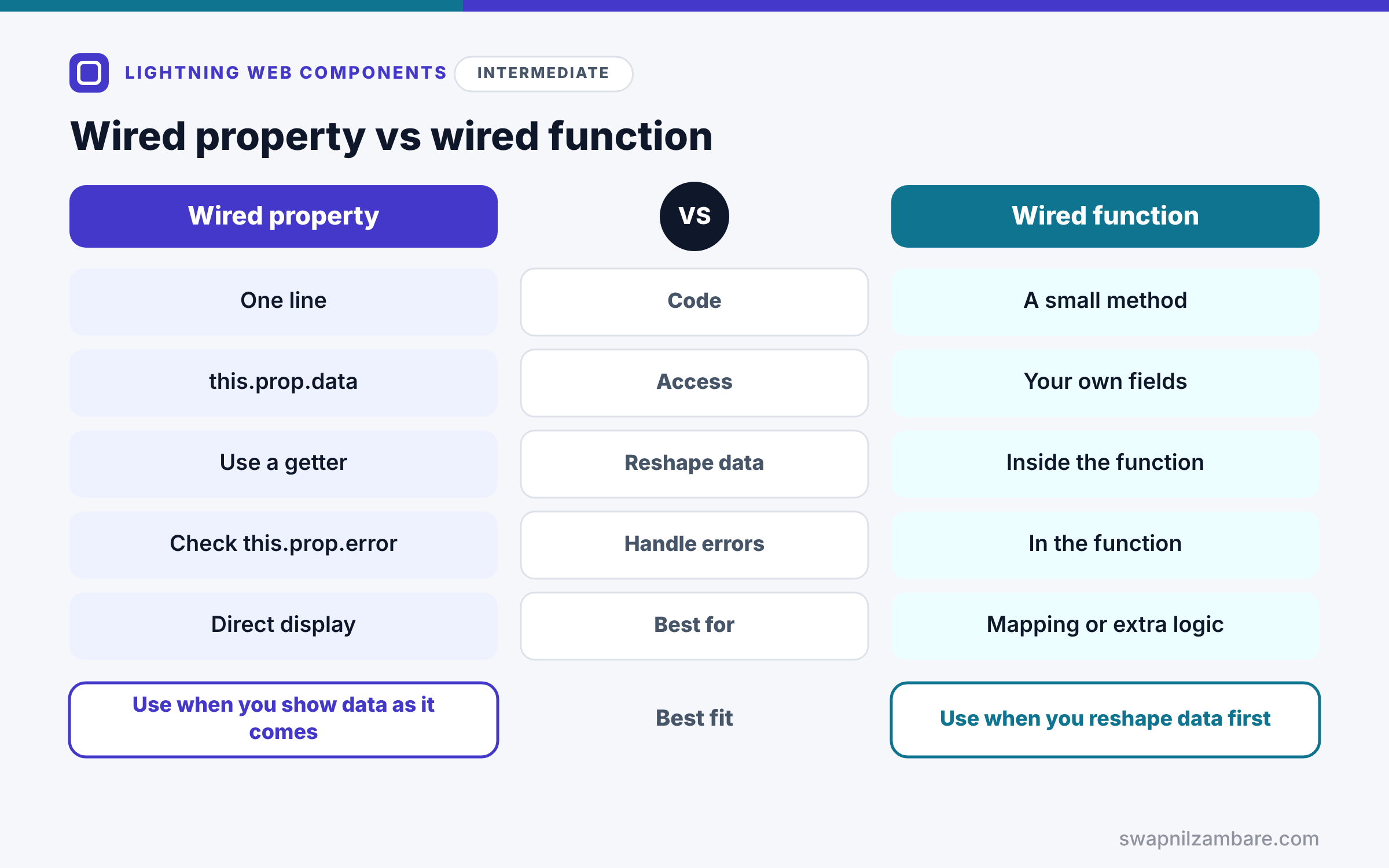
The table below compares the two ways to receive wired data.
| Feature | Wired property | Wired function |
|---|---|---|
| Code | One line | A small method |
| Access | this.prop.data in templates | Your own fields |
| Reshape data | Use a getter | Inside the function |
| Handle errors | Check this.prop.error | Handle in the function |
| Best for | Direct display | Mapping or extra logic |
When to use which depends on the data. Wire a property when you display the data as it comes. Wire a function when you need to reshape or combine it first.
A Real LWC Wire Adapters Example
Let’s use LWC Wire Adapters on the Course__c record page at Bright Path Tutors. The component shows a Level picklist with real values and lists the course’s enrolments.
Step 1: Object Info and Picklist Values
import { LightningElement, api, wire } from 'lwc';
import { getObjectInfo, getPicklistValues } from 'lightning/uiObjectInfoApi';
import { getRelatedListRecords } from 'lightning/uiRelatedListApi';
import COURSE_OBJECT from '@salesforce/schema/Course__c';
import LEVEL_FIELD from '@salesforce/schema/Course__c.Level__c';

export default class CourseExtras extends LightningElement {
    @api recordId;
    levelOptions = [];
    enrolments = [];

    @wire(getObjectInfo, { objectApiName: COURSE_OBJECT })
    courseInfo;

    @wire(getPicklistValues, {
        recordTypeId: '$courseInfo.data.defaultRecordTypeId',
        fieldApiName: LEVEL_FIELD
    })
    wiredLevels({ data }) {
        if (data) {
            this.levelOptions = data.values.map(v => ({ label: v.label, value: v.value }));
        }
    }
}
The first wire loads Course__c metadata. Then the picklist wire waits until the default record type Id exists, because its parameter starts with $. When values arrive, the function maps them into options for a combobox.
Step 2: Related Enrolments
    @wire(getRelatedListRecords, {
        parentRecordId: '$recordId',
        relatedListId: 'Enrolments__r',
        fields: ['Enrolment__c.Name', 'Enrolment__c.Status__c']
    })
    wiredEnrolments({ data, error }) {
        if (data) {
            this.enrolments = data.records.map(r => ({
                Id: r.id,
                Name: r.fields.Name.value,
                Status: r.fields.Status__c.value
            }));
        } else if (error) {
            this.enrolments = [];
        }
    }
This wire loads enrolments through the Enrolments__r relationship of the current course. Then it maps each record into a flat object, which is easy to loop over in the template.
Step 3: The Template
<template>
    <lightning-combobox label="Level" options={levelOptions}></lightning-combobox>
    <template for:each={enrolments} for:item="e">
        <p key={e.Id}>{e.Name}: {e.Status}</p>
    </template>
</template>
Here is what the component shows on the Apex Basics course page.
Level: [Beginner | Intermediate | Advanced]
ENR-0001: Active
ENR-0002: Cancelled
The picklist values and enrolments came from Salesforce with no Apex at all.
LWC Wire Adapters and Timing
You cannot control exactly when a wire runs. It may deliver undefined first and data later, and it may run again. So always check for data before using it, and never rely on a wire inside connectedCallback. When you need full control over timing, call Apex imperatively, which the next post covers.
Common Mistakes with LWC Wire Adapters
- Forgetting the $ prefix, so the wire never reacts to new values.
- Reading .data before checking that it exists.
- Calling getPicklistValues without a record type Id.
- Expecting a wire to run at a specific moment.
- Using Apex for metadata and picklists that adapters already provide.
Best Practices for LWC Wire Adapters
- Import objects and fields from @salesforce/schema.
- Use $ for every parameter that can change.
- Check data and error in every wired function.
- Map data into simple objects before rendering lists.
- Prefer UI API adapters before writing Apex.
Practice Task
Use getObjectInfo to show the translated label of Fee__c above the fee value. Hint: read courseInfo.data.fields.Fee__c.label in a getter.
Most Asked Interview Questions on LWC Wire Adapters
Wire questions appear in every LWC interview. Here are the 21 questions asked most about LWC Wire Adapters.
Basic Questions on LWC Wire Adapters
Q1: What is the wire service?
A reactive service that provides data to components through @wire and adapters.
Q2: What does a wired property contain?
An object with data and error properties.
Q3: What does the $ prefix do?
It makes a parameter reactive, so the wire reruns when the value changes.
Q4: Which adapter gives field labels?
getObjectInfo from lightning/uiObjectInfoApi.
Q5: Which adapter gives picklist values?
getPicklistValues, which needs a record type Id and a field.
Q6: Can you wire a function?
Yes, so you can run code and reshape data when it arrives.
Q7: Which API do most wire adapters use?
The User Interface API.
Code and Scenario Questions on LWC Wire Adapters
Q8: How do you get the default record type Id?
Read objectInfo.data.defaultRecordTypeId from getObjectInfo.
Q9: How do you chain two wires?
Use a $ parameter that points into the first wire’s data, such as ‘$courseInfo.data.defaultRecordTypeId’.
Q10: How do you load child records without Apex?
Use getRelatedListRecords with the parent Id and the relationship name.
Q11: Why might a wire return undefined first?
Because it delivers before data is ready, so always check for data.
Q12: Can you call a wire adapter on a button click?
Not directly, so change a reactive parameter or use an imperative call instead.
Q13: How do you show a wire error?
Check the error property and display a friendly message.
Q14: Do wire adapters respect FLS?
Yes, because UI API returns only fields the user can access.
Advanced Questions on LWC Wire Adapters
Q15: When does a wire not run?
When a reactive parameter is undefined, so the wire waits.
Q16: Do wired results come from a cache?
Often yes, so the Lightning Data Service cache can answer without a server call.
Q17: How do you refresh wired data?
Use refreshApex for Apex wires, or notifyRecordUpdateAvailable for record data.
Q18: What is the graphql wire adapter for?
It queries several records with filters and fields through GraphQL, without Apex.
Q19: Can you control the order of two wires?
No, so design code that works in any order.
Q20: Why prefer wire adapters over Apex for metadata?
Because they need no Apex, use the cache and enforce security automatically.
Q21: When should you choose imperative Apex instead?
When you need to control timing, send data or load data on demand.
Official Resources
Quick Recap
- LWC Wire Adapters supply data through @wire.
- Reactive parameters with $ rerun the wire when they change.
- getObjectInfo and getPicklistValues give metadata and picklists.
- getRelatedListRecords loads child records without Apex.
- Always check data and error, and never rely on wire timing.
What’s Next?
When adapters are not enough, call your own Apex. Next, read our guide to calling Apex from LWC, wire vs imperative.


