The Salesforce Agent API lets an outside application hold a conversation with an Agentforce agent over REST. You start a session, send messages, read the replies, and end the session. Nothing about it requires a Salesforce user interface.
The Models API is a different thing that people often confuse with it. That one calls a language model directly, from Apex or REST, for a single piece of work such as a summary or a classification. One is a conversation with an agent, and the other is one call to a model.
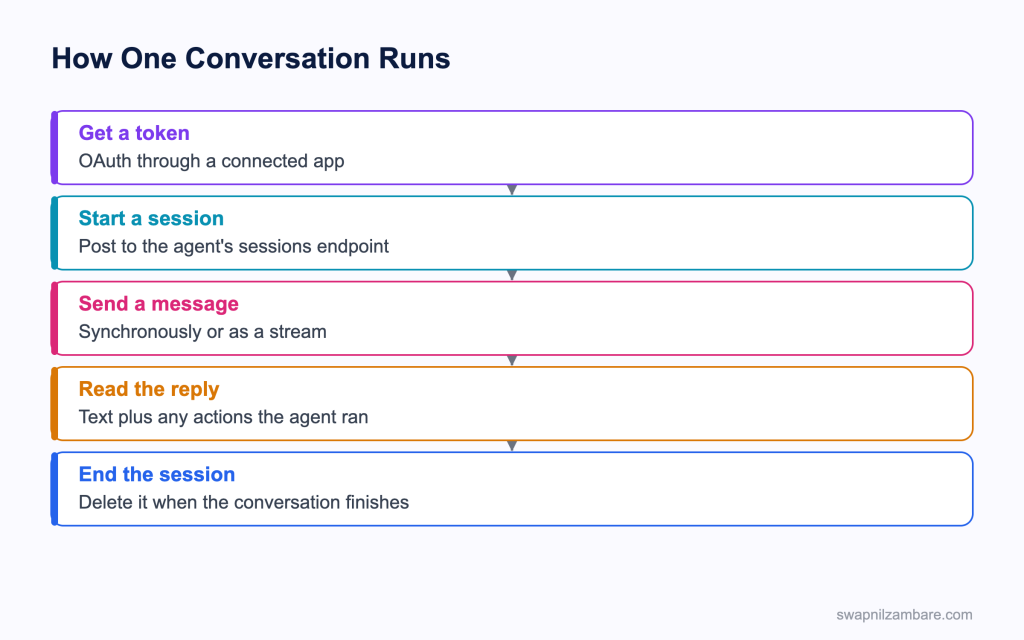
Caption: The session is the unit of work, so it has to be ended rather than left open.
What the Salesforce Agent API Does
The Salesforce Agent API exposes an agent as a REST service under the Einstein path.
| Step | Request |
|---|---|
| Start a session | POST to the agent’s sessions endpoint |
| Send a message | POST to the session’s messages endpoint |
| Stream a message | POST to the stream endpoint and read server sent events |
| End the session | DELETE the session |
curl --location -X POST \
  'https://api.salesforce.com/einstein/ai-agent/v1/agents/{AGENT_ID}/sessions' \
  --header 'Content-Type: application/json' \
  --header 'Authorization: Bearer {ACCESS_TOKEN}' \
  --data '{
    "externalSessionKey": "{RANDOM_UUID}",
    "instanceConfig": { "endpoint": "https://{MY_DOMAIN_URL}" },
    "streamingCapabilities": { "chunkTypes": ["Text"] },
    "bypassUser": true
  }'
The Salesforce Agent API returns a session id and a set of links for the next calls, which is a nice touch because your client can follow them instead of building paths by hand.
| Body field | What it is for |
|---|---|
| externalSessionKey | Your own identifier for the conversation |
| instanceConfig.endpoint | Your My Domain URL |
| streamingCapabilities | Which chunk types your client can handle |
| bypassUser | Whether the session runs without a specific user context |
Synchronous or Streaming
| Mode | What you get | Suits |
|---|---|---|
| Synchronous | The whole reply in one response | A server to server call |
| Streaming | Server sent events as the reply forms | A chat window where typing should appear |
The Salesforce Agent API offers both for a reason. A chat interface wants streaming, because a four second wait with nothing on screen feels broken. A background integration wants the synchronous endpoint, because it is simpler to handle.
Authentication
Access is an OAuth bearer token, usually from a connected app using the client credentials flow, with a permission set controlling what the agent can reach. Keep that token server side. A browser calling the Salesforce Agent API directly would expose it to anyone who opens the developer tools.
Two facts save time at the start. The Salesforce Agent API is not supported for agents of the default Agentforce type, so the agent has to be one you built. And Government Cloud orgs use a different base host, so check that before debugging a connection.
What the Models API Does Instead
The Models API connects your code to a language model, with Apex classes generated from its REST specification. The namespace is aiplatform and the main class is ModelsAPI.
aiplatform.ModelsAPI modelsAPI = new aiplatform.ModelsAPI();
aiplatform.ModelsAPI.createGenerations_Request request =
    new aiplatform.ModelsAPI.createGenerations_Request();
request.modelName = 'sfdc_ai__DefaultGPT4Omni';

aiplatform.ModelsAPI_GenerationRequest body =
    new aiplatform.ModelsAPI_GenerationRequest();
body.prompt = 'Summarise this enquiry in two sentences. ' + enquiryText;
request.body = body;

try {
    aiplatform.ModelsAPI.createGenerations_Response response =
        modelsAPI.createGenerations(request);
    summary = response.Code200.generation.generatedText;
} catch (aiplatform.ModelsAPI.createGenerations_ResponseException e) {
    Logger.error(e, 'EnquirySummary');
}| Capability | Method |
|---|---|
| Generate text from a prompt | createGenerations |
| Generate a reply in a chat conversation | createChatGenerations |
| Create embeddings for search or clustering | createEmbeddings |
| Send feedback on a generation | submitFeedback |
The agent itself is built and versioned with the tooling in the post on Agentforce DX, and its actions are ordinary invocable Apex, so the rules in CRUD and FLS still apply. Callouts from a model action follow the patterns in named credentials.
Three details matter in that example. The response is read through a code property such as Code200, the exception type is specific to the method you called, and the model is named rather than assumed, so a configured model from the AI Models setup can be swapped in without changing the logic.
| Point | Why it matters |
|---|---|
| Every call goes through the trust layer | Masking, toxicity scoring and audit apply |
| Apex callout limits apply | A model call is a callout, with the usual ceilings |
| Managed packages can use it | Both packaging generations are supported |
| Models come from several providers | Configured in the AI Models setup, not hard coded |
Agent API or Models API
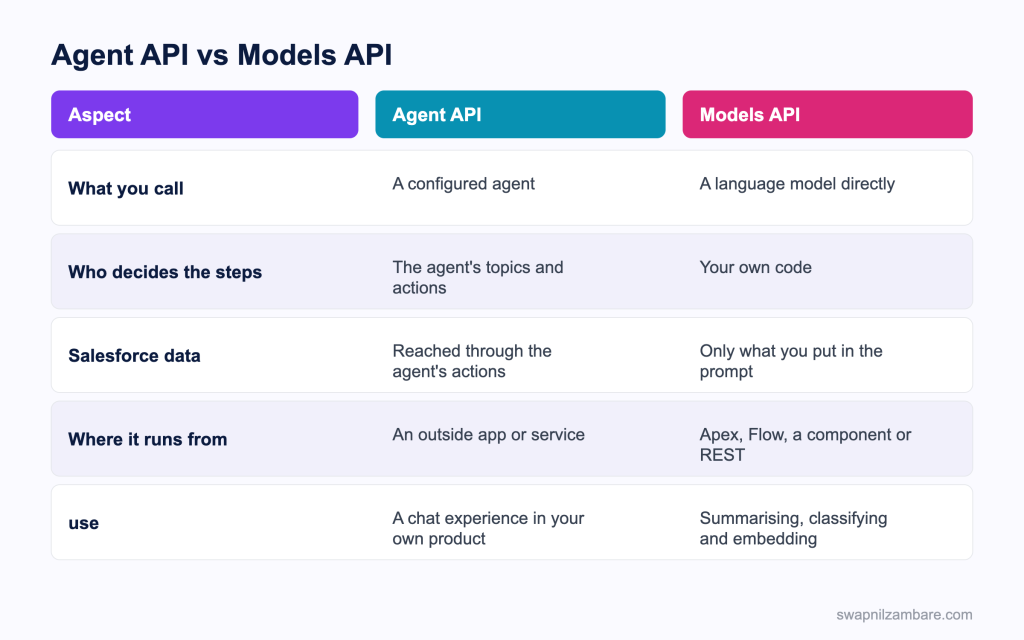
Caption: An agent decides what to do, and a model only answers what you ask.
| Need | Pick |
|---|---|
| A chat window in your own product | Agent API |
| A conversation that can take actions in Salesforce | Agent API |
| Summarise a case description | Models API |
| Classify an enquiry into a picklist value | Models API |
| Embeddings for a similarity search | Models API |
| A support bot on a public site | Agent API |
| Draft text inside a Lightning component | Models API |
The deciding question between the Salesforce Agent API and a model call is who chooses the steps. If you want something that picks its own actions from a set you configured, that is an agent. If you want one answer from one prompt and your own code does the rest, that is a model call.
A Real Salesforce Agent API Example
The Salesforce Agent API gave us a bot without a Salesforce interface. Bright Path Tutors has a student portal outside Salesforce. Parents asked the same five questions constantly, and the support inbox carried all of them.
| Option considered | Why it won or lost |
|---|---|
| A hard coded FAQ page | Nobody read it |
| A model call per question | No access to the student’s own records |
| An agent reached over the API | Chosen, since it can look things up |
We built one agent with three actions and called it from the portal’s own backend.
| Measure | Before | After |
|---|---|---|
| Repeat questions in the support inbox | Most of the volume | A small fraction |
| Where the token lives | Not applicable | Server side only |
| Average first reply | Hours | Seconds |
| Escalations to a human | Everything | The genuinely unusual cases |
We also used the Models API in the same project, but for something else entirely. It summarises the conversation into a case description when a chat does escalate.
Limits and Things to Watch
- Sessions are stateful, so a client that never ends them leaves work behind
- Calling the Salesforce Agent API from Apex is a poor fit, because long running calls use up the concurrent request allowance
- The default Agentforce agent type is not supported, so build your own agent
- Government Cloud orgs use a different base host
- Model calls from Apex are callouts, so callout limits apply
- Rate limits apply to the Models API, so a bulk job needs batching and backoff
- Model output is never guaranteed, so anything that writes data needs validation
The Apex point deserves emphasis. A conversation call can take seconds, and Salesforce limits long running synchronous requests per org, so a few agent calls from Apex can affect every other user. Call the agent from your own service, and keep Apex for the actions the agent invokes.
Common Mistakes with the Salesforce Agent API
| Mistake | What you see | Fix |
|---|---|---|
| Token in browser code | A credential anyone can read | Keep the token server side |
| Sessions never ended | Sessions piling up | Delete the session when the chat closes |
| Calling it from Apex | Concurrency problems for everyone | Call it from your own service |
| Expecting it to work with the default agent | Requests refused | Use an agent you built |
| Building paths by hand | Breakage when a path changes | Follow the links in the response |
| Using the sync endpoint for a chat window | A long silent wait | Use the streaming endpoint |
| Trusting model output blindly | Bad data saved | Validate before any write |
Best Practices for the Salesforce Agent API
- Keep the token and the session on your server, never in the browser
- End every session, including after an error
- Stream for anything a person is watching
- Follow the links the API returns rather than composing paths
- Name the model explicitly so it can be changed in configuration
- Read both the response code property and the method’s own exception type
- Log the request id and the session key so a conversation can be traced
- Validate anything a model produces before it reaches a record
Most Asked Salesforce Agent API Interview Questions
Q1: What does the Agent API let you do?
Start a session with an agent, send and receive messages, and end the session, all over REST.
Q2: What is the first call?
A post to the agent’s sessions endpoint, which returns a session id and links.
Q3: What are the two ways to send a message?
The synchronous endpoint, and the streaming endpoint that returns server sent events.
Q4: When would you use streaming?
For a chat window, where a person should see the reply forming.
Q5: When is the synchronous endpoint better?
For a server to server call where simplicity matters more than perceived speed.
Q6: How do you end a conversation?
Delete the session.
Q7: How is a request authenticated?
With an OAuth bearer token, usually from a connected app using client credentials.
Q8: Where should that token live?
On your server, never in browser code.
Q9: What is externalSessionKey for?
Your own identifier for the conversation, which helps when tracing.
Q10: Which agent type is not supported?
The default Agentforce agent type, so the agent has to be one you built.
Q11: What changes for a Government Cloud org?
The base host is different.
Q12: Why is calling it from Apex a poor idea?
The calls are long running, and the org limit on concurrent long running requests is easy to exhaust.
Q13: What should Apex do instead?
Provide the actions the agent invokes, while the conversation runs from your own service.
Q14: What is the Models API?
An API that calls a language model directly, available as Apex classes and REST endpoints.
Q15: Which Apex namespace holds it?
The aiplatform namespace, with ModelsAPI as the main class.
Q16: Name three of its methods.
createGenerations, createChatGenerations and createEmbeddings.
Q17: How do you read a successful response in Apex?
Through the response code property, such as the one for a 200 result.
Q18: How do you catch a failure?
With the response exception type belonging to the method you called.
Q19: Why name the model rather than hard code behaviour?
So a configured model can be swapped in the AI Models setup without a code change.
Q20: What does every model call pass through?
The Einstein trust layer, which applies masking, scoring and audit.
Q21: Do callout limits apply to the Models API in Apex?
Yes. A model call is a callout like any other.
Q22: Can a managed package use it?
Yes, in both packaging generations.
Q23: What is embeddings output used for?
Similarity search, clustering and recommendation style work.
Q24: Which API would you use to summarise a case description?
The Models API, since it is one prompt and one answer.
Q25: Which API would you use for a support chat on your own site?
The Agent API, since the agent decides what to do and can take actions.
Q26: Can both be used in one project?
Yes, and that is common, with the agent handling the conversation and a model call doing a specific task.
Q27: Scenario: a chat feels frozen for four seconds. What is wrong?
The synchronous endpoint is being used where streaming belongs.
Q28: Scenario: other users see slow pages whenever the bot is busy. What happened?
The agent is being called from Apex, consuming long running request capacity.
Q29: Scenario: a model wrote a wrong value onto a record. What was missing?
Validation between the model output and the write.
Q30: What is the one habit that keeps either API safe?
Tokens on the server, sessions closed, and model output validated before it is trusted.
Official Resources
What Is Next
Next, read Prompt Templates in Apex with Connect API Explained.


