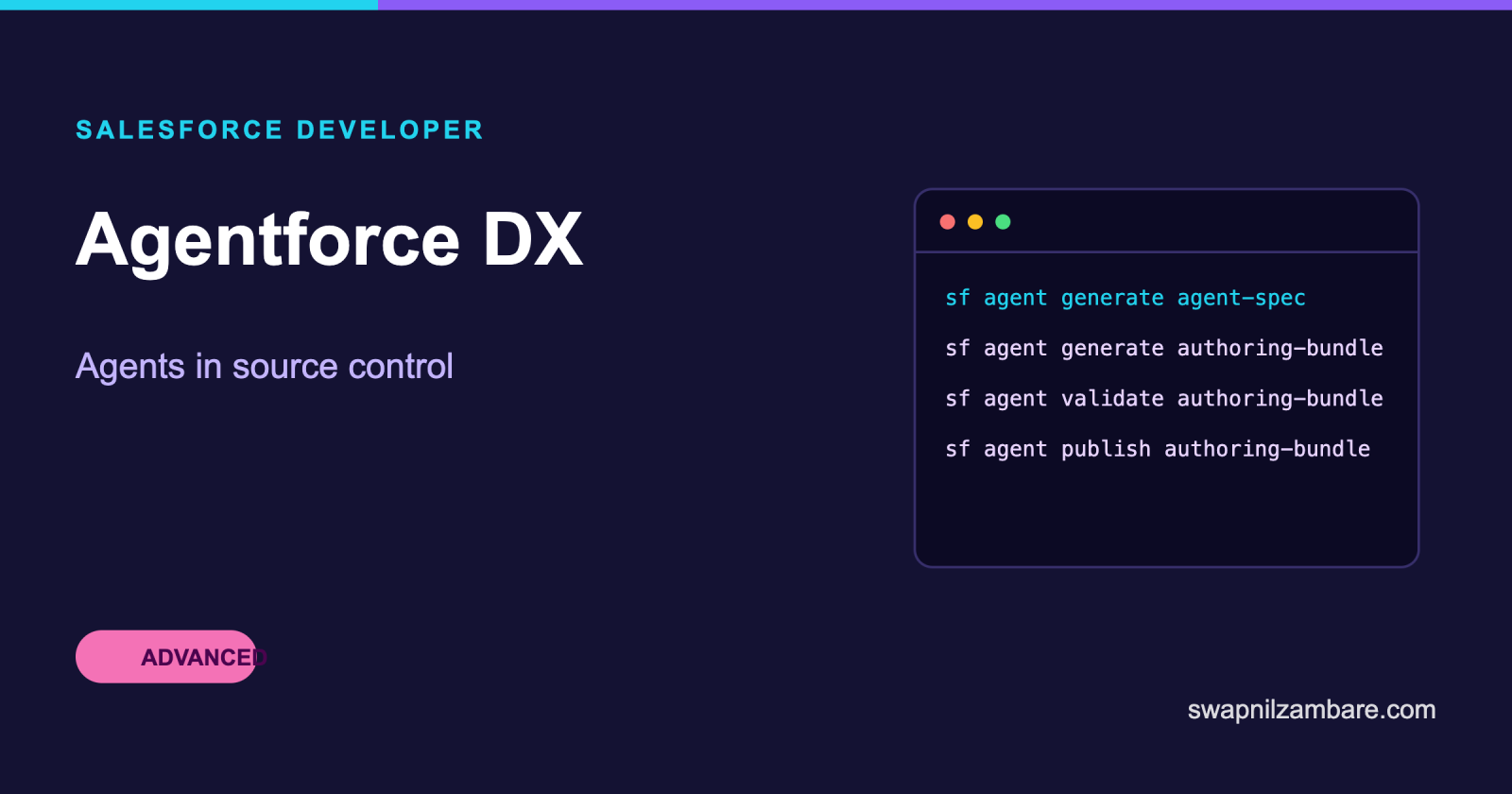
Agentforce DX is the set of tools that brings agents into a normal developer workflow. Instead of building an agent only in a browser, you generate its definition into a local Salesforce DX project, edit it in VS Code, publish it to an org, and commit the files to Git.
That matters because an agent built only in the Builder UI lives in one org, with no diff, no review and no repeatable path to the next environment. The same problem Apex had before source tracking, solved the same way.
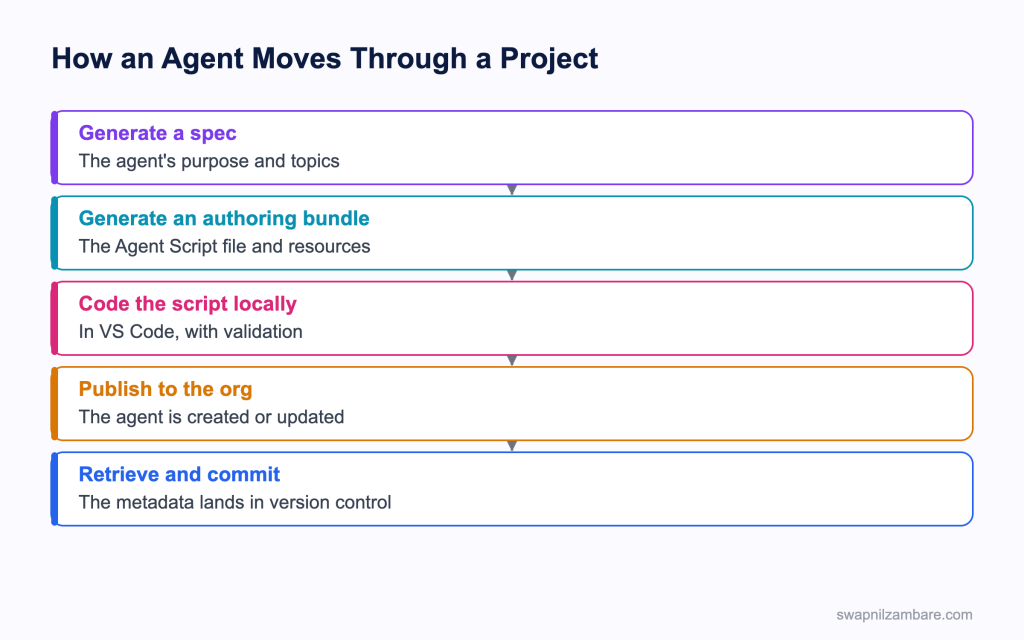
Caption: The loop ends in version control, which is the point of the whole exercise.
What Agentforce DX Gives You
Agentforce DX is two things, plus the usual DX project around them.
| Piece | What it does |
|---|---|
| CLI commands | An agent topic of commands under the sf command |
| A VS Code extension | Editing support for agent files, including Agent Script |
| A DX project | The same project structure you already use for Apex and components |
Agentforce DX commands live under the agent topic, and the plugin ships as a core plugin.
sf update
sf plugins --core
sf search
Running sf search and typing agent is the quickest way to see what your installed version offers, which matters because the CLI ships weekly and these commands change more often than most.
| Command | What it does |
|---|---|
| agent generate agent-spec | Creates a spec describing the agent’s purpose and topics |
| agent generate authoring-bundle | Creates the Agent Script file and its resources locally |
| agent validate authoring-bundle | Checks the script before you publish it |
| agent publish authoring-bundle | Pushes the authored agent into the org |
| agent preview | Talks to the agent from the terminal |
| agent test run | Runs the agent’s tests, which suits a pipeline |
| agent activate | Activates an agent in an org |
Setting Up the Environment
- Install or update the Salesforce CLI and confirm the agent plugin is present
- Install the VS Code extensions, including the Agentforce DX extension
- Authenticate to an org that has Einstein and Agentforce enabled
- Create or open a Salesforce DX project
- Generate the spec, then the authoring bundle
- Edit, validate, publish, retrieve and commit
| Environment | When it fits |
|---|---|
| A Developer or Developer Pro sandbox | The recommended choice, especially with data libraries |
| A Developer Edition org with Agentforce enabled | Learning and experiments |
| A scratch org | Works when the definition file enables Einstein and Agentforce |
A sandbox is the usual Agentforce DX recommendation because agents lean on data, and a scratch org starts empty. If you do use a scratch org, the features have to be declared, which the post on scratch org definition files covers.
What Agent Script Is
Agent Script is the language Agentforce DX edits, and the authoring language for the newer Agentforce Builder. It describes what the agent does as a definition you can read, rather than behaviour that depends entirely on how a model interprets a sentence.
| Idea | Why it exists |
|---|---|
| Declared steps | The agent follows a path you wrote, not a guess |
| Topics and actions | The agent’s capabilities, named and scoped |
| Variables and context | Values carried through a conversation |
| Logic beside prompts | Deterministic branching where it matters |
The Builder UI has a script view, so an admin and a developer can work on the same definition from two directions. A developer retrieves the file, edits it in VS Code with validation and autocomplete, and publishes it back.
Calling Your Own Code From an Agent
The parts a developer owns in Agentforce DX are the actions. An agent action can be an Apex method, a Flow or an outside service, and the script names it.
public with sharing class CourseActions {

    @InvocableMethod(
        label='Find Courses'
        description='Returns published courses for a level'
    )
    public static List<Response> find(List<Request> requests) {
        Response r = new Response();
        r.courses = [
            SELECT Id, Name, Fee__c
            FROM Course__c
            WHERE Level__c = :requests[0].level
              AND Is_Published__c = true
            WITH USER_MODE
            LIMIT 20
        ];
        return new List<Response>{ r };
    }

    public class Request {
        @InvocableVariable(required=true label='Level')
        public String level;
    }

    public class Response {
        @InvocableVariable(label='Courses')
        public List<Course__c> courses;
    }
}
Two details decide whether an agent uses the action well. The label and description are read by the planner, so they have to describe the action in plain words. And the query runs in user mode, so the agent cannot read more than the person it is acting for.
Builder UI or Agentforce DX
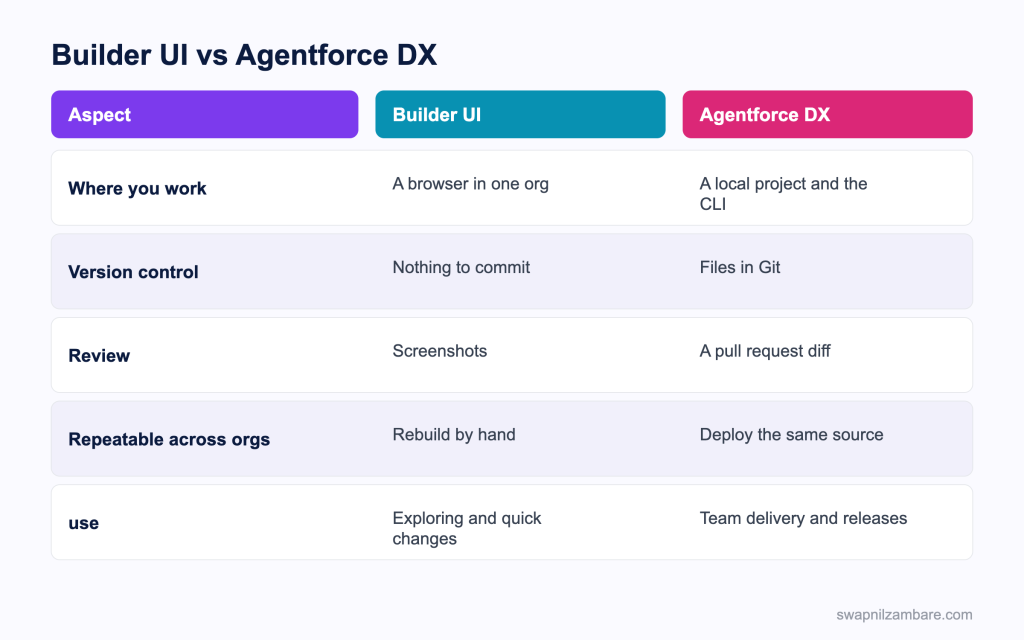
Caption: Exploration belongs in the browser, and delivery belongs in the project.
| Situation | Pick |
|---|---|
| Trying an idea in a sandbox | Builder UI |
| An admin tuning a topic description | Builder UI |
| A change that needs review | Agentforce DX |
| The same agent in three orgs | Agentforce DX |
| Tests in a pipeline | Agentforce DX |
| Writing an Apex action | Agentforce DX, with the usual Apex workflow |
In practice teams use both, with Agentforce DX taking over once the agent is real. The agent is explored in the Builder, then retrieved into the project, and from that point the project is the source of truth. The post on CI and CD covers wiring the tests into a pipeline.
A Real Agentforce DX Example
Agentforce DX arrived late for us. Bright Path Tutors built a course enquiry agent in the Builder. It worked, and then the trouble started.
| Problem | What it cost |
|---|---|
| No version history | A working topic was overwritten and lost |
| Rebuilt by hand per org | Two hours per environment, with drift |
| No review | A prompt change nobody saw reached users |
| No automated tests | Regressions found by customers |
We retrieved the agent into the DX project and treated it as source.
| Measure | Builder only | With the project |
|---|---|---|
| Time to move to another org | 2 hours, by hand | One deploy |
| Changes reviewed before release | None | Every one |
| Agent tests in the pipeline | None | Run on each pull request |
| Lost work | Twice in a month | None |
The overwritten topic was what forced the change. There was no history to restore, so it was rewritten from memory, and nobody could be sure it matched.
Limits and Things to Watch
- The CLI ships weekly, so command names and flags move faster than for older tooling
- Several agent commands are released as developer preview, so check before relying on one
- The org needs Einstein and Agentforce enabled before any of it works
- A scratch org needs those features declared in its definition file
- Agent behaviour depends on data, so an empty org gives you a poor picture
- Tests check behaviour against expectations, which is not the same as deterministic assertions
The weekly release pace around Agentforce DX is worth a habit. Run sf update and check the release notes before blaming your project, because a command that worked last month may have moved or been renamed.
Common Mistakes with Agentforce DX
| Mistake | What you see | Fix |
|---|---|---|
| Editing in the Builder after retrieving | The project and the org drift apart | Pick one source of truth and retrieve changes |
| Vague action labels and descriptions | The agent never picks the action | Describe the action in plain words |
| Apex actions in system mode | The agent reads more than the user can | Query in user mode |
| Publishing without validating | Errors found in the org | Validate the bundle first |
| A scratch org without the features | Commands fail immediately | Declare Einstein and Agentforce |
| No agent tests | Regressions reach users | Add tests and run them in the pipeline |
| An old CLI | Commands that do not exist | Update weekly and read the notes |
Deploying the agent alongside its Apex and Flow changes uses the ordinary commands from the post on the Salesforce CLI.
Best Practices for Agentforce DX
- Decide early whether the project or the org is the source of truth
- Validate the authoring bundle before every publish
- Write action labels and descriptions for the planner to read, not for a developer
- Keep every Apex action narrow, in user mode, and tested on its own
- Commit the agent files with the Apex and Flow changes they depend on
- Run the agent tests on every pull request
- Use a sandbox with realistic data rather than an empty org
- Update the CLI weekly and read the agent release notes
Most Asked Agentforce DX Interview Questions
Q1: What problem does Agentforce DX solve?
It brings agents into source control and a normal developer workflow instead of living in one org.
Q2: What does it consist of?
CLI commands under the agent topic, a VS Code extension, and a standard DX project.
Q3: How do you see which agent commands you have?
Run the search command and type agent, since the list changes with CLI releases.
Q4: Which command creates the agent’s spec?
The command that generates an agent spec, describing purpose and topics.
Q5: What is an authoring bundle?
The local set of files holding the Agent Script definition and its resources.
Q6: Which command checks the script before publishing?
The validate authoring bundle command.
Q7: Which command pushes the authored agent to the org?
The publish authoring bundle command.
Q8: How do you talk to the agent from the terminal?
With the preview command.
Q9: Which command suits a pipeline?
The test run command, since it returns results a build can act on.
Q10: What is Agent Script?
The authoring language for the newer Agentforce Builder, describing the agent as a readable definition.
Q11: Why does a declared script matter?
It makes behaviour predictable rather than depending entirely on how a model reads a sentence.
Q12: Can an admin and a developer work on the same definition?
Yes. The Builder has a script view, and a developer edits the same file in VS Code.
Q13: What can an agent action be?
An Apex method, a Flow or an outside service.
Q14: What makes an Apex action discoverable to an agent?
The invocable method label and description, which the planner reads.
Q15: Why write those descriptions carefully?
Because a vague description means the agent never chooses the action.
Q16: Which access mode should an agent’s Apex query use?
User mode, so the agent cannot read more than the person it acts for.
Q17: Which environment is recommended?
A Developer or Developer Pro sandbox, since agents depend on data.
Q18: Can you use a scratch org?
Yes, if the definition file enables Einstein and Agentforce.
Q19: Why is an empty org a poor choice?
Agent behaviour depends on data, so an empty org gives a misleading picture.
Q20: How often does the CLI change?
Weekly, which is why the agent commands move more than older tooling.
Q21: What does developer preview mean for a command?
It may change or disappear, so do not build a release process on it.
Q22: Where should the source of truth live?
In the project, once the agent moves past exploration.
Q23: What happens if people edit in both places?
The project and the org drift, and someone loses work.
Q24: How do agent tests differ from Apex tests?
They check behaviour against expectations rather than asserting exact values.
Q25: Scenario: a topic was overwritten and the old version is gone. What was missing?
Version control, which is the main reason to move the agent into a project.
Q26: Scenario: the agent never uses your new action. What do you check first?
The label and description, since the planner reads them to decide.
Q27: Scenario: an agent answers with data the user should not see. What is wrong?
The Apex action is running in system mode rather than user mode.
Q28: Scenario: a command in the docs does not exist locally. What now?
Update the CLI, then check the agent release notes for a rename.
Q29: Scenario: moving the agent to another org takes two hours. What changes that?
Treating the agent as source and deploying it like any other metadata.
Q30: What is the one habit that keeps agent work sane?
One source of truth, validated before publish, committed with the code it depends on.
Official Resources
What Is Next
Next, read Salesforce Agent API and Models API Explained.


