A Scratch Org Definition file is the recipe for a fresh Salesforce org. It names the edition, switches on the features your code needs, and sets the org settings that would otherwise be clicked by hand. Everything about the org comes from that file, which is why it belongs in Git next to the code.
This is what makes a scratch org reproducible. Two developers running the same command get identical orgs, and so does the build server. A sandbox, by contrast, carries whatever its source org happened to have switched on.
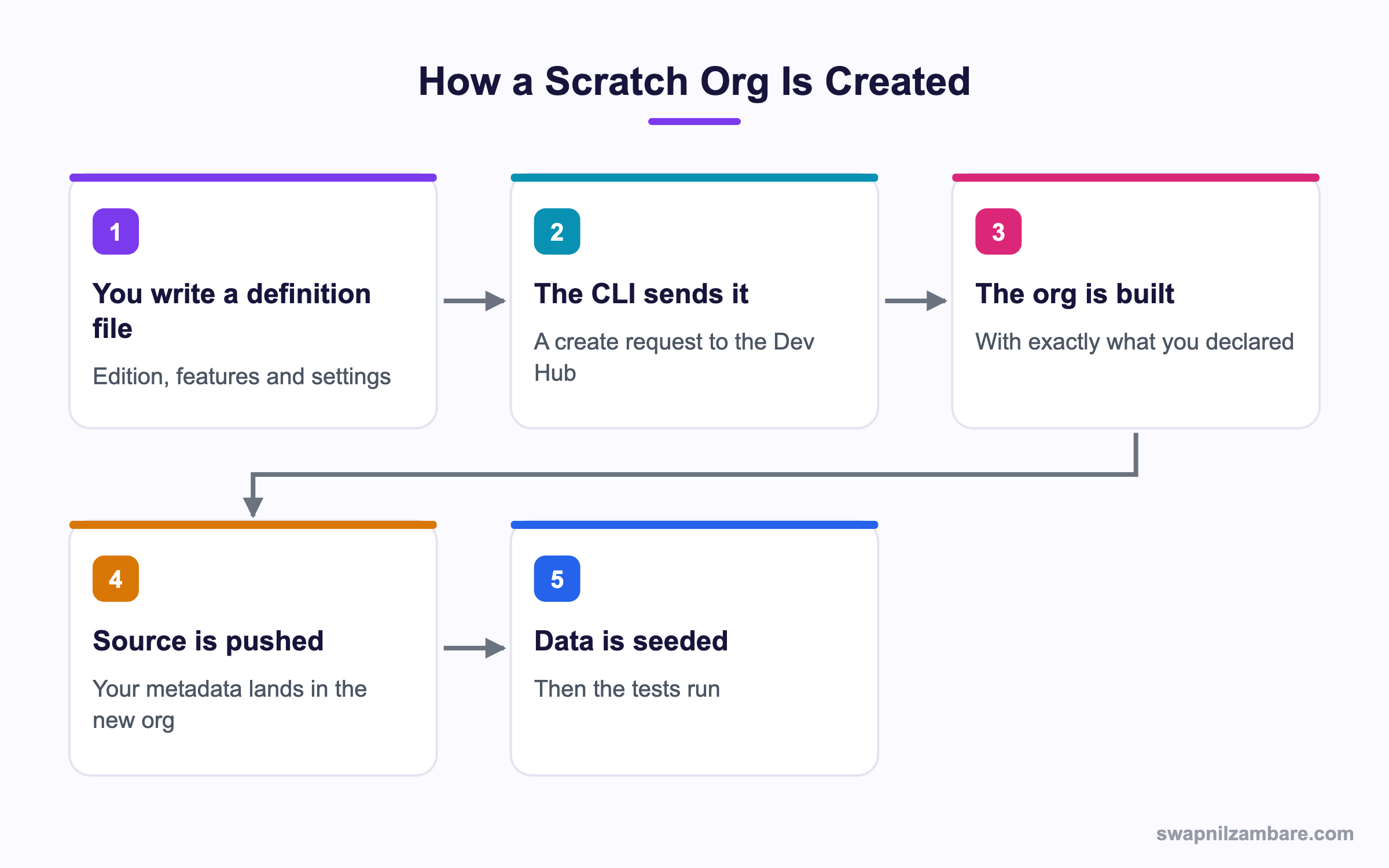
Caption: Nothing in the org exists unless the definition file, the source or the seed data put it there.
What Is a Scratch Org Definition File
A Scratch Org Definition is a small JSON file, normally at config/project-scratch-def.json.
{
  "orgName": "Bright Path Tutors Dev",
  "edition": "Developer",
  "features": [
    "EnableSetPasswordInApi",
    "PersonAccounts",
    "DebugApex"
  ],
  "settings": {
    "lightningExperienceSettings": {
      "enableS1DesktopEnabled": true
    },
    "securitySettings": {
      "passwordPolicies": {
        "minimumPasswordLength": 10
      }
    }
  }
}| Key | What it controls |
|---|---|
| orgName | The name shown in the org, which is cosmetic |
| edition | Developer, Enterprise, Group or Professional |
| features | Capabilities to switch on, as a list of names |
| settings | Org settings, grouped by settings type |
| sourceOrg | The org shape to copy, instead of declaring settings |
| snapshot | A saved org snapshot to create from |
| hasSampleData | Whether to include the standard sample data |
Creating the Org
sf org create scratch \
  --definition-file config/project-scratch-def.json \
  --alias dev1 \
  --duration-days 7 \
  --set-default

sf project deploy start --target-org dev1
sf apex run test --target-org dev1 --wait 20
The duration on a Scratch Org Definition matters more than people expect. A scratch org expires, and an expired org takes your unsaved work with it. Short durations for daily work and longer ones for a feature branch is the usual pattern. The post on scratch orgs and sandboxes compares the environment types.
Features and Settings Are Different Things
This distinction causes most of the confusion with a Scratch Org Definition.
| Concept | What it is | Example |
|---|---|---|
| A feature | A capability to switch on | PersonAccounts, Sites, ServiceCloud |
| A setting | A configuration value inside a settings type | A password length, a Chatter toggle |
Some features take a quantity, written with a colon in the name, such as a number of extra licences. Settings follow the metadata settings structure, so the key names match the Metadata API rather than the Setup page labels.
"features": ["MultiCurrency", "AuthorApex", "ProcessBuilder"],
"settings": {
  "chatterSettings": { "enableChatter": false },
  "omniChannelSettings": { "enableOmniChannel": true }
}
When a deployment fails in a scratch org but works in a sandbox, a missing feature is almost always the reason. The error names the component, and the fix is one line in the definition file.
Org Shape for Complicated Orgs
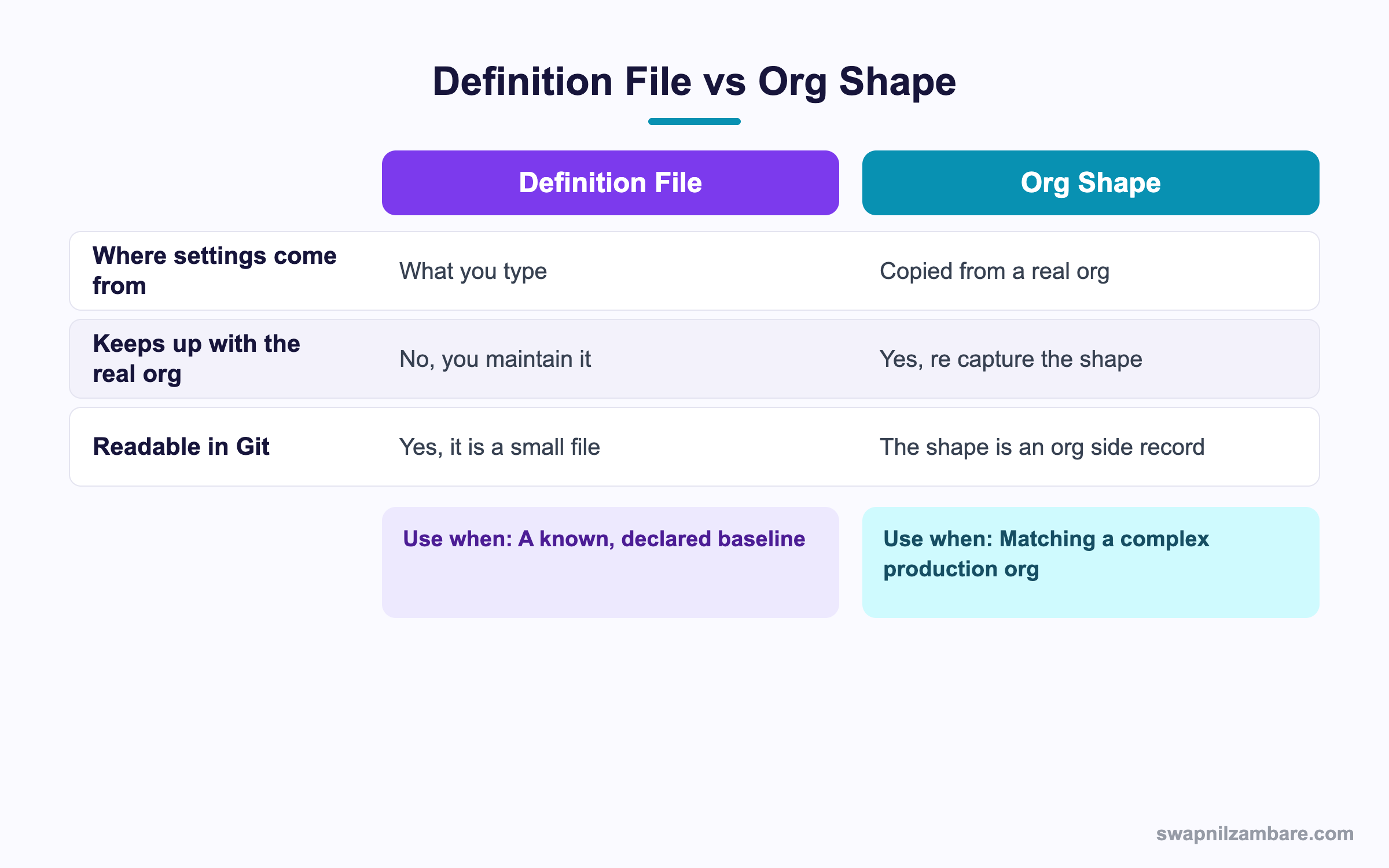
Caption: A hand written definition file is clearer, and a shape is more honest about a messy production org.
A Scratch Org Definition for a large production org would hold hundreds of settings, and nobody wants to transcribe them. Org shape captures the shape of a real org and lets a scratch org be created from it.
sf org create shape --target-org production{
"orgName": "Shape of production",
"sourceOrg": "00D..."
}| Behaviour | What it means |
|---|---|
| Settings come from the source org | No transcription by hand |
| Features come from the source org | Including ones nobody documented |
| Data is not copied | A shape is configuration, not records |
| It is a snapshot in time | Capture it again when the org changes |
That third row is worth repeating. A shape gives you an empty org configured like production, which is exactly what a developer wants and not at all what a tester wants.
Snapshots for Faster Setup
If a Scratch Org Definition, a deploy and a data seed take twelve minutes together, a snapshot turns that into one command.
sf org create snapshot \
  --source-org dev1 \
  --snapshot-name base-with-data \
  --description 'Metadata plus seed data'
{
"orgName": "Feature work",
"snapshot": "base-with-data"
}| Approach | Setup time | Keeps up with changes |
|---|---|---|
| Definition file plus deploy plus seed | The longest | Always current |
| Org shape plus deploy plus seed | Long, but matches production | Current if recaptured |
| Snapshot | The shortest | Only as fresh as the snapshot |
The trap with snapshots is staleness. A snapshot taken three weeks ago contains three weeks old metadata, so most teams refresh it on a schedule and keep the definition file as the source of truth.
A Real Scratch Org Definition Example
Our Scratch Org Definition used to be guesswork. Bright Path Tutors ran into the same conversation every Monday. A developer created a scratch org, the deployment failed, somebody remembered the missing feature, and forty minutes went by.
| Problem | What it cost |
|---|---|
| Features discovered by trial and error | Forty minutes per new developer |
| Three definition files in three branches | Different orgs for different people |
| No seed data step | Tests passed locally and failed in review |
| Twelve minute setup | Nobody created a clean org when they should have |
We settled on one definition file, one seed script and a weekly snapshot.
| Measure | Before | After |
|---|---|---|
| Time to a working org | 40 minutes, with help | 90 seconds from the snapshot |
| Definition files in the repo | 3 | 1 |
| Deployment failures from missing features | Weekly | None |
| Clean orgs created per developer per week | Under 1 | 4 or 5 |
The same script runs in the pipeline, which is covered in the post on CI and CD.
The last row is the point of the whole exercise. When a fresh org is cheap, people throw orgs away instead of nursing broken ones.
Seeding Data
A Scratch Org Definition builds an empty org, so data is a separate step. A small plan file keeps it repeatable.
sf data import tree --plan data/sample-plan.json --target-org dev1Keep the data set small and deliberate. Ten courses and six contacts that exercise the edge cases beat a thousand random rows, and the post on the Salesforce CLI covers building that set.
Limits and Things to Watch
- Scratch orgs expire, and an expired org cannot be recovered
- Your Dev Hub has daily and active allowances, which a busy team can exhaust
- Settings key names follow the Metadata API, not the Setup page labels
- Not every feature is available in every edition you can choose
- A shape is configuration only, with no records
- A snapshot ages, so it needs refreshing
- Some features need a case with Salesforce before they can be used in a scratch org
The Scratch Org Definition is only half the story during a release week, because allowances bite. Several developers creating orgs all day can use the daily number, and the error message is not always obvious. Expiring orgs you no longer need with sf org delete scratch is a good habit.
Common Mistakes with a Scratch Org Definition
| Mistake | What you see | Fix |
|---|---|---|
| Features found by trial and error | Repeated deployment failures | Record each one in the definition file |
| Several definition files in one repo | Different orgs per developer | Keep one, with named variants if needed |
| Setup page labels used as settings keys | The create call is rejected | Use the Metadata API names |
| A seven day org for a long feature | Work lost on expiry | Set the duration to match the work |
| A snapshot never refreshed | Old metadata in new orgs | Refresh on a schedule |
| No seed data step | Tests that pass only on one machine | Keep a plan file in the repo |
| Leaving unused orgs active | The allowance exhausted | Delete orgs when you are done |
Best Practices for a Scratch Org Definition
- Keep one definition file in the repo and treat it as part of the build
- Add every feature you discover, with a comment saying what needed it
- Set the duration to the expected life of the branch
- Script the whole path, from create to deploy to seed to test, in one command
- Use a shape when production configuration is too complex to transcribe
- Use a snapshot for speed, and refresh it on a schedule
- Delete orgs you are finished with
- Make the same script run in your pipeline so the build uses the same org
Most Asked Scratch Org Definition Interview Questions
Q1: What does a definition file control?
The edition, features and settings of a newly created scratch org.
Q2: Where does it usually live?
In the config folder of the project, as project-scratch-def.json.
Q3: Which editions can you choose?
Developer, Enterprise, Group and Professional.
Q4: What is the difference between a feature and a setting?
A feature switches a capability on, and a setting configures a value inside a settings type.
Q5: Where do settings key names come from?
The Metadata API settings types, not the Setup page labels.
Q6: What happens when a deployment fails in a scratch org but works in a sandbox?
Usually a feature is missing from the definition file.
Q7: How long can a scratch org live?
It is set by the duration when you create it, up to the maximum your Dev Hub allows.
Q8: What happens when it expires?
It is gone, along with anything in it that was not committed.
Q9: What is org shape?
A captured configuration of a real org, which a scratch org can be created from.
Q10: Which key points a definition file at a shape?
The sourceOrg key, naming the org the shape came from.
Q11: Does a shape include data?
No. It is configuration only.
Q12: When is a shape the better choice?
When a production org has too many settings to transcribe by hand.
Q13: What is an org snapshot?
A saved copy of an org including its metadata and data, used to create new orgs quickly.
Q14: Which key creates from a snapshot?
The snapshot key, naming the snapshot.
Q15: What is the drawback of a snapshot?
It ages, so it has to be refreshed or it hands out stale metadata.
Q16: Which of the three is the source of truth?
The definition file, since it is readable, reviewable and lives in Git.
Q17: How do you seed data?
With a data plan file and the CLI import command, run after the deployment.
Q18: How big should the seed data set be?
Small and deliberate, covering the edge cases rather than filling the org.
Q19: Why keep only one definition file?
So every developer and the build server create the same org.
Q20: What limits apply to scratch orgs?
Daily and active allowances on the Dev Hub, which a busy team can exhaust.
Q21: How do you avoid exhausting them?
Delete orgs when you finish with them rather than letting them expire.
Q22: Can every feature be enabled in a scratch org?
No. Some depend on the edition, and a few need a case with Salesforce.
Q23: Why is a reproducible org worth the effort?
Because a failing test can then be trusted, since the environment is the same everywhere.
Q24: Scenario: a new developer loses forty minutes on a failed deployment. What went wrong?
A feature the code needs is missing from the definition file.
Q25: Scenario: two developers see different behaviour in their orgs. Why?
They are creating from different definition files or an out of date snapshot.
Q26: Scenario: a week of work vanished. What happened?
The org expired, which is why work belongs in Git rather than in an org.
Q27: Scenario: the create command fails on a settings key. What do you check?
The Metadata API name for that settings type, since Setup labels do not match.
Q28: Should the pipeline use the same definition file?
Yes. That is the main reason to keep it in the repo.
Q29: What is the single habit that makes scratch orgs work?
Script the whole path in one command, so creating a clean org is cheaper than fixing a dirty one.
Official Resources
What Is Next
Next, read Salesforce Data Seeding for Scratch Orgs Explained.


