The AppExchange Security Review is the check every package passes before it can be listed for other companies to install. It is not a formality. Reviewers run a scan, read your answers about how the app handles data, and fail submissions that leave a real hole open.
Most first submissions to the AppExchange Security Review fail on something small. A single unescaped merge field in a Visualforce page, a query without sharing, or a secret left in a class. All of them are cheap to fix before you submit and expensive to discover after.
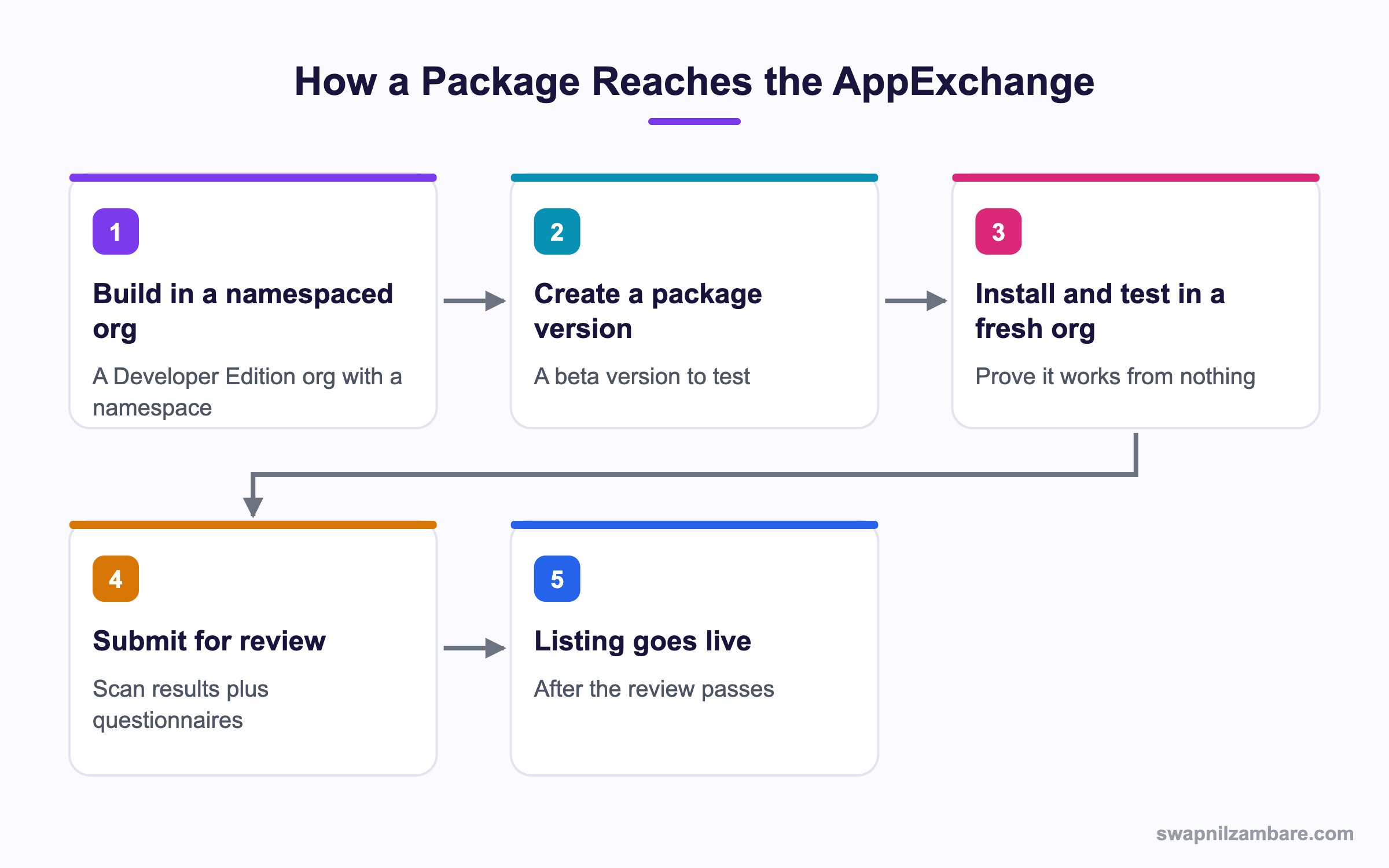
Caption: The review comes after the package already installs cleanly in a fresh org, not before.
Managed, Unlocked and Unmanaged Packages
| Type | What it is for |
|---|---|
| Managed | A commercial app, with hidden code and enforced upgrades |
| Unlocked | Your own org or a client project, with visible code |
| Unmanaged | A one time template, with no upgrade path at all |
Only a managed package can be listed on the AppExchange, and only a managed package goes through the AppExchange Security Review. The others are deployment tools rather than products.
A managed package needs a namespace, registered once in a Developer Edition org, and that namespace prefixes every component you build.
sf package create --name CoursePro --package-type Managed --path force-app
sf package version create --package CoursePro --installation-key-bypass --wait 20
sf package install --package 04t... --target-org testOrg --wait 20
sf package version promote --package CoursePro@1.0.0-1| Step | Why it exists |
|---|---|
| Create the package | Registers the package in your Dev Hub |
| Create a version | Builds a beta you can install |
| Install in a clean org | Proves it works from nothing |
| Promote | Marks the version as released, which is what you submit |
That clean org step is not optional in practice, and it comes before the AppExchange Security Review. A package that works in the org it was built in can still fail on install, because that org has fields and permissions the package does not carry.
What the AppExchange Security Review Checks
The AppExchange Security Review scan looks for a short list of real problems, and almost every failure is one of these.
| Finding | What it means |
|---|---|
| SOQL injection | A query built from user input without escaping |
| Cross site scripting | Output rendered without escaping |
| Missing CRUD and FLS checks | Reading or writing fields the user cannot access |
| Sharing not enforced | A class without the sharing keyword |
| Hard coded secrets | A key, token or password in code or metadata |
| Insecure callouts | HTTP rather than HTTPS, or an unverified endpoint |
| Unescaped merge fields | A Visualforce expression without escaping |
The Three Fixes That Clear Most Findings
// Sharing enforced at the class level
public with sharing class CourseService {

    // Field and object access enforced by user mode
    public List<Course__c> search(String term) {
        String like = '%' + String.escapeSingleQuotes(term) + '%';
        return [
            SELECT Id, Name, Fee__c
            FROM Course__c
            WHERE Name LIKE :like
            WITH USER_MODE
            LIMIT 50
        ];
    }
}
Three things in that short class answer most of the AppExchange Security Review scan. The sharing keyword, the bind variable rather than string concatenation, and user mode on the query. The posts on secure coding and CRUD and FLS cover each in depth.
Preparing a Submission
Running the AppExchange Security Review scan yourself first is the single biggest time saver. Salesforce provides a scanner, and Code Analyzer catches a similar set of issues locally.
- Run Code Analyzer over the whole package and fix everything it reports
- Submit the code to the Salesforce scanner and read the full report
- Fix every finding, and write a short note for anything you believe is a false positive
- Install the promoted version in a brand new org and run through the app
- Complete the security questionnaires honestly, including outside services you call
- Submit, and expect questions
| Document asked for | What it covers |
|---|---|
| Security questionnaire | How the app handles data and authentication |
| Architecture description | What runs where, and which services are involved |
| Test credentials | A working login so reviewers can use the app |
| Scan results | The report, with your notes on anything disputed |
Test credentials catch people out in the AppExchange Security Review. Reviewers need a way into your app with sample data in place, and a submission without a working path through the app comes straight back.
Managed or Unlocked
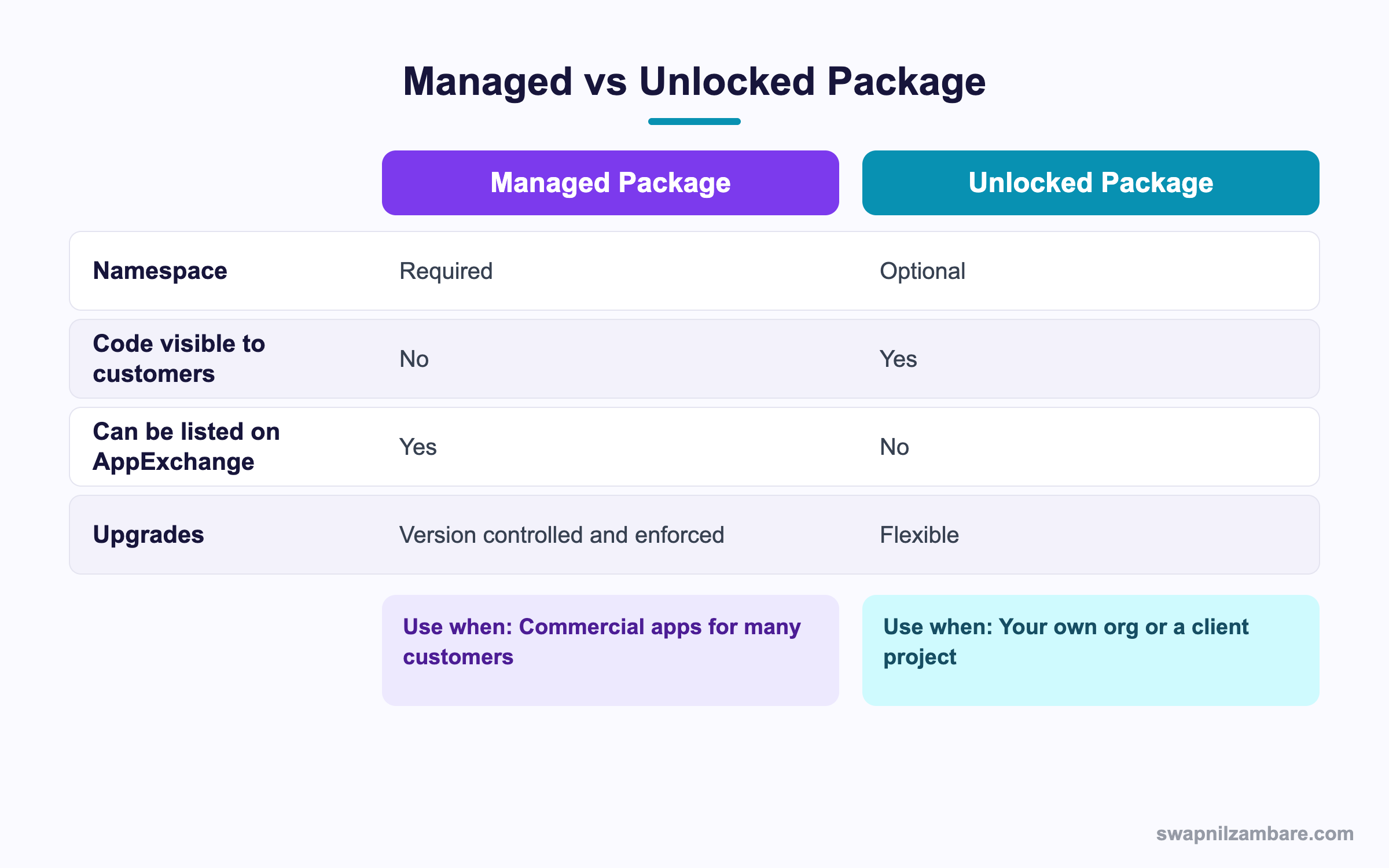
Caption: The listing is the deciding factor, since only a managed package can be sold on the AppExchange.
| Situation | Pick |
|---|---|
| An app you will list and sell | Managed |
| Your own org, split into packages | Unlocked |
| A consulting deliverable for one client | Unlocked |
| Code you must keep hidden | Managed |
| Something you may need to patch in a customer org | Unlocked |
| A sample app or template | Unmanaged |
The hidden code row matters commercially. In a managed package, customers cannot read your Apex, and upgrades are controlled by you. With an unlocked package, customers can see everything and change it, which is fine for internal work and rarely acceptable for a product.
A Real AppExchange Security Review Example
The AppExchange Security Review failed us once. Bright Path Tutors built a course catalogue app and submitted it for listing. The first submission failed.
| Finding | Where it came from |
|---|---|
| Unescaped merge field | One old Visualforce page kept for printing |
| Missing FLS on two fields | A method written before user mode existed |
| A test API key in a class | Left over from development |
| No sharing keyword on a utility class | Nobody had noticed it |
| Action | Result |
|---|---|
| Ran Code Analyzer over the package | Found three of the four issues locally |
| Moved the key to a protected custom setting | Finding cleared |
| Rewrote the two methods with user mode | Finding cleared |
| Replaced the Visualforce page with an LWC | Finding cleared |
| Measure | First attempt | Second attempt |
|---|---|---|
| Findings returned by the review | 4 | 0 |
| Weeks from submission to listing | Failed, restarted | 3 |
| Time spent fixing | 2 days |
Running the analyser locally would have found three of the four before the first submission. That is the whole lesson of the exercise.
Keeping a Package Reviewable
- Register the namespace early, since it cannot be changed
- Never put a secret in code, a static resource or a custom label
- Use protected custom settings or custom metadata for configuration
- Add the sharing keyword to every class as you write it
- Query in user mode by default and justify any exception in a comment
- Run Code Analyzer in your pipeline so findings appear on every pull request
- Install each promoted version in a fresh org before you submit anything
The pipeline step is what keeps a package ready for the AppExchange Security Review over years. A finding caught on a pull request costs ten minutes, and the same finding caught at review costs a submission cycle. The post on CI and CD covers wiring it in.
Common Mistakes with the AppExchange Security Review
| Mistake | What happens | Fix |
|---|---|---|
| Submitting without running the scan first | A failed cycle on findings you could have fixed | Run Code Analyzer and the scanner first |
| A secret left in code | An automatic failure | Move it to a protected setting |
| Classes without the sharing keyword | Multiple findings | Add it as you write each class |
| Old Visualforce pages left in the package | Escaping findings | Remove or rewrite them |
| No working test credentials | The submission is returned | Provide a login with sample data |
| Testing only in the development org | Install failures | Install in a fresh org every time |
| Disputing findings with no explanation | Delays and more questions | Write a short note per disputed item |
Best Practices for the AppExchange Security Review
- Treat the scan as a build step rather than a gate at the end
- Write every class with the sharing keyword and user mode queries from the start
- Keep configuration in protected custom settings or custom metadata
- Remove code you no longer ship, since it is still reviewed
- Document every outside service the app calls before you are asked
- Give reviewers a working login and data they can act on
- Promote a version and install it clean before submitting
- Budget time for a round of questions, because it is normal
Most Asked AppExchange Security Review Interview Questions
Q1: Which package type can be listed on the AppExchange?
A managed package.
Q2: What is an unlocked package for?
Your own org or a client project, where the code can be visible and changed.
Q3: What is an unmanaged package for?
A one time template, with no upgrade path.
Q4: Does a managed package need a namespace?
Yes, registered once, and it cannot be changed afterwards.
Q5: Can customers read Apex in a managed package?
No, which is one of the main commercial reasons to use one.
Q6: What does the review consist of?
An automated scan, questionnaires about data handling, and a hands on check by reviewers.
Q7: Name four findings the scan commonly reports.
SOQL injection, cross site scripting, missing CRUD and FLS checks, and sharing not enforced.
Q8: Which three code habits clear most findings?
The sharing keyword on classes, bind variables instead of concatenation, and user mode queries.
Q9: How do you avoid a SOQL injection finding?
Use bind variables, and escape single quotes when dynamic SOQL is unavoidable.
Q10: Where should an API key live?
In a protected custom setting, a named credential or custom metadata, never in code.
Q11: Why do old Visualforce pages cause problems?
Unescaped merge fields are a common escaping finding, and the pages are still reviewed.
Q12: What should you run before submitting?
Code Analyzer locally, then the Salesforce scanner, fixing everything both report.
Q13: What do you do about a false positive?
Keep it, and write a short note explaining why it is not an issue.
Q14: Why install in a brand new org?
Because the development org has components the package does not carry, which hides install failures.
Q15: What does promoting a package version mean?
Marking it as released, which is the state a submitted version must be in.
Q16: What do reviewers need from you besides code?
Questionnaire answers, an architecture description and working test credentials with sample data.
Q17: Why are test credentials so important?
Without a usable path through the app, reviewers cannot assess it and the submission is returned.
Q18: Do you have to declare outside services the app calls?
Yes. Where data goes is one of the main things the review covers.
Q19: How long does a review take?
Expect weeks rather than days, plus time for a round of questions.
Q20: What happens if the review fails?
You fix the findings and resubmit, which costs a cycle, so prepare properly first.
Q21: Is there a review for every new version?
Significant changes are reviewed again, so keep the package clean rather than cleaning it once.
Q22: How do you keep a package clean over years?
Run the analyser on every pull request so findings appear while the code is being written.
Q23: Scenario: the app works in your org and fails on install elsewhere. Why?
A dependency that lives in your org and is not part of the package.
Q24: Scenario: the scan flags a utility class you believe is safe. What now?
Fix it if you can, and otherwise explain clearly why it is safe.
Q25: Scenario: a key is only used in a sandbox. Is it acceptable in code?
No. A secret in code fails regardless of which environment it points at.
Q26: Scenario: you need to patch a customer org urgently. Which package type helps?
An unlocked package is more flexible, though a product normally stays managed and ships a patch version.
Q27: Can an unlocked package be sold?
Not through the AppExchange, since listing requires a managed package.
Q28: What is the cheapest way to shorten the review?
Submit with zero findings and complete answers, so there is nothing to go back and forth about.
Q29: What single habit prevents most failures?
Write every class with sharing and user mode from the first line, rather than fixing it later.
Official Resources
- Second Generation Packaging in the Salesforce DX Guide
- Apex Developer Guide
- Build an AppExchange App on Trailhead
What Is Next
Next, read Scratch Org Definition Files and Org Shape Explained.


