LWR Sites are Experience Cloud sites that run on the Lightning Web Runtime instead of the older Aura framework. Pages load faster, the markup is friendlier to search engines, and everything on the page is a Lightning Web Component.
That last point is the trade. You get speed and a modern component model, and you give up the long tail of older standard components that Aura sites could drop onto a page.
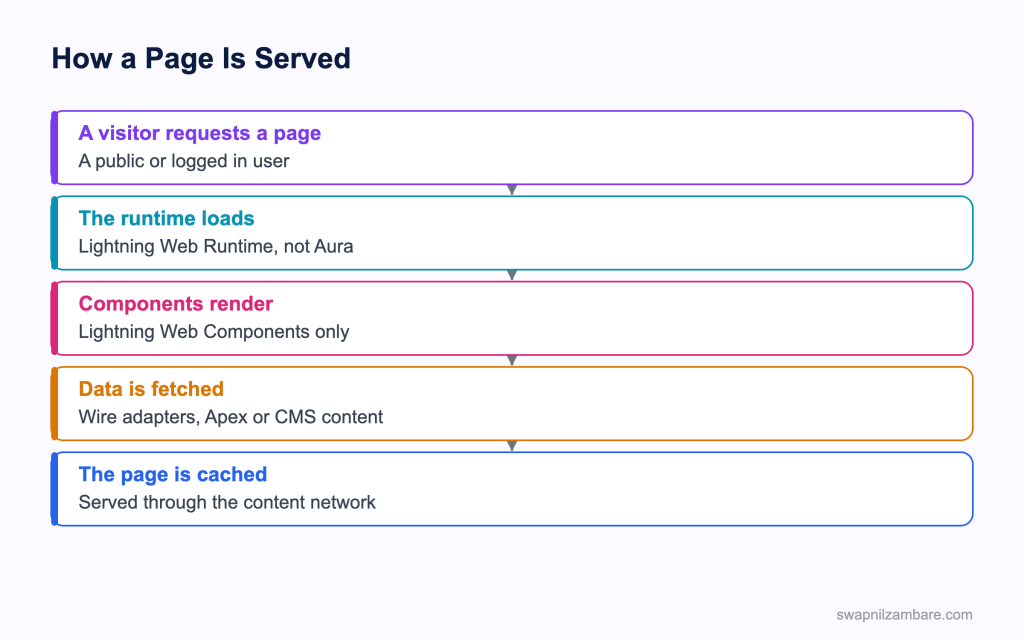
Caption: The runtime is the difference, and it decides which components can appear on the page.
What Are LWR Sites
LWR Sites start with a template choice. When you create a site in Experience Builder, the template you pick decides the runtime. Templates built on the Lightning Web Runtime give you LWR Sites, and the older templates give you an Aura site.
| Template family | Runtime | Typical use |
|---|---|---|
| Build Your Own | LWR | A public site or portal you design |
| Microsite | LWR | A small campaign or landing site |
| Help Center | LWR | Public knowledge and case deflection |
| Customer Service | Aura | Older portals with many standard components |
The runtime behind LWR Sites is fixed when the site is created. There is no switch to flip later, so a move from Aura to LWR means a new site and a rebuild of the pages. That one fact shapes most planning conversations.
The Targets a Component Needs
A component only appears on LWR Sites if its metadata declares the right target.
<?xml version="1.0" encoding="UTF-8"?>
<LightningComponentBundle xmlns="http://soap.sforce.com/2006/04/metadata">
  <apiVersion>62.0</apiVersion>
  <isExposed>true</isExposed>
  <masterLabel>Course Tile</masterLabel>
  <targets>
    <target>lightningCommunity__Page</target>
    <target>lightningCommunity__Default</target>
  </targets>
  <targetConfigs>
    <targetConfig targets="lightningCommunity__Default">
      <property name="courseId" type="String" label="Course" />
      <property name="showFee" type="Boolean" label="Show fee" default="true" />
    </targetConfig>
  </targetConfigs>
</LightningComponentBundle>| Target | What it allows |
|---|---|
| lightningCommunity__Page | The component can sit on a site page |
| lightningCommunity__Default | Properties can be set in Experience Builder |
| lightningCommunity__Page_Layout | The component can be a page layout |
| lightningCommunity__Theme_Layout | The component can be a theme layout |
Both of the first two are needed in practice. The page target makes it available, and the default target is what lets an admin configure it.
Why LWR Sites Matter
| Benefit | What it gives you |
|---|---|
| Faster first load | Less framework to download before anything paints |
| Better search results | Cleaner markup and faster pages |
| One component model | The same components as the rest of your org |
| Content network caching | Public pages served close to the visitor |
| Modern styling | SLDS styling hooks rather than theme hacks |
Search visibility is usually what sells LWR Sites to a marketing team. A public catalogue that takes four seconds to paint does not rank, and the older runtime made that hard to fix. The post on component performance covers the component side of the same problem.
Theming and Layouts
LWR Sites keep three things separate, and keeping them separate is what makes a site maintainable.
| Piece | What it controls |
|---|---|
| Theme layout | The header, footer and anything on every page |
| Page layout | How regions are arranged on one kind of page |
| Components | The content inside the regions |
A custom theme layout is a Lightning Web Component with slots, so Experience Builder can place content inside it.
<template>
  <header class="site-header">
    <slot name="header"></slot>
  </header>
  <main>
    <slot></slot>
  </main>
  <footer class="site-footer">
    <slot name="footer"></slot>
  </footer>
</template>
Styling belongs in SLDS styling hooks rather than in overrides that fight the platform, because a hook survives a release and a selector hack does not. The post on styling hooks covers the supported set.
Data on a Public Page
LWR Sites often serve guests, and a guest has no user record of their own, so every piece of data needs a deliberate decision.
| Need | How it is granted |
|---|---|
| Read a custom object | Guest user profile object permissions |
| See specific records | A sharing rule for the guest user |
| Read CMS content | A content channel published to the site |
| Call Apex | A class exposed and allowed for the guest profile |
| Write a record | Usually an Apex method, with validation |
public without sharing class CourseCatalogue {

    @AuraEnabled(cacheable=true)
    public static List<Course__c> published() {
        return [
            SELECT Id, Name, Fee__c, Level__c
            FROM Course__c
            WHERE Is_Published__c = true
            ORDER BY Name
            LIMIT 200
        ];
    }
}
That without sharing keyword is deliberate and it deserves a comment in the code. A guest catalogue is published data by definition, and the filter is what makes it safe rather than the sharing model. Everything else on the page should stay in user mode, and the post on sharing keywords covers the distinction.
LWR or an Aura Site
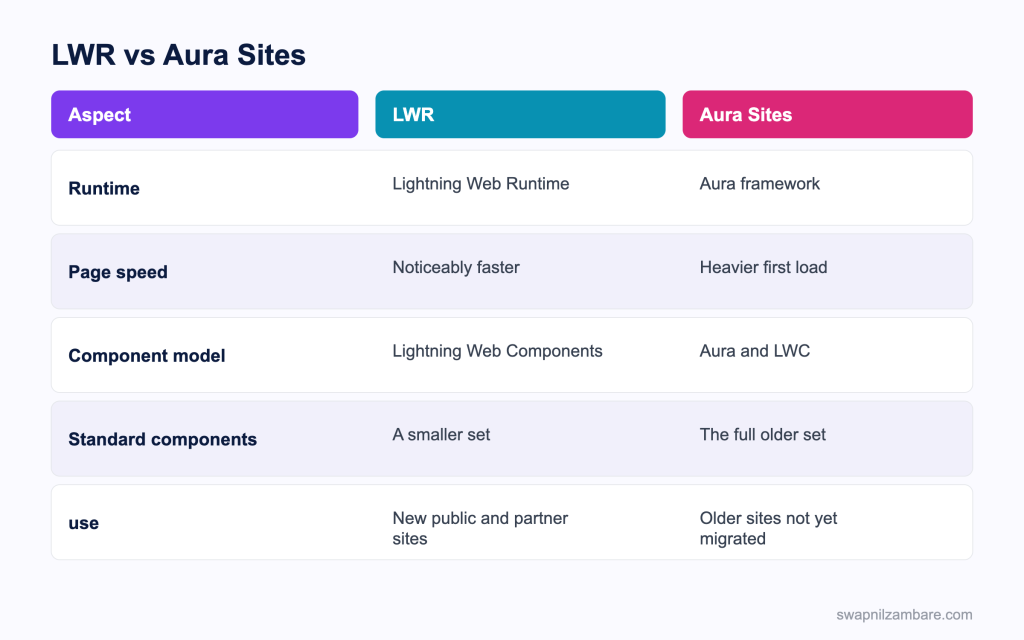
Caption: A new build goes to LWR unless a missing standard component decides otherwise.
| Situation | Pick |
|---|---|
| A new public catalogue or microsite | LWR |
| Search visibility matters | LWR |
| A help centre with knowledge articles | LWR |
| A portal needing many older standard components | Check LWR first, then Aura |
| An existing Aura site with 60 pages | Leave it, and plan the rebuild |
| A partner portal with heavy record pages | Compare component availability carefully |
The component availability row is the real decision. Make a list of the standard components the site needs, check each one against the template you intend to use, and only then commit. Discovering a missing component halfway through a build is the expensive outcome.
A Real LWR Sites Example
LWR Sites solved a search problem for us. Bright Path Tutors published a public course catalogue on an older Aura site. Marketing complained for a year that it never appeared in search results.
| Problem | Measurement |
|---|---|
| First paint on mobile | 4.8 seconds |
| Framework downloaded before content | Large |
| Pages indexed by search engines | Few |
| Enquiries from search | Close to none |
We rebuilt the catalogue as an LWR site with three custom components and one theme layout.
| Measure | Aura site | LWR site |
|---|---|---|
| First paint on mobile | 4.8 seconds | 1.3 seconds |
| Custom components to build | 2 | 3 |
| Standard components we lost | None needed | One, replaced by our own |
| Enquiries from search per month | Close to none | A steady trickle |
The extra component was the honest cost. One standard component we had relied on was not available, so we wrote a simpler version of it, which took two days.
Limits and Things to Watch
- The runtime is chosen when the site is created and cannot be switched later
- Only Lightning Web Components run, so Aura components and Visualforce pages do not
- The set of standard components is smaller, and it varies by template and release
- Guest access needs explicit profile permissions and sharing rules
- Caching means a content change may not appear immediately
- Some older site features arrive on LWR later than on Aura, so check the current release notes
The caching behaviour of LWR Sites catches content teams. A published change can sit behind the cache for a while, so agree with the team how long that is rather than letting them think the site is broken.
Common Mistakes with LWR Sites
| Mistake | What you see | Fix |
|---|---|---|
| Missing the page target | The component never appears in the builder | Add lightningCommunity__Page |
| Missing the default target | No properties to configure | Add lightningCommunity__Default |
| Assuming an Aura component will work | Nothing renders | Rewrite it as a Lightning Web Component |
| No guest profile permissions | An empty page for visitors | Grant object access and a sharing rule |
| Styling with selector overrides | Breaks at the next release | Use SLDS styling hooks |
| Planning a runtime switch | There is no switch | Plan a rebuild on a new site |
| Checking components after the build starts | A missing component late on | List and check them first |
Best Practices for LWR Sites
- List every standard component the site needs and check availability before you start
- Declare both the page and default targets on every component you expose
- Keep the theme layout thin, with slots rather than content
- Use SLDS styling hooks for anything a designer may want to change
- Grant guest access deliberately, object by object, with a filter in the query
- Keep Apex for guest pages small and read only wherever possible
- Test every page as a guest in a private window, not only as yourself
- Agree the cache behaviour with the content team before go live
Most Asked LWR Sites Interview Questions
Q1: What does LWR stand for?
Lightning Web Runtime, the runtime behind the newer Experience Cloud templates.
Q2: How do you end up with an LWR site rather than an Aura one?
By choosing a template built on the Lightning Web Runtime when the site is created.
Q3: Can you switch an existing site to LWR?
No. The runtime is fixed at creation, so a move means a new site and a rebuild.
Q4: Which components can run on these sites?
Lightning Web Components only.
Q5: Do Aura components work?
No, which is the main reason an older portal cannot be lifted across unchanged.
Q6: Does Visualforce work on a page?
No. Visualforce is not part of this runtime.
Q7: Which target makes a component available on a site page?
The lightningCommunity__Page target.
Q8: Which target lets an admin configure its properties?
The lightningCommunity__Default target, with properties in the target config.
Q9: What are the other two site targets for?
Page layouts and theme layouts, which shape the page rather than fill it.
Q10: What does a theme layout control?
The header, footer and anything that appears on every page.
Q11: How does content get into a custom theme layout?
Through slots, which Experience Builder fills with the page content.
Q12: Why are these sites faster?
Less framework code is downloaded before the first paint.
Q13: Why does that matter for search?
Faster pages with cleaner markup are indexed and ranked more readily.
Q14: What does a guest visitor have in terms of access?
Only what the guest user profile and sharing rules grant.
Q15: How do you expose a list of records publicly?
Grant object read to the guest profile, add a sharing rule, and filter the query.
Q16: When is without sharing acceptable in guest Apex?
For deliberately published data, with the filter doing the safety work and a comment saying so.
Q17: Should guest Apex write records?
Only through a narrow method with validation, never a general purpose save.
Q18: How should a site be styled?
With SLDS styling hooks, since selector overrides break on release upgrades.
Q19: How do you handle a missing standard component?
Write a simpler version yourself, and budget time for it before the build starts.
Q20: Why list components before starting?
Because finding a missing one halfway through a build is the expensive outcome.
Q21: Does content appear immediately after publishing?
Not always, since pages are cached, so agree the expected delay with the content team.
Q22: How do you test guest access properly?
Open the site in a private window with no session, rather than relying on your own view.
Q23: Scenario: a component is missing from the builder palette. What is wrong?
The page target is missing, or the component is not exposed.
Q24: Scenario: the component appears but has no settings. What is missing?
The default target with its property definitions.
Q25: Scenario: the page is empty for visitors and fine for you. Why?
Guest profile permissions or a sharing rule are missing.
Q26: Scenario: a design change broke after a release. What caused it?
Styling that overrode internal selectors rather than using styling hooks.
Q27: Scenario: marketing wants the old portal made faster. What do you tell them?
That the runtime cannot be switched, so the work is a rebuild on a new site.
Q28: Are standard component gaps permanent?
No. The set grows release by release, so check the current notes rather than an old blog post.
Q29: What is the quickest win on these sites?
A small number of purpose built components rather than many configurable ones.
Q30: What is the one habit that keeps a site healthy?
Check component availability and guest access first, then build.
Official Resources
- Lightning Web Components Developer Guide
- Experience Cloud in Salesforce Help
- Build an Experience Cloud Site on Trailhead
What Is Next
Next, read Agentforce DX and Agent Script for Developers.


