LWC Jest Testing lets you check that your Lightning Web Components render and behave correctly, on your own computer, in seconds, without deploying to an org. Jest is a popular JavaScript test framework, and Salesforce provides a ready setup called sfdx-lwc-jest. Unlike Apex, LWC tests are not required for deployment, but they catch bugs early and make changes safe.
In this post, you will set up Jest, write your first test, simulate clicks, and mock Apex methods and wire adapters. It builds on Apex test class basics, calling Apex from LWC and LWC in flows and quick actions.
What is LWC Jest Testing?
LWC Jest Testing means writing JavaScript test files that create a component in a fake browser, interact with it and check the result. The tests run in Node.js with jsdom, a simulated DOM. Salesforce modules, such as Apex imports and wire adapters, are replaced with mocks that you control.
Think of a flight simulator again, this time for components. Pilots practise on the ground with controlled weather. Jest is the ground simulator, and mocks are the weather you choose, such as “Apex returns two courses” or “Apex fails”.
Why LWC Jest Testing Matters
UI bugs are easy to miss in manual clicks. Here is why LWC Jest Testing matters at Bright Path Tutors.
- First, a change to the course card should not break the Enrol button.
- Also, the search component must show an error message when Apex fails.
- Next, tests run in seconds, so developers run them often.
- CI pipelines can block a pull request when a test fails.
- Finally, tests document how each component should behave.
So Jest gives the UI the same safety net that Apex tests give the back end.
How LWC Jest Testing Works
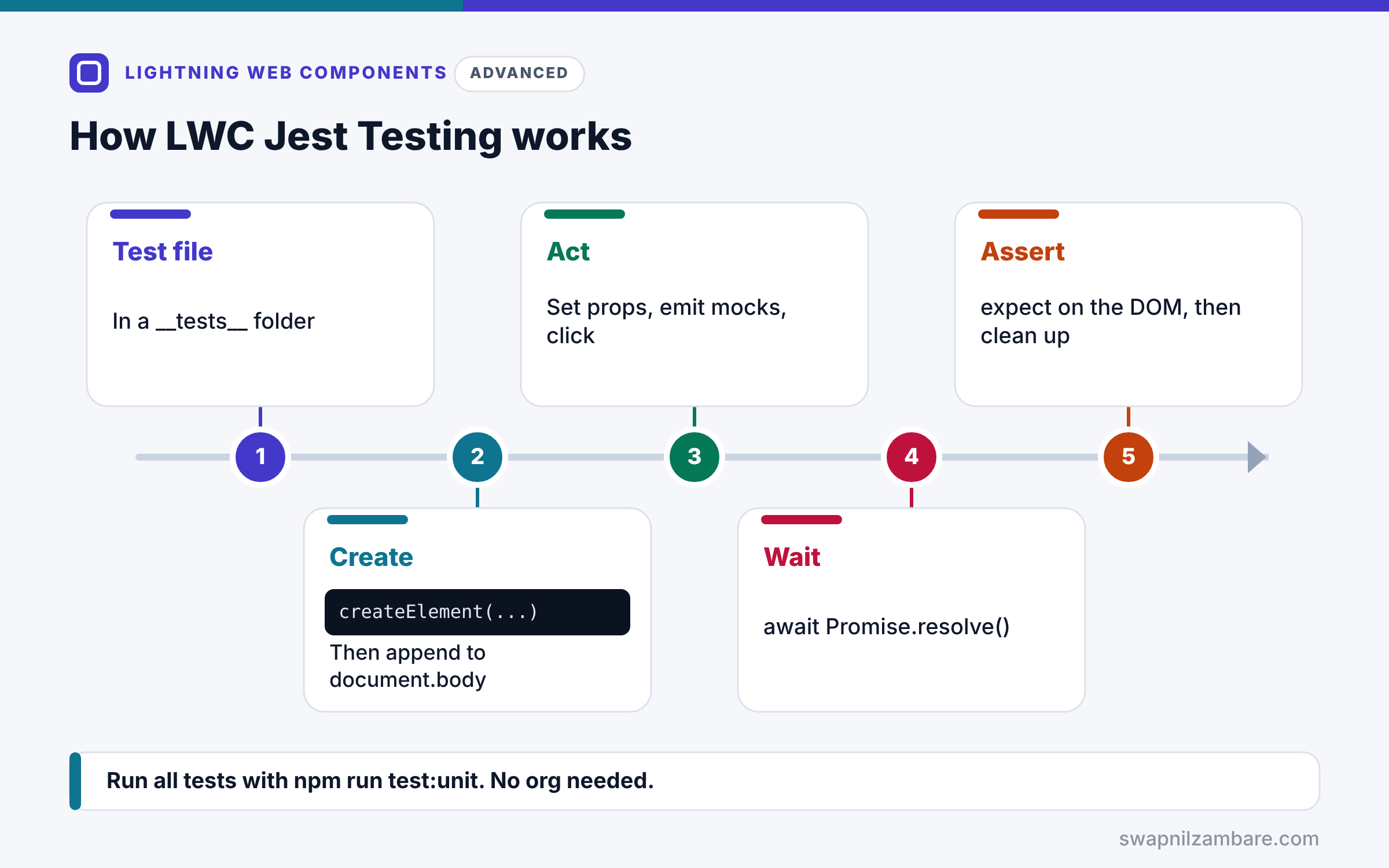
LWC Jest Testing follows a steady pattern. First, you put a test file in a __tests__ folder inside the component folder. Next, the test creates the component with createElement and adds it to document.body. Then it sets properties, sends mock data or clicks buttons. After that, it waits for the DOM to update, usually with await Promise.resolve(). Finally, it checks the DOM with expect and cleans up after each test.
Setup
Projects created with the Salesforce CLI include sfdx-lwc-jest in package.json. Run npm install once, then npm run test:unit to run all tests.
createElement
createElement(‘c-course-card’, { is: CourseCard }) builds the component. Then document.body.appendChild(element) renders it.
Querying the DOM
Use element.shadowRoot.querySelector to find elements inside the component, because each component renders in its own shadow tree.
Waiting for Re-renders
After a change, LWC re-renders asynchronously. So await Promise.resolve() before checking the DOM.
Mocking Apex
jest.mock replaces an Apex import, such as @salesforce/apex/CourseController.searchCourses, with a jest function. Then you set what it returns.
Mocking Wire Adapters
Wire adapters, such as getRecord, have an emit method in tests. Call getRecord.emit(mockData) to send data into the component.
Jest Commands and Files
The table below lists what you need for LWC Jest Testing.
| Item | Value |
|---|---|
| Package | @salesforce/sfdx-lwc-jest |
| Run all tests | npm run test:unit |
| Watch mode | npm run test:unit:watch |
| Coverage report | npm run test:unit:coverage |
| Test folder | lwc/courseCard/__tests__ |
Jest Tests vs Apex Tests
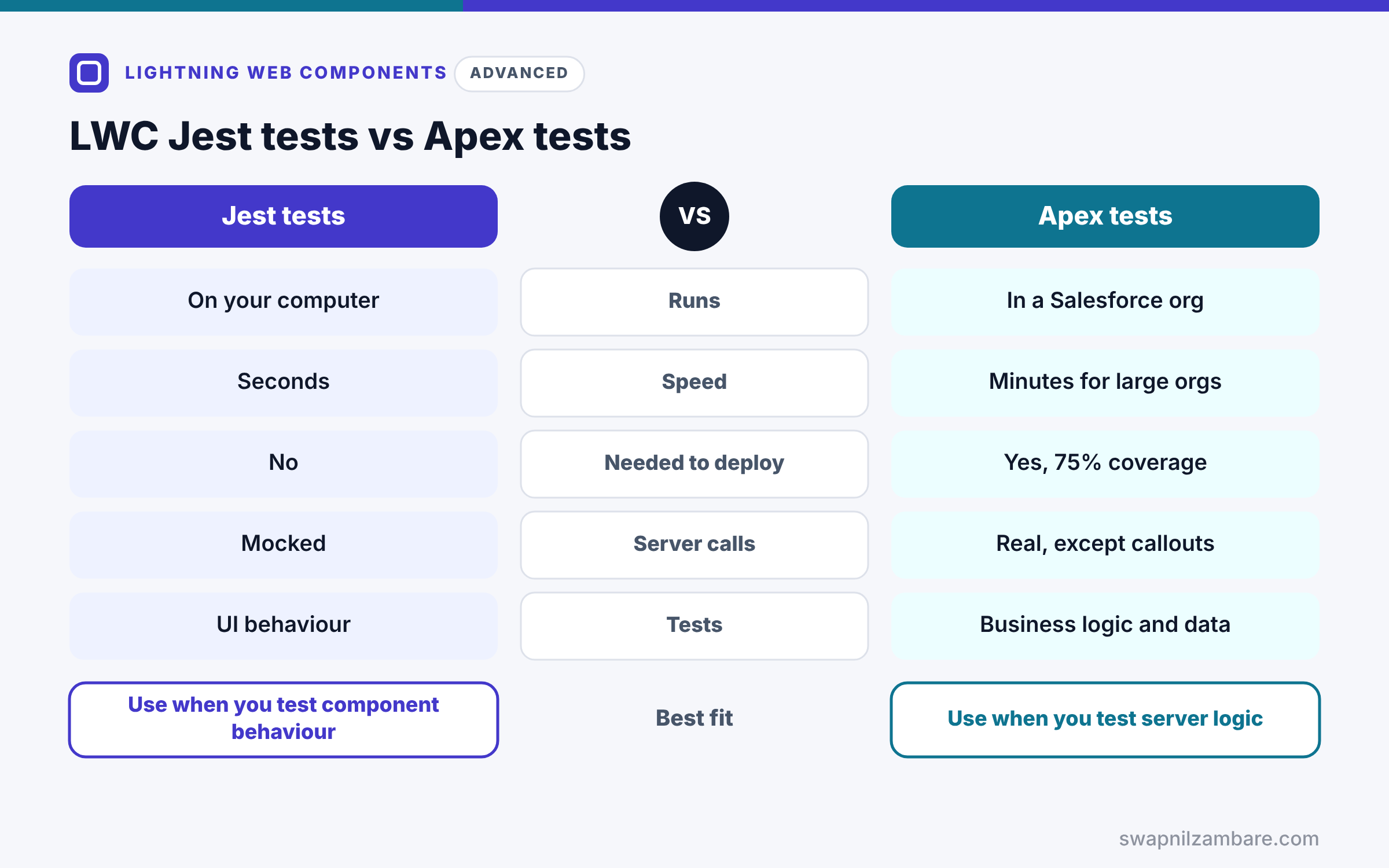
The table below compares the two kinds of tests.
| Feature | LWC Jest tests | Apex tests |
|---|---|---|
| Runs | On your computer | In a Salesforce org |
| Speed | Seconds | Minutes for large orgs |
| Needed to deploy | No | Yes, 75% coverage |
| Server calls | Mocked | Real, except callouts |
| Tests | UI behaviour | Business logic and data |
When to use which is simple. Use Apex tests for server logic and Jest for component behaviour. A solid project has both.
A Real LWC Jest Testing Example
Let’s apply LWC Jest Testing to the courseSearch component from the Apex post. We test that results appear and that errors show a message.
Step 1: Mock the Apex Method
import { createElement } from 'lwc';
import CourseSearch from 'c/courseSearch';
import searchCourses from '@salesforce/apex/CourseController.searchCourses';

jest.mock('@salesforce/apex/CourseController.searchCourses', () => {
    const { createApexTestWireAdapter } = require('@salesforce/sfdx-lwc-jest');
    return { default: createApexTestWireAdapter(jest.fn()) };
}, { virtual: true });

jest.mock('@salesforce/apex/CourseController.enrol', () => ({ default: jest.fn() }),
    { virtual: true });
searchCourses is wired, so the mock uses an Apex test wire adapter that supports emit and error. enrol is imperative, so a plain jest function is enough.
Step 2: Write the Tests
describe('c-course-search', () => {
    afterEach(() => {
        while (document.body.firstChild) {
            document.body.removeChild(document.body.firstChild);
        }
    });

    it('shows courses returned by Apex', async () => {
        const element = createElement('c-course-search', { is: CourseSearch });
        document.body.appendChild(element);

        searchCourses.emit([{ Id: 'a01A', Name: 'Apex Basics', Fee__c: 5000 }]);
        await Promise.resolve();

        const rows = element.shadowRoot.querySelectorAll('.course-row');
        expect(rows.length).toBe(1);
        expect(rows[0].textContent).toContain('Apex Basics');
    });

    it('shows an error message when Apex fails', async () => {
        const element = createElement('c-course-search', { is: CourseSearch });
        document.body.appendChild(element);

        searchCourses.error({ message: 'Search failed' });
        await Promise.resolve();

        const msg = element.shadowRoot.querySelector('.message');
        expect(msg.textContent).toContain('Search failed');
    });
});
afterEach removes components, so tests stay independent. The first test emits one course and checks the row. Then the second sends an error and checks the message. The selectors assume the template uses the course-row and message classes.
Step 3: Run the Tests
npm run test:unit -- courseSearchHere is the shortened output.
PASS  force-app/main/default/lwc/courseSearch/__tests__/courseSearch.test.js
  c-course-search
    [pass] shows courses returned by Apex (18 ms)
    [pass] shows an error message when Apex fails (6 ms)
Tests: 2 passed, 2 total
Both tests ran in milliseconds, with no org involved.
LWC Jest Testing and .forceignore
Keep test files out of deployments. Add /__tests__/ to .forceignore, which CLI projects include by default. Otherwise, a deployment may fail on files Salesforce does not expect.
Common Mistakes with LWC Jest Testing
- Checking the DOM before awaiting a re-render.
- Forgetting to remove components after each test.
- Querying document instead of element.shadowRoot.
- Mocking a wired Apex method with a plain jest function.
- Deploying __tests__ folders to the org.
Best Practices for LWC Jest Testing
- Test what users see and do, not private fields.
- Keep each test small, with one behaviour.
- Use mock data files for realistic wire responses.
- Run tests in CI on every pull request.
- Test error states as well as success.
Practice Task
Add a test that types “SOQL” into the search input and checks that the wire receives searchKey “SOQL”. Hint: dispatch a change event on the input, await, then check searchCourses.getLastConfig().
Most Asked Interview Questions on LWC Jest Testing
Front-end testing questions are increasingly common in LWC interviews. Here are the 21 questions asked most about LWC Jest Testing.
Basic Questions on LWC Jest Testing
Q1: What is Jest?
A JavaScript testing framework that runs tests in Node.js.
Q2: Which package sets up Jest for LWC?
@salesforce/sfdx-lwc-jest.
Q3: Are LWC Jest tests required for deployment?
No, but they catch UI bugs early and protect future changes.
Q4: Where do LWC test files go?
In a __tests__ folder inside the component folder.
Q5: How do you run tests?
Run npm run test:unit.
Q6: How do you create a component in a test?
Use createElement from lwc, then append it to document.body.
Q7: How do you find elements inside the component?
Use element.shadowRoot.querySelector.
Code and Scenario Questions on LWC Jest Testing
Q8: Why await Promise.resolve() in tests?
Because LWC re-renders asynchronously, so the DOM updates after the current task.
Q9: How do you mock an imperative Apex call?
Use jest.mock on the Apex import with a jest function, then set mockResolvedValue.
Q10: How do you mock a wired Apex method?
Use createApexTestWireAdapter, then call emit or error in the test.
Q11: How do you send data to getRecord in a test?
Call getRecord.emit(mockData) after the component is connected.
Q12: Why clean up the DOM after each test?
Because leftover components can affect later tests.
Q13: How do you simulate a click?
Find the button and call click(), or dispatch a click event.
Q14: How do you check that a custom event fired?
Add a jest.fn listener to the element and assert it was called.
Advanced Questions on LWC Jest Testing
Q15: Why add __tests__ to .forceignore?
Because test files should not be deployed to the org.
Q16: Does Jest test real Salesforce data?
No, because all server calls are mocked.
Q17: How do you get a coverage report?
Run npm run test:unit:coverage.
Q18: How do you test navigation calls?
Use the navigation mock from sfdx-lwc-jest and check the page reference it received.
Q19: How do you keep mock data realistic?
Save real API responses as JSON files and load them in tests.
Q20: How do Jest tests fit in CI?
The pipeline runs them on each pull request and fails the build on any failure.
Q21: What should you test first in a component?
Rendering, key user actions and error states.
Official Resources
- Test Lightning Web Components (LWC Developer Guide)
- Write Jest Tests for Wire Service (LWC Developer Guide)
Quick Recap
- LWC Jest Testing runs component tests locally in seconds.
- Use createElement, shadowRoot and await Promise.resolve().
- Mock Apex with jest.mock and wire adapters with emit.
- Clean up after each test and keep tests small.
- Exclude __tests__ folders from deployments.
What’s Next?
Fast components keep users happy. Next, read our guide to LWC performance best practices.


