Salesforce Reports Interview Questions check how you turn data into answers for managers, and how you design pages that users enjoy. This is Part 7 of our 25-part series, with questions on reports, dashboards, page layouts, Lightning pages, apps and the mobile app.
In Part 6, we covered Service Cloud. Reporting questions are very practical, so expect “how would you show” questions. For real situations, also see our reports and performance scenario questions.
How to Use These Salesforce Reports Interview Questions
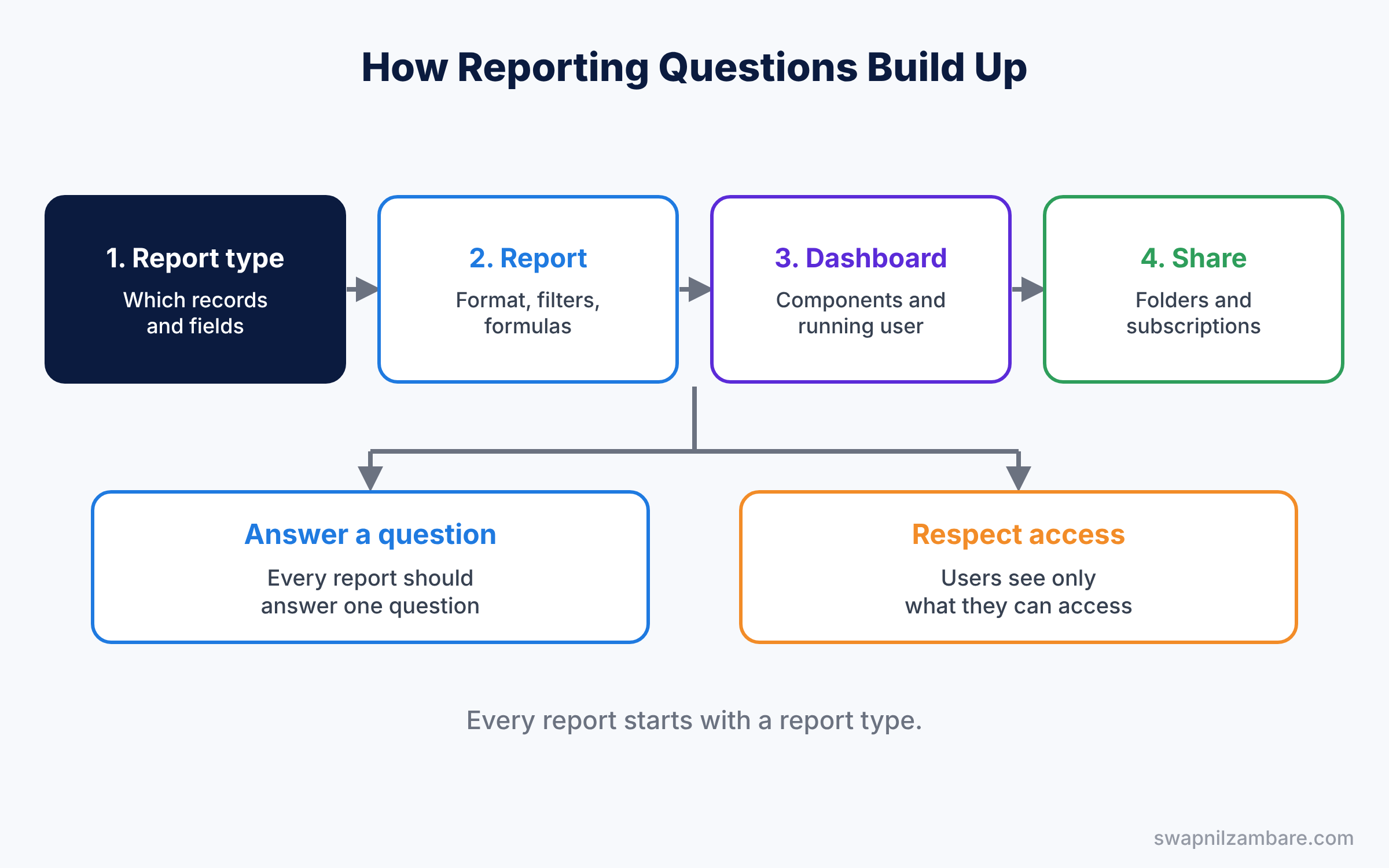
First, learn report types, because every report starts there. Next, practise building three reports and one dashboard in your practice org. Then learn the page design tools, from page layouts to Dynamic Forms. Our Reports and Dashboards guide covers the basics.
Salesforce Reports Interview Questions on Report Types
Study with Custom Report Types.
- What is a report type?
- What is the difference between standard and custom report types?
- Briefly, what does “with or without” mean in a report type?
- Are new fields added to custom report types automatically?
- How many objects can a custom report type include?
- Can you add fields from a lookup in a report type?
- What happens to reports if you delete a report type?
- What is a report type category?
- Can you base a report type on a custom object only?
- What is the field layout of a report type?
- Scenario: sales wants courses with or without enrollments in one report. How do you build it?
- Scenario: a new field does not show in a report. What do you check?
Report Formats and Filters Questions
Study with Reports and Dashboards.
- What are the four report formats?
- When do you use a matrix report?
- What are report filters and filter logic?
- What is a standard filter?
- Define a field filter.
- What is a row limit filter?
- How do you group report rows?
- How do you hide details and show only totals?
- What is conditional formatting?
- What is the difference between summary and tabular reports?
- Define a grand total.
- What are relative date filters?
- How do you export a report?
- What is the report run page vs the builder?
- What is a report chart?
- How do you add a chart to a report?
- What is a scheduled report email limit?
- Scenario: a report shows fewer records than expected. What could cause it?
- Scenario: a manager wants deals closing this quarter by stage and owner. Which format do you pick?
Salesforce Reports Interview Questions on Report Formulas and Buckets
Study with Joined Reports and Bucket Fields.
- What is a bucket field?
- What is a summary formula?
- Define a row-level formula.
- What is the difference between them?
- How many row-level formulas can a report have?
- What does PARENTGROUPVAL do?
- What does PREVGROUPVAL do?
- Define a summary formula display type.
- Can a bucket field use a text field?
- How do you show a percentage of total?
- What is a cumulative sum?
- Scenario: a manager needs win rate by rep. Which formula do you write?
- Scenario: fees must show as Low, Medium and High. How do you group them?
Joined Reports and Cross Filters Questions
Study with Cross Filters.
- What is a joined report?
- How many blocks can a joined report have?
- What is a cross filter?
- What does “without” do in a cross filter?
- Describe subfilters in a cross filter.
- Can a joined report use different report types?
- What are cross-block formulas?
- What is the limit on cross filters per report?
- Scenario: sales wants accounts with no activity in 90 days. How do you build it?
- Scenario: one view must show open cases and open deals per account. What do you use?
Salesforce Reports Interview Questions on Folders and Report Sharing
Study with Report Folders.
- How do report folders control access?
- What are View, Edit and Manage folder access?
- Can a report show records a user cannot access?
- How do you subscribe to a report?
- How do you schedule a report?
- What is the difference between a private and a public folder?
- What is enhanced folder sharing?
- Can you move a report between folders?
- What is the difference between Viewer, Editor and Manager?
- How do you find unused reports?
- Scenario: a new hire can see a dashboard but not the report behind it. Why?
- Scenario: finance reports must be visible only to finance. How do you set it up?
Dashboards Questions
Study with Dynamic Dashboards.
- What is a dashboard?
- Which report formats can feed a dashboard component?
- What is the running user of a dashboard?
- What is a dynamic dashboard?
- Describe the limits of dynamic dashboards.
- What are dashboard filters?
- How do you refresh a dashboard?
- Can you schedule a dashboard refresh?
- What component types can a dashboard have?
- What is the limit of components on a dashboard?
- Define a dashboard table component.
- What is a gauge chart used for?
- How do you follow a dashboard in Chatter?
- Can a dashboard show data from many report types?
- What is a dashboard subscription?
- What is a dashboard component filter?
- How do you clone a dashboard?
- Scenario: each manager must see only their team numbers on one dashboard. How do you build it?
- Scenario: the dashboard shows old numbers in a meeting. What happened?
Salesforce Reports Interview Questions on Reporting Snapshots and Analytics
Study with Reporting Snapshots.
- What is a reporting snapshot?
- Why use a reporting snapshot?
- What is a source report and a target object?
- How often can a snapshot run?
- What is CRM Analytics, at a high level?
- What is the Analytics Studio, at a high level?
- Briefly, what is an Einstein Discovery story, at a high level?
- Scenario: the CEO wants to see how the pipeline changed week by week. What do you use?
- Scenario: case backlog must be tracked every day for a year. How do you store it?
Page Layouts and Lightning Pages Questions
Study with Page Layouts and Dynamic Forms.
- What is a page layout?
- What is a Lightning record page?
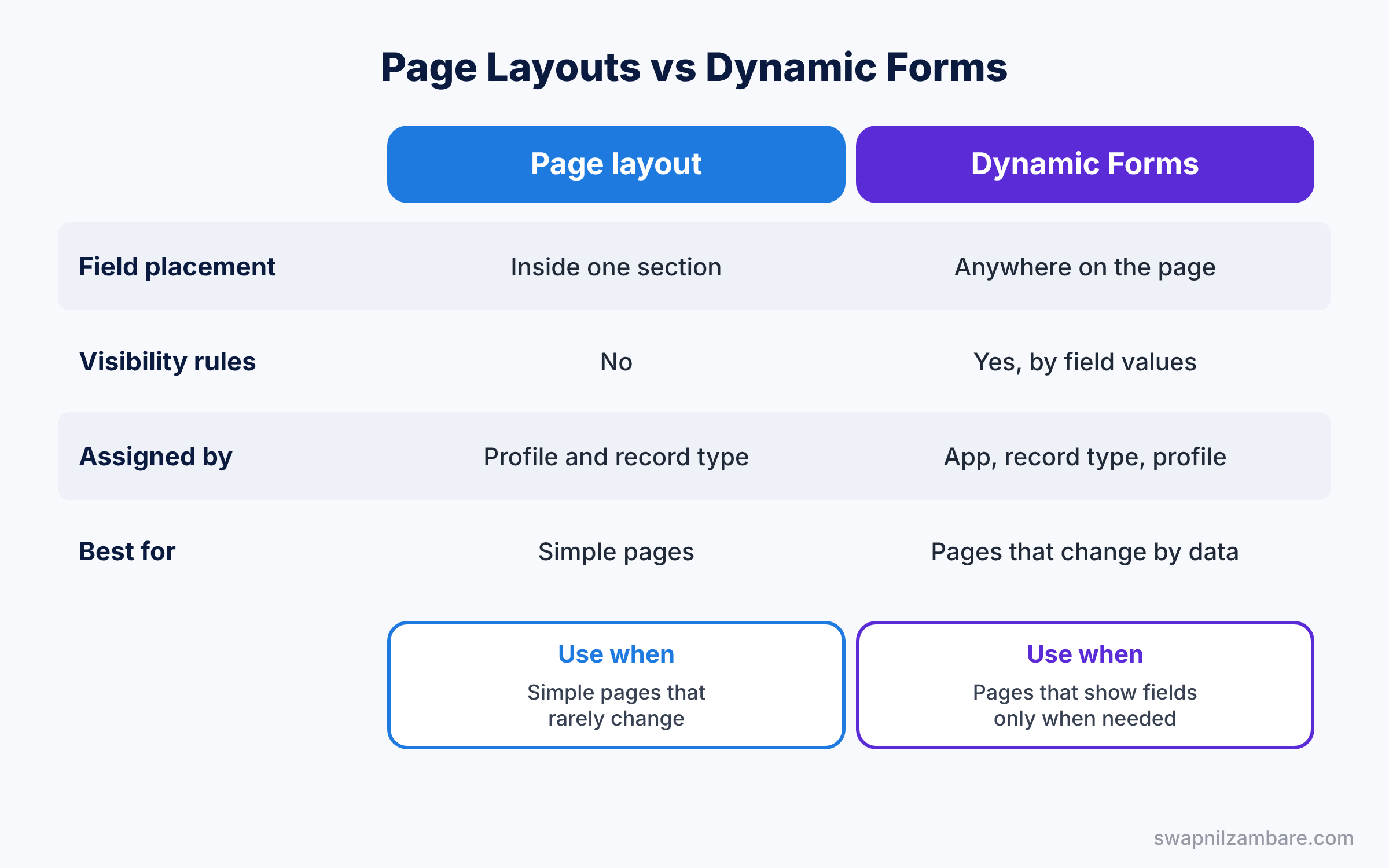
- Explain the difference between them.
- What are Dynamic Forms?
- What are Dynamic Actions?
- Define component visibility.
- How do you assign a Lightning page by app, record type and profile?
- What are compact layouts?
- What are related lists, and how do you control them?
- Describe field sets.
- How do you check page load speed?
- What is the Fields tab in Lightning App Builder?
- What is a custom Lightning component, at a high level?
- Define the Path component.
- What are tabs and accordion components?
- How do you activate a Lightning page?
- Scenario: a section must show only for online courses. How do you build it?
- Scenario: support agents say the case page is slow and crowded. What do you change?
Salesforce Reports Interview Questions on Apps, Navigation and Search
Study with Lightning App Builder and List Views.
- What is a Lightning app?
- What types of custom tabs exist?
- Can users access an object without a tab?
- What is a list view?
- Who can see a list view?
- What is the Kanban view?
- What are search layouts?
- Define global search.
- How do you add an app to the App Launcher?
- What is a utility bar?
- What is app personalization?
- Define the recently viewed list.
- What is a filter on a list view?
- Can you share a list view with a group?
- What is a console app?
- What is the default landing tab of an app?
- Scenario: managers want a list of this week deals shared with their team. How do you do it?
- Scenario: users cannot find a new object. What do you check?
Actions, Mobile and Guidance Questions
Study with Quick Actions and Mobile and In-App Guidance.
- What is the difference between object-specific and global actions?
- Can a quick action launch a flow?
- What are predefined field values on an action?
- How do you control what shows in the Salesforce mobile app?
- What is mobile navigation?
- What is In-App Guidance?
- Define a walkthrough.
- What is a global quick action?
- What is a mobile-only action?
- Define offline access in the mobile app.
- What is a prompt in In-App Guidance?
- How do you target guidance to a profile?
- Scenario: reps want to log a visit from their phone in one tap. What do you build?
- Scenario: users keep missing a new field. How do you announce it on the page?
Salesforce Reports Interview Questions FAQ
Do interviewers ask me to build a report live?
Sometimes. Practise building a summary report with a filter and a chart in under five minutes.
Is CRM Analytics asked in admin interviews?
Only at a high level. Focus on standard reports and dashboards first.
Official Resources
- Reports and Dashboards for Lightning Experience (Trailhead)
- Salesforce Platform Administrator Credential (Trailhead)
Quick Recap
- These Salesforce Reports Interview Questions cover report types, formats, formulas, dashboards and page design.
- Every report starts with a report type.
- Know the running user and dynamic dashboard rules.
- Each section ends with two scenario questions.
- Part 8 covers data, deployment, integration and AI.
What’s Next?
Continue with the next part. Read Salesforce Deployment Interview Questions: Data, Release and AI (Part 8).