Salesforce DX Interview Questions are about how you actually work, not what you know in theory. An interviewer is finding out whether your source lives in a repository or in an org, and whether you have run the command line for real.
Last reviewed for the Winter ’27 release (November 2026).
This post covers the questions asked, grouped into the project structure, the CLI, scratch orgs, source tracking, authentication and scenario questions.
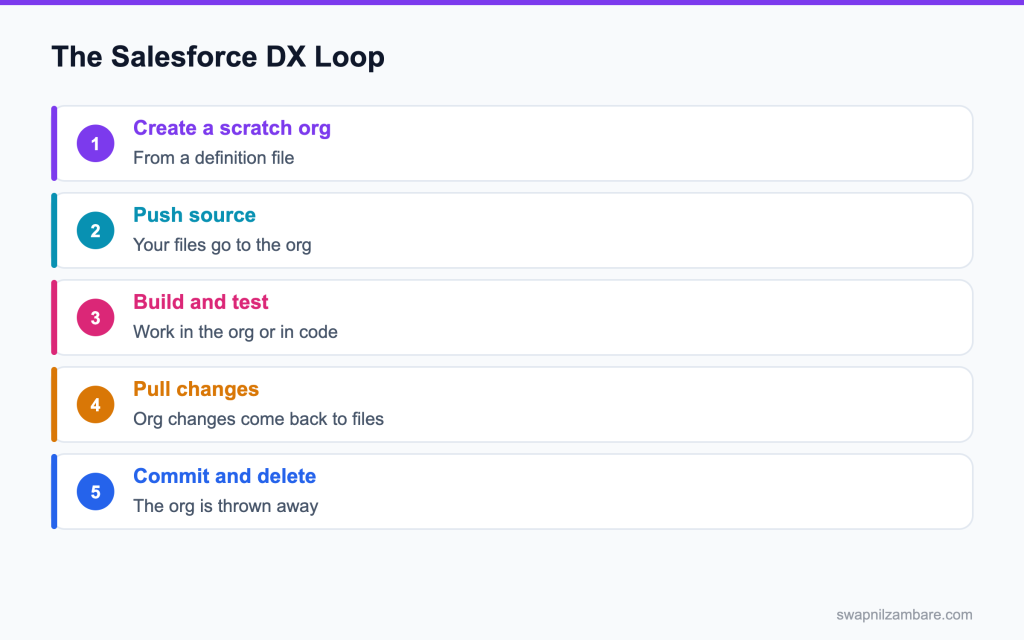
Caption: The loop that defines this way of working. The org is temporary and the files are permanent.
What Salesforce DX Interview Questions Cover
Salesforce DX Interview Questions start from one shift. The repository is the source of truth, and an org is something you create, use and throw away.
That is the opposite of the older habit, where the sandbox held the real work and change sets moved it around. Once you accept the shift, scratch orgs, source tracking and packaging all make sense together.
Most Salesforce DX Interview Questions are a test of whether you have internalised that. The post on developer edition org covers the starting point if you have never had an org of your own, and scratch orgs compared covers which org type to reach for.
Org Development vs Package Development
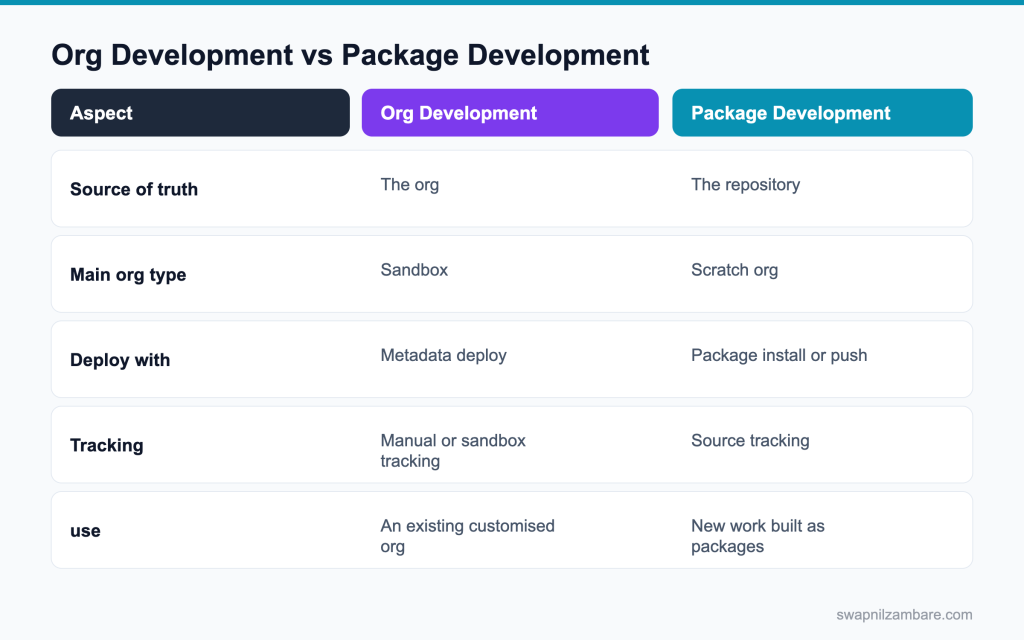
Caption: Two models. Which one a team uses decides almost every other answer.
| Term | What it means |
|---|---|
| Project | A folder with sfdx-project.json and your metadata in source format |
| Source format | Metadata split into readable files, so a diff is useful |
| Scratch org | A temporary org built from a definition file |
| Dev hub | The org that is allowed to create scratch orgs |
| Source tracking | The platform keeping a record of what changed in the org and in your files |
| Org shape | A scratch org definition generated from an existing org’s settings |
| Command | What it does |
|---|---|
| sf org create scratch | Creates a scratch org from a definition file |
| sf project deploy start | Deploys source to an org without tracking |
| sf project retrieve start | Retrieves metadata into files |
| sf project deploy preview | Shows what a deploy would change |
| sf apex run test | Runs Apex tests and reports coverage |
| sf data query | Runs SOQL from the command line |
Those two tables answer a good share of Salesforce DX Interview Questions by themselves.
Salesforce DX Interview Questions on the Project
Q1: What is in sfdx-project.json?
The package directories, the namespace, the source API version, and for package work the package aliases and dependencies.
Interview tip: name sourceApiVersion and packageDirectories. Specific keys show hands on use.
Q2: What is a package directory?
A folder listed in the project file that holds metadata. One of them is marked as the default, which is where retrieved metadata lands.
Follow-up you may get: Can a project have several package directories? Yes, often one per package or module.
Q3: What is the difference between source format and metadata format?
Source format splits large metadata into separate files, so a custom object becomes a folder with one file per field. Metadata format keeps them in one large file. Source format exists to make version control usable.
Interview tip: give the custom object example: one folder, one file per field.
Q4: Can you convert between the two?
Yes. sf project convert source turns source format into metadata format, and sf project convert mdapi does the reverse.
You use this when moving an older metadata format project into Salesforce DX, or when a tool needs a package.xml style folder.
Q5: What is a manifest and when do you need one?
A package.xml listing the metadata to retrieve or deploy. You need it when you work against an org without source tracking, such as production.
Follow-up you may get: How do you build a manifest? sf project generate manifest –source-dir force-app.
Q6: What is .forceignore for?
It lists files to leave out of deploys and retrieves, such as profiles you do not manage or settings that differ between orgs.
Interview tip: mention ignoring profiles. It is the most common use of .forceignore.
Q7: What is a namespace in sfdx-project.json for?
It sets the namespace prefix for managed or namespaced unlocked packages, so components get that prefix in scratch orgs. Leave it empty for normal org development.
Q8: Where do Apex tests live in a project?
In the same classes folder as the rest of the Apex, as separate test classes. There is no separate test directory in the platform’s structure.
Example: force-app/main/default/classes holds CourseService.cls and CourseServiceTest.cls side by side.
Salesforce DX Interview Questions on the CLI
Q9: Is it sfdx or sf?
sf is the current command set. The older sfdx commands still run but are being retired, and new work should use sf.
Interview tip: say you use sf. Mentioning only sfdx commands sounds dated.
Q10: How do you find a command?
Run sf search, or sf help with the topic. The CLI ships new commands often, so checking the installed version beats working from memory.
Q11: How do you see which orgs you are connected to?
sf org list, which shows each alias, its type and whether it has expired.
These are the commands developers use every day:
| Task | Command |
|---|---|
| List connected orgs | sf org list |
| Log in to an org in a browser | sf org login web –alias dev |
| Create a scratch org | sf org create scratch –definition-file config/project-scratch-def.json –alias feature1 |
| Deploy source | sf project deploy start |
| Retrieve source | sf project retrieve start |
| Run tests | sf apex run test –test-level RunLocalTests –wait 10 |
| Open an org | sf org open –target-org feature1 |
Q12: What does sf project deploy preview do?
It shows which files would be deployed, ignored or conflict, without changing the org. It is the safe thing to run before a deploy you are unsure about.
Follow-up you may get: Is there a retrieve preview too? Yes, sf project retrieve preview.
Q13: How do you run one test class?
sf apex run test with the class name, and the flag that waits for the result so you see it in the terminal rather than polling.
Q14: How do you deploy only what changed?
Against a tracked org, sf project deploy start with no arguments deploys the tracked changes. Against an untracked org you pass a manifest or a path.
Interview tip: explain tracked versus untracked orgs in one sentence.
Q15: How do you run anonymous Apex from the CLI?
sf apex run, with the code in a file or piped in.
Example: sf apex run –file scripts/apex/seedCourses.apex –target-org feature1 runs the script and prints the debug output.
Q16: How do you load test data?
Export a record tree with sf data export tree, then import it into a new scratch org with sf data import tree. For larger volumes, use the bulk commands.
Q17: How do you run SOQL from the CLI?
sf data query –query “SELECT Id, Name FROM Account LIMIT 5” –target-org dev. Add –result-format csv to save the output, or –use-tooling-api to query Tooling API objects.
Q18: Can the CLI replace the Developer Console?
For most daily work, yes. Logs, tests, queries and anonymous Apex all run from the terminal, and the output goes into files you can grep.
Five commands is the whole loop, which is why Salesforce DX Interview Questions often ask you to say it out loud rather than write it.
Example: sf apex tail log streams debug logs live, and sf data query runs SOQL with results you can save as CSV.
# create, set up and open a scratch org
sf org create scratch -f config/project-scratch-def.json -a dev -d 7
sf project deploy start -o dev
sf data import tree -p data/plan.json -o dev
sf apex run test -o dev --result-format human --wait 10
sf org open -o dev
Salesforce DX Interview Questions on Scratch Orgs
Q19: What is a scratch org?
A temporary org created from a definition file, used for one piece of work and then deleted. It starts empty of your customisation and gets it from your source.
Follow-up you may get: Can you log in to a scratch org without a password? Yes, sf org open uses the stored auth.
Q20: How long does a scratch org last?
Up to 30 days, with 7 days as the default. You set the duration when you create it.
Example: sf org create scratch –definition-file config/project-scratch-def.json –duration-days 14. Delete it early with sf org delete scratch when the work is merged.
Q21: What is a dev hub?
The org that holds the right to create scratch orgs. A production org or a Developer Edition org with the Dev Hub setting on.
Interview tip: say which org you would use as dev hub and why.
Q22: What is in a scratch org definition file?
The edition, the features to enable, and the settings to apply. It is the recipe for the kind of org your code needs.
Q23: What is an org shape?
A snapshot of an existing org‘s edition, features and settings, which you can use in place of hand writing a definition file. It helps when production has a long history of enabled features.
Follow-up you may get: Where do you create an org shape? In the source org, with sf org create shape.
Q24: What is a scratch org snapshot?
A saved state of a scratch org, including data, that new scratch orgs can be created from. It saves repeating a long setup each time.
Q25: Does a scratch org have your production data?
No. A scratch org starts with no records.
Load the data you need with sf data import tree, a seeding script, or a snapshot that already holds sample data.
Q26: Scratch org or sandbox for a bug fix in a heavily customised org?
A sandbox, because reproducing years of configuration in a scratch org is usually not realistic. That trade off is a favourite among Salesforce DX Interview Questions.
Interview tip: this trade off is a common interview question. Give a clear rule.
Q27: How many scratch orgs can you have?
It depends on the dev hub’s edition and licences, counted as active orgs and as daily creations. Check the limits in the dev hub rather than quoting a number.
Q28: What is the difference between a scratch org and a Developer Edition org?
A scratch org is short lived, created from source and a definition file, and tied to a dev hub. A Developer Edition org is a permanent free org you set up by hand, often used for learning or as a dev hub.
Q29: What happens when a scratch org expires?
It is gone, with its data. Anything you have not pulled into files is lost, which is the point of the model.
Commit and push your work to Git often, so an expired org never loses anything that matters.
Salesforce DX Interview Questions on Source Tracking
Q30: What is source tracking?
The platform keeping a record of changes on both sides, so the CLI can tell you what changed in the org and what changed in your files since the last sync.
Q31: Which orgs support it?
Scratch orgs, and Developer and Developer Pro sandboxes with source tracking turned on in the dev hub.
Partial and full sandboxes and production do not track source, so you deploy and retrieve with a manifest or path there.
Q32: How do you see what changed?
sf project retrieve preview and sf project deploy preview, or the status commands, which list local changes, remote changes and conflicts.
Q33: What is a conflict?
The same metadata changed in the org and in your files since the last sync. The CLI stops and asks, rather than picking a side for you.
Follow-up you may get: How do you overwrite the org anyway? sf project deploy start –ignore-conflicts.
Q34: How do you resolve one?
Decide which side is right, then force the direction with the ignore conflicts flag, or merge the file by hand first. Looking at the diff before choosing is the honest answer.
Q35: Does source tracking work with Git branches?
Source tracking follows the org, not the branch. When you switch branches, deploy the branch’s source to a fresh scratch org, or reset tracking carefully, so the org and files match again.
Q36: What does resetting tracking do?
It tells the platform to treat the current state as the baseline, so nothing shows as changed. Useful after a manual sync, risky if you have not checked what you are discarding.
Run sf project reset tracking only after confirming the org and your files really match, for example right after a full retrieve.
Salesforce DX Interview Questions on Authentication
Q37: How do you authenticate a CLI to an org?
With a web login, which opens a browser, or with a JWT bearer flow using a connected app and a certificate for automation.
Q38: Which one belongs in a pipeline?
The JWT flow, because no browser is involved and no password is stored. A web login in a pipeline is a sign nobody set it up properly.
Interview tip: say JWT for pipelines, web login for people.
Q39: What is an auth URL and why be careful with it?
A single string containing a refresh token and the instance. It grants access to the org, so it belongs in a secret store rather than in a repository.
Follow-up you may get: How do you get an auth URL? sf org display –verbose shows it for an authenticated org.
Q40: What is an alias?
A short local name for an authenticated org, so commands read cleanly and no one is pasting usernames.
Q41: How do you log in to a sandbox from the CLI?
sf org login web –instance-url https://test.salesforce.com –alias uat, or use your My Domain URL for the sandbox. For pipelines, use sf org login jwt with the sandbox username and the connected app.
Q42: How do you set a default org?
With the set default flag when authenticating, or sf config set target-org with the alias.
Example: sf config set target-org feature1, then every command uses that org unless you pass –target-org.
Scenario Salesforce DX Interview Questions
Q43: A team of six developers keeps overwriting each other in one sandbox. What do you change?
Move the source into a repository, give each developer a scratch org, and deploy to a shared sandbox only when a branch is ready. The overwriting stops because nobody is editing the same org.
Q44: A new developer joins. How long until they can work?
Clone the repository, authenticate to the dev hub, run the create and push commands, and they have an org with the project in it. Under an hour if the data script is in the repository.
With the current CLI, “push” means sf project deploy start against the new scratch org; the older force:source:push command is retired.
Q45: Your scratch org will not create and the error mentions a feature. What is wrong?
A feature in the definition file is not available to the dev hub’s edition, or the name is misspelled. Compare the file against an org shape generated from production.
Q46: Production has 300 profiles and a deploy keeps failing on them. What do you do?
Add profiles to .forceignore and manage permissions with permission sets instead, which is where the platform has been heading for years anyway.
Interview tip: tie this to permission sets replacing profiles.
Q47: A deploy to production succeeded in a sandbox but fails in production. Why?
Different enabled features, different data failing a validation rule, or test classes that pass against sandbox data and fail against production data. Run the deploy as a validation first and read the test failures.
Q48: Someone committed an auth URL to the repository. What now?
Revoke the connected app’s access or reset the user’s password to invalidate the token, rotate the credential, and move it into the secret store. Rewriting the git history is secondary, because the token is already out.
Q49: You need the same scratch org setup twenty times a week. What do you build?
A snapshot, or a script that creates the org, deploys, imports data and opens it in one step. Then the setup is one command rather than five.
Q50: A manager asks why not keep using change sets. What do you say?
Change sets cannot be reviewed, diffed or rolled back, and they cannot be automated. Source control gives you all three, and the CLI is how the source reaches an org.
Q51: How do you set up a pipeline that validates every pull request?
In GitHub Actions, install the sf CLI, log in with JWT using secrets, then run sf project deploy validate –test-level RunLocalTests against a sandbox. Fail the check if validation fails, and add Code Analyzer and Jest steps.
Q52: How do you handle a metadata type the CLI cannot retrieve?
Check whether it is supported in the API version you are on, deploy it by hand in the meantime, and note it as a known manual step so nobody is surprised at release time.
Check the Metadata Coverage Report for the type, and add the manual step to the release runbook until it is supported.
Common Mistakes with Salesforce DX
- Treating the org as the source of truth while claiming to use source control
- Committing an auth URL or a certificate to the repository
- Hand writing a scratch org definition when an org shape would be accurate
- Resetting source tracking to make a conflict go away without reading it
- Deploying to production without running a validation deploy first
- Trying to rebuild a ten year old org in a scratch org instead of using a sandbox
Best Practices
| Practice | Why it helps |
|---|---|
| Keep source in a repository | Changes are reviewable and reversible |
| One scratch org per piece of work | No shared org to overwrite |
| Script the whole setup | A new org is one command |
| Use the JWT flow for automation | No browser and no stored password |
| Run a validation deploy first | Failures appear before release night |
| Ignore profiles, use permission sets | Deploys stop fighting over them |
Answering Salesforce DX Interview Questions is much easier after a week of real use. Install the CLI, point it at a Developer Edition org with Dev Hub enabled, and run the loop once end to end.
Where to Read More
The official material is the Salesforce DX developer guide, which covers project structure, scratch orgs and tracking, and the CLI command reference for the current commands. The Trailhead quick start on the CLI walks the loop with a sample project.
What’s Next?
The next post covers packaging, continuous integration and the security review, which is where this tooling turns into a release process. The posts on CLI deploy and retrieve and git basics sit next to this one.
If you are asked Salesforce DX Interview Questions, say early that the repository is the source of truth. Everything else in the answer follows from it.


