To Run Apex Tests well, you need more than the Developer Console. The Salesforce CLI lets you run one method, one class or every local test, see code coverage, and save results for a CI pipeline, all with one command. It is also how most teams check tests before a deployment.
In this post, you will learn the sf apex run test command, the three test levels, how to read the coverage report, and how tests run during a deployment. It builds on Salesforce CLI and VS Code setup, deploying and retrieving metadata with the CLI and Apex callout mocks. The test classes come from the earlier posts in this level.
What Does It Mean to Run Apex Tests?
To Run Apex Tests means asking Salesforce to execute your test methods in an org and report which passed, which failed, and how much code they covered. Tests always run on the Salesforce servers, never on your laptop. The CLI, VS Code, the Developer Console and Setup are just different buttons for the same engine.
Think of an exam centre. Students can register online, at a counter or by phone, but every exam is marked by the same board. In the same way, every tool sends tests to the same Salesforce test engine.
Why the CLI Matters When You Run Apex Tests
Clicking through the Developer Console works for one class. Here is why the CLI matters when you Run Apex Tests at Bright Path Tutors.
- First, one command runs all local tests before every deployment.
- Also, you can run just one failing method while you fix it.
- Next, JUnit output plugs straight into CI tools such as GitHub Actions.
- The coverage report shows which classes are below 75% before production does.
- Finally, commands are repeatable, so every developer tests the same way.
So when you Run Apex Tests from the CLI, testing becomes a routine instead of a manual chore.
How the Process Works When You Run Apex Tests
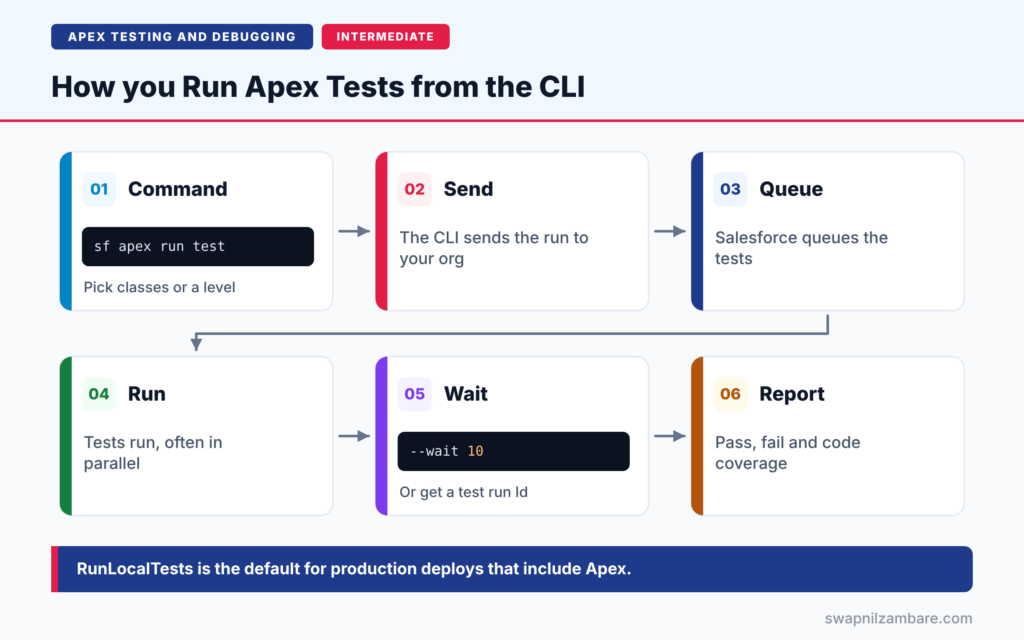
The flow is the same for every run. First, you run sf apex run test with the classes or test level you want. Next, the CLI sends the request to your target org. Then Salesforce queues the tests and runs them, usually in parallel. After that, the CLI waits for the results, or gives you a test run Id. Finally, it shows the pass and fail summary and, if you asked, the code coverage.
Choosing Tests
Use –class-names for whole classes, –tests for single methods such as CourseFeeServiceTest.appliesTenPercentDiscount, or –suite-names for a saved test suite. You can pick only one of these three flags in a command.
Test Levels
The –test-level flag picks a preset. RunLocalTests runs every test in your org except managed package tests. RunAllTestsInOrg runs everything. RunSpecifiedTests runs only the tests you name.
Code Coverage
Add –code-coverage to see coverage per class. Then add –detailed-coverage to see which test method covered which class.
Result Formats
The –result-format flag supports human, tap, junit and json. Human output suits your terminal, while junit suits CI tools. Use –output-dir to save the files.
Synchronous Runs
By default, tests run asynchronously and return a test run Id. However, the –synchronous flag runs the methods of one class and waits for the result.
Test Levels at a Glance
The table below explains each test level.
| Test level | Runs | Typical use |
|---|---|---|
| RunSpecifiedTests | Only the tests you list | Fast deploys of a few classes |
| RunLocalTests | All tests except managed packages | Default for production deploys with Apex |
| RunAllTestsInOrg | Every test, including packages | Full health check |
RunLocalTests vs RunSpecifiedTests
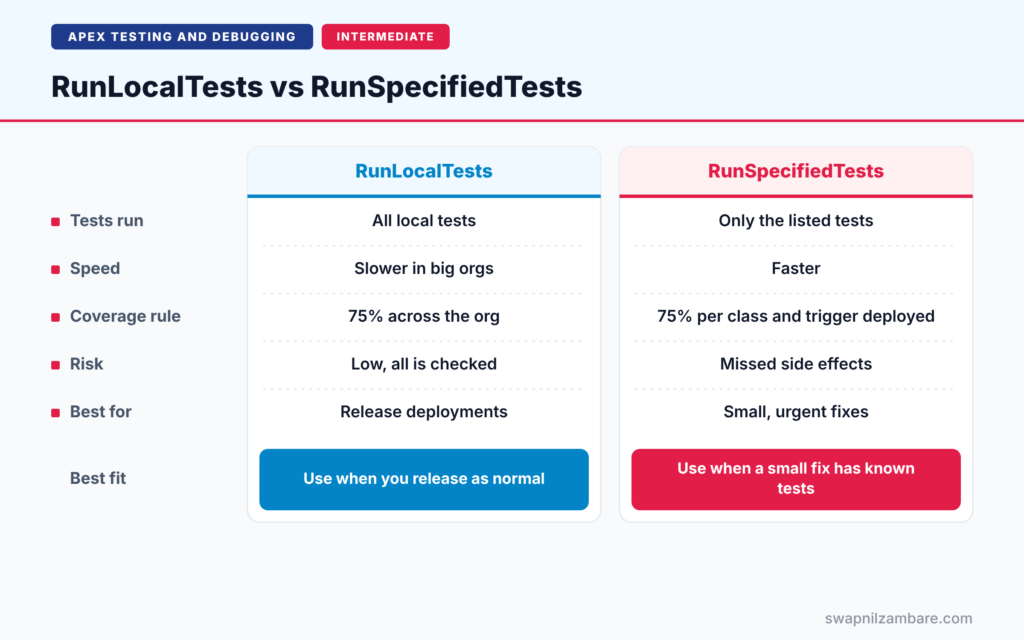
The table below compares the two levels used most often in deployments.
| Feature | RunLocalTests | RunSpecifiedTests |
|---|---|---|
| Tests run | All local tests | Only the listed tests |
| Speed | Slower in big orgs | Faster |
| Coverage rule | 75% across the org | 75% for each class and trigger deployed |
| Risk | Low, everything is checked | Missed side effects |
| Best for | Release deployments | Small, urgent fixes |
When to use which comes down to risk. Use RunLocalTests for normal releases. Use RunSpecifiedTests only when you know exactly which tests cover the change.
A Real Example: Run Apex Tests with the CLI
Let’s Run Apex Tests for Bright Path Tutors from VS Code’s terminal. Your default org is already set, as shown in the CLI setup post.
Step 1: Run One Class with Coverage
sf apex run test --class-names CourseFeeServiceTest --code-coverage --result-format human --wait 10This runs every method in CourseFeeServiceTest, waits up to 10 minutes, and prints coverage. The –wait flag shows results in the terminal instead of only a run Id.
Step 2: Run a Single Method
sf apex run test --tests EnrolmentTriggerTest.blocksCancellingPaidEnrolment --result-format human --wait 10The –tests flag takes Class.method names. So you can rerun one failing test in seconds while you fix the code.
Step 3: Run All Local Tests for CI
sf apex run test --test-level RunLocalTests --code-coverage --result-format junit --output-dir test-results --wait 30This is how most teams Run Apex Tests in CI. It runs every local test and saves JUnit and coverage files in the test-results folder. A CI tool can then read those files and fail the build if any test fails.
Step 4: Read the Summary
Here is a simplified version of the human-readable summary.
=== Test Summary
Outcome              Passed
Tests Ran            14
Pass Rate            100%
Test Run Coverage    94%
Org Wide Coverage    82%
All 14 tests passed. Test Run Coverage covers only the classes these tests touched, while Org Wide Coverage covers all Apex in the org.
Step 5: Get Results Later
sf apex get test --test-run-id 707XXXXXXXXXXXX --code-coverage --result-format humanIf a long run finishes after the wait time, this command fetches its results using the test run Id the CLI printed.
Tests During Deployment
Tests also run when you deploy. For example, sf project deploy start --source-dir force-app --test-level RunSpecifiedTests --tests CourseFeeServiceTest --dry-run validates a deployment without saving it. Production deployments that include Apex use RunLocalTests by default.
Common Mistakes When You Run Apex Tests
- Mixing –class-names and –tests in one command, which is not allowed.
- Forgetting –wait, then thinking the tests never finished.
- Reading Test Run Coverage as if it were org-wide coverage.
- Using RunSpecifiedTests for a large release and missing side effects.
- Running tests without the View All Data permission, which the command needs.
Best Practices When You Run Apex Tests
- Run single methods while coding, and all local tests before a deploy.
- Save JUnit results in CI, so failures are visible to the team.
- Validate production deploys with –dry-run before release day.
- Check the lowest-covered classes first when coverage drops.
- Keep tests fast, so developers run them often.
Practice Task
Create a test suite named LevelFiveTests in the Developer Console with Test > New Suite, and add the test classes from this level. Then run it with –suite-names LevelFiveTests and –code-coverage. Hint: suites are org metadata, so you can also retrieve them with the CLI.
Most Asked Interview Questions on How to Run Apex Tests
These questions test whether you know real release workflows. Here are the 21 questions asked most about how to Run Apex Tests.
Basic Questions on How to Run Apex Tests
Q1: Which CLI command runs Apex tests?
sf apex run test.
Q2: What are the three test levels?
RunSpecifiedTests, RunLocalTests and RunAllTestsInOrg.
Q3: Which flag shows code coverage?
–code-coverage, and –detailed-coverage for per-method detail.
Q4: How do you run one test method?
Use –tests with ClassName.methodName.
Q5: What result formats does the CLI support?
human, tap, junit and json.
Q6: Where else can you run tests?
The Developer Console, VS Code, Setup > Apex Test Execution, and Setup > Apex Classes.
Q7: Do tests run on your computer?
No. They always run in the Salesforce org.
Code and Scenario Questions on How to Run Apex Tests
Q8: What does –wait do?
It makes the CLI wait up to that many minutes and show results when the tests finish.
Q9: How do you get results for an earlier run?
Use sf apex get test with the test run Id.
Q10: Which test level is the default for production deploys with Apex?
RunLocalTests.
Q11: What coverage does RunSpecifiedTests need?
At least 75% for each class and trigger in the deployment, measured individually.
Q12: What is the difference between Test Run Coverage and Org Wide Coverage?
Test Run Coverage measures classes touched by this run. Org Wide Coverage measures all Apex in the org.
Q13: How do you validate a deployment without saving it?
Use sf project deploy start with –dry-run, or sf project deploy validate.
Q14: What is a test suite?
A saved group of test classes that you can run together by name.
Advanced Questions on How to Run Apex Tests
Q15: How do you use test results in CI?
Save junit output with –output-dir, then let the CI tool read the files.
Q16: Why do tests sometimes fail only when run in parallel?
They may lock the same records, so record locking errors appear. You can disable parallel testing in Setup, or fix the data.
Q17: How do you find classes with low coverage?
Run tests with –code-coverage and sort the classes by coverage, lowest first.
Q18: What permission does sf apex run test need?
The View All Data system permission.
Q19: How do you run Apex and Flow tests together?
Use sf logic run test, which accepts both Apex and Flow tests.
Q20: Why is RunAllTestsInOrg rarely used for deploys?
It also runs managed package tests, which is slow and outside your control.
Q21: How do you keep a test run fast?
Use @TestSetup, avoid unnecessary DML, mock callouts and run only relevant tests while coding.
Official Resources
Quick Recap
- To Run Apex Tests from the CLI, use sf apex run test.
- Choose tests by class, method, suite or test level.
- Add –code-coverage to see coverage per class.
- RunLocalTests is the default for production deploys with Apex.
- Save JUnit results for CI pipelines.
What’s Next?
When a test fails, you need to see what happened inside. Next, read our guide to Apex debug logs, checkpoints and the Replay Debugger.


