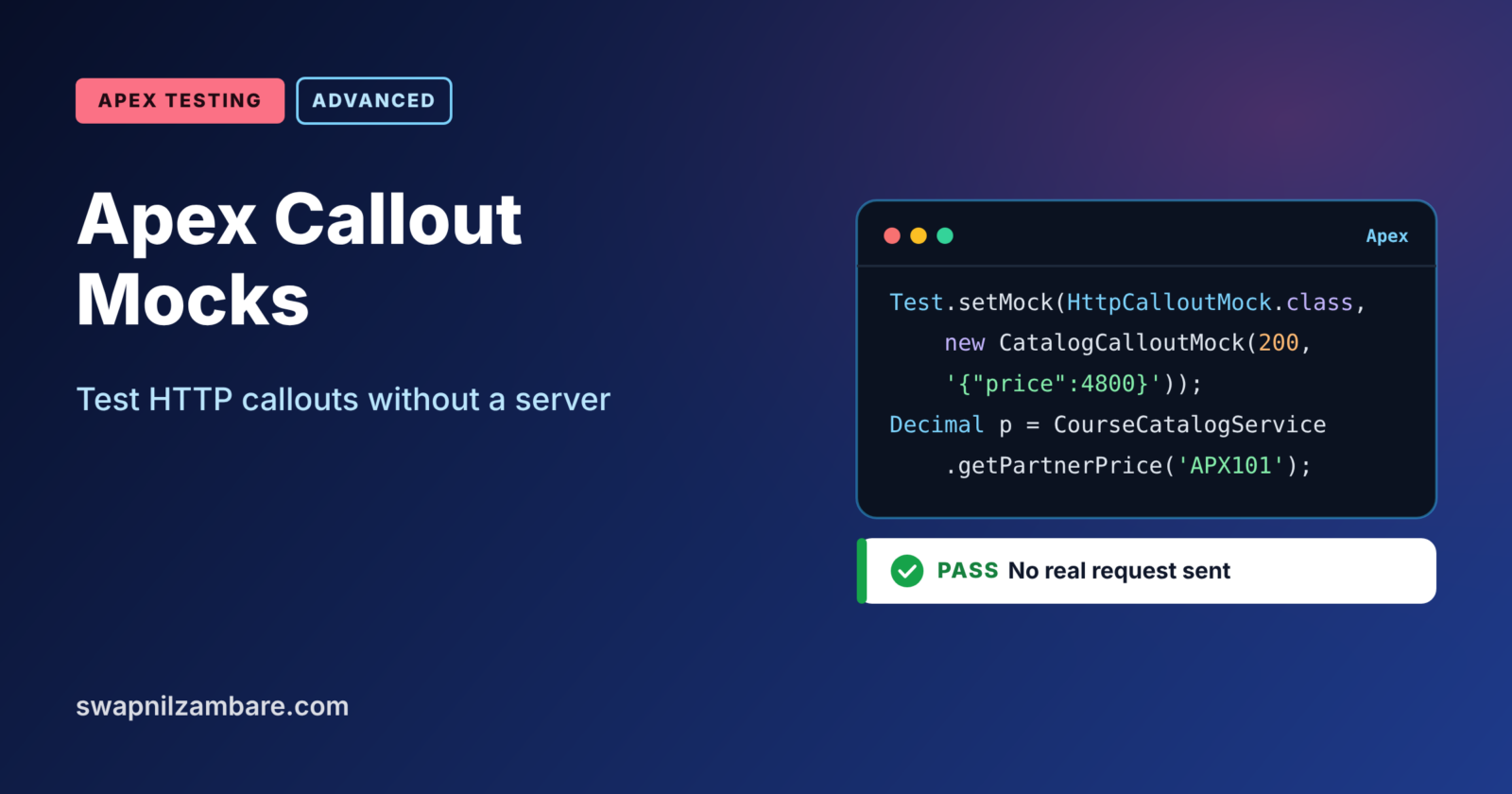
Apex Callout Mocks let you test code that calls an outside system without making a real HTTP request. Salesforce does not allow real callouts in tests, so a mock returns a fake response that you control. That way, you can test success, errors and odd data in seconds.
In this post, you will learn how HttpCalloutMock works, how Test.setMock connects it to your test, and when to use static resource mocks instead. Callouts get full posts in Level 9, so we keep the service small here. This builds on testing async Apex, Apex exception handling and Apex assert methods.
What are Apex Callout Mocks?
Apex Callout Mocks are test classes that pretend to be an outside server. When your code sends a request during a test, Salesforce gives it to the mock instead of the internet. Then the mock builds an HttpResponse with the status code, headers and body you chose.
Think of a flight simulator. Pilots practise engine failures and storms without leaving the ground. A callout mock is a simulator for your integration code, so you can test bad weather safely.
Why Apex Callout Mocks Matter
Integration code breaks in ways that are hard to repeat with a real server. Here is why Apex Callout Mocks matter at Bright Path Tutors.
- First, tests cannot make real callouts, so callout code has no coverage without mocks.
- Also, a partner catalog may return errors, and you need to test that path.
- Next, real servers can be slow or down, but mocks always answer at once.
- You can return strange JSON on purpose to test your parsing.
- Finally, mocks keep test data and API keys out of real systems.
So every class that makes a callout needs a mock-based test.
How Apex Callout Mocks Work
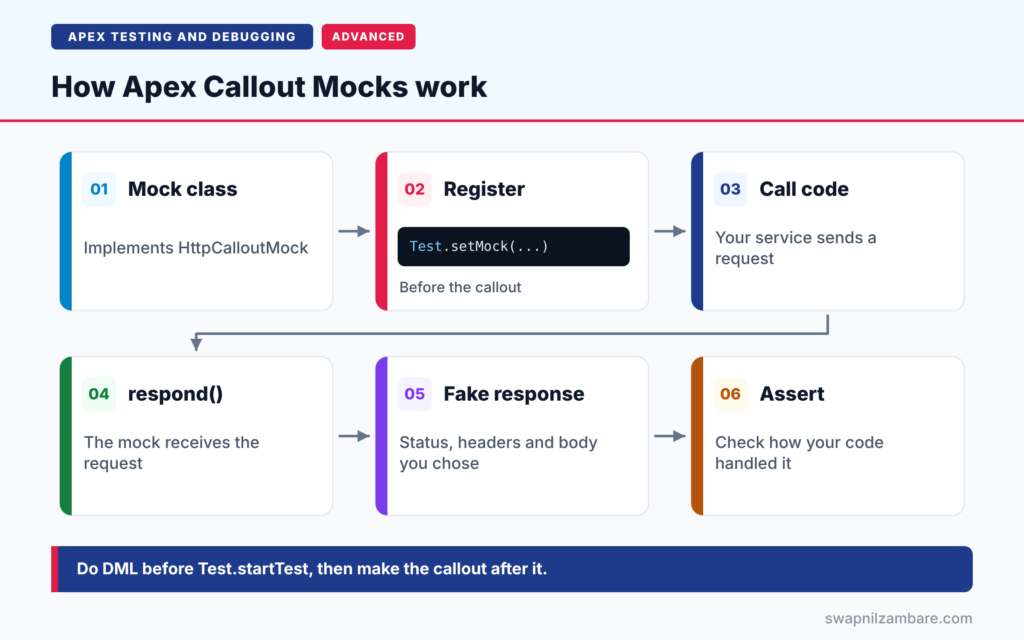
Apex Callout Mocks follow a short flow. First, you write a class that implements HttpCalloutMock and its respond method. Next, the test calls Test.setMock to register that class. Then the test calls your real code, which sends an HTTP request as usual. After that, Salesforce passes the request to the mock’s respond method, which returns a fake response. Finally, your code handles that response, and your asserts check the result.
The HttpCalloutMock Interface
A mock class implements HttpCalloutMock and has one method, respond. It receives the HttpRequest and returns an HttpResponse. The class must be public or global, and you can mark it @isTest.
Test.setMock
Test.setMock(HttpCalloutMock.class, new MyMock()) tells Salesforce to use your mock for every HTTP callout in that test.
Static Resource Mocks
StaticResourceCalloutMock returns a body stored in a static resource, such as a JSON file. It is handy for large sample responses.
Multiple Endpoints
MultiStaticResourceCalloutMock maps each endpoint to a different static resource. So one test can cover code that calls two services.
SOAP Callouts
SOAP code generated from WSDL uses WebServiceMock and its doInvoke method instead. Then you register it with Test.setMock(WebServiceMock.class, mock).
Types of Apex Callout Mocks
The table below lists the mock types and when to use each.
| Mock type | Response comes from | Best for |
|---|---|---|
| HttpCalloutMock | Your Apex code | Dynamic or error responses |
| StaticResourceCalloutMock | One static resource | One large fixed response |
| MultiStaticResourceCalloutMock | A resource per endpoint | Several endpoints in one test |
| WebServiceMock | Your Apex code | SOAP classes from WSDL |
HttpCalloutMock vs StaticResourceCalloutMock
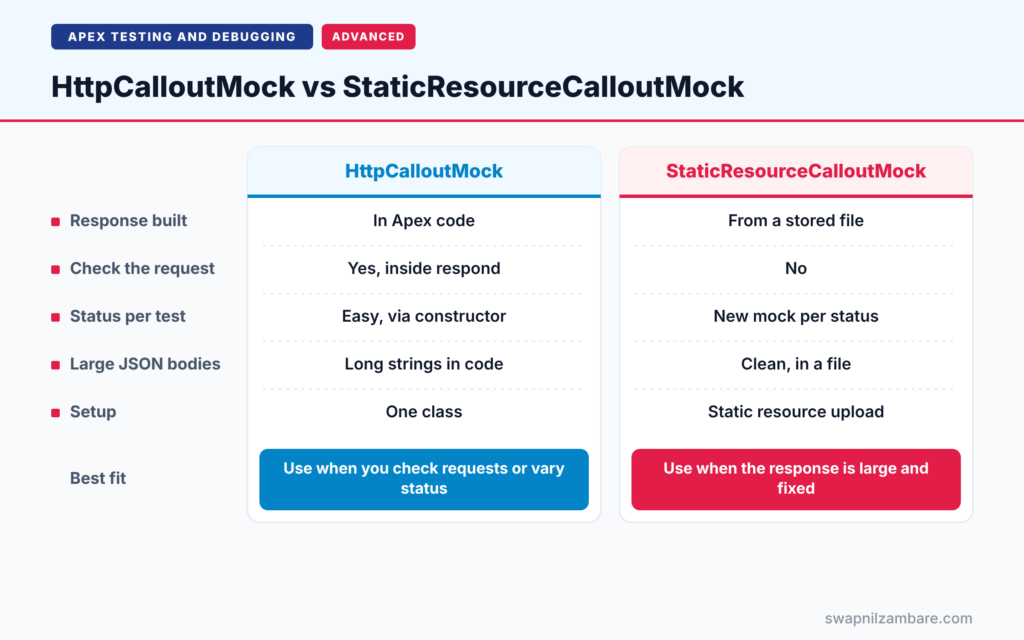
The table below compares the two most common choices.
| Feature | HttpCalloutMock | StaticResourceCalloutMock |
|---|---|---|
| Response built | In Apex code | From a stored file |
| Check the request | Yes, inside respond | No |
| Different status per test | Easy, via constructor | New mock per status |
| Large JSON bodies | Long strings in code | Clean, in a file |
| Setup | One class | Static resource upload |
When to use which is clear. Use HttpCalloutMock when you want to check the request or return different statuses. Use a static resource when the response body is large and fixed.
A Real Apex Callout Mocks Example
Let’s use Apex Callout Mocks to test a service that reads a course price from a partner catalog at Bright Path Tutors. The endpoint uses a named credential called Partner_Catalog, which we cover in Level 9.
Step 1: The Service That Makes the Callout
public with sharing class CourseCatalogService {

    public class CatalogException extends Exception {}

    public static Decimal getPartnerPrice(String courseCode) {
        HttpRequest req = new HttpRequest();
        req.setEndpoint('callout:Partner_Catalog/courses/' + courseCode);
        req.setMethod('GET');
        HttpResponse res = new Http().send(req);

        if (res.getStatusCode() != 200) {
            throw new CatalogException('Catalog error: ' + res.getStatusCode());
        }
        Map<String, Object> body = (Map<String, Object>) JSON.deserializeUntyped(res.getBody());
        return Decimal.valueOf(String.valueOf(body.get('price')));
    }
}
The method sends a GET request and checks the status code. On success, it reads the price from the JSON body. On any other status, it throws a custom exception.
Step 2: The Mock Class
@isTest
public class CatalogCalloutMock implements HttpCalloutMock {

    private Integer statusCode;
    private String body;

    public CatalogCalloutMock(Integer statusCode, String body) {
        this.statusCode = statusCode;
        this.body = body;
    }

    public HttpResponse respond(HttpRequest req) {
        Assert.areEqual('GET', req.getMethod(), 'Catalog calls should use GET');
        HttpResponse res = new HttpResponse();
        res.setHeader('Content-Type', 'application/json');
        res.setStatusCode(statusCode);
        res.setBody(body);
        return res;
    }
}
The constructor takes the status and body, so one mock covers success and error tests. Also, the respond method checks the request method before answering.
Step 3: Success and Error Tests
@isTest
private class CourseCatalogServiceTest {

    @isTest
    static void returnsPartnerPrice() {
        Test.setMock(HttpCalloutMock.class,
            new CatalogCalloutMock(200, '{"code":"APX101","price":4800}'));

        Test.startTest();
        Decimal price = CourseCatalogService.getPartnerPrice('APX101');
        Test.stopTest();

        Assert.areEqual(4800, price, 'Price should come from the catalog');
    }

    @isTest
    static void throwsOnServerError() {
        Test.setMock(HttpCalloutMock.class, new CatalogCalloutMock(500, '{}'));
        try {
            CourseCatalogService.getPartnerPrice('APX101');
            Assert.fail('Expected a CatalogException');
        } catch (CourseCatalogService.CatalogException e) {
            Assert.isTrue(e.getMessage().contains('500'), 'Message should show the status');
        }
    }
}
The first test returns a 200 response with a price, then asserts the parsed value. The second returns a 500 error and checks that the service throws the right exception with the status in its message.
Step 4: Read the Results
Here is a simplified view of the test run.
CourseCatalogServiceTest.returnsPartnerPrice   Pass
CourseCatalogServiceTest.throwsOnServerError   Pass
Code coverage: CourseCatalogService 100%
Both paths are covered by Apex Callout Mocks, and no real request ever left Salesforce.
Apex Callout Mocks and Uncommitted Work
A callout fails if the same transaction already ran DML, with the error “You have uncommitted work pending”. In tests, the fix is simple. Insert your test data first, then call Test.startTest, and make the callout after it. Test.startTest gives the callout a fresh context.
Common Mistakes with Apex Callout Mocks
- Forgetting Test.setMock, so the test fails with a callout error.
- Testing only the 200 response and never an error status.
- Running DML right before the callout without Test.startTest in between.
- Hard-coding huge JSON strings instead of using a static resource.
- Never checking the request the code sends.
Best Practices for Apex Callout Mocks
- Make the mock configurable with a status code and body.
- Test success, client errors, server errors and bad JSON.
- Assert the request method, endpoint or headers inside respond.
- Use static resources for large, realistic sample responses.
- Keep DML before Test.startTest and callouts after it.
Practice Task
Add a test where the mock returns status 200 with the body “not json”. Then assert that the service throws an exception. Hint: catch the general Exception type and assert it is not null.
Most Asked Interview Questions on Apex Callout Mocks
Integration roles always ask about testing callouts. Here are the 21 questions asked most about Apex Callout Mocks.
Basic Questions on Apex Callout Mocks
Q1: Can Apex tests make real callouts?
No. Tests must use a mock, or the callout fails.
Q2: What is HttpCalloutMock?
An interface with a respond method that returns a fake HttpResponse for tests.
Q3: How do you register a mock?
Call Test.setMock(HttpCalloutMock.class, new YourMock()) before the code makes the callout.
Q4: What does the respond method receive?
The HttpRequest your code sent, so you can check it.
Q5: What access modifier does a mock class need?
Public or global.
Q6: What is StaticResourceCalloutMock?
A built-in mock that returns a response body stored in a static resource.
Q7: How do you mock SOAP callouts?
Implement WebServiceMock with doInvoke, and register it with Test.setMock(WebServiceMock.class, mock).
Code and Scenario Questions on Apex Callout Mocks
Q8: How do you test an error response?
Make the mock return a status such as 500, then assert that your code handles it correctly.
Q9: How do you mock two different endpoints?
Use MultiStaticResourceCalloutMock, or check req.getEndpoint() inside respond and return different bodies.
Q10: What causes “You have uncommitted work pending”?
Running DML before a callout in the same transaction.
Q11: How do you avoid uncommitted work errors in tests?
Do DML before Test.startTest, then make the callout after it.
Q12: How do you check the request body your code sends?
Read req.getBody() inside respond and assert on it.
Q13: How do you test a callout from a Queueable?
Set the mock, then enqueue the job between startTest and stopTest.
Q14: How do you test a callout from a future method?
Set the mock, call the future method between startTest and stopTest, then assert.
Advanced Questions on Apex Callout Mocks
Q15: Why make a mock class configurable?
So one class can return success, errors and bad data across many tests.
Q16: How do you test timeouts?
Throw a CalloutException from respond, then assert your code handles it.
Q17: Can a mock check headers such as Authorization?
Yes. Read req.getHeader inside respond and assert it is set.
Q18: Do named credentials work in tests?
Your code can use the callout: endpoint as normal, because the mock answers instead of the server.
Q19: How do you test code that makes several callouts in a row?
Return different responses based on the endpoint or a counter inside the mock.
Q20: Should mocks contain business logic?
No. Keep them simple, so tests stay easy to trust.
Q21: What should a full callout test class cover?
Success, error statuses, bad JSON, timeouts and the exact request sent.
Official Resources
- Testing HTTP Callouts by Implementing the HttpCalloutMock Interface (Apex Developer Guide)
- Testing HTTP Callouts Using Static Resources (Apex Developer Guide)
- Apex REST Callouts (Trailhead)
Quick Recap
- Apex Callout Mocks return fake responses, because tests cannot make real callouts.
- Implement HttpCalloutMock and register it with Test.setMock.
- Use static resource mocks for large fixed responses.
- Test success, errors and bad data.
- Do DML before Test.startTest and the callout after it.
What’s Next?
You can now test almost any Apex code. Next, read our guide to running Apex tests from the CLI and checking coverage.


