Big Objects Interview Questions come up once an interviewer wants to know how you handle data that no longer fits in a normal object. Billions of rows need a different storage model, and the trade is that you give up most of the platform features you are used to.
Last reviewed for the Winter ’27 release (November 2026).
This post covers what gets asked, grouped into index design, querying, Apex, Async SOQL, cursors, DataWeave in Apex, and scenario questions.
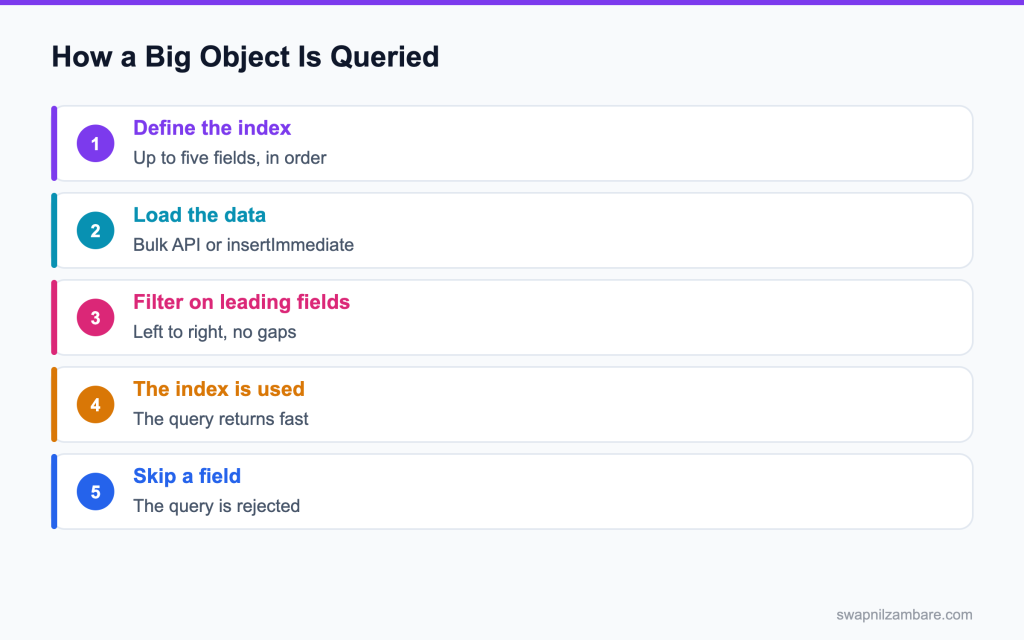
Caption: The index decides everything. A filter that skips a field in the index order cannot be run.
What Big Objects Interview Questions Cover
Big Objects Interview Questions test one idea above all others. A big object is queried only through the index you defined when you created it, and that index cannot be changed once records exist.
Think of it like a filing cabinet where the drawers are labelled by year, then month, then customer. You can find anything if you work in that order. Ask for everything from one customer across all years and you are opening every drawer.
Most Big Objects Interview Questions are a variation on that one point, so it is worth saying first. That one constraint drives the rest of the topic. Index design, query shape and the missing platform features all follow from it. The background is in the post on big objects.
Standard Object vs Big Object
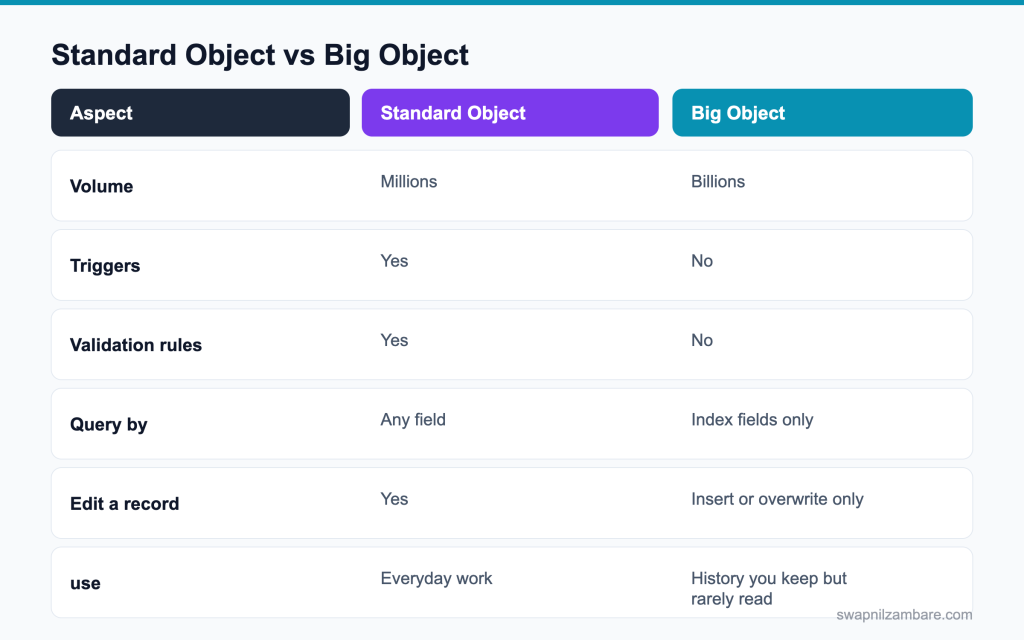
Caption: What you gain in volume, you give up in platform features.
| Feature | Big object |
|---|---|
| Triggers | Not supported |
| Validation rules | Not supported |
| Workflow and Flow | Not supported |
| Standard reports | Not supported |
| Record edit | No update, only insert or overwrite by index |
| Sharing rules | Not supported, access is by permission |
| Field history | Not supported |
| Query | SOQL on index fields, or Async SOQL |
| Type of big object | Who creates it |
|---|---|
| Custom big object | You, through Metadata API or Setup |
| Standard big object | Salesforce, such as FieldHistoryArchive |
Those two tables answer a good share of Big Objects Interview Questions on their own.
Big Objects Interview Questions on Index Design
Q1: What is a big object index?
A definition of up to five fields, in a fixed order, that acts as the only way to query the object. It is set when you create the object.
Follow-up you may get: How many fields can an index have? Up to five.
Q2: Can you change the index later?
Not once the object holds records. In practice you create a new big object with the right index and migrate the data.
Interview tip: say the index is permanent once data exists. It is the key design point.
Q3: Can an index field be nillable?
No. Every field in the index must be required, which is why a text field in the index usually gets a default rather than being left empty.
Q4: How do you choose the field order?
Put the field you always filter on first, then the next most common, and so on. The order has to match how you will query, because filters are applied left to right.
Interview tip: give an example index and the queries it supports.
Q5: What happens if you filter on the second index field but not the first?
The query is rejected. You cannot skip an index field and continue further down the index.
Example: with an index of Account, ClosedDate, CaseNumber, a filter on ClosedDate alone fails; a filter on Account and ClosedDate works.
Q6: Can you filter on a field that is not in the index?
Yes, but only together with a valid filter on the leading index fields. On its own, it is not allowed.
The leading filter narrows the rows through the index first; the extra filter is then applied to that small set.
Q7: Which field types can go in the index?
Text, Number, Date, Date/Time, Lookup and Long Text are supported as fields, and the index itself takes Text, Number, Date, Date/Time and Lookup.
Follow-up you may get: Can a picklist be in the index? No, use a text field instead.
Q8: What is the maximum total length of an index?
The combined index fields are limited to 100 characters, which is why a long text field cannot be indexed.
Q9: How many custom big objects can an org have?
100 custom big objects by default, and more if you ask Salesforce.
Most orgs need only a few, often one per kind of archive, like case history or meter readings.
Q10: What is the difference between a big object and a custom object?
A custom object suits data used every day with reports, automation and any field filters. A big object holds billions of rows cheaply, but is queried only by its index, with no triggers, flows or standard reports. Use big objects for history and archives.
Q11: What are standard big objects?
Big objects Salesforce provides, like FieldHistoryArchive, which stores field history beyond the normal retention when Field Audit Trail is on. You query them the same way, by their defined index.
Q12: How do you create a custom big object?
Through Setup, or by deploying the object, its fields and its index definition with the Metadata API. The Metadata API route is what most teams use, because the index belongs in source control.
Big object API names end in __b, like Case_Archive__b, and their fields end in __c.
Big Objects Interview Questions on Loading Data
Q13: How do you insert records into a big object from Apex?
With Database.insertImmediate. Normal insert DML does not work on big objects.
Example: Database.insertImmediate(new List<Case_Archive__b>{ row1, row2 }); returns SaveResults you should check.
Q14: Why is it called insertImmediate?
It commits straight away rather than taking part in the transaction’s rollback. If the transaction fails later, the big object rows stay.
Interview tip: stress that rows stay even if the transaction fails. It surprises many people.
Q15: What does that mean for error handling?
You cannot rely on a rollback to clean up. Write the job so a repeat run overwrites the same rows rather than adding duplicates.
Follow-up you may get: How do you make a job safe to rerun? Use the same index values, so rows overwrite.
Q16: How do you update a big object record?
You insert a record with the same index values, which overwrites the existing row. There is no update operation.
Interview tip: “insert to overwrite” is the short answer interviewers want.
Q17: How do you delete from a big object?
Through the Bulk API with a hard delete, or by using a deleteImmediate call in Apex where it is available. There is no recycle bin.
Q18: What is the fastest way to load millions of rows?
The Bulk API in parallel mode with a CSV file, in batches, after the index is defined correctly.
Q19: How do you archive records from a custom object into a big object?
Run a batch or cursor job that reads old records, builds big object rows with the same key values, writes them with insertImmediate, checks the results, then deletes the source records only after the archive is confirmed.
Q20: Can a flow write to a big object?
Not with normal Create Records. Use an invocable Apex action that calls Database.insertImmediate, so the flow can still trigger archiving.
Q21: Does loading a big object count against data storage?
Big object storage is counted separately from standard data storage, and the included allowance is much larger.
Loading is the second theme in Big Objects Interview Questions, and this is the shape interviewers expect to see. The index on that object is Account_Id__c, then Closed_Date__c, then Case_Number__c, so a query by account and date range works and a query by subject does not.
Check usage in Setup, Storage Usage, which lists big object records separately from normal data.
// archive a closed case into a big object
List<Case_Archive__b> rows = new List<Case_Archive__b>();
for (Case c : scope) {
  Case_Archive__b r = new Case_Archive__b();
  r.Account_Id__c = c.AccountId;
  r.Closed_Date__c = c.ClosedDate;
  r.Case_Number__c = c.CaseNumber;
  r.Subject__c = c.Subject;
  rows.add(r);
}
Database.SaveResult[] res = Database.insertImmediate(rows);
Big Objects Interview Questions on Querying
Q22: How do you query a big object with SOQL?
Filter on the leading index fields, in order. Equality on the leading fields, and a range filter is allowed on the last field you use.
Follow-up you may get: Can you sort big object results? Only in index order.
Q23: Can you use a subquery or a relationship query?
No. Big objects do not support relationship queries in the usual way, and they cannot be the parent in a subquery.
Q24: Does a big object query count against SOQL governor limits?
Yes, a synchronous query counts as one of the 100 queries, and the rows count against the 50,000 row limit.
Q25: Can you aggregate on a big object?
COUNT is supported in a limited form. For real aggregation you use Async SOQL where available, or you precompute the totals when you load the data.
Q26: What is Async SOQL?
A way of running a query against a big object in the background and writing the result into another object, for volumes a synchronous query cannot handle.
Interview tip: mention that Async SOQL is being retired, so check before using it.
Q27: Is Async SOQL still the recommended approach?
It has been scheduled for retirement since Summer 23, so check its status in your own org before designing around it. Most new work uses Batch Apex over an indexed filter, or cursors.
Q28: How do you report on big object data?
Move a summary into a standard or custom object on a schedule and report on that. Direct reporting on a big object is not supported.
Q29: How do you page through big object results?
Order by the index and use the last index values you read as the starting filter for the next query, like ClosedDate > :lastDate for the same account. OFFSET is not supported.
Q30: Can SOSL search big objects?
No. Big objects are not in the search index, so users cannot find them through global search. Build an Apex search on the index fields instead.
Q31: Can a Lightning web component show big object data?
Yes, through an Apex method that runs a valid indexed query. There is no wire adapter for it.
| Need | Approach on a big object |
|---|---|
| Show one account’s history | SOQL on the leading index field |
| Total rows by month | Precompute on load, or a scheduled summary job |
| Full export | Bulk API query |
| Row by row processing | Batch Apex over an indexed filter, or a cursor |
| Ad hoc analysis | Move the data to a reporting store outside the org |
Keep the LWC page small: query one account’s archive at a time, and page with the index’s last field.
Big Objects Interview Questions on Cursors and DataWeave
Q32: What is an Apex cursor?
An object that holds the position in a large query result so you can fetch it in pieces across transactions, instead of loading everything into heap at once.
Follow-up you may get: How many rows can a cursor hold? Up to 50 million.
Q33: Why would you use a cursor over Batch Apex?
A cursor gives you control over the chunk size and lets you keep processing in a single queueable chain, which suits a job where you need to carry state between pieces.
Interview tip: compare cursors and Batch Apex in one line each.
Q34: What is the shape of cursor code?
You create the cursor from a query, read its size, then fetch a window of records by position and process that window.
Database.Cursor cur = Database.getCursor(
  'SELECT Id, Name FROM Course__c WHERE Is_Published__c = true'
);
Integer total = cur.getNumRecords();
List<Course__c> page = (List<Course__c>) cur.fetch(0, 200);
for (Course__c c : page) {
  // process this page, then queue the next offset
}Q35: Do cursors remove governor limits?
No. They move the work across transactions so each piece stays inside the limits. The limits still apply to each piece.
Q36: What is DataWeave in Apex?
A way of calling a DataWeave script from Apex to transform data between formats, such as CSV to JSON, or one JSON shape to another, without writing the parsing by hand.
Interview tip: mention it removes hand written parsing. That is its main value.
Q37: When is DataWeave in Apex worth using?
When you are reshaping a payload from an outside system, or turning a file into records. It is shorter and easier to read than hand written parsing, and the script lives in metadata.
Follow-up you may get: Can DataWeave read CSV? Yes, and turn it into Apex objects or JSON.
Q38: How do you call a DataWeave script from Apex?
You load the script by name, set its input, and run it, then cast the result to the type you expect.
Cursors and DataWeave are the newest material in Big Objects Interview Questions, so knowing the shape of the code is enough for most interviews.
DataWeave.Script script = DataWeave.Script.createScript('csvToCourses');
DataWeave.Result result = script.execute(
  new Map<String, Object>{ 'records' => csvBody }
);
List<Course__c> parsed = (List<Course__c>) result.getValue();Q39: What is the difference between an Apex cursor and a SOQL for loop?
A SOQL for loop processes a query in chunks within one transaction. A cursor keeps the query result on the server so you can fetch pieces across several transactions, like chained queueables, while staying inside each transaction’s limits.
Q40: How do you handle a DataWeave script error?
Wrap the execute call in try and catch, log the input reference and error message, and return a clear error to the caller. Test scripts with sample payloads, including missing fields, before going live.
Q41: Where does the DataWeave script live?
In the project as a metadata file, so it is deployed and version controlled with the rest of the code.
Keep DataWeave scripts in force-app/main/default/dw as .dwl files, and test them with Apex tests that check the output.
Scenario Big Objects Interview Questions
Q42: The business wants seven years of case history kept, but cases are slowing everything down. What do you design?
A big object with an index of account, then closed date, then case number. A scheduled Batch Apex job moves closed cases older than a cut off into it with insertImmediate, then hard deletes them from Case. A Lightning component shows the archive for one account through an Apex method.
Q43: The team asks for a report on the archive by month. What do you tell them?
Big objects do not report directly. Add a nightly job that writes monthly totals into a small custom object and report on that.
Q44: Someone defined the index as case number first. What is wrong?
Nearly every real query starts from an account or a date range, and neither can be used without a case number. The index has to be rebuilt on a new object and the data migrated.
Interview tip: explain index order with a real query example.
Q45: An archive job fails halfway through. What state is the data in?
The rows already written stay, because insertImmediate commits immediately. Make the job repeatable so the same rows are overwritten rather than duplicated on the next run.
Q46: A million row file needs loading into a big object nightly. How?
Bulk API in parallel mode, with the file split into batches, and a check afterwards comparing the row count to the source.
Q47: An integration sends a nested JSON payload that has to become records. Hand written parsing or DataWeave?
DataWeave, because the mapping lives in one readable script rather than spread through Apex, and changes to the payload shape are a script edit.
Q48: A job has to walk five million records and keep a running total. Batch Apex or a cursor?
Either works. A cursor is the better fit when you need the running total to stay in one chain with controlled chunk sizes. Batch Apex is the better fit when you want the platform to handle the splitting and retries.
Follow-up you may get: How do you keep the total across a chain? Pass it to the next queueable’s constructor.
Q49: Do you need a big object for 3 million rows?
Usually not. A standard object with a good index handles that. Reach for a big object when you are into the hundreds of millions, or when the data is write once and rarely read.
Q50: Scenario: users need to see a customer’s archived cases on the account page. What do you build?
An LWC on the account page that calls an Apex method querying the big object by the account in its index, newest first, with paging. It shows a read only list, separate from active cases.
Q51: Scenario: the archive must be restored for one customer after a dispute. How?
Query that customer’s rows from the big object by the index, recreate the records in the normal object with a batch job, and mark them as restored. Plan for this in the design, because big objects have no undelete.
Q52: How do you test a big object design?
Load real volume into a sandbox, run the queries you plan to run, and confirm each one uses the index. A design that only works at low volume is the thing this topic exists to prevent.
Scenario Big Objects Interview Questions like those are where an interviewer finds out whether you have built one.
Also measure load times and query times at that volume, and agree acceptable limits with the business before go live.
Common Mistakes with Big Objects
- Designing the index from the data model instead of from the queries
- Expecting triggers, validation rules or reports to work
- Assuming a failed transaction rolls back an insertImmediate
- Using a big object for a few million rows where an index would do
- Building on Async SOQL without checking its status in the org
- Forgetting that there is no recycle bin, so a hard delete is final
Best Practices
| Practice | Why it helps |
|---|---|
| Write the queries before the index | The index order follows real use |
| Keep the archive job repeatable | A half finished run can be rerun safely |
| Precompute summaries on load | Reporting does not need the big object |
| Deploy the object through metadata | The index lives in source control |
| Check retention rules first | You archive what the business has to keep |
Practising Big Objects Interview Questions is easier with an object in front of you. Create one in a developer org with a three field index, load a few thousand rows, then try a query that skips the first field and read the error.
Where to Read More
The official detail is in the big objects implementation guide, which covers index rules and the supported field types. The Apex cursors documentation and the DataWeave in Apex guide cover the two newer pieces.
What’s Next?
The next post moves to Salesforce DX, the CLI and scratch orgs, which is where the developer track turns to tooling. The posts on large data volumes and batch apex cover the ground this one builds on.
If you get asked Big Objects Interview Questions, lead with the index. Everything else about the object follows from it, and an interviewer hears that straight away.


