Salesforce Big Objects store billions of rows in a separate database built for volume rather than flexibility. They cost almost nothing against normal data storage, and in exchange they give up triggers, Flows, standard reports and the freedom to query any field you like.
That trade is the whole story. A big object is the right home for ride history, meter readings, click events or eight years of completed transactions. It is the wrong home for anything a user edits.
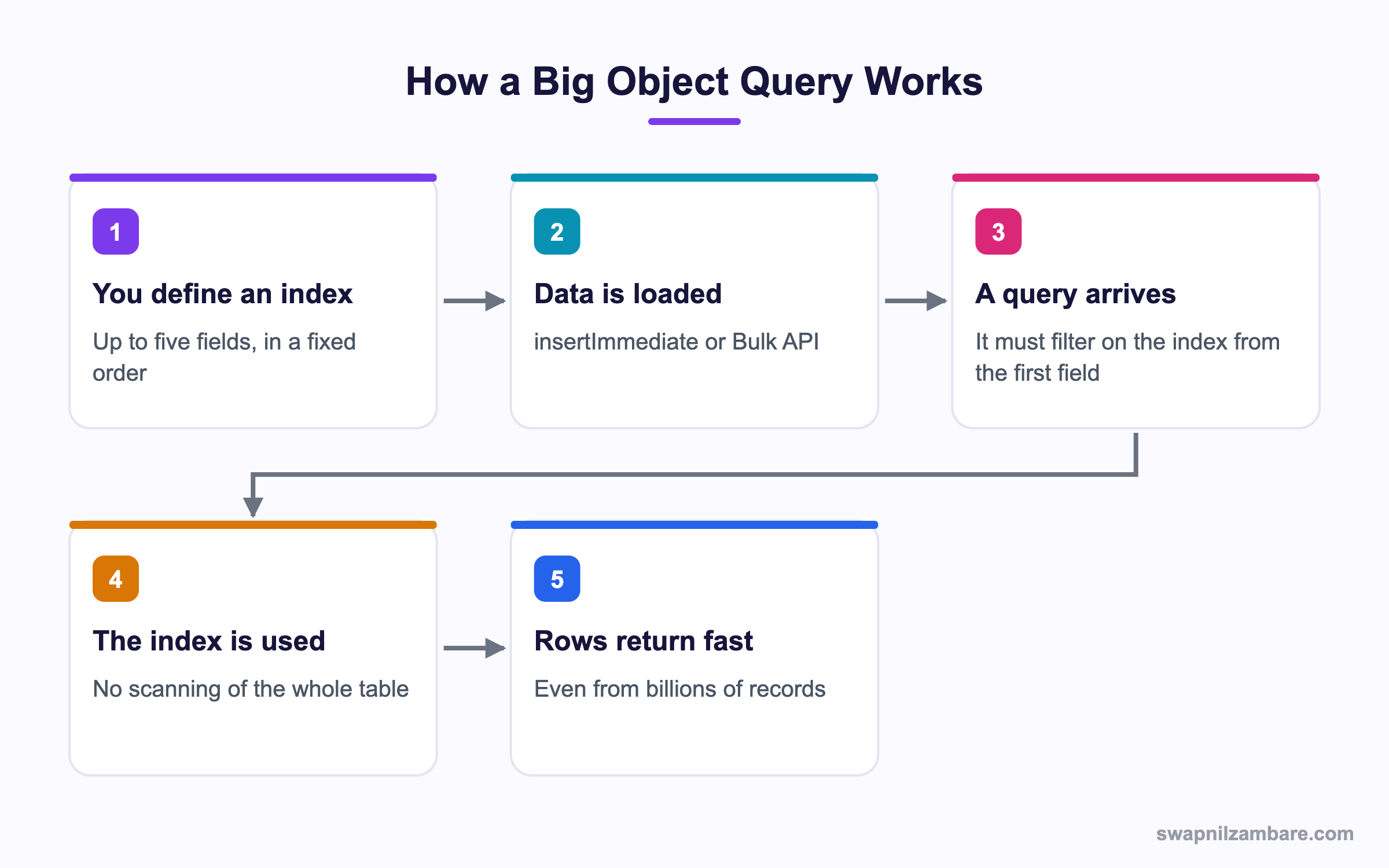
Caption: The index is not an optimisation, it is the only way in.
What Are Salesforce Big Objects
Salesforce Big Objects come in two kinds.
| Kind | Example | Can you change it |
|---|---|---|
| Standard big object | FieldHistoryArchive, from Field Audit Trail | No |
| Custom big object | Ride__b, defined by you | Yes, with care |
A custom big object uses a __b suffix and is defined as metadata rather than through a point and click page. The definition has three parts, and the third is the one that matters.
<?xml version="1.0" encoding="UTF-8"?>
<CustomObject xmlns="http://soap.sforce.com/2006/04/metadata">
  <deploymentStatus>Deployed</deploymentStatus>
  <label>Ride</label>
  <pluralLabel>Rides</pluralLabel>
  <fields>
    <fullName>Rider__c</fullName>
    <label>Rider</label>
    <required>true</required>
    <type>Text</type>
    <length>18</length>
  </fields>
  <indexes>
    <fullName>RideIndex</fullName>
    <label>Ride Index</label>
    <fields>
      <name>Rider__c</name>
      <sortDirection>ASC</sortDirection>
    </fields>
    <fields>
      <name>Ride_Date__c</name>
      <sortDirection>DESC</sortDirection>
    </fields>
  </indexes>
</CustomObject>
The Index Decides Everything
| Index rule | What it means |
|---|---|
| Up to five fields | Choose them before you load any data |
| Every index field is required | No nulls allowed in those fields |
| The order is fixed | Queries must filter from the first field onward |
| It cannot be changed later | A new index means a new object and a reload |
That last row is why a Salesforce Big Objects project starts with a whiteboard, not a keyboard. Design the index around the questions you will ask, because changing your mind after loading 200 million rows means loading them again.
Querying Salesforce Big Objects
SOQL works on Salesforce Big Objects, within strict rules.
List<Ride__b> recent = [
    SELECT Rider__c, Ride_Date__c, Fare__c
    FROM Ride__b
    WHERE Rider__c = :riderId
      AND Ride_Date__c > :sinceDate
    LIMIT 100
];| Allowed | Not allowed |
|---|---|
| Filtering on index fields in order | Filtering on a non index field |
| Equals and IN on index fields | Skipping the first index field |
| Range filters on the last index field used | OR across different fields |
| LIMIT | ORDER BY on a non index field |
| Counting with a query | Most aggregate functions |
Skipping the first index field is the Salesforce Big Objects mistake everyone makes once. A query that filters only on the date, when the rider id comes first in the index, is simply rejected.
Loading and Deleting Data
Writes to Salesforce Big Objects do not behave like normal DML. There is no rollback, because the database favours consistency over transactional behaviour.
List<Ride__b> rows = new List<Ride__b>();
for (RideStage__c s : staged) {
    rows.add(new Ride__b(
        Rider__c = s.Rider__c,
        Ride_Date__c = s.Ride_Date__c,
        Fare__c = s.Fare__c
    ));
}
Database.insertImmediate(rows);| Operation | How you do it |
|---|---|
| Insert from Apex | Database.insertImmediate |
| Insert in volume | Bulk API 2.0 |
| Delete from Apex | Database.deleteImmediate, with the index fields set |
| Update | Insert the same index values again, which overwrites |
That update row surprises people who expect Salesforce Big Objects to behave like custom objects. There is no separate update call. Inserting a row with the same index field values replaces the existing row, so the index doubles as the record key.
A queueable with Apex Cursors is the usual pattern for a large load, since each chunk fits in a transaction. The post on Apex Cursors covers that loop, and Bulk API 2.0 covers loading from outside.
Reporting on Salesforce Big Objects
You cannot build a normal report on Salesforce Big Objects, and that is the single most common disappointment in these projects.
The accepted pattern is to copy a working subset into a custom object and report on that.
| Step | What you build |
|---|---|
| Identify the questions | The handful of reports the business needs |
| Create a custom object | Fields matching only those questions |
| Run a nightly job | Read the big object, write the subset |
| Report on the custom object | Normal reports and dashboards |
Async SOQL was the tool built for that copy step. It is worth knowing the name, because older guides and Workbench still mention it, but it has been scheduled for retirement since Summer 2023, so new work should not be built on it.
| Instead of Async SOQL | Use |
|---|---|
| Build a reporting subset | A queueable with a cursor, or batch Apex |
| Extract to another system | Bulk API 2.0 query jobs |
| Analytics over the full volume | CRM Analytics or Data Cloud |
| Ad hoc counts | A narrow indexed SOQL query |
Big Object or Custom Object
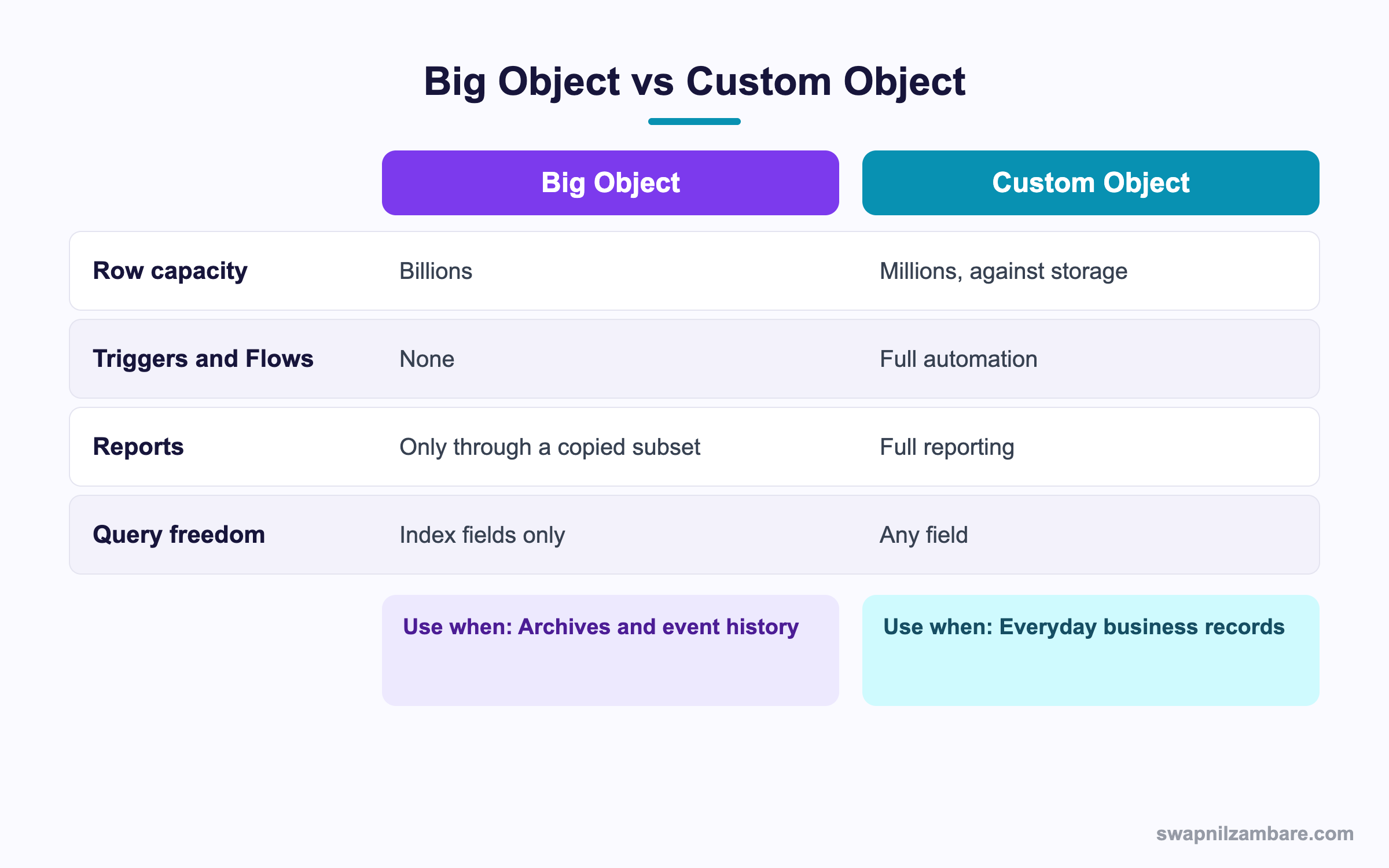
Caption: If anyone needs to edit a row or report on it directly, it is not a big object.
| Situation | Pick |
|---|---|
| Eight years of completed transactions | Big object |
| Device readings every minute | Big object |
| Field history beyond the standard retention | Big object, through Field Audit Trail |
| Records a user opens and edits | Custom object |
| Anything needing a trigger or a Flow | Custom object |
| Data the business reports on daily | Custom object |
| An archive queried by one key | Big object |
A Real Salesforce Big Objects Example
Salesforce Big Objects took over our portal activity log. Bright Path Tutors logs every page view in its student portal, around 40 million rows a year. Support needs to see one student’s recent activity when a ticket comes in.
The first build used a custom object.
| Problem | What it cost |
|---|---|
| Data storage | The largest single object in the org |
| A purge job | Deleting 3 million rows a month, slowly |
| Only 90 days kept | Older questions could not be answered |
| Report performance | Dashboards timed out |
We moved it to a big object indexed on student, then date.
| Measure | Custom object | Big object |
|---|---|---|
| Rows kept | 10 million, 90 days | 200 million, five years |
| Normal data storage used | High | Negligible |
| Purge job needed | Yes, monthly | No |
| Time to load one student’s history | 4 seconds | Under a second |
| Dashboard reporting | Direct, and slow | From a nightly subset |
The nightly job itself is ordinary batch Apex, reading the index in date order and writing totals.
The nightly subset was the compromise we had to accept. One job writes daily totals into a small custom object, and every dashboard reads that instead.
Limits and Things to Watch
- No triggers, no Flows, no workflow rules and no roll up summary fields
- No standard reports, so plan a subset object from the start
- The index cannot be changed after creation, so a redesign means a reload
- Every index field is required, so your source data must never be null there
- Writes have no rollback, so a partial load leaves partial data
- Record ids are not the key, the index is
- Deleting needs the index values, so you cannot delete by a stray field
The no rollback behaviour of Salesforce Big Objects changes how you write the loader. A failed chunk leaves its successful rows in place, so the loader needs to know where it stopped. Storing the position and re inserting the same index values is safe, because a repeat insert overwrites.
Common Mistakes with Salesforce Big Objects
| Mistake | What you see | Fix |
|---|---|---|
| An index chosen before the questions | Queries that cannot be written | Design the index around real queries |
| Skipping the first index field in a filter | A rejected query | Always filter from the first field onward |
| Expecting reports to work | A late and painful surprise | Build a subset custom object |
| Nulls in an index field | Load failures | Clean the source, since index fields are required |
| Using normal insert | A compile or runtime error | Use insertImmediate |
| Expecting a rollback | Partial data after a failure | Make the loader resumable |
| Building new work on Async SOQL | A retired tool | Use a cursor job or Bulk API query |
Best Practices for Salesforce Big Objects
- Write down the five questions the data must answer, then design the index
- Put the most selective field first, which is usually an id
- Keep the field list narrow, since a big object is not a place to store everything
- Load with a resumable queueable and store the position
- Create the reporting subset object in the same release, not later
- Treat the index values as the record key, because they are
- Document that there are no triggers, so nobody designs automation around it
Most Asked Salesforce Big Objects Interview Questions
Q1: What is a big object?
An object that stores billions of rows in a separate database, with narrow query rules and no automation.
Q2: What are the two kinds?
Standard big objects such as FieldHistoryArchive, and custom big objects you define yourself.
Q3: What suffix does a custom big object use?
A double b suffix on the API name.
Q4: How is one created?
As metadata, through a deployment, rather than a point and click setup page.
Q5: How many fields can the index hold?
Up to five.
Q6: Can the index be changed later?
No. A different index means a new object and a reload.
Q7: Are index fields optional?
No. Every index field is required, so nulls are not allowed.
Q8: What rule governs a query filter?
It must filter on the index fields starting from the first one, in order.
Q9: What happens if you filter only on a later index field?
The query is rejected.
Q10: Which operators work on index fields?
Equals and IN, with a range filter allowed on the last index field used.
Q11: Can you use OR across different fields?
No. That is one of the main query restrictions.
Q12: Which Apex method inserts rows?
Database.insertImmediate.
Q13: Is there a rollback?
No. The database favours consistency, so a failed load leaves its successful rows.
Q14: How do you update a row?
Insert again with the same index values, which overwrites the existing row.
Q15: How do you delete rows?
With Database.deleteImmediate, supplying the index field values.
Q16: Can you put a trigger on a big object?
No. There are no triggers, Flows, workflow rules or roll up summaries.
Q17: Can you report on one directly?
No. The accepted pattern is to copy a subset into a custom object and report on that.
Q18: What was Async SOQL for?
Running background queries over big object data and writing the results into another object.
Q19: Should you build new work on it?
No. It has been scheduled for retirement since Summer 2023.
Q20: What replaces it for a reporting subset?
A queueable with a cursor, or batch Apex, writing into a custom object.
Q21: What replaces it for an extract?
Bulk API 2.0 query jobs.
Q22: Do big object rows count against normal data storage?
They sit in a separate allocation, which is the main reason to use them.
Q23: What belongs in a big object?
Archives, event history, meter readings and anything written once and read by a single key.
Q24: What does not belong in one?
Anything a user edits, anything needing automation, and anything reported on daily.
Q25: Which field should come first in the index?
The most selective one, which in practice is usually a record id.
Q26: Scenario: the business asks for a dashboard over 200 million rows. What do you say?
That a nightly subset object is the route, since direct reporting is not available.
Q27: Scenario: a load failed halfway. What is the state?
Partial. The rows that succeeded are there, so the loader must be resumable.
Q28: Scenario: six months in, a new question needs a different index. What now?
A new big object and a reload, which is why the index design matters so much at the start.
Q29: Scenario: the source file has blank ids. What happens?
The load fails, because index fields are required.
Q30: What is the one habit that saves a big object project?
Write the queries first and design the index to answer them.
Official Resources
What Is Next
Next, read Apex Performance Profiling with Limits and ApexGuru.


