The Salesforce Metadata API moves configuration rather than data. Objects, fields, page layouts, Apex classes, Flows, profiles and permission sets all travel through it. Every release tool you have used, including the command line and change set alternatives, sits on top of it.
The Tooling API is its faster, smaller cousin. Where the Metadata API deals in packages and asynchronous jobs, the Tooling API reads and edits one item at a time and answers immediately. Development tools use it to open a class, save a change and keep working.
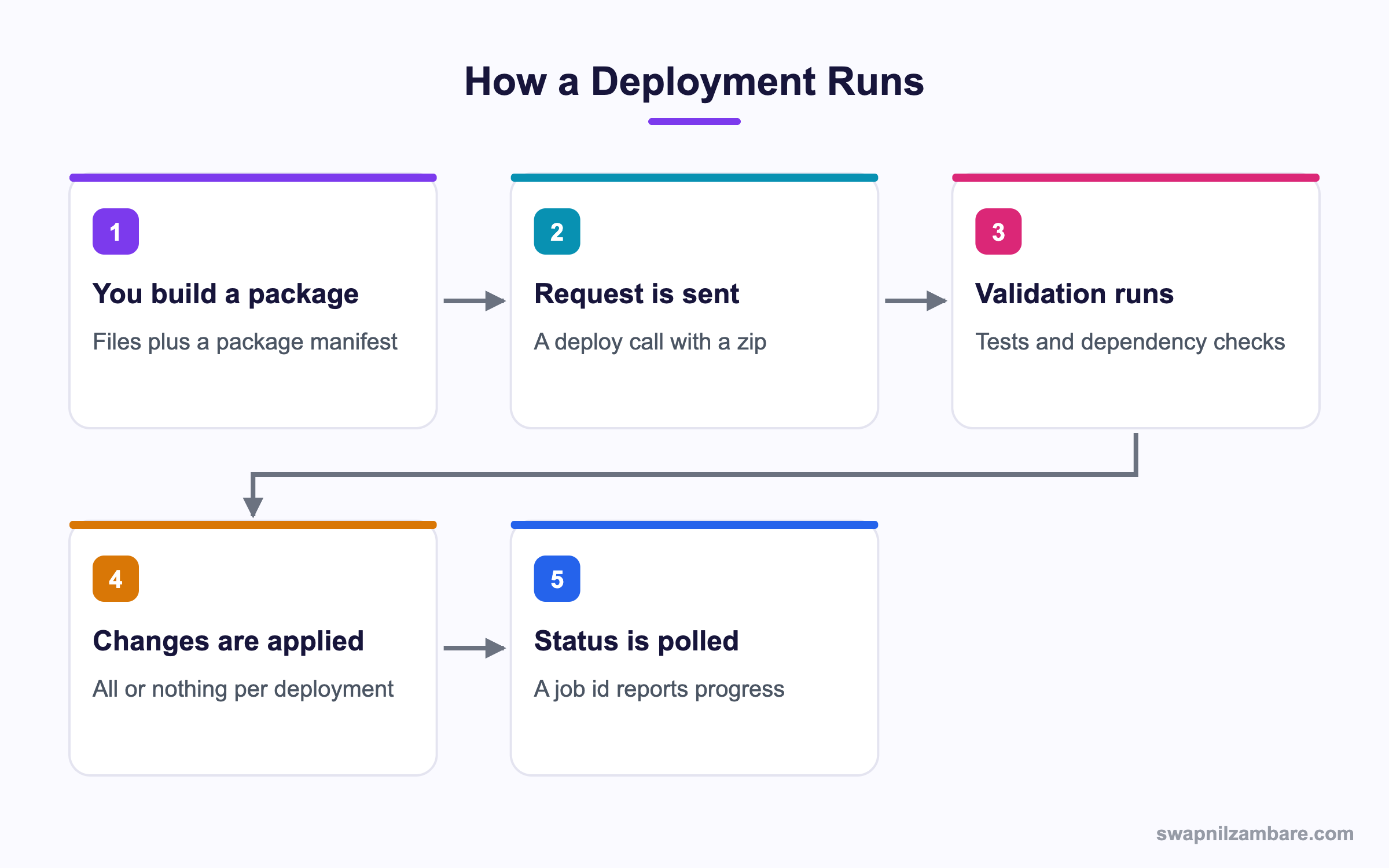
Caption: A deployment is one transaction, so either every component lands or none of them do.
What Is the Salesforce Metadata API
The Salesforce Metadata API is an API for configuration, not records. You send a package, which is a set of metadata files plus a manifest naming what is inside.
<?xml version="1.0" encoding="UTF-8"?>
<Package xmlns="http://soap.sforce.com/2006/04/metadata">
  <types>
    <members>Course__c</members>
    <name>CustomObject</name>
  </types>
  <types>
    <members>CourseService</members>
    <name>ApexClass</name>
  </types>
  <version>62.0</version>
</Package>
The Salesforce Metadata API reads a manifest called package.xml, and it is the piece people argue about most. A wildcard pulls everything of a type, a named member pulls one item, and the difference decides how long your retrieve takes.
| Manifest entry | What it fetches |
|---|---|
| A single member name | Just that component |
| An asterisk as the member | Every component of that type |
| Several types in one file | A mixed package |
| A folder path for reports | Reports inside that folder |
Retrieve and Deploy
The Salesforce Metadata API has two verbs that matter, retrieve and deploy. Pipelines built on them are covered in the post on CI and CD for Salesforce. Retrieve pulls configuration out of an org into files. Deploy pushes files into an org.
sf project retrieve start --manifest manifest/package.xml
sf project deploy start --source-dir force-app --test-level RunLocalTests
Both are asynchronous. The call returns a job id, and you poll that id until the job finishes. A large deployment can take many minutes, mostly spent running tests.
Why the Salesforce Metadata API Matters
| Benefit | What it gives a team |
|---|---|
| Repeatable releases | The same package deploys to every org |
| Version control | Configuration lives in Git like code |
| Validation before the fact | A check only deploy proves it will work |
| All or nothing | No half applied release |
| Automation | A pipeline can deploy with no clicks |
The validation point changes how teams work. A check only deployment runs every test against production without changing anything, so a release can be proven safe hours before the window opens. The post on the Salesforce CLI covers the tooling around that.
What the Tooling API Does Differently
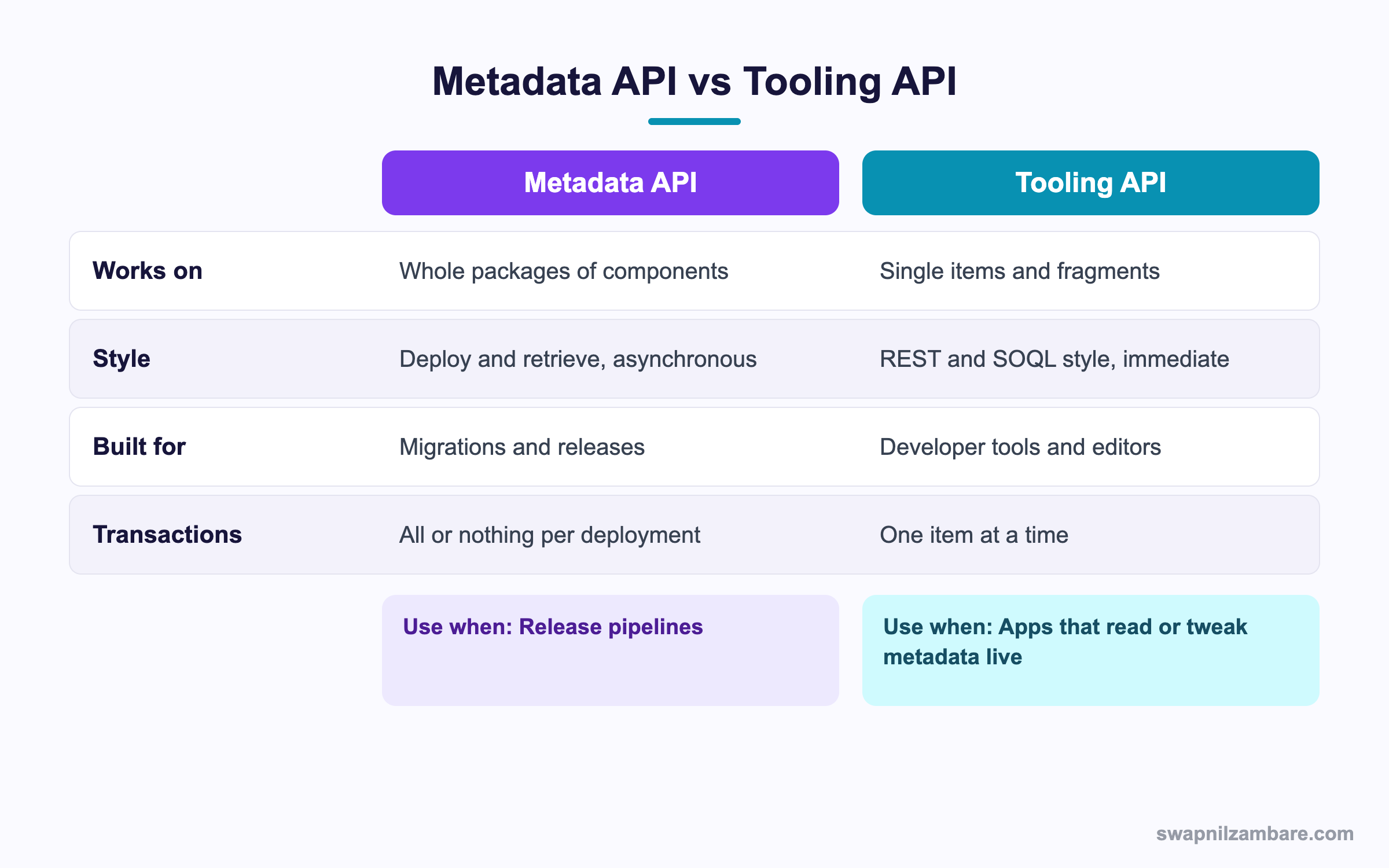
Caption: Release pipelines use one, and editors and admin tools use the other.
The Tooling API sits beside the Salesforce Metadata API and exposes metadata as objects you can query with SOQL style syntax over REST.
GET /services/data/v62.0/tooling/query/?q=SELECT+Id,Name,Body+FROM+ApexClass+WHERE+Name='CourseService'That single call returns the class body immediately. No package, no zip, no job id. It is why a code editor can open a class in under a second.
| Task | Metadata API | Tooling API |
|---|---|---|
| Deploy 300 components | Yes | No |
| Read one Apex class body | Clumsy | Yes |
| Create a debug log trace flag | No | Yes |
| Run a single test and read coverage | Limited | Yes |
| Retrieve every profile | Yes | No |
| Edit a custom field description live | Possible but heavy | Yes |
The Tooling API also exposes things the Salesforce Metadata API does not, such as code coverage results, trace flags and the symbol table for a class. Those exist for tools, not for releases.
A Real Salesforce Metadata API Example
The Salesforce Metadata API fixed a real release problem for us. Bright Path Tutors had one. Configuration moved between orgs through change sets, built by hand each time, and two releases in a row missed a permission set.
| Problem | What it cost |
|---|---|
| Change sets built by hand | An hour per release, every release |
| No record of what shipped | Arguments about what changed |
| Missed components | Two hotfixes in one quarter |
| No dry run | Failures found during the window |
We moved to a package in Git with a pipeline.
| Step | What runs |
|---|---|
| Pull request opened | A check only deployment to a sandbox |
| Review approved | Tests run again with RunLocalTests |
| Merge to main | A real deployment to the release sandbox |
| Release window | The same package deploys to production |
| Measure | Before | After |
|---|---|---|
| Time to prepare a release | 60 minutes | 5 minutes |
| Missed components per quarter | 2 | 0 |
| Record of what shipped | A screenshot | A Git commit |
The missed components figure is the one that convinced the team. The same package deployed everywhere, so a component could not be in one org and absent from another.
Destructive Changes
The Salesforce Metadata API needs a second manifest to delete configuration.
<?xml version="1.0" encoding="UTF-8"?>
<Package xmlns="http://soap.sforce.com/2006/04/metadata">
  <types>
    <members>Old_Field__c</members>
    <name>CustomField</name>
  </types>
</Package>
Save that as destructiveChangesPost.xml alongside an empty package.xml, and the deployment removes those components. Always run it as a check only deployment first, because a deleted field takes its data with it.
| File name | When the deletion runs |
|---|---|
| destructiveChangesPre.xml | Before the rest of the package |
| destructiveChangesPost.xml | After the rest of the package |
Use the post version when a new field replaces an old one, so the new field exists before the old one goes.
Limits and Things to Watch
- Deployments are asynchronous, so a pipeline must poll for the result
- There is a cap on components per deployment, so very large packages need splitting
- Profiles retrieve only the permissions related to the other components in the package
- Some settings are not covered, so a few steps stay manual at go live
- A failed test anywhere rolls back the whole deployment
- Field deletions destroy data, and a check only run does not warn you loudly enough
The Salesforce Metadata API handles profiles in a way that catches almost everyone once. Retrieve a profile on its own and you get very little. Retrieve it alongside the objects and fields it governs and the file fills out. The post on profiles and permission sets explains what those permissions cover.
Common Mistakes with the Salesforce Metadata API
| Mistake | What you see | Fix |
|---|---|---|
| Wildcards everywhere in the manifest | Very slow retrieves | Name the members you need |
| Retrieving a profile alone | An almost empty file | Retrieve it with the related components |
| No check only run before a release | Failures in the window | Validate first, deploy second |
| Deleting a field without a backup | Data gone with no recovery | Export the data before the destructive run |
| Treating deploy as synchronous | A pipeline that reports success too early | Poll the job id until it finishes |
| One giant package | Hitting the component cap | Split by feature or by object |
| Using it to read one class | Slow and awkward | Use the Tooling API instead |
Best Practices for the Salesforce Metadata API
- Keep the manifest in version control beside the source
- Name members explicitly rather than using wildcards in a release package
- Always run a check only deployment before a production release
- Export data before any destructive change to a field or object
- Set an explicit test level so you know what ran
- Split very large releases into packages that deploy in a known order
- Use the Tooling API for anything a developer tool needs to read quickly
Most Asked Salesforce Metadata API Interview Questions
Q1: What does the Metadata API move?
Configuration rather than records. Objects, fields, classes, layouts, Flows and permissions.
Q2: What is package.xml?
The manifest that names which components a retrieve or deploy covers.
Q3: What does an asterisk mean in a manifest member?
Every component of that type, which makes retrieves slow on a large org.
Q4: Which two operations matter most?
Retrieve, which pulls configuration into files, and deploy, which pushes files into an org.
Q5: Are deployments synchronous?
No. The call returns a job id and you poll it until the job finishes.
Q6: What is a check only deployment?
A validation run that executes tests and dependency checks without changing anything.
Q7: Why is that useful before a release?
It proves the package will deploy, hours before the release window opens.
Q8: What happens if one test fails during a deployment?
The whole deployment rolls back, since it is a single transaction.
Q9: How do you delete components?
With a destructive changes manifest alongside an empty package manifest.
Q10: What is the difference between the pre and post destructive files?
Pre runs before the rest of the package and post runs after it.
Q11: When would you use the post version?
When a new field replaces an old one and must exist before the old one is removed.
Q12: Why does retrieving a profile alone give you almost nothing?
Profile permissions are returned only for components also in the package.
Q13: What is the Tooling API for?
Reading and editing single metadata items immediately, which suits editors and admin tools.
Q14: How do you query with the Tooling API?
With a SOQL style query against a tooling endpoint over REST.
Q15: Name three things the Tooling API exposes that the Salesforce Metadata API does not.
Code coverage results, trace flags and the symbol table for an Apex class.
Q16: Which API does a code editor use to open a class?
The Tooling API, because it answers immediately with the class body.
Q17: Which API would a release pipeline use?
The Metadata API, since it deploys whole packages as one transaction.
Q18: Can the Tooling API deploy three hundred components?
No. That is squarely the job of the Metadata API.
Q19: What test levels can a deployment use?
Options such as no tests, specified tests, local tests and all tests in the org.
Q20: Which test level suits a production release?
Local tests at a minimum, so your own tests all run.
Q21: Scenario: a pipeline reports success but nothing changed. Why?
It did not poll the job, so it read the queued response as a finished one.
Q22: Scenario: a retrieve takes forty minutes. What is the usual cause?
Wildcards in the manifest pulling every component of several types.
Q23: Scenario: a field was deleted and the data is gone. Was that avoidable?
Yes, with a data export before the destructive deployment.
Q24: Does the Metadata API cover every setting in the org?
No. A short list of settings stays manual, so document those steps for go live.
Q25: How does it relate to change sets?
Change sets are a user interface over the same idea, with no version control behind them.
Q26: Can you use it from Apex?
There is limited Apex support for metadata operations, though release work normally runs outside the org.
Q27: How do you split a very large release?
By feature or object, deployed in a known order so dependencies land first.
Q28: Why keep the manifest in Git?
So the record of what shipped is a commit rather than a screenshot.
Q29: What is the habit that prevents most release pain?
Validate with a check only deployment every time, and never use wildcards in a release package.
Official Resources
What Is Next
Next, read Salesforce Streaming API and PushTopics Explained.


