The Salesforce GraphQL API gives an outside client one endpoint and one language for reading data. The client sends a query naming the exact fields it wants, including related records, and gets back a response shaped the same way.
It solves a problem every mobile team knows. A REST resource returns a fixed shape, so a phone screen showing three fields downloads twenty. Ten screens means ten shapes, and either ten endpoints or one endpoint that returns everything.
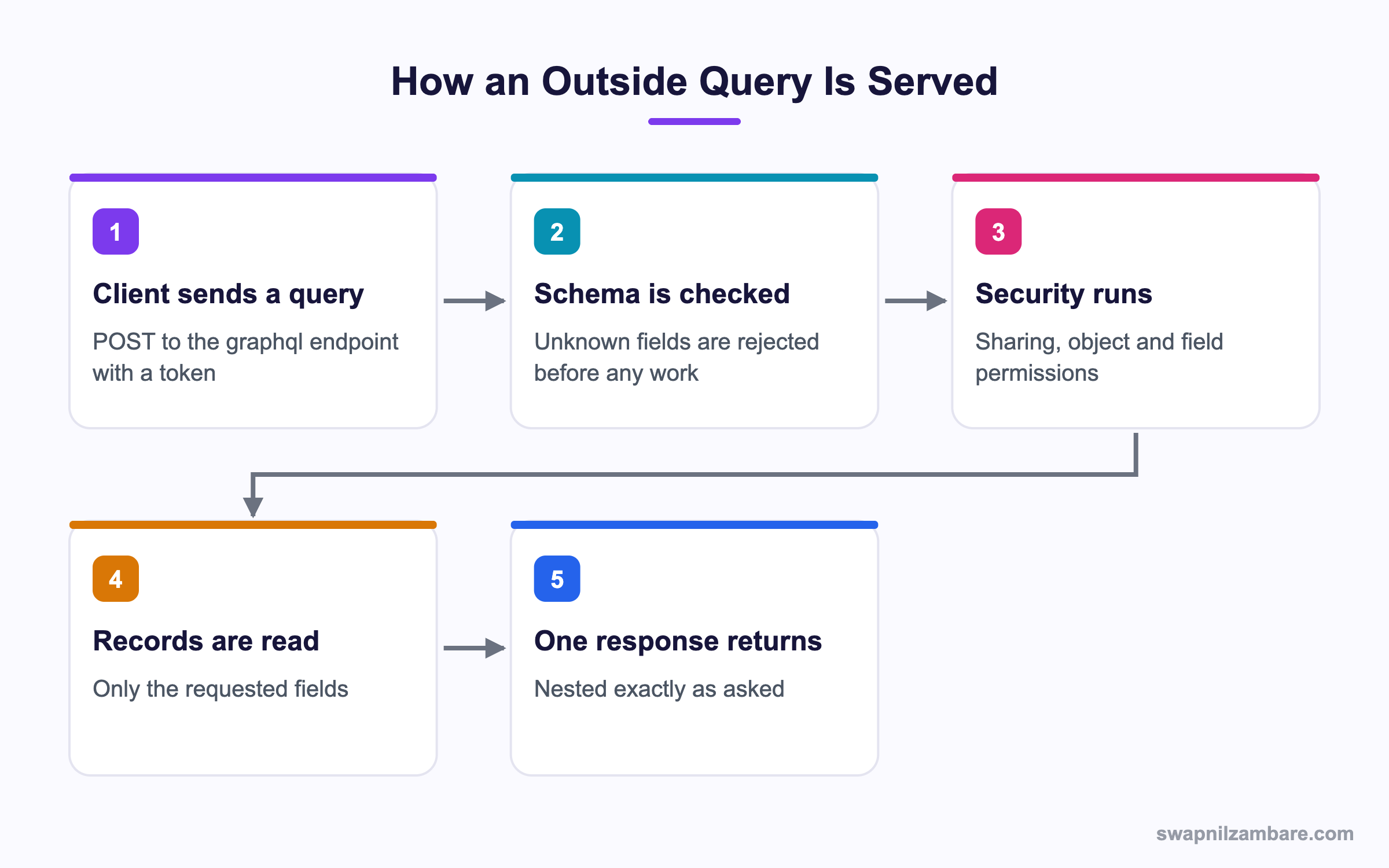
Caption: Security runs on the server, so a query cannot read anything the user is not allowed to see.
What Is the Salesforce GraphQL API
The Salesforce GraphQL API is a single REST endpoint that accepts a GraphQL query in the body.
POST /services/data/v62.0/graphql
Authorization: Bearer <access token>
Content-Type: application/json

{ "query": "query courses { uiapi { query { Course__c(first: 5) { edges { node { Id Name { value } Fee__c { value displayValue } } } } } } }" }
Everything sits under uiapi because the API is built on the same UI API layer that powers Lightning. That is why fields come back as objects with a value and a displayValue, and why the platform applies security for you.
The Shape of a Response
{
  "data": {
    "uiapi": {
      "query": {
        "Course__c": {
          "edges": [
            { "node": { "Id": "a01...", "Name": { "value": "Apex Basics" } } }
          ]
        }
      }
    }
  }
}
The Salesforce GraphQL API puts records under edges and then node. That looks heavy at first, and the reason is paging. Each edge can carry a cursor, which is how you walk a long list without an offset.
Why the Salesforce GraphQL API Matters
| Benefit | What it gives the client |
|---|---|
| Exact fields | Small payloads on slow connections |
| One round trip | Parent and child records together |
| One endpoint | No new resource per screen |
| Schema introspection | The client can discover what exists |
| Platform security | Sharing and field permissions applied for you |
The schema point is underrated. A client can ask the Salesforce GraphQL API what objects and fields it may read, which means tooling can autocomplete queries and catch a typo before the request is ever sent.
If you have not called Salesforce from outside before, the post on the REST API with Postman covers getting a token first.
Filtering, Sorting and Paging
The Salesforce GraphQL API takes arguments on each object.
Course__c(
  where: { Fee__c: { gt: { value: "3000" } } }
  orderBy: { Name: { order: ASC } }
  first: 20
  after: "cursorValueFromLastPage"
) {
  edges { node { Id Name { value } } }
  pageInfo { hasNextPage endCursor }
}| Argument | What it does |
|---|---|
| where | Filters records with operators such as eq, gt and like |
| orderBy | Sorts by one or more fields |
| first | Limits how many records come back |
| after | Continues from a cursor |
| pageInfo | Tells you whether more pages exist |
The Salesforce GraphQL API uses cursor paging, which is different from OFFSET in SOQL, and it is better for long lists. An offset gets slower as it grows and can skip or repeat rows when data changes. A cursor points at a position, so neither problem appears.
Reading Related Records
Course__c(first: 5) {
  edges {
    node {
      Name { value }
      Course_Enrolments__r(first: 10) {
        edges { node { Student__c { value } } }
      }
    }
  }
}
That is one request where REST would need a call per course or a crafted SOQL query behind a custom endpoint. The post on relationship queries shows the SOQL equivalent.
Salesforce GraphQL API vs REST API
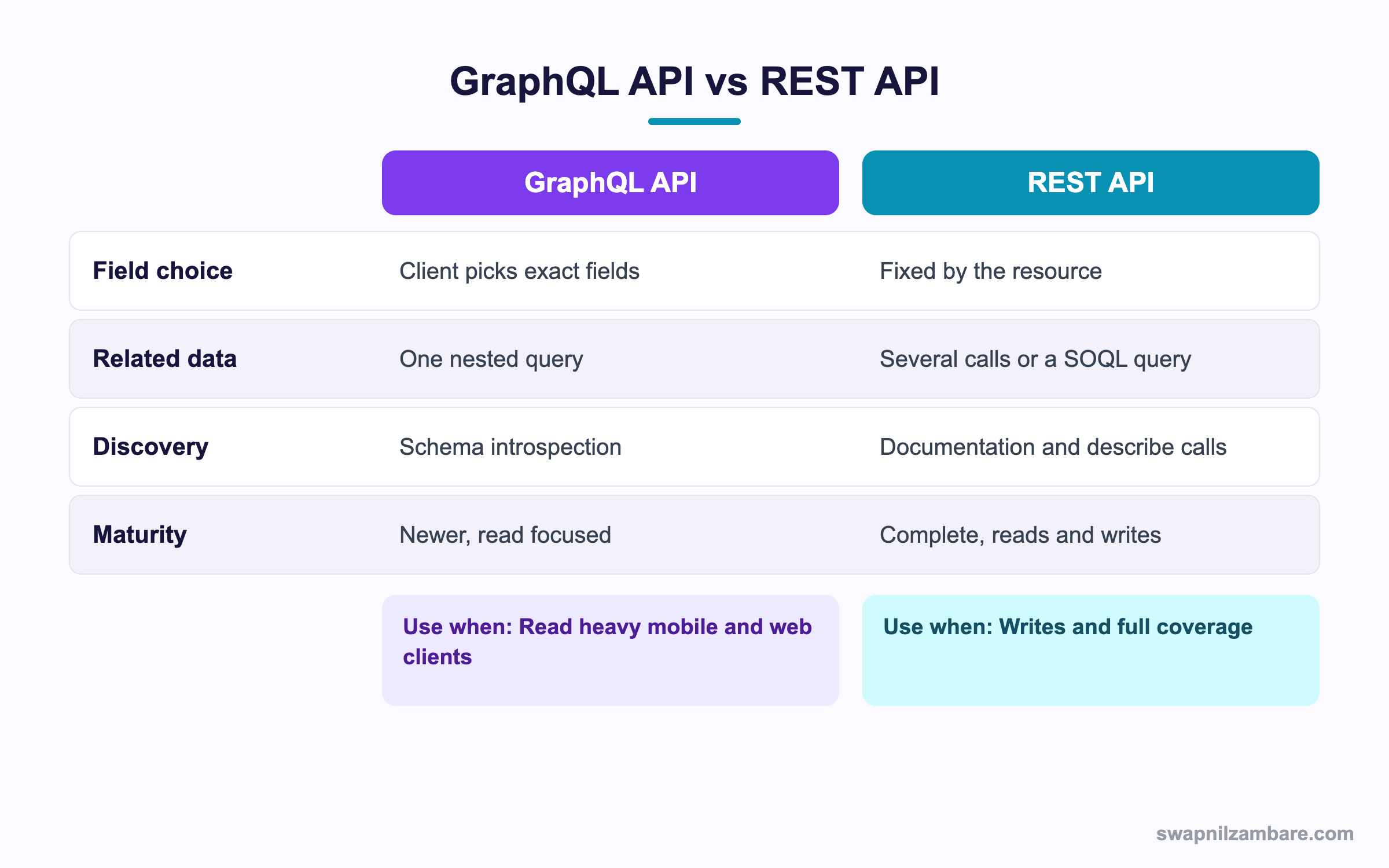
Caption: REST still covers writes and the full surface area, so most integrations use both.
| Need | Pick |
|---|---|
| A mobile screen reading five fields | GraphQL |
| Parent and child records in one call | GraphQL |
| Creating or updating records | REST or composite |
| Loading a million rows | Bulk API 2.0 |
| Calling custom Apex logic | Apex REST |
| Metadata changes | Metadata API |
| Streaming changes as they happen | Pub/Sub API |
The honest summary is that the Salesforce GraphQL API is a read tool today. For writes, the composite resource is the usual partner, and the post on the Composite API covers that side.
A Real Salesforce GraphQL API Example
We moved one screen to the Salesforce GraphQL API first. Bright Path Tutors built a parent app that shows a student, their enrolled courses, and the fee for each. The first version used three REST calls per screen load.
| Measure | REST version | GraphQL version |
|---|---|---|
| HTTP calls per screen | 3 | 1 |
| Fields downloaded | 42 | 7 |
| Payload size | 31 KB | 4 KB |
| Endpoints to maintain | 2 custom Apex REST classes | 0 |
The payload drop mattered because many parents open the app on a phone with a weak signal. The endpoint count mattered more to the team, since two Apex classes and their tests stopped needing maintenance.
Limits and Things to Watch
- It is read focused, so creates and updates still go through other APIs
- Aggregates are limited, so counts and sums are often better in SOQL
- Nesting depth is capped, so very long relationship chains fail
- Not every object is exposed, since it is built on the UI API layer
- A field the user cannot see returns null rather than an error
- Each query counts against your API request limits like any other call
The Salesforce GraphQL API hides permission gaps quietly, so that null behaviour deserves attention during testing. Field level security is applied silently, so a missing value for one user and not another is a permission question. The post on field level security covers where those checks come from.
Errors and Partial Results
{
  "data": { "uiapi": { "query": { "Course__c": null } } },
  "errors": [
    { "message": "Field Fee__d does not exist", "path": ["uiapi", "query"] }
  ]
}
A Salesforce GraphQL API response can carry data and errors together, and the HTTP status is often still 200. So a client that checks only the status code will treat a broken query as a success with empty data.
Common Mistakes with the Salesforce GraphQL API
| Mistake | What you see | Fix |
|---|---|---|
| Reading the field directly | undefined instead of a value | Read the value property |
| Skipping edges and node | A type error in the client | Walk edges then node |
| Checking only the HTTP status | Broken queries look successful | Read the errors array too |
| Using OFFSET thinking | Slow or repeated rows | Use cursor paging with after |
| Expecting a mutation | Nothing saves | Use REST or composite for writes |
| Asking for every field | Large payloads again | List only what the screen needs |
| Assuming every object exists | A schema error | Check the schema before you design |
Best Practices for the Salesforce GraphQL API
- Name every query so it shows clearly in logs and in the network tab
- Request only the fields the screen renders, which is the whole point
- Use variables rather than building query strings by hand in the client
- Read data and errors together on every response
- Keep cursors in client state rather than recomputing positions
- Use introspection in a build step to catch field name typos early
- Pair it with the composite resource for the write side of the integration
Most Asked Salesforce GraphQL API Interview Questions
Q1: What is the endpoint for it?
A single REST path ending in graphql, with the query sent in the request body.
Q2: Why is everything nested under uiapi?
Because the API is built on the UI API layer, which is also what Lightning uses.
Q3: Why do fields have a value and a displayValue?
The value is raw data and the displayValue is formatted for the user locale.
Q4: Why are records under edges and node?
It is the connection pattern, which lets each record carry a cursor for paging.
Q5: What does pageInfo give you?
Whether another page exists, and the cursor to continue from.
Q6: How is cursor paging better than OFFSET?
It stays fast as the list grows and does not skip or repeat rows when data changes.
Q7: Can you write records with it?
Not today. It is read focused, so writes go through REST, composite or Apex.
Q8: Does it apply sharing rules?
Yes. Object permissions, field permissions and sharing all run on the server.
Q9: What happens when a user cannot see a field?
The field returns null rather than an error, so a blank value can be a permission issue.
Q10: How do you filter results?
With the where argument and operators such as eq, gt, lt and like.
Q11: How do you sort?
With the orderBy argument, naming the field and the direction.
Q12: How do you limit the number of records?
With the first argument on the object.
Q13: Can one query read a parent and its children?
Yes, by nesting the child relationship inside the parent node.
Q14: What is introspection?
A query against the schema itself, which tells a client what objects and fields it can read.
Q15: Why is introspection useful in a build pipeline?
It catches a misspelled field name before the query is ever sent to production.
Q16: Does a GraphQL error return a 400?
Often not. A 200 with an errors array is common, which is why clients must read both keys.
Q17: Can data and errors appear together?
Yes. A partial result with an errors array is normal in GraphQL.
Q18: How does it compare with Bulk API 2.0?
Bulk is for very large loads and extracts. GraphQL is for precise reads from an app.
Q19: Is every Salesforce object available?
No. The UI API layer does not expose everything, so check the schema when designing.
Q20: Does each query count against API limits?
Yes. It is a normal API request as far as your limits are concerned.
Q21: How do aggregates compare with SOQL?
SOQL is stronger here, so counts and sums usually belong in Apex or a report.
Q22: Scenario: one user sees a blank fee and another does not. Why?
Field level security on that field, since the API returns null instead of refusing.
Q23: Scenario: the client shows an empty list and reports success. What went wrong?
The query failed and the client ignored the errors array while the status stayed 200.
Q24: Scenario: paging repeats rows near the end of a long list. What is the cause?
Offset style paging over changing data. Switch to cursors with the after argument.
Q25: How deep can relationship nesting go?
There is a documented cap, so very long chains need a different design.
Q26: Should an integration use GraphQL alone?
Rarely. Most use GraphQL for reads and REST or composite for writes.
Q27: How do you authenticate?
With a normal OAuth access token in the Authorization header, the same as REST.
Q28: What is the single biggest benefit in practice?
Smaller payloads and fewer round trips for read heavy client screens.
Q29: What is the habit that avoids most client bugs?
Read data and errors on every response, and request only the fields you render.
Official Resources
What Is Next
Next, read Salesforce Metadata API and Tooling API Explained.


